1. Utangulizi
This manual provides comprehensive instructions for the SHANLING EC Zero Portable CD Player. Please read this manual thoroughly before using the device to ensure proper operation and to maximize its performance and longevity. The EC Zero is a high-fidelity portable CD player designed for audiophiles, featuring advanced audio components and versatile connectivity options.
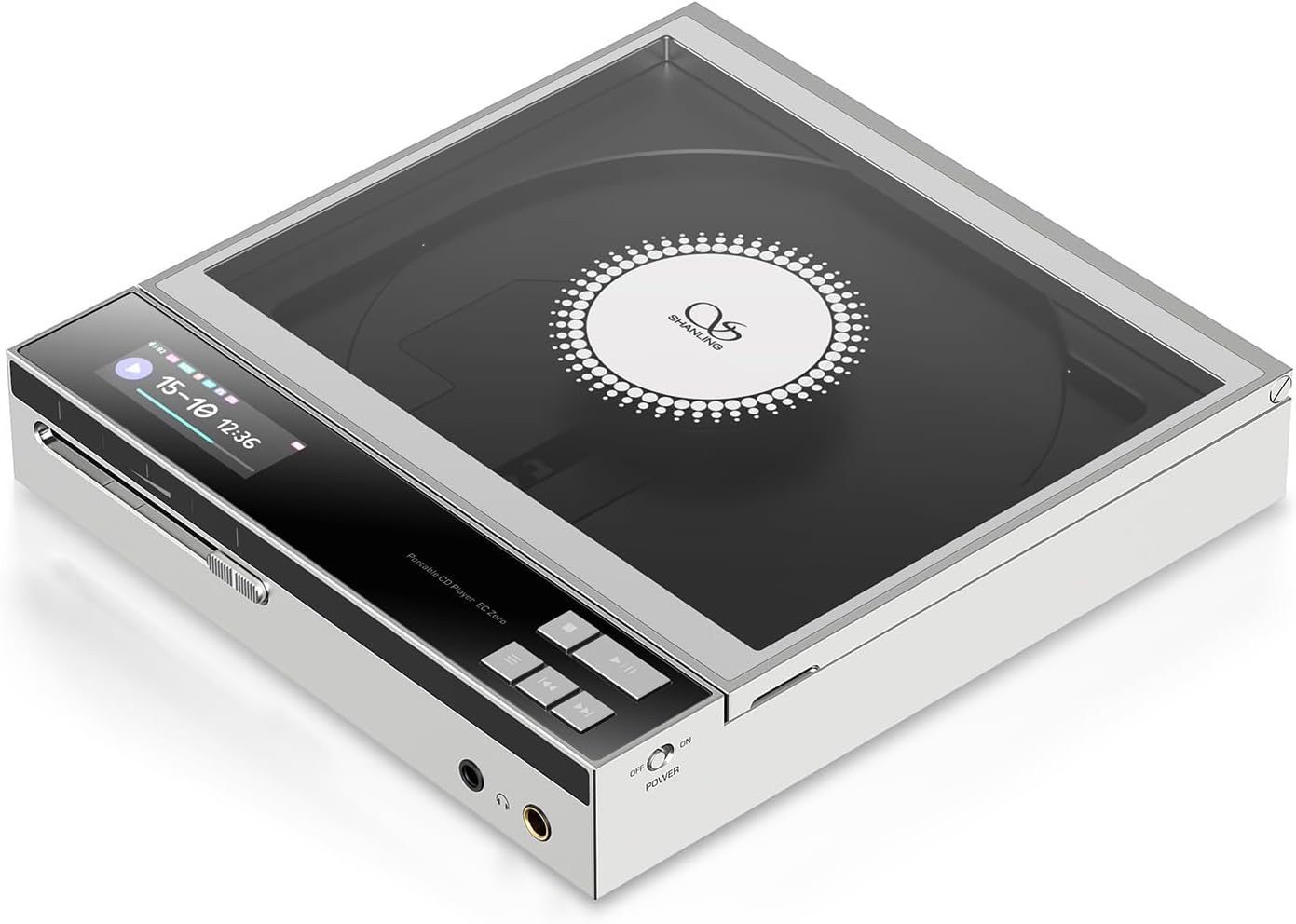
Image 1.1: The SHANLING EC Zero Portable CD Player, showcasing its sleek design and transparent CD cover.
2. Yaliyomo kwenye Kifurushi
Thibitisha kuwa bidhaa zote zilizoorodheshwa hapa chini zipo kwenye kifungashio cha bidhaa yako:
- 1x SHANLING EC Zero CD Player
3. Kifaa Kimeishaview
Familiarize yourself with the various components and controls of your EC Zero CD Player.
3.1 Front Panel and Controls
Picha 3.1: Mbele view of the SHANLING EC Zero, highlighting the display and playback controls.
- Skrini ya Kuonyesha: Shows track information, playback status, battery level, and settings.
- Vidhibiti vya Uchezaji: Play/Pause, Skip Forward, Skip Backward buttons for CD playback.
- Kitelezi cha Sauti: Analog potentiometer for precise volume adjustment.
- Kitoa sauti cha 3.5mm: Jack ya kawaida ya kipaza sauti.
- 4.4mm Pato la Kipokea Simu Lililosawazishwa: For balanced headphones, offering higher power output.
- Kubadilisha Nguvu: On/Off toggle.
3.2 Paneli na Milango ya Nyuma

Image 3.2: Rear panel of the SHANLING EC Zero, showing connectivity options.
- LINE OUT: 3.5mm analog line output for connecting to external amplifiers au wasemaji.
- SPDIF OUT: Coaxial/Optical digital output for connecting to external DACs or receivers.
- USB DAC: USB-C port for using the EC Zero as an external DAC for a computer or other digital source.
- USB/DC IN: USB-C port for charging and external DC power input.
- P MODE (Playback Mode Switch): Selects between battery power and external DC power mode.
- EXT DC: Indicator for external DC power.
4. Kuweka
4.1 Kuchaji Betri
The EC Zero is equipped with a built-in 5500mAh battery. Before first use, fully charge the device.
- Connect the provided USB-C cable to the "USB/DC IN" port on the rear of the EC Zero.
- Connect the other end of the USB-C cable to a compatible USB power adapter (5V/2A recommended, not included).
- The display will indicate charging status. A full charge typically takes several hours.
- Kwa afya bora ya betri, epuka kuimaliza betri kabisa mara kwa mara.
4.2 Kuwasha / Kuzima
- Kuwasha: Slide the "POWER" switch to the "ON" position. The display will illuminate.
- Kuzima: Slide the "POWER" switch to the "OFF" position. The display will turn off.
4.3 Kuingiza CD

Image 4.1: Demonstrating the process of inserting a CD into the player.
- Gently open the transparent top cover of the CD player.
- Place a standard audio CD onto the spindle, ensuring it is centered and lies flat.
- Close the top cover firmly until it clicks into place.
- The player will read the disc, and track information will appear on the display.
Kumbuka: Ensure the CD is clean and free of scratches or smudges for optimal playback.
4.4 Kuunganisha Vifaa vya Sauti
- Vipokea sauti vya masikioni: Connect your headphones to either the 3.5mm or 4.4mm output jack on the front panel.
- Nje Amplifier/Speakers (Line Out): Use a 3.5mm to RCA or 3.5mm to 3.5mm cable to connect the "LINE OUT" port to your amppembejeo ya lifier.
- External DAC (SPDIF Out): Use a coaxial or optical cable to connect the "SPDIF OUT" port to your external DAC's digital input.
5. Maagizo ya Uendeshaji
5.1 Uchezaji wa CD
- Insert a CD as described in Section 4.3.
- Bonyeza kwa Cheza/Sitisha kitufe cha kuanza kucheza.
- Bonyeza kwa Cheza/Sitisha kitufe tena ili kusitisha uchezaji.
- Tumia Ruka Mbele na Ruka nyuma vifungo vya kusogeza kati ya nyimbo.
- Adjust the volume using the sliding potentiometer on the front panel.
5.2 Muunganisho wa Bluetooth
The EC Zero supports Bluetooth 5.3 for wireless audio transmission to compatible headphones or speakers.
- Ensure the EC Zero is powered on.
- Access the Bluetooth settings on the EC Zero (refer to the on-screen menu if available, or long-press a specific button if indicated in a full manual).
- Enable Bluetooth pairing mode on the EC Zero.
- Kwenye vipokea sauti vyako vya Bluetooth au spika, washa hali ya kuoanisha.
- Select "SHANLING EC Zero" from the list of available devices on your receiving device.
- Once connected, audio from the EC Zero will be transmitted wirelessly.
Supported codecs include aptX Adaptive, aptX, and SBC.
5.3 USB DAC Modi
The EC Zero can function as an external USB Digital-to-Analog Converter (DAC) for your computer or other compatible devices, supporting up to 768kHz/32bit PCM and DSD512.
- Connect the EC Zero to your computer using a USB-C to USB-A/C cable via the "USB DAC" port.
- The computer should automatically recognize the EC Zero as an audio output device.
- Select "SHANLING EC Zero" as the audio output device in your computer's sound settings.
- Play audio from your computer, and it will be processed and outputted by the EC Zero.
5.4 CD Ripping Function
The EC Zero allows you to rip audio tracks from your CDs to a USB storage device in WAV format.
- Insert a CD into the EC Zero.
- Connect a USB storage device (formatted to FAT32) to the "USB DAC" port.
- Navigate to the CD Ripping function in the EC Zero's menu (specific steps may vary, refer to on-screen prompts).
- Select the tracks you wish to rip or choose to rip the entire CD.
- Initiate the ripping process. The display will show progress.
- Once complete, safely remove the USB storage device.
Kumbuka: Ripping speed is 1x. Ensure the USB drive is formatted to FAT32 for compatibility.
5.5 External DC Power Mode
For extended listening sessions or to achieve maximum output power, connect the EC Zero to an external DC power source.
- Connect a USB-C power adapter (5V/2A recommended) to the "USB/DC IN" port.
- Slide the "P MODE" switch on the rear panel to the "EXT DC" position.
- The "EXT DC" indicator light will illuminate, confirming the device is operating on external power.
6. Matengenezo
6.1 Kusafisha
- Wipe the exterior of the device with a soft, dry, lint-free cloth.
- Usitumie visafishaji abrasive, vimumunyisho, au kemikali kali.
- Keep the CD compartment clean and free of dust. Use a soft brush or compressed air if necessary.
6.2 Utunzaji wa Betri
- Ili kuongeza muda wa matumizi ya betri, epuka halijoto kali.
- If storing the device for an extended period, charge it to approximately 50% every few months.
- Do not attempt to replace the internal battery yourself. Contact authorized service personnel.
6.3 Hifadhi
Store the EC Zero in a cool, dry place away from direct sunlight, excessive heat, and moisture. Keep it away from strong magnetic fields.
7. Utatuzi wa shida
| Tatizo | Sababu inayowezekana | Suluhisho |
|---|---|---|
| Kifaa hakiwashi. | Betri imeisha. Swichi ya umeme imezimwa. | Charge the battery. Ensure the power switch is in the "ON" position. |
| CD haichezi au kuruka. | CD is dirty or scratched. CD is not inserted correctly. | Clean the CD with a soft cloth. Re-insert the CD, ensuring it is flat and centered. |
| Hakuna pato la sauti. | Volume is too low. Headphones/speakers not connected properly. Incorrect output mode selected. | Increase volume. Check headphone/speaker connections. Verify correct output (e.g., 3.5mm, 4.4mm, Line Out, Bluetooth). |
| Kuoanisha Bluetooth hakufaulu. | Device is not in pairing mode. Receiving device is too far or not in pairing mode. | Ensure both devices are in pairing mode and within range. Restart both devices and try again. |
| CD Ripping fails. | USB drive not formatted to FAT32. USB drive full. | Ensure USB drive is FAT32. Check available space on USB drive. |
If the problem persists after attempting these solutions, please contact SHANLING customer support.
8. Vipimo
| Kipengele | Maelezo |
|---|---|
| Vipimo | 158 x 150 x 28mm |
| Uzito | Gramu 575 (pauni 2.16) |
| Onyesho | Onyesho la LCD la inchi 1.68 |
| Chipu ya DAC | AKM AK4493S |
| Usaidizi wa DAC ya USB | 768kHz/32bit, DSD512 |
| Ingizo la Nguvu za Nje | USB-C 5V / 2A |
| Kupasua CD | 1x speed, to FAT32 USB Drive, WAV format |
| Pato la dijiti | 3.5mm Combined Coaxial / Optical SPDIF |
| Toleo la Bluetooth | V5.3 |
| Bluetooth Transmitter Codecs | aptX Adaptive, aptX, SBC |
| 3.5mm Headphone Output Power | Low Gain: 52mW@32Ω, High Gain: 122mW@32Ω (213mW@32Ω External Power) |
| 4.4mm Headphone Output Power | Low Gain: 211mW@32Ω, High Gain: 525mW@32Ω (836mW@32Ω External Power) |
| Betri | 5500mAh Lithium Ion (imejumuishwa) |
| Playback Time (3.5mm/4.4mm) | Hadi saa 10 |
| Playback Time (Bluetooth) | Hadi saa 18 |
| Signal-to-Noise Ratio (CD Play) | 117dB |
| Dynamic Range (CD Play) | 119dB |
| THD+N (CD Play) | 0.0004% |
9. Udhamini na Msaada
SHANLING products are covered by a limited warranty. For specific warranty terms and conditions, please refer to the warranty card included with your product or visit the official SHANLING webtovuti.
For technical support, troubleshooting assistance, or service inquiries, please contact SHANLING customer support through their official website or authorized service centers. Keep your purchase receipt as proof of purchase for warranty claims.
Official SHANLING Webtovuti: www.shanling.com


