1. Utangulizi
The Trevi RDA 70 BR is a compact and versatile portable radio designed to provide a comprehensive listening experience. It combines traditional radio functionality with modern digital features, making it suitable for listening to music or news anywhere. This manual provides instructions for the proper setup, operation, and maintenance of your device.
2. Taarifa za Usalama
- Soma maagizo yote kwa uangalifu kabla ya kutumia kifaa.
- Usiweke redio kwenye mvua, unyevu au halijoto kali.
- Epuka kuweka kifaa karibu na vyanzo vya joto au kwenye jua moja kwa moja.
- Usitenganishe au kujaribu kurekebisha kitengo mwenyewe. Rejelea huduma zote kwa wafanyikazi waliohitimu.
- Weka kifaa mbali na sehemu zenye nguvu za sumaku.
- Use only the specified charging cable (USB Type-C) for recharging the battery.
3. Yaliyomo kwenye Kifurushi
Hakikisha bidhaa zote zipo kwenye kifurushi:
- Trevi RDA 70 BR Portable Radio
- Kebo ya kuchaji ya Type-C ya USB
- Mwongozo wa Mtumiaji (hati hii)
4. Bidhaa Imeishaview
Familiarize yourself with the various parts and controls of your Trevi RDA 70 BR radio.

Mchoro 1: Mbele yenye pembe view of the Trevi RDA 70 BR Portable Radio, showing the speaker grille, display, and main controls.
Udhibiti wa Paneli ya Mbele
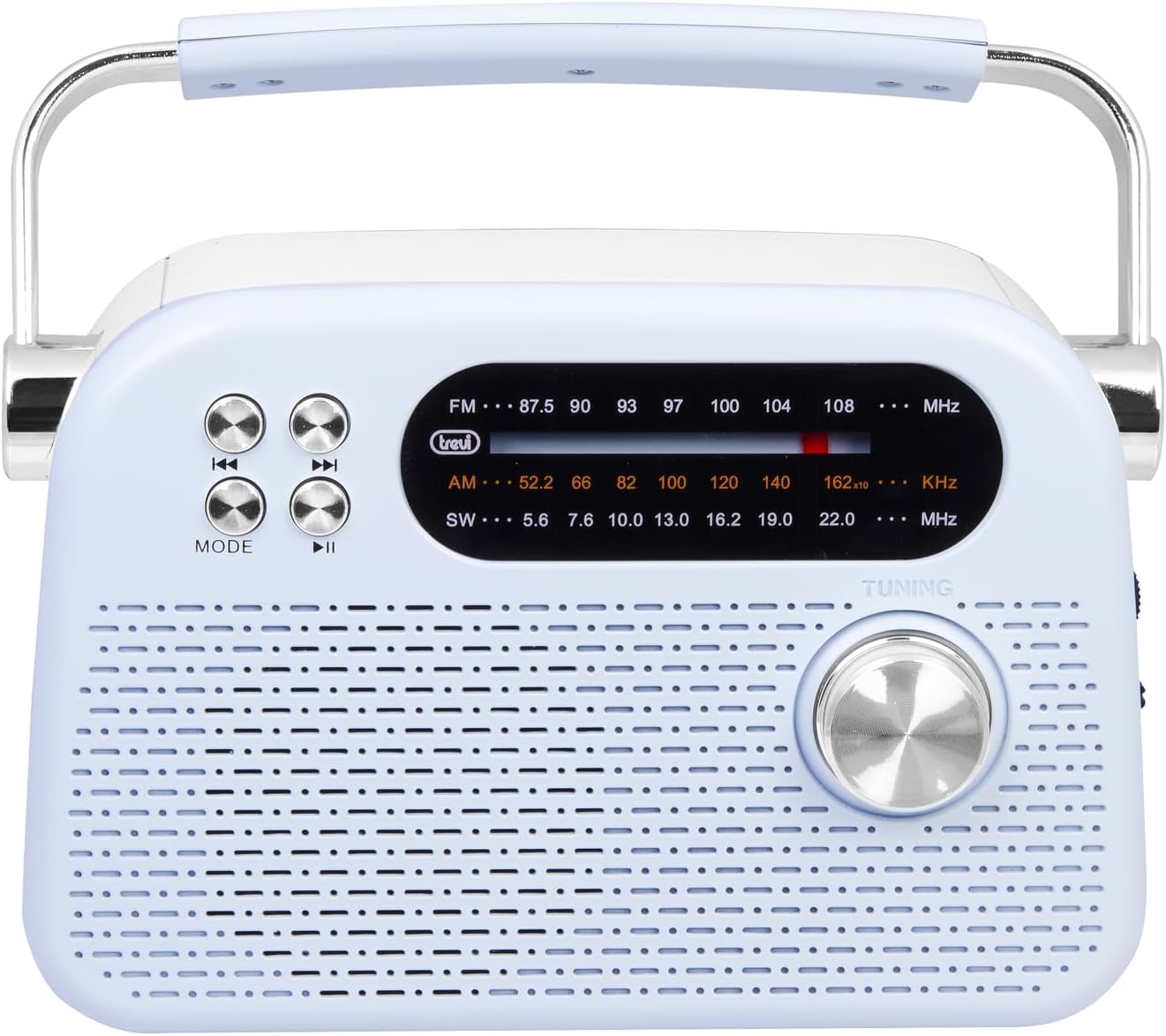
Kielelezo 2: Mbele ya kina view highlighting the display, mode button, playback controls, and tuning knob.
- Onyesha: Inaonyesha masafa, hali, na taarifa nyingine.
- Kitufe cha MODE: Switches between radio bands (FM/AM/SW) and media playback modes (USB/Micro SD/Wireless).
- Playback Controls (◀◀ / ▶▶ / ▶▶): Used for skipping tracks in media mode or fine-tuning in radio mode.
- Kitufe cha Kurekebisha: For manual station tuning.
Side Panel Controls and Ports

Kielelezo 3: Upande view showing the power switch, volume control, USB port, Micro SD slot, and USB Type-C charging port.
- OFF/ON/Volume Knob: Turns the radio on/off and adjusts the volume level.
- DC 5V IN (USB Type-C): Mlango wa kuchaji kwa betri ya ndani.
- Mlango wa USB: Kwa kuunganisha viendeshi vya USB flash kwa ajili ya uchezaji wa MP3.
- Micro SD Slot (TF): Kwa kuingiza kadi ndogo za SD kwa uchezaji wa MP3.
- Badili ya Kiteuzi cha Bendi: Selects between FM, AM, and SW radio bands, and MEDIA mode for USB/Micro SD/Wireless.
Paneli ya nyuma

Kielelezo cha 4: Nyuma view showing the telescopic antenna and battery compartment.
- Antena ya Telescopic: Extend for improved radio reception, especially for FM and SW bands.
- Sehemu ya Betri: Houses the rechargeable lithium battery.
5. Kuweka
5.1 Kuchaji Betri
- Locate the USB Type-C charging port on the side of the radio.
- Unganisha kebo ya USB Aina ya C iliyotolewa kwenye mlango wa kuchaji wa redio.
- Unganisha ncha nyingine ya kebo ya USB kwenye adapta ya kawaida ya nishati ya USB (haijajumuishwa) au mlango wa USB wa kompyuta.
- The charging indicator light will illuminate (if present) to show charging status.
- Once fully charged, disconnect the cable. A full charge ensures maximum portability and uninterrupted use.
5.2 Marekebisho ya Antena
For optimal radio reception, extend the telescopic antenna fully. Adjust its direction and angle to achieve the clearest signal, especially for FM and Shortwave (SW) broadcasts.
6. Maagizo ya Uendeshaji
6.1 Kuwasha/Kuzima na Kudhibiti Kiasi
- Ili kugeuza redio ON, rotate the OFF/ON/Volume knob clockwise.
- Continue rotating the knob clockwise to kuongeza sauti.
- Rotate the knob counter-clockwise to kupunguza sauti.
- Ili kugeuza redio IMEZIMWA, rotate the knob counter-clockwise until it clicks into the OFF position.
6.2 Uteuzi wa Njia
Tumia Badili ya Kiteuzi cha Bendi on the side panel to choose your desired mode:
- FM: For Frequency Modulation radio stations.
- AM: Kwa Amplitude Modulation radio stations.
- SW: For Shortwave radio stations.
- NUSU: For playing audio from USB, Micro SD, or Wireless (Bluetooth) sources.
6.3 Urekebishaji wa Redio
- Select the desired radio band (FM, AM, or SW) using the Band Selector Switch.
- Panua antena ya telescopic kwa mapokezi bora.
- Polepole mzunguko Tuning Knob on the front panel to scan for stations.
- The frequency will be displayed on the screen. Stop tuning when you find a clear station.
6.4 USB/Micro SD Playback (MP3)
- Insert a USB flash drive or a Micro SD card (with MP3 files) into the corresponding port/slot on the side panel.
- Switch the Band Selector Switch to VYOMBO VYA HABARI mode. The radio should automatically detect and begin playing MP3 files.
- Tumia Vidhibiti vya Uchezaji (◀◀ / ▶▶) to skip to the previous or next track.
- Tumia Play/Pause (▶▶) kitufe cha kusitisha au kuendelea kucheza.
6.5 Muunganisho Usiotumia Waya (Bluetooth)
The radio supports wireless audio streaming from compatible devices.
- Switch the Band Selector Switch to VYOMBO VYA HABARI mode. The radio will enter Bluetooth pairing mode (indicated by an audible prompt or flashing indicator).
- Kwenye simu yako mahiri, kompyuta kibao, au kifaa kingine kinachoweza Bluetooth, washa Bluetooth na utafute vifaa vinavyopatikana.
- Chagua "Trevi RDA 70 BR" (or similar name) from the list of devices to pair.
- Ukishaoanishwa, unaweza kutiririsha sauti kutoka kwenye kifaa chako hadi kwenye redio.
- Use the playback controls on your connected device or the radio's playback controls to manage audio.
7. Matengenezo
- Kusafisha: Tumia kitambaa laini na kikavu kusafisha sehemu ya nje ya redio. Usitumie visafishaji vya abrasive au vimumunyisho.
- Hifadhi: Wakati haitumiki kwa muda mrefu, hifadhi redio mahali pa baridi, kavu, mbali na jua moja kwa moja na joto kali.
- Utunzaji wa Betri: To prolong battery life, avoid fully discharging the battery frequently. Recharge it regularly, even if not in constant use.
8. Utatuzi wa shida
| Tatizo | Sababu inayowezekana | Suluhisho |
|---|---|---|
| Hakuna nguvu | Battery is discharged; Power knob is OFF. | Charge the battery; Rotate the power knob to ON. |
| Mapokezi duni ya redio | Antena haijapanuliwa; Ishara dhaifu; Kuingilia kati. | Extend and adjust the telescopic antenna; Move the radio to a different location; Tune carefully. |
| USB/Micro SD haichezi | Incorrect mode; Unsupported file umbizo; Imeharibika files. | Ensure Band Selector Switch is on MEDIA; Check if files are MP3 format; Try a different USB/Micro SD card. |
| Cannot connect via Wireless (Bluetooth) | Radio not in pairing mode; Bluetooth off on device; Device already connected to another unit. | Ensure radio is in MEDIA mode; Enable Bluetooth on your device; Disconnect from other devices and try again. |
9. Vipimo
| Kipengele | Maelezo |
|---|---|
| Chapa | Trevi |
| Mfano | RDA 70 BR |
| Vipimo (L x W x H) | 18.5 x 7 x 12.5 cm |
| Uzito | gramu 600 |
| Chanzo cha Nguvu | Betri ya Lithium inayoweza Kuchajiwa tena |
| Kuchaji Bandari | USB Type-C (DC 5V) |
| Bendi za Redio Zinazotumika | FM, AM, SW |
| Uchezaji wa Vyombo vya Habari | USB, Micro SD (MP3 format) |
| Muunganisho wa Waya | Yes (Bluetooth compatible) |
| Vipengele Maalum | Inabebeka, Inaweza Kuchajiwa tena |
10. Udhamini na Msaada
For warranty information and customer support, please refer to the documentation provided at the time of purchase or visit the official Trevi website. Standard return policies apply for products purchased through retailers. For specific details regarding returns or defective products, consult your purchase platform's help pages.


