1. Utangulizi
This manual provides essential information for setting up, operating, and maintaining your Machenike Mini Desktop. Please read this manual thoroughly before using the device to ensure proper functionality and longevity.
The Machenike Mini Desktop, model GTR HP8745H00, is a compact and powerful computing solution featuring an AMD Ryzen 7 8745HS processor, AMD Radeon Graphics, 32GB DDR5 RAM, and a 1TB SSD, running on Windows 11 Home.
2. Yaliyomo kwenye Kifurushi
Thibitisha kuwa vipengee vyote vipo kwenye kifurushi:
- Machenike Mini Desktop (GTR HP8745H00)
- Adapta ya Nguvu
- Mwongozo wa Mtumiaji (hati hii)
- (Additional accessories may vary by region or bundle)
3. Bidhaa Imeishaview
The Machenike Mini Desktop is designed for efficiency and performance in a small form factor. Below is an illustration of the device and its various ports.

Picha: Mbele view of the Machenike Mini Desktop, showcasing its compact design and front-facing ports.
3.1. Mpangilio wa Bandari
Familiarize yourself with the available ports for connecting peripherals and displays.
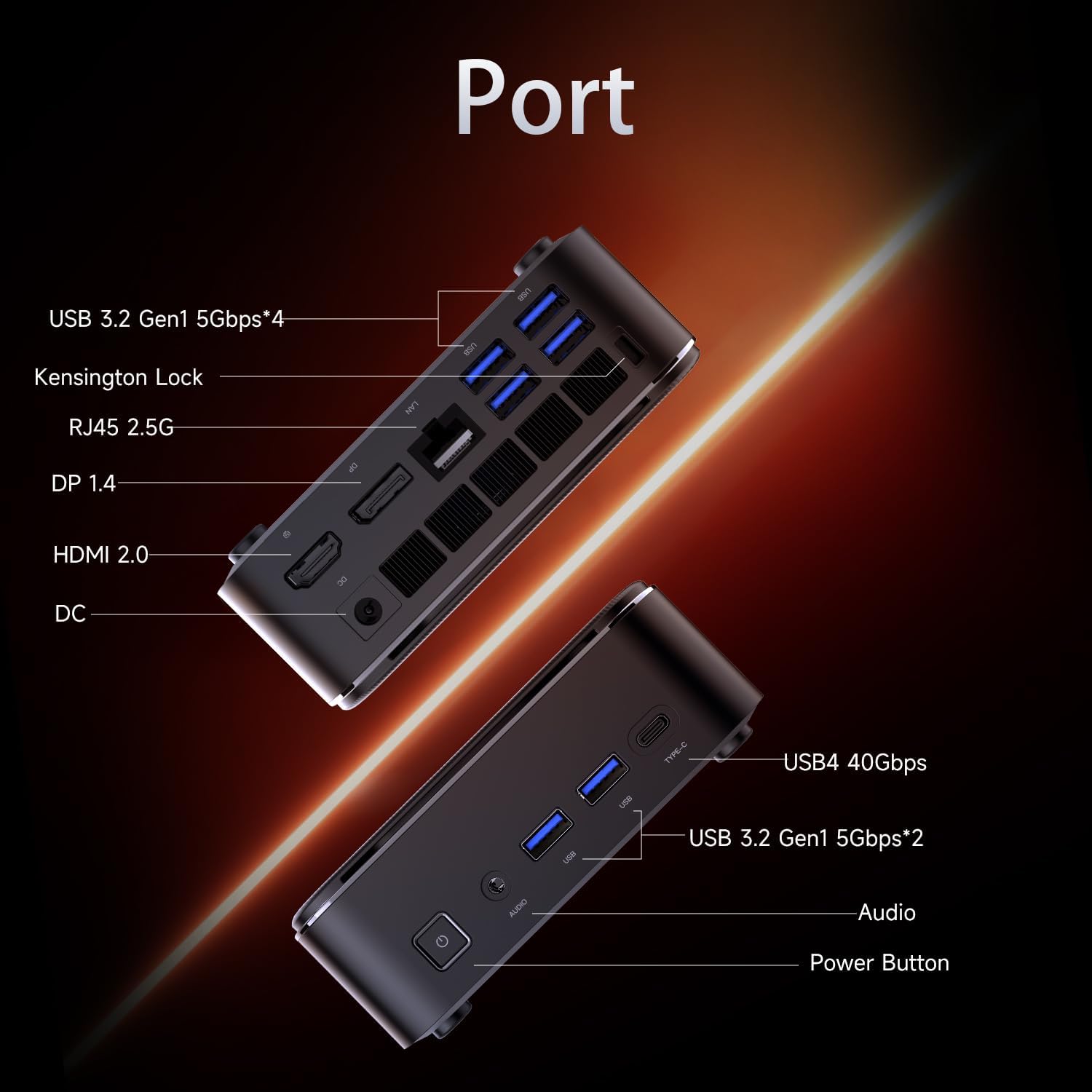
Image: Diagram illustrating the various ports on the Machenike Mini Desktop, including USB, Type-C, HDMI, DisplayPort, RJ45, and audio connections.
- Bandari za mbele: Power Button, 3.5mm Audio Jack, 2 x USB 3.2 Gen1 (5Gbps), 1 x Type-C (USB4 40Gbps)
- Bandari za Nyuma: 2 x USB 3.2 Gen1 (5Gbps), 1 x USB 3.2 Gen2 (10Gbps), 1 x Type-C, 1 x HDMI 2.1, 1 x RJ45, 1 x Display Port, DC Power Input, Kensington Lock Slot, Restart Button
4. Usanidi wa Awali
Follow these steps to set up your Machenike Mini Desktop:
- Unganisha Onyesho: Connect your monitor or display to the Mini Desktop using an HDMI or DisplayPort cable. The device supports 4K resolution.
- Unganisha Pembeni: Chomeka kibodi, kipanya, na vifaa vingine vyovyote vya USB kwenye milango inayopatikana ya USB.
- Unganisha Nguvu: Connect the power adapter to the DC power input port on the Mini Desktop, then plug the adapter into a power outlet.
- Washa: Press the power button located on the front of the device. The system will boot up.
- Mpangilio wa Windows: Follow the on-screen instructions to complete the initial Windows 11 Home setup, including language, region, network connection, and user account creation.
5. Maagizo ya Uendeshaji
5.1. Washa/Zima
- Washa: Bonyeza kitufe cha kuwasha/kuzima kwenye sehemu ya mbele ya kifaa.
- Zima: Bofya kitufe cha Anza katika Windows, kisha uchague Nguvu > Zima.
- Anzisha upya: Bofya kitufe cha Anza katika Windows, kisha uchague Nguvu > Anzisha upya.
5.2. Muunganisho wa Mtandao
- Wi-Fi: The device supports Wi-Fi 6. During Windows setup or via Windows Settings, select your Wi-Fi network and enter the password.
- Waya (Ethernet): Connect an Ethernet cable from your router or modem to the RJ45 port on the back of the Mini Desktop.
5.3. Kuunganisha Vifaa vya Nje
- Vifaa vya USB: Connect USB flash drives, external hard drives, printers, or other USB peripherals to any available USB 3.2 Gen1 or Gen2 ports.
- Type-C Devices: Use the Type-C ports for compatible devices, including high-speed data transfer (up to 40Gbps on the front Type-C port) or display output.
- Sauti: Connect headphones or speakers to the 3.5mm audio jack on the front.
- Bluetooth: The device supports Bluetooth for wireless peripherals like keyboards, mice, and speakers. Pair devices through Windows Settings > Bluetooth & devices.
6. Matengenezo
Regular maintenance helps ensure optimal performance and extends the lifespan of your Mini Desktop.
- Kusafisha: Use a soft, dry cloth to clean the exterior. For dust accumulation in vents, use compressed air. Ensure the device is powered off and unplugged before cleaning.
- Masasisho ya Programu: Regularly check for and install Windows updates and driver updates to ensure system stability and security.
- Uingizaji hewa: Ensure the Mini Desktop is placed in a well-ventilated area. Avoid blocking the air vents to prevent overheating.
- Hifadhi Nakala ya Data: Hifadhi nakala rudufu ya data muhimu mara kwa mara kwenye hifadhi ya nje au hifadhi ya wingu.
7. Utatuzi wa shida
Sehemu hii inashughulikia masuala ya kawaida ambayo unaweza kukutana nayo.
- Hakuna Nguvu:
- Ensure the power adapter is securely connected to both the Mini Desktop and a working power outlet.
- Jaribu sehemu ya umeme ukitumia kifaa kingine.
- Hakuna Onyesho:
- Verify that the HDMI or DisplayPort cable is securely connected to both the Mini Desktop and the monitor.
- Hakikisha kuwa kifuatiliaji kimewashwa na kimewekwa kwenye chanzo sahihi cha ingizo.
- Jaribu kebo tofauti au kifuatilizi ikiwa kinapatikana.
- Hakuna Muunganisho wa Mtandao:
- For Wi-Fi, check if the Wi-Fi adapter is enabled in Windows Settings and if you are connected to the correct network with the right password.
- Kwa muunganisho wa waya, hakikisha kebo ya Ethernet imeunganishwa ipasavyo na kipanga njia/modemu yako inafanya kazi.
- Masuala ya Muunganisho wa Bluetooth:
- Ensure Bluetooth is enabled in Windows Settings.
- Remove and re-pair the problematic Bluetooth device.
- Update Bluetooth drivers through Device Manager.
- Ensure the device is within range and fully charged.
- Kupungua kwa Mfumo:
- Check Task Manager for resource-intensive applications.
- Hakikisha nafasi ya kutosha ya bure kwenye SSD.
- Run a disk cleanup and defragmentation (for HDD, though SSDs don't need defragging).
- Perform a malware scan.
8. Vipimo
Detailed technical specifications for the Machenike Mini Desktop (GTR HP8745H00):
| Kipengele | Vipimo |
|---|---|
| Mfano | GTR HP8745H00 |
| Kichakataji | AMD Ryzen 7 8745HS (8 Cores, 16 Threads, 16MB L3 Cache, up to 5.1 GHz) |
| Michoro | Picha za AMD Radeon (Imeunganishwa) |
| RAM | DDR5 ya GB 32 (4800 MHz) |
| Hifadhi | 1TB PCIe M.2 SSD |
| Mfumo wa Uendeshaji | Windows 11 Nyumbani |
| Muunganisho wa Waya | Wi-Fi 6 (802.11ax), Bluetooth |
| Bandari za mbele | 1 x Power Button, 1 x 3.5mm Audio, 2 x USB 3.2 Gen1 (5Gbps), 1 x Type-C (USB4 40Gbps) |
| Bandari za Nyuma | 2 x USB 3.2 Gen1 (5Gbps), 1 x USB 3.2 Gen2 (10Gbps), 1 x Type-C, 1 x HDMI 2.1, 1 x RJ45, 1 x Display Port, DC Power Input, Kensington Lock, Restart Button |
| Ubora wa Juu wa Skrini | 3840 x 2160 (4K) |
| Vipimo (LxWxH) | Inchi 5.05 x 1.96 x 5.05 |
| Uzito | Pauni 3.4 |
| Rangi | Nyeusi |
9. Udhamini na Msaada
Machenike products are covered by a limited warranty. For specific warranty terms and conditions, please refer to the warranty card included with your product or visit the official Machenike webtovuti.
For technical support, troubleshooting assistance, or to inquire about service, please contact Machenike customer support or visit the official brand store:


