1. Utangulizi
Asante kwa ununuziasing the Moukey MAMP3 2.0 Stereo ya Chaneli Amplifier. This manual provides essential information for the safe and efficient operation of your device. Please read it thoroughly before use and retain it for future reference.
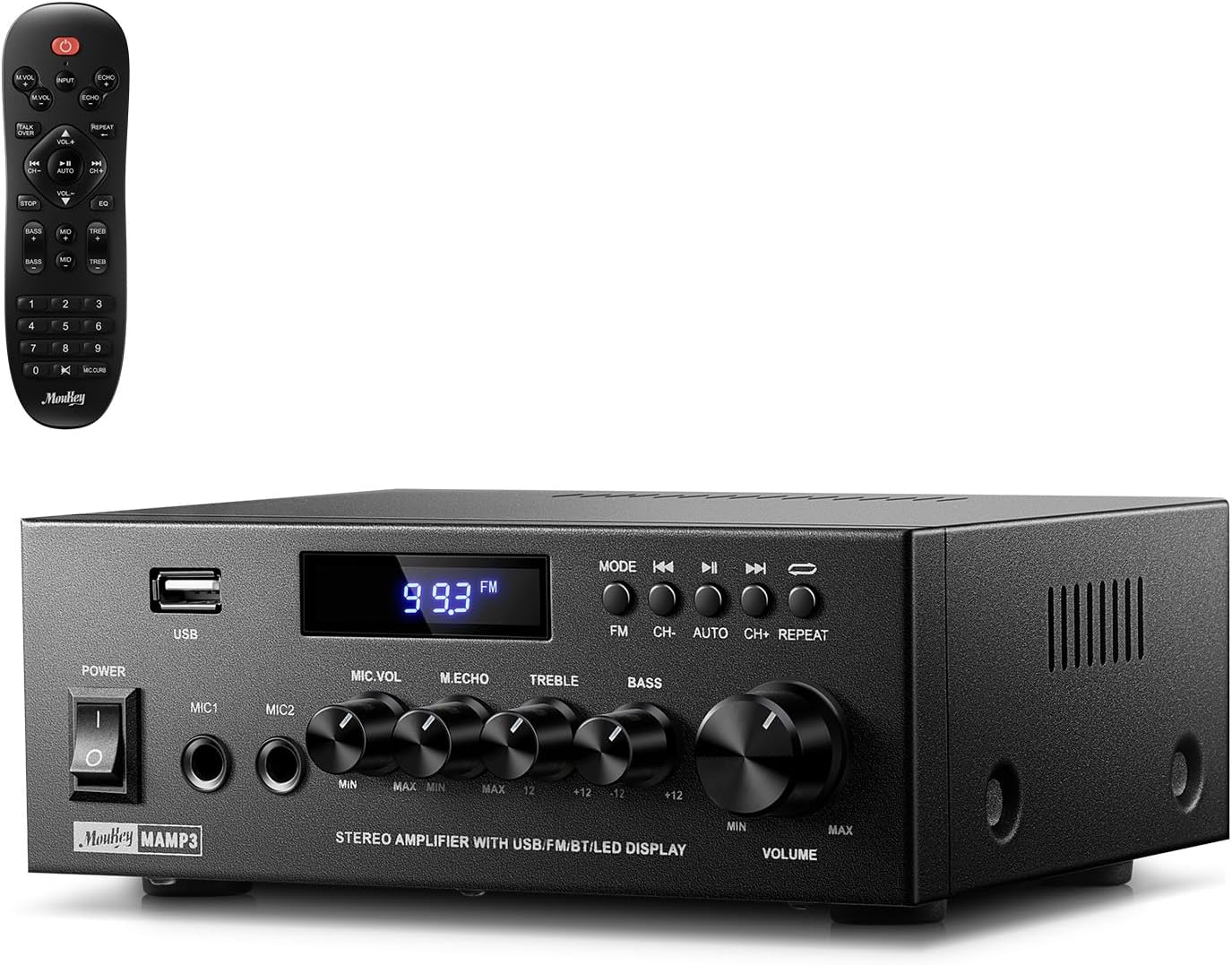
Image 1.1: The Moukey MAMP3 amplifier and its remote control.
2. Maagizo ya Usalama
- Soma maagizo yote kabla ya kutumia ampmaisha zaidi.
- Weka amplifier away from water, moisture, and extreme temperatures.
- Do not block ventilation openings. Ensure proper airflow around the unit.
- Tumia tu adapta ya umeme inayotolewa na kitengo.
- Usijaribu kutengeneza au kurekebisha kitengo mwenyewe. Waelekeze wafanyakazi wote waliohitimu katika huduma.
- Disconnect the power cord from the outlet if the unit will be unused for extended periods.
3. Bidhaa Imeishaview
3.1 Sifa Muhimu
- 2.0 Channel Stereo Audio Output
- Bluetooth 5.3 for stable wireless connection
- Multiple Audio Inputs: RCA, USB, FM Radio, 2 Microphone Inputs
- Full-function Remote Control with EQ adjustments
- Customizable Treble, Midrange, and Bass controls
- Memory function for mode, volume, and EQ settings
- 300 Watts Peak Power Output
3.2 Vidhibiti na Viashiria vya Paneli ya Mbele

Picha 3.1: Mpangilio wa Paneli ya Mbele
- Kubadilisha Nguvu: Huwasha au kuzima kitengo.
- MIC1/2: Jackets za kuingiza maikrofoni za 6.35mm.
- Kitufe cha Sauti ya Maikrofoni: Hurekebisha sauti ya maikrofoni zilizounganishwa.
- Echo Knob: Hurekebisha athari ya mwangwi kwa maikrofoni.
- Treble Knob: Hurekebisha sauti ya masafa ya juu.
- Bass Knob: Hurekebisha sauti ya masafa ya chini.
- Knob ya Sauti ya Muziki: Main volume control for all audio sources.
- Nafasi ya USB: Kwa ajili ya kuunganisha vifaa vya hifadhi ya USB kwa ajili ya uchezaji wa sauti.
- Onyesho la LED: Shows current mode, track information, or FM frequency.
- Kitufe cha MODE: Switches between input sources (BT, Aux, CD, USB, FM).
- Kitufe cha awali: Skips to the previous track (USB/BT) or FM station.
- Kitufe cha Cheza/Sitisha: Plays or pauses audio (USB/BT).
- Kitufe Kifuatacho: Skips to the next track (USB/BT) or FM station.
- Kitufe cha Kurudia: Repeats current track or all tracks (USB).
3.3 Viunganisho vya Paneli ya Nyuma

Picha 3.2: Miunganisho ya Paneli za Nyuma
- Ingizo la Antena ya FM: Connect the included FM antenna for radio reception.
- AUDIO INPUT (RCA): Connect external audio sources like CD/DVD players using RCA cables.
- AUDIO OUTPUT (Speaker Terminals): Connect passive speakers. Ensure correct polarity (+ to + and - to -).
- POWER AC INPUT: Unganisha kamba ya umeme kwenye duka la AC.
4. Kuweka
4.1 Kufungua
Ondoa kwa uangalifu faili ya amplifier and all accessories from the packaging. Verify that all items listed in the 'What's in the Box' section are present.
4.2 Kuunganisha Spika
MhAMP3 amplifier supports two passive speakers. Connect your speakers to the MATOKEO YA AUDIO terminals on the rear panel. Ensure that the positive (+) terminal on the amplifier connects to the positive (+) terminal on your speaker, and the negative (-) terminal on the amplifier connects to the negative (-) terminal on your speaker. Incorrect polarity can affect sound quality.

Image 4.1: Speaker Connection Diagram
4.3 Kuunganisha Vyanzo vya Sauti
The amplifier offers multiple input options:
- Ingizo la RCA: Use RCA cables to connect devices such as CD players, DVD players, or other audio equipment to the Pembejeo ya AUDIO jeki kwenye paneli ya nyuma.
- Uingizaji wa USB: Ingiza kiendeshi cha USB flash kwenye Slot ya USB on the front panel for direct audio playback.
- Bluetooth: Pair your Bluetooth-enabled device (smartphone, tablet, laptop) wirelessly.
- Redio ya FM: Connect the included FM antenna to the Ingizo la Antena ya FM on the rear panel for radio reception. Extend the antenna for optimal signal.
- Uingizaji wa kipaza sauti: Unganisha hadi maikrofoni mbili kwenye MIC1/2 jacks on the front panel for karaoke or public address.

Image 4.2: Available Signal Inputs
Uunganisho wa Nguvu 4.4
Unganisha kamba ya umeme kwa POWER AC INPUT on the rear panel and then plug it into a standard AC power outlet.
5. Maagizo ya Uendeshaji
5.1 Washa/Zima
Bonyeza kwa Kubadilisha Nguvu on the front panel to turn the amplifier on or off. The LED display will illuminate when the unit is powered on.
5.2 Uteuzi wa Ingizo
Bonyeza kwa MODE button on the front panel or the remote control to cycle through the available input sources: Bluetooth (BT), Auxiliary (Aux), CD, USB, and FM radio. The selected mode will be shown on the LED display.
5.3 Udhibiti wa Kiasi
Zungusha kubwa Music Volume Knob on the front panel clockwise to increase volume and counter-clockwise to decrease it. Volume can also be adjusted using the remote control.
5.4 Equalizer (EQ) Adjustment
Adjust the sound characteristics using the Kitambaa cha Treble na Kitasa cha Bass on the front panel. The remote control also provides dedicated buttons for Treble, Midrange, and Bass adjustments. The amplifier will automatically save your preferred EQ settings.
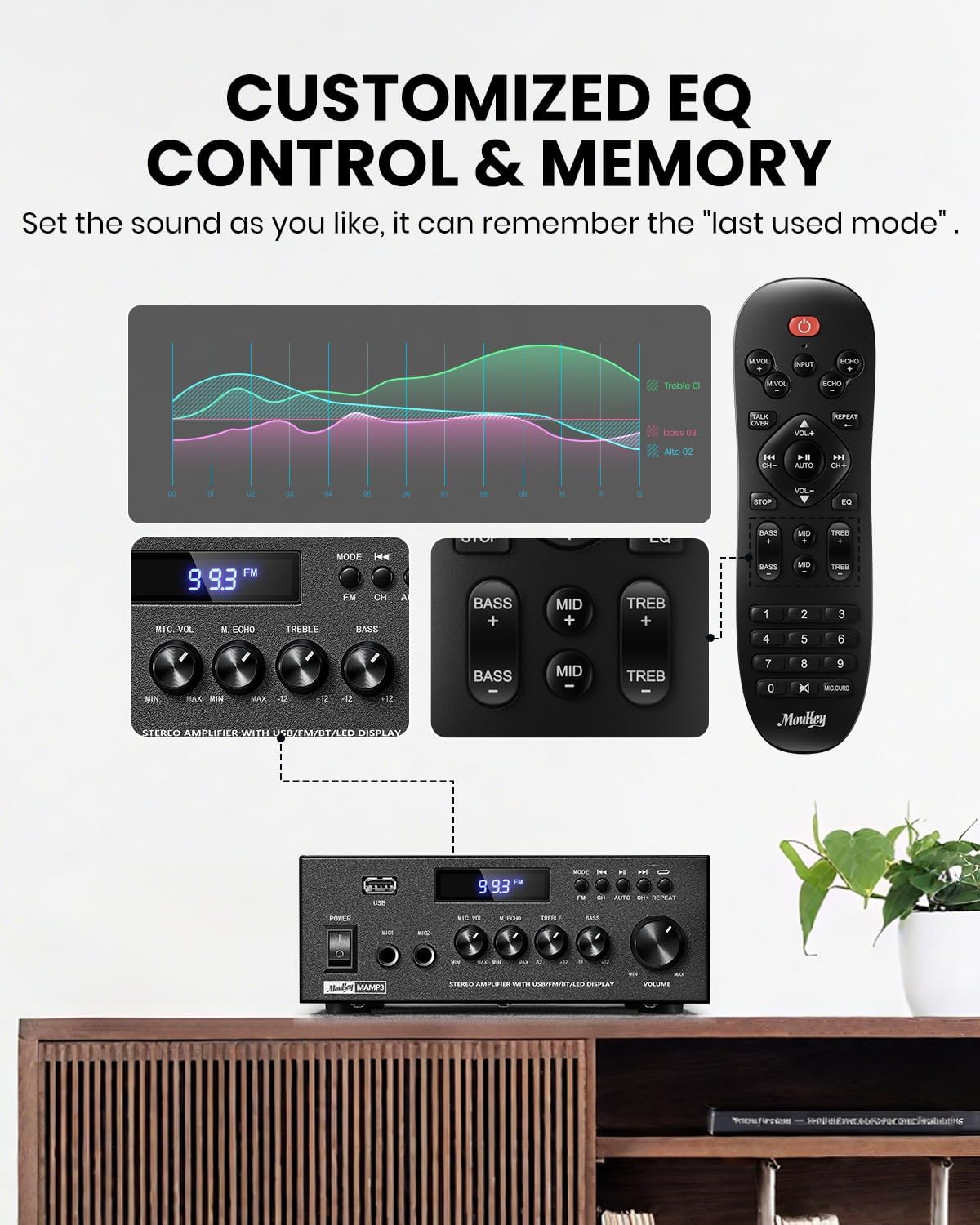
Image 5.1: Customizable EQ Control
5.5 Vidhibiti vya Maikrofoni
If microphones are connected, use the Kitasa cha Sauti ya Kipaza sauti to adjust their output level and the Echo Knob to add an echo effect. The remote control also features a 'Talkover' function.
5.6 Uendeshaji wa Bluetooth
- Bonyeza kwa MODE button until "BT" appears on the LED display. The amplifier sasa iko katika hali ya kuoanisha ya Bluetooth.
- On your mobile device, enable Bluetooth and search for "Moukey MAMP3".
- Select "Moukey MAMP3" to pair. Once connected, you will hear a confirmation tone.
- Sasa unaweza kucheza sauti kutoka kwa kifaa chako kupitia ampmaisha zaidi.

Image 5.2: Bluetooth Pairing
5.7 Uendeshaji wa Redio ya FM
- Bonyeza kwa MODE kifungo hadi "FM" inaonekana kwenye onyesho la LED.
- Tambaza kiotomatiki: Press the "AUTO" button on the remote to automatically scan and save available FM stations.
- Uwekaji wa Mwongozo: Use the number pad on the remote control to directly enter the desired FM frequency (e.g., for 101.1 MHz, enter 1011).
- Tumia Iliyotangulia na Inayofuata buttons to navigate between saved stations or fine-tune frequencies.
5.8 Uchezaji wa USB
Insert a USB flash drive containing MP3 or WAV audio files kwenye Slot ya USB. The amplifier will automatically switch to USB mode and begin playback. Use the Iliyotangulia, Cheza/Sitisha, na Inayofuata buttons to control playback. The Rudia button allows you to repeat the current track or all tracks.
Udhibiti wa Remote wa 5.9
The included full-function remote control allows for convenient operation from a distance. It provides control over input selection, volume, EQ settings (treble, midrange, bass), microphone echo, and talkover functions across all input modes.

Image 5.3: Upgraded Remote Control Functionality
6. Matengenezo
- Kusafisha: Tumia kitambaa laini na kavu kusafisha sehemu ya nje ampUsitumie visafishaji vya kioevu au viyeyusho.
- Uingizaji hewa: Ensure that the ventilation openings are free from dust and debris to prevent overheating.
- Hifadhi: Ikiwa haitumiki kwa muda mrefu, hifadhi amplifier mahali pakavu na penye baridi, mbali na jua moja kwa moja na halijoto kali.
7. Utatuzi wa shida
| Tatizo | Sababu inayowezekana | Suluhisho |
|---|---|---|
| Hakuna nguvu | Waya ya umeme haijaunganishwa; Soketi ya umeme ina hitilafu; Kizimio cha umeme kimezimwa. | Ensure power cord is securely connected; Test outlet with another device; Turn power switch on. |
| Hakuna pato la sauti | Volume too low; Incorrect input selected; Speaker wires loose/incorrectly connected; Audio source issue. | Increase volume; Select correct input mode; Check speaker wire connections and polarity; Verify audio source is playing. |
| Bluetooth haiunganishi | Amplifier not in BT mode; Device too far; Device already connected to another unit; Interference. | Badili amplifier to BT mode; Move device closer; Disconnect from other devices; Reduce interference. |
| Mapokezi duni ya FM | Antenna not connected or poorly positioned; Weak signal. | Connect and adjust FM antenna position; Try auto-scan or manual tuning for stronger stations. |
| Matatizo ya uchezaji wa USB | Haitumiki file format; USB drive not formatted correctly; USB drive capacity too large. | Hakikisha files are MP3/WAV; Format USB drive to FAT32; Use USB drives 32GB or less. |
8. Vipimo
| Kipengele | Vipimo |
|---|---|
| Nambari ya Mfano | MAMP3 |
| Nguvu ya Pato | Wati 300 (Kilele) |
| Vituo | 2.0 Stereo |
| Teknolojia ya Uunganisho | Auxiliary, Bluetooth 5.3, FM, USB |
| Vifaa Sambamba | Smartphone, Tablet, Laptop, Computer, Speakers, CD/DVD Player |
| Aina ya kiunganishi | RCA, USB, 2 Mic input |
| Njia ya Pato la Sauti | Stereo |
| Vipimo vya Bidhaa | 6.1"D x 7.1"W x 2.8"H (cm 15.5 x 18.0 x 7.1) |
| Uzito wa Kipengee | Pauni 2.14 (kilo 0.97) |
| Rangi | Nyeusi |
8.1 Ni nini kwenye Sanduku
- Moukey MAMP3 Ampmaisha zaidi
- Kidhibiti cha Mbali
- Antena ya FM
- Mwongozo wa Mtumiaji
- Adapta ya Nguvu
9. Udhamini na Msaada
9.1 Taarifa ya Udhamini
Moukey products are designed and manufactured to the highest quality standards. This product is covered by a limited warranty against defects in materials and workmanship. Please refer to the warranty card included with your purchase for specific terms and conditions, or visit the official Moukey webtovuti kwa habari ya udhamini wa kina.
9.2 Usaidizi kwa Wateja
If you encounter any issues or have questions regarding your Moukey MAMP3 amplifier, please contact our customer support team. You can find contact information on the official Moukey webtovuti au kupitia jukwaa lako la ununuzi.
Webtovuti: www.moukey.com (Kutample link, please refer to actual product documentation)
Barua pepe: support@moukey.com (Kutample email, please refer to actual product documentation)


