1. Utangulizi
This manual provides detailed instructions for the safe and effective use of your GODOX iT22S Mini TTL Wireless Camera Flash for Sony. Please read this manual thoroughly before operation to ensure optimal performance and to prevent damage to the product.
2. Bidhaa Imeishaview
Sifa Muhimu
- Smart TTL Functionality: Provides automatic light output for simplified operation.
- Muundo Kompakt: Weighing approximately 45g, its small size ensures portability.
- Betri Iliyounganishwa ya Lithium: Features a built-in 470mAh lithium battery with USB-C charging for extended use.
- Kubadilisha Modi: Easily switch between Manual (M) and TTL modes using a dedicated button. The high-definition display shows real-time settings.
- Magnetic Accessory System: Compatible with magnetic snap-on diffusers, color filters (CTO/CTB), creative gels, and honeycomb grids (accessories may be sold separately).
- Utendaji: Offers over 700 flashes per charge with a 1.5-second recycle time at full power.
- Udhibiti wa Nguvu: Adjust flash intensity across 6 stops (1/32 to 1/1 power) in 1/3-step increments.
Ni nini kwenye Sanduku
- Flash Body x1
- Kebo ya Kuchaji ya USB-C x1
- Magnetic Spreader x1
- Magnetic Color Filter x2 (1/2 CTO, 1/1 CTO)
- Mfuko wa Kuhifadhi x1

Image 2.1: The GODOX iT22S Mini Flash with its complete set of accessories, including the flash unit, magnetic spreader, magnetic color filters, USB-C charging cable, and storage bag.
3. Kuweka
3.1 Kuchaji Betri
The GODOX iT22S features a built-in lithium battery. Before first use, fully charge the flash unit.
- Connect the supplied USB-C charging cable to the USB-C port on the flash unit.
- Unganisha ncha nyingine ya kebo ya USB-C kwenye adapta ya umeme ya USB inayooana (haijajumuishwa).
- The battery indicator on the display will show charging status. Charging typically takes approximately 1 hour and 10 minutes for a full charge.

Image 3.1: The GODOX iT22S flash unit being charged via its USB-C port, illustrating the charging process and battery status display.
3.2 Mounting the Flash on Your Camera
The iT22S is designed to mount onto a camera's hotshoe.
- Hakikisha kamera yako imezimwa.
- Slide the flash unit's hotshoe mount into your camera's hotshoe slot until it clicks into place.
- If your camera has a locking mechanism for the hotshoe, secure the flash.
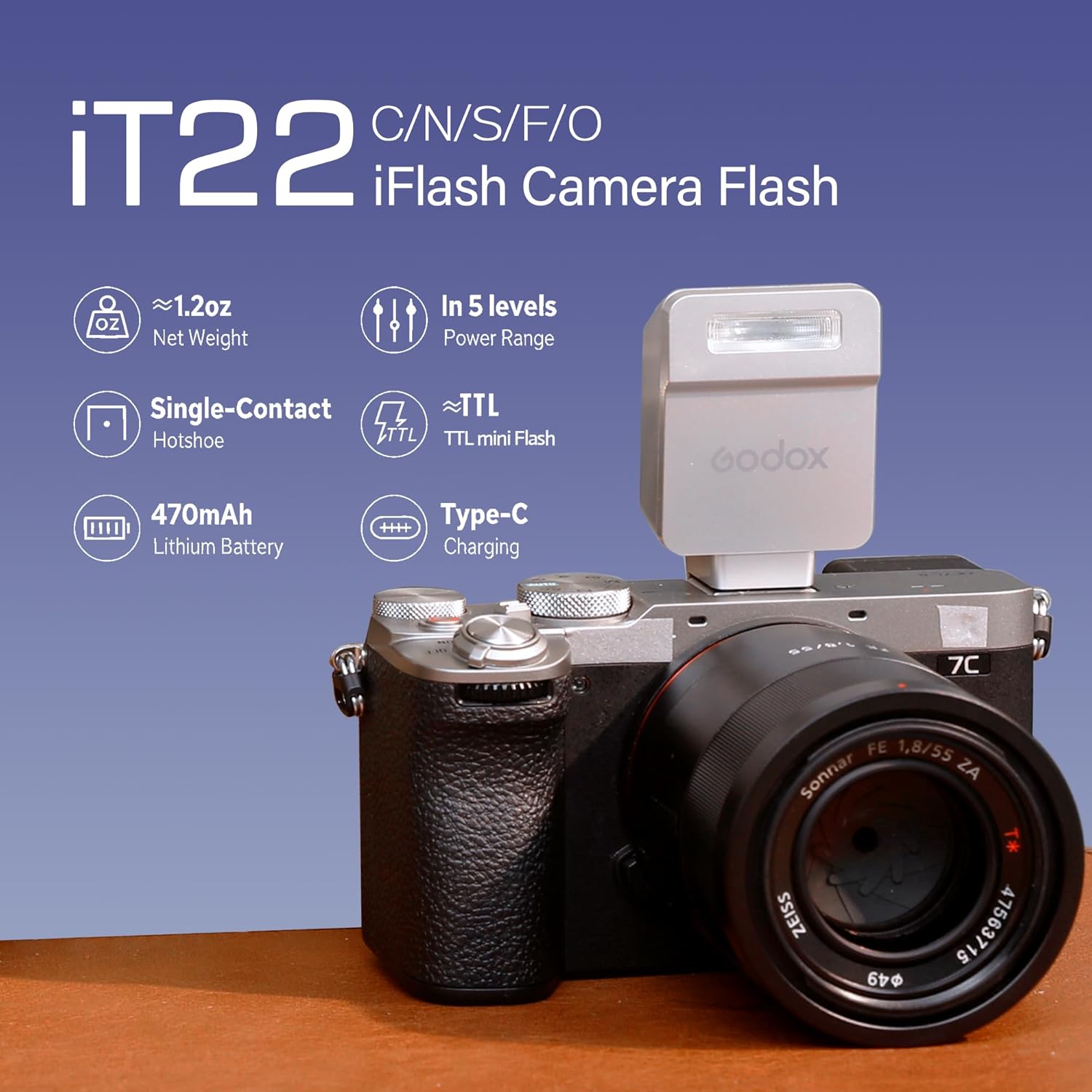
Image 3.2: The GODOX iT22S flash unit securely mounted on a Sony camera, demonstrating its compact size and hotshoe connection.
3.3 Attaching Magnetic Accessories
The iT22S features a magnetic front for quick attachment of light modifiers.
- Select the desired magnetic accessory (e.g., spreader, color filter).
- Align the accessory with the front of the flash head.
- The magnets will secure the accessory in place.

Image 3.3: The GODOX iT22S flash unit demonstrating the use of magnetic accessories, including diffusers and color filters, for creative lighting effects.
4. Maagizo ya Uendeshaji
4.1 Kuwasha / Kuzima
- Ili kuwasha, bonyeza na ushikilie kitufe cha kuwasha/kuzima hadi skrini iangaze.
- Ili kuzima, bonyeza na ushikilie kitufe cha kuwasha/kuzima hadi onyesho lizime.
4.2 Switching Between M/TTL Modes
The iT22S allows for quick switching between Manual and TTL modes.
- Press the dedicated 'MODE' button to toggle between TTL (Through-The-Lens) and M (Manual) modes.
- The current mode will be displayed on the high-definition screen.

Picha 4.1: Karibu view of the GODOX iT22S flash unit's control panel, highlighting the 'MODE' button for switching between TTL and Manual settings, and the clear display.
4.3 Adjusting Power Output (Manual Mode)
In Manual mode, you can precisely control the flash intensity.
- Once in M mode, use the '+' and '-' buttons to adjust the power output.
- Power can be adjusted from 1/32 to 1/1 in 1/3-stop increments.

Image 4.2: A sequence of images demonstrating the effect of different power settings (1/1, 1/2, 1/4) on a subject, illustrating the precise power control of the GODOX iT22S flash.
4.4 Using the Optional TR Hot Shoe Riser
For improved clearance with wide or protruding lenses, an optional TR Hot Shoe Riser can be used.
- Mount the TR Hot Shoe Riser onto your camera's hotshoe first.
- Then, mount the iT22S flash onto the riser.
- The riser allows for a 0-90 degree tilt adjustment for direct or bounce flash.
Note: The TR Hot Shoe Riser is recommended for use with Godox camera flashes under 300g for optimal balance and stability.

Image 4.3: The GODOX iT22S flash unit shown with the optional TR Hot Shoe Riser, demonstrating how it elevates the flash and allows for tilt adjustments from 0 to 90 degrees.
5. Matengenezo
5.1 Kusafisha
- Use a soft, dry cloth to clean the flash unit.
- Kwa uchafu mkaidi, kidogo dampjw.org sw kitambaa chenye maji au myeyusho mdogo wa kusafisha.
- Epuka kutumia vimumunyisho vikali au visafishaji vya abrasive.
5.2 Hifadhi
- Store the flash in a cool, dry place, away from direct sunlight and extreme temperatures.
- Iwapo itahifadhiwa kwa muda mrefu, hakikisha kuwa betri imechajiwa kiasi (karibu 50%) ili kuongeza muda wa maisha yake.
- Use the provided storage bag to protect the unit from dust and scratches.
5.3 Utunzaji wa Betri
- Epuka kutoa betri kikamilifu mara kwa mara.
- Recharge the battery regularly, even if not in use, to maintain its health.
- Usiweke betri kwenye joto la juu au kuichoma.
6. Utatuzi wa shida
| Tatizo | Sababu inayowezekana | Suluhisho |
|---|---|---|
| Flash haiwaki. | Betri imeisha. | Charge the flash unit using the USB-C cable. |
| Flash haina moto. | Flash not securely mounted; Camera settings incorrect; Flash in standby mode. | Ensure flash is fully seated in hotshoe. Check camera flash settings. Press any button on the flash to wake it from standby. |
| Flash output is inconsistent or too weak. | Incorrect power setting (M mode); TTL exposure compensation needed; Low battery. | Adjust power in M mode. Check camera's flash exposure compensation. Recharge battery. |
| Magnetic accessories do not attach properly. | Obstruction on flash head or accessory; Accessory not magnetic. | Clean flash head and accessory. Ensure you are using compatible magnetic accessories. |
7. Vipimo
| Kipengele | Maelezo |
|---|---|
| Nambari ya Mfano | MIC-GD-IT22-S-S |
| Chapa | GODOX |
| Vipandikizi Vinavyolingana | Sony Hotshoe |
| Aina ya Flash | TTL Wireless Camera Flash |
| Betri | Built-in Lithium, 470mAh |
| Kuchaji Bandari | USB-C |
| Muda wa Urejeshaji | Approx. 1.5 seconds (at full power) |
| Flashes per Charge | Over 700 (at full power) |
| Power Output Range | 1/32 to 1/1 (in 1/3-stop increments) |
| Uzito wa Kipengee | Wakia 4.3 (takriban 122g) |
| Dimensions (Flash Body) | Takriban. 40mm x 64mm x 28mm |
| Rangi | Fedha |

Image 7.1: The GODOX iT22S flash unit with its dimensions (40mm x 64mm x 28mm) and net weight (approximately 52g) clearly indicated.
8. Udhamini na Msaada
GODOX products are designed and manufactured to high-quality standards. For information regarding warranty coverage, please refer to the warranty card included with your product or visit the official GODOX webtovuti.
For technical support, troubleshooting assistance beyond this manual, or service inquiries, please contact GODOX customer service through their official channels. Keep your purchase receipt as proof of purchase for warranty claims.


