1. Utangulizi
This manual provides detailed instructions for the setup, operation, maintenance, and troubleshooting of your DIERYA DK68 Wireless Mechanical Keyboard. Please read this manual thoroughly before using the product to ensure proper functionality and to maximize your user experience.
2. Yaliyomo kwenye Kifurushi
Thibitisha kuwa vipengee vyote vipo kwenye kifurushi:
- 1 x DIERYA DK68 68-Key Wireless Mechanical Keyboard
- 1 x 2.4G Kipokea Kifaa kisichotumia waya
- 1 x USB-C hadi Kebo ya USB-A
- 1 x Mwongozo wa Maagizo (hati hii)
3. Bidhaa Imeishaview
The DIERYA DK68 is a compact 68-key mechanical keyboard featuring triple-mode connectivity (wired USB-C, 2.4GHz wireless, and Bluetooth 5.0). It is equipped with linear red mechanical switches and customizable RGB backlighting.

Image: The DIERYA DK68 Wireless Mechanical Keyboard in white, showcasing mpangilio wake mdogo wa vitufe 68 na mwangaza wa nyuma wa RGB.
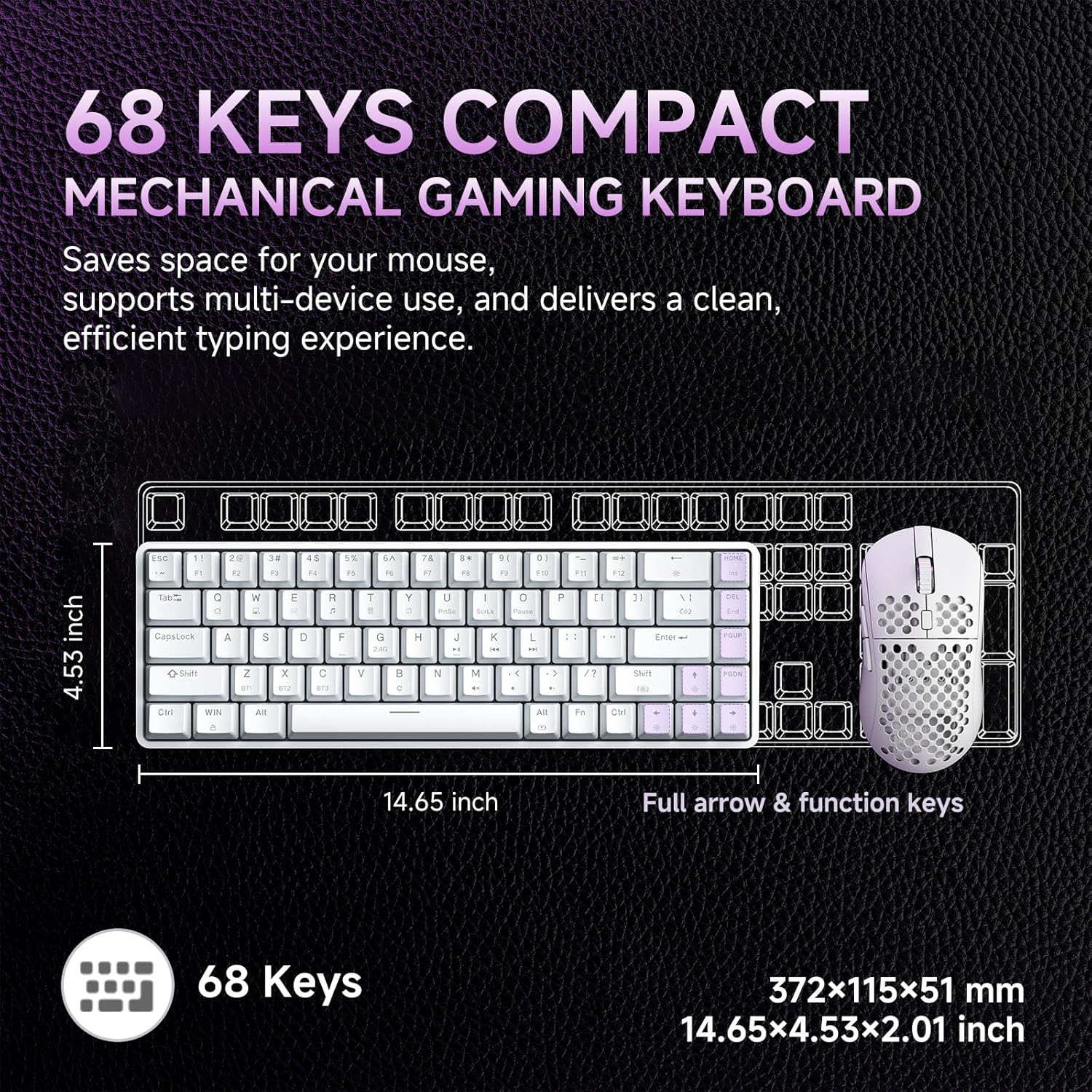
Image: A diagram illustrating the compact dimensions of the DIERYA DK68 keyboard, measuring 14.65 inches in length and 4.53 inches in width.
4. Kuweka
4.1 Muunganisho wa Waya (USB-C)
- Unganisha kebo ya USB-C iliyotolewa kwenye mlango wa USB-C wa kibodi.
- Connect the other end of the USB-C cable to an available USB-A port on your computer.
- Kibodi itatambuliwa kiotomatiki na iko tayari kutumika.
Muunganisho Usiotumia Waya wa 4.2 2.4GHz
- Locate the 2.4G wireless receiver included in the package.
- Chomeka kipokezi cha 2.4G kwenye mlango wa USB-A unaopatikana kwenye kompyuta yako.
- Turn on the keyboard using the switch located on the back or side of the keyboard.
- The keyboard should automatically connect to the receiver. If not, press Fn + R kuanzisha kuoanisha.
4.3 Muunganisho wa Bluetooth 5.0
Kibodi inasaidia kuunganisha hadi vifaa vitatu vya Bluetooth.
- Hakikisha kibodi imewashwa.
- Bonyeza na ushikilie Fn+Z, Fn + X, au Fn + C kwa sekunde 3-5 ili kuingia katika hali ya kuoanisha kwa kifaa cha Bluetooth 1, 2, au 3 mtawalia. Mwanga wa kiashiria utawaka haraka.
- Kwenye kifaa chako (Kompyuta, kompyuta ya mkononi, kompyuta kibao, simu mahiri), washa Bluetooth na utafute vifaa vipya.
- Select "DIERYA DK68" from the list of available devices to pair.
- Mara tu ikiunganishwa, taa ya kiashiria itaacha kuwaka na kubaki imara kwa sekunde chache.
- Ili kubadilisha kati ya vifaa vya Bluetooth vilivyooanishwa, bonyeza Fn+Z, Fn + X, au Fn + C kwa ufupi.

Image: Visual representation of the DIERYA DK68's triple-mode connectivity options: USB-C, Bluetooth 5.0, and 2.4GHz wireless, compatible with various operating systems.
5. Maagizo ya Uendeshaji
5.1 Kazi za Msingi za Kibodi
The DK68 features a 68-key layout. Many standard functions are accessed via the Fn michanganyiko muhimu.
- Fn + 1-12: F1-F12 function keys.
- Fn + Q/W/E/R/T/Y: Multimedia controls (specific functions may vary).
- Funguo za Mshale + Fn: Page Up, Page Down, Home, End.
- Fn + Backspace: Delete.
Udhibiti wa Taa wa 5.2 RGB
The keyboard offers 20 built-in RGB lighting effects and 16.8 million customizable colors.
- Fn + Backspace: Turn backlight On/Off.
- Fn + Shift: Switch light colors (for certain modes).
- Fn + |\: Switch light modes (cycle through 20 effects).
- Fn + Kishale Juu: Ongeza mwangaza.
- Kishale cha Fn + Chini: Punguza mwangaza.
- Fn + Mshale wa Kushoto: Decrease light speed.
- Fn + Mshale wa Kulia: Increase light speed.

Image: A visual guide to controlling the RGB backlighting on the DIERYA DK68 keyboard using Fn key combinations for mode, color, brightness, and speed adjustments.
5.3 Usimamizi wa Betri
The keyboard is equipped with a 3000mAh lithium battery.
- Inachaji: Connect the keyboard via the USB-C cable to a power source (computer USB port or USB wall adapter). The charging indicator light will show charging status.
- Maisha ya Betri: Up to 12 hours with backlighting on, and up to 333 hours with backlighting off.
- Kulala Kiotomatiki: The keyboard enters auto-sleep mode after 3 minutes of inactivity to conserve power. Press any key to wake it up.

Image: An infographic detailing the 3000mAh battery capacity, showing 12 hours of use with lights on, 333 hours with lights off, 3-minute auto-stop, and Type-C charging.
5.4 Ubinafsishaji wa Programu
For advanced customization of keys, macros, and lighting effects, download the dedicated software from the official DIERYA webtovuti. Programu hii inaruhusu:
- 16.8 million customizable lighting colors.
- Music-sync lighting effects.
- Full-key macro programming.
- Macro recording and editing.
- Custom shortcut keys.
6. Matengenezo
- Kusafisha: Use a soft, dry cloth to wipe the keyboard surface. For deeper cleaning, use compressed air to remove dust and debris from between keycaps. Avoid using liquid cleaners directly on the keyboard.
- Hifadhi: Hifadhi kibodi mahali pa baridi, pakavu mbali na jua moja kwa moja na halijoto kali.
- Uondoaji wa kofia kuu: If removing keycaps for cleaning or switch replacement, use a keycap puller to avoid damage.
7. Utatuzi wa shida
| Suala | Suluhisho |
|---|---|
| Kibodi haifanyi kazi (Ina waya) | Hakikisha kebo ya USB-C imeunganishwa vizuri kwenye kibodi na kompyuta. Jaribu mlango au kebo tofauti ya USB. |
| 2.4GHz wireless connection unstable or not connecting | Ensure the 2.4G receiver is plugged in and the keyboard is powered on. Re-pair by pressing Fn + R. Move the receiver closer to the keyboard. Avoid interference from other wireless devices. |
| Matatizo ya muunganisho wa Bluetooth | Hakikisha Bluetooth imewashwa kwenye kifaa chako. Ingiza tena hali ya kuoanisha (Fn + Z/X/C) and re-pair. Forget the device on your computer/phone and try pairing again. Ensure the keyboard is charged. |
| RGB backlighting not working | Bonyeza Fn + Backspace to toggle the backlight. Check brightness settings (Kishale cha Fn + Juu/Chini). Ensure the keyboard battery is not critically low. |
| Funguo hazijasajiliwa (Kupinga Mizimu) | The keyboard features full N-Key Rollover (NKRO). If specific keys are not registering, try cleaning under the keycap or contact support. |
| Keyboard not charging | Verify the USB-C cable and power source are functional. Try a different cable or charging port. |
8. Vipimo
| Kipengele | Maelezo |
|---|---|
| Mfano | DIERYA DK68 |
| Muunganisho | Waya ya USB-C, Waya ya 2.4GHz Isiyotumia Waya, Bluetooth 5.0 |
| Badilisha Aina | Swichi za Mitambo Nyekundu za Linear |
| Hesabu muhimu | Funguo 68 (Mpangilio wa 60%) |
| Mwangaza nyuma | RGB (16.8 Million Colors, 20 Modes) |
| Uwezo wa Betri | 3000mAh |
| Maisha ya Betri | Up to 12 hours (backlight on), 333 hours (backlight off) |
| Kupinga Ghosting | Full N-Key Rollover (NKRO) |
| Nyenzo muhimu | Acrylonitrile Butadiene Styrene (ABS) Double-shot |
| Vifaa Sambamba | Laptop, Kompyuta, Simu mahiri |
| Vipimo | Inchi 14.65 x 4.53 x 2.01 (372 x 115 x 51 mm) |
| Uzito wa Kipengee | Pauni 1.83 (820g) |
| Vipengee vilivyojumuishwa | Keyboard, 2.4G Receiver, USB Cable, Instruction Manual |
9. Udhamini na Msaada
DIERYA products are designed for reliability and performance. For warranty information, technical support, or service inquiries, please refer to the official DIERYA webtovuti au wasiliana na usaidizi kwa wateja wao moja kwa moja. Weka risiti yako ya ununuzi kama dhibitisho la ununuzi kwa madai ya udhamini.
For the latest drivers and software, please visit: www.dierya.com


