1. Utangulizi
Thank you for choosing the Inateck Nomad Ergo N0131 Foldable Ergonomic Wireless Keyboard. This manual provides detailed instructions for setting up, operating, maintaining, and troubleshooting your device. Please read this manual thoroughly before use to ensure optimal performance and longevity of your keyboard.
2. Yaliyomo kwenye Kifurushi
Baada ya kufungua kifurushi, tafadhali hakikisha kwamba vitu vyote vilivyoorodheshwa hapa chini vipo na viko katika hali nzuri:
- Inateck Nomad Ergo N0131 Foldable Ergonomic Wireless Keyboard
- Kebo ya Kuchaji ya USB-C
- Adjustable Device Stand
- Soft Protective Pouch
- Mwongozo wa Mtumiaji

Picha ya 2.1: The Inateck Nomad Ergo N0131 keyboard, accompanied by its USB-C charging cable, an adjustable stand for mobile devices, and a soft protective pouch.
3. Bidhaa Imeishaview
The Inateck Nomad Ergo N0131 is a dual-fold, ergonomic wireless keyboard designed for portability and comfortable typing across multiple devices. It features a QWERTZ layout and connects via Bluetooth.
3.1 Sifa Muhimu
- Dual-Fold Magnetic Design: Folds compactly for easy transport and secures with a magnetic closure.
- Ergonomic V-shaped Layout: Positions wrists at a 15° angle to reduce fatigue during extended typing.
- Muunganisho wa Vifaa Vingi: Supports up to three Bluetooth devices with quick switching.
- Maisha marefu ya Betri: Integrated 140mAh lithium battery provides approximately 45 hours of continuous typing and up to 150 days of standby time.
- Ujenzi wa kudumu: Skin-friendly PU layer resists fingerprints, and keys are rated for 5 million strokes.
- Vifunguo vya Kubadilisha Mkasi: Provides a comfortable and precise typing experience with 1mm key travel.

Picha ya 3.1: The dual-fold magnetic design of the keyboard, illustrating its compact folding capability.

Picha ya 3.2: Maelezo ya kina view of the magnetic closure, which ensures stability when the keyboard is unfolded for use.

Picha ya 3.3: Ililipuka view illustrating the scissor-switch structure beneath a keycap, designed for comfortable and accurate typing.

Picha ya 3.4: The keyboard's exterior, highlighting the skin-friendly PU leather material that is resistant to fingerprints and scratches.
4. Kuweka
4.1 Kuchaji Kinanda
- Tafuta mlango wa kuchaji wa USB-C kwenye kibodi.
- Unganisha kebo ya USB-C iliyotolewa kwenye mlango wa kuchaji wa kibodi.
- Connect the other end of the USB-C cable to a USB power source (e.g., computer USB port, USB wall adapter).
- Nuru ya kiashiria cha malipo itaangazia. Chaji kamili huchukua takriban saa 2.

Picha ya 4.1: The USB-C charging port on the keyboard, indicating charging status and battery life details.
4.2 Kuoanisha Bluetooth
Kibodi inaweza kuunganishwa na hadi vifaa vitatu kwa wakati mmoja.
- Washa: Unfold the keyboard to automatically power it on.
- Chagua Kituo: Bonyeza kwa Fn ufunguo wakati huo huo na BT1, BT2, au BT3 to select a Bluetooth channel. The corresponding indicator light will flash slowly.
- Ingiza Njia ya Kuoanisha: Bonyeza na ushikilie Fn + C (or the dedicated Bluetooth pairing key if available) until the selected channel indicator light flashes rapidly. This indicates the keyboard is in pairing mode.
- Washa Bluetooth kwenye Kifaa Chako: Kwenye kompyuta yako, kompyuta kibao, au simu mahiri, nenda kwenye mipangilio ya Bluetooth na uwashe Bluetooth.
- Unganisha: Tafuta available devices and select "Inateck N0131" (or similar name) from the list. Follow any on-screen prompts to complete the pairing.
- Uthibitisho: Once successfully paired, the indicator light on the keyboard will stop flashing and remain solid for a few seconds before turning off.

Picha ya 4.2: The keyboard demonstrating multi-device connectivity, showing it paired with a tablet, a desktop computer, and a smartphone.
4.3 Kubadilisha Kati ya Vifaa Vilivyooanishwa
To switch between previously paired devices, simply press Fn + BT1, BT2, au BT3 corresponding to the desired device. The keyboard will automatically connect to the selected device.
5. Maagizo ya Uendeshaji
5.1 Kukunja na Kukunjuka
The keyboard features a dual-fold design. To unfold, gently open the two halves until they lie flat and the magnetic mechanism engages, securing the keyboard in its typing position. To fold, disengage the magnetic lock and fold the halves inwards until they meet, forming a compact unit.
5.2 Ergonomic Typing
The V-shaped layout and split design are engineered to promote a natural wrist and forearm posture. When typing, ensure your wrists are relaxed and positioned comfortably at the keyboard's 15° angle to minimize strain.

Picha ya 5.1: A user demonstrating the ergonomic V-shaped layout, which helps maintain a natural and relaxed wrist posture during typing.
5.3 Using Multimedia Hotkeys
The keyboard includes dedicated multimedia hotkeys for increased productivity. These keys are typically accessed by pressing the Fn key in combination with the corresponding function key (e.g., volume control, screenshot). Refer to the keycap legends for specific functions.
5.4 Adjustable Device Stand
The included adjustable stand can be used to position your smartphone or tablet at an optimal viewing angle, reducing neck strain during use with the keyboard.
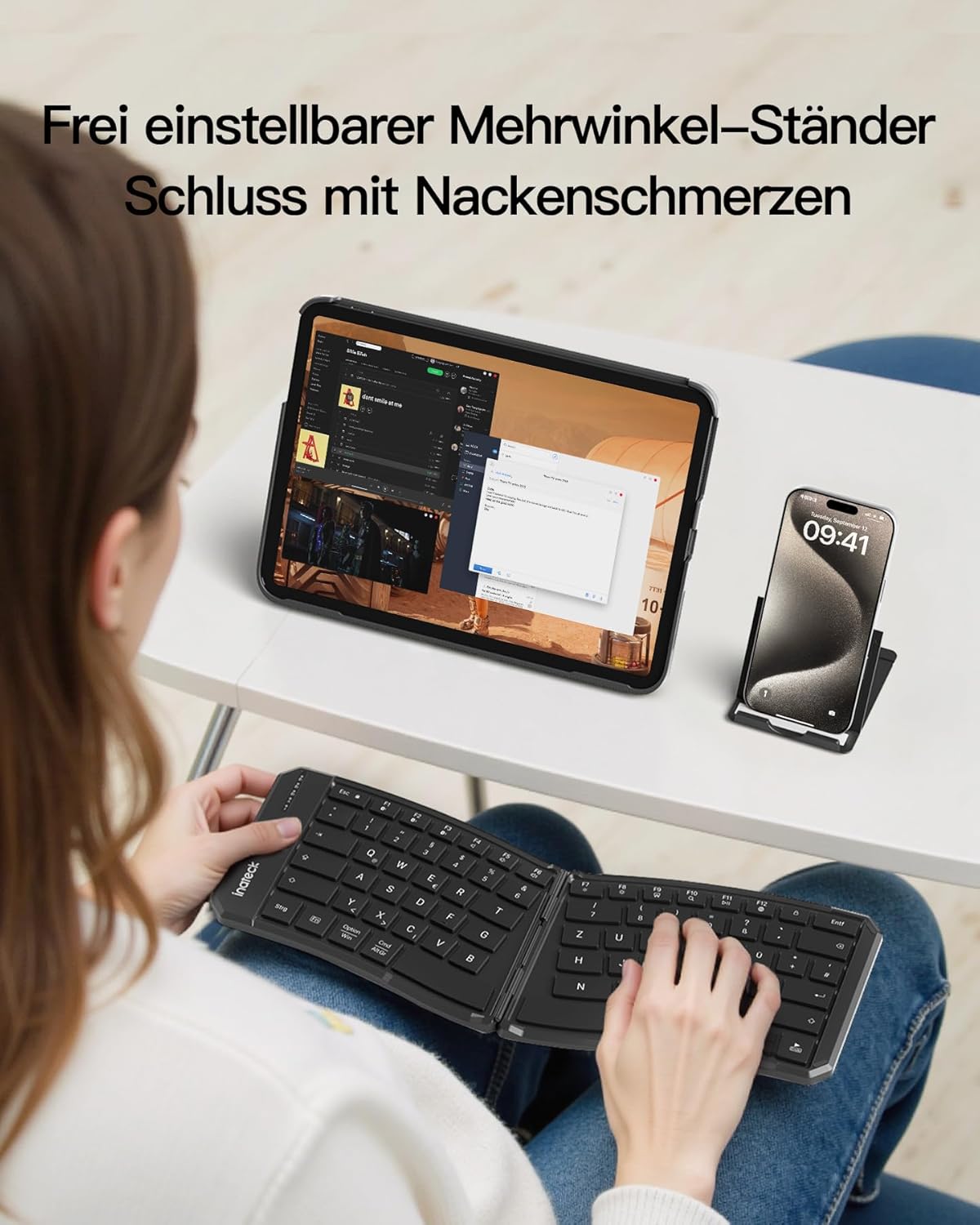
Picha ya 5.2: The adjustable stand in use, supporting a tablet and smartphone, allowing for comfortable viewing angles while typing on the keyboard.
6. Matengenezo
6.1 Kusafisha
- Hakikisha kibodi imezimwa kabla ya kusafisha.
- Tumia kitambaa laini kisicho na pamba kidogo dampiliyotiwa na maji au suluhisho laini la kusafisha ili kuifuta uso.
- Epuka kutumia kemikali kali, visafishaji abrasive, au unyevu kupita kiasi, kwani hizi zinaweza kuharibu kibodi.
- Kwa kusafisha kati ya funguo, tumia hewa iliyoshinikizwa au brashi ndogo.
6.2 Hifadhi
- When not in use, fold the keyboard and store it in the provided soft protective pouch to guard against dust and scratches.
- Hifadhi mahali pa baridi, kavu mbali na jua moja kwa moja na joto kali.
7. Utatuzi wa shida
7.1 Keyboard Not Connecting via Bluetooth
- Angalia Nguvu: Ensure the keyboard is unfolded and powered on, and that the battery has sufficient charge.
- Ingiza tena Hali ya Kuoanisha: Follow the steps in Section 4.2 to put the keyboard back into pairing mode.
- Bluetooth ya Kifaa: Verify that Bluetooth is enabled on your device (computer, tablet, smartphone).
- Kusahau Kifaa: On your device, try forgetting or removing the keyboard from the list of paired Bluetooth devices, then attempt to pair again.
- Anzisha tena Vifaa: Anzisha upya kibodi (kwa kukunja na kufungua) na kifaa chako cha mwenyeji.
- Kuingilia: Ondoka kutoka kwa vifaa vingine visivyotumia waya ambavyo vinaweza kusababisha usumbufu.
7.2 Funguo kutojibu
- Kiwango cha Betri: Check if the keyboard battery is low. Charge the keyboard if necessary.
- Muunganisho: Ensure the keyboard is properly connected to your device via Bluetooth.
- Anzisha upya: Power off and on the keyboard, and restart your host device.
- Vifunguo Safi: Check for any debris under the keys that might be preventing them from functioning correctly.
7.3 Keyboard Unstable When Unfolded
- Ensure the keyboard is fully unfolded and the internal magnetic closure mechanism has engaged properly.
- Place the keyboard on a flat, stable surface.
8. Vipimo
| Chapa | Inateck |
| Nambari ya Mfano | Nomad Ergo N0131 |
| Teknolojia ya Uunganisho | Bluetooth |
| Mpangilio wa Kibodi | QWERTZ |
| Vipengele Maalum | Dual-Fold Magnetic, Ergonomic Design, Multi-Device Support |
| Vifaa Sambamba | Laptop, PC, Smartphone, Tablet (iPad, iPhone, Mac, Android, Windows) |
| Uwezo wa Betri | Betri ya Lithium ya 140mAh |
| Continuous Typing Time | ≥Saa 45 |
| Wakati wa Kusubiri | Hadi siku 150 |
| Muda wa Kuchaji | Takriban saa 2 (kupitia USB-C) |
| Aina ya Kubadilisha Muhimu | Scissor-Switch |
| Usafiri Muhimu | 1 mm |
| Vipimo vya Bidhaa (Vilivyofunuliwa) | 35.72 x 14.48 x 0.93 cm |
| Uzito wa Bidhaa | 262 g |
9. Udhamini na Msaada
Inateck products are designed and manufactured to the highest quality standards. For warranty information and technical support, please refer to the warranty card included in your package or visit the official Inateck webtovuti. Tafadhali hifadhi uthibitisho wako wa ununuzi kwa madai ya udhamini.


