Utangulizi
Asante kwa ununuziasing the Dierya DK68 Wireless Mechanical Gaming Keyboard. This manual provides detailed instructions on how to set up, operate, and maintain your keyboard. Please read this manual thoroughly before use to ensure optimal performance and longevity of your device.

Image: The Dierya DK68 wireless mechanical gaming keyboard, showcasing its compact 60% layout and RGB backlighting.
Sifa Muhimu
- Muundo Compact 60%: 68-key design for space efficiency, with all functions accessible via FN key combinations. Ideal for portability and maximizing desk space.
- Tri-Mode Seamless Connectivity: Supports USB-C wired, Bluetooth, and 2.4GHz wireless receiver connections. Easily switch between up to 3 devices (PC, Mac, smartphone/tablet).
- Customizable 16.8 Million Color RGB Backlight: Features 21 dynamic lighting effects. Adjust effects and colors using FN key combinations.
- Long-Lasting Battery & Standby: Equipped with a 3000mAh battery, providing approximately 8 hours of continuous use with backlight on, or up to 90 hours with backlight off. Standby time up to 360 hours (approx. 15 days).
- Swichi za Mitambo Zinazodumu: Utilizes Dierya's proprietary mechanical switches with a 60 million keystroke lifespan. Red switches (linear, silent) are suitable for gaming and office work.
- Kugeuza N-Key (NKRO): Ensures all key presses are registered accurately, even during simultaneous inputs, for competitive gaming.
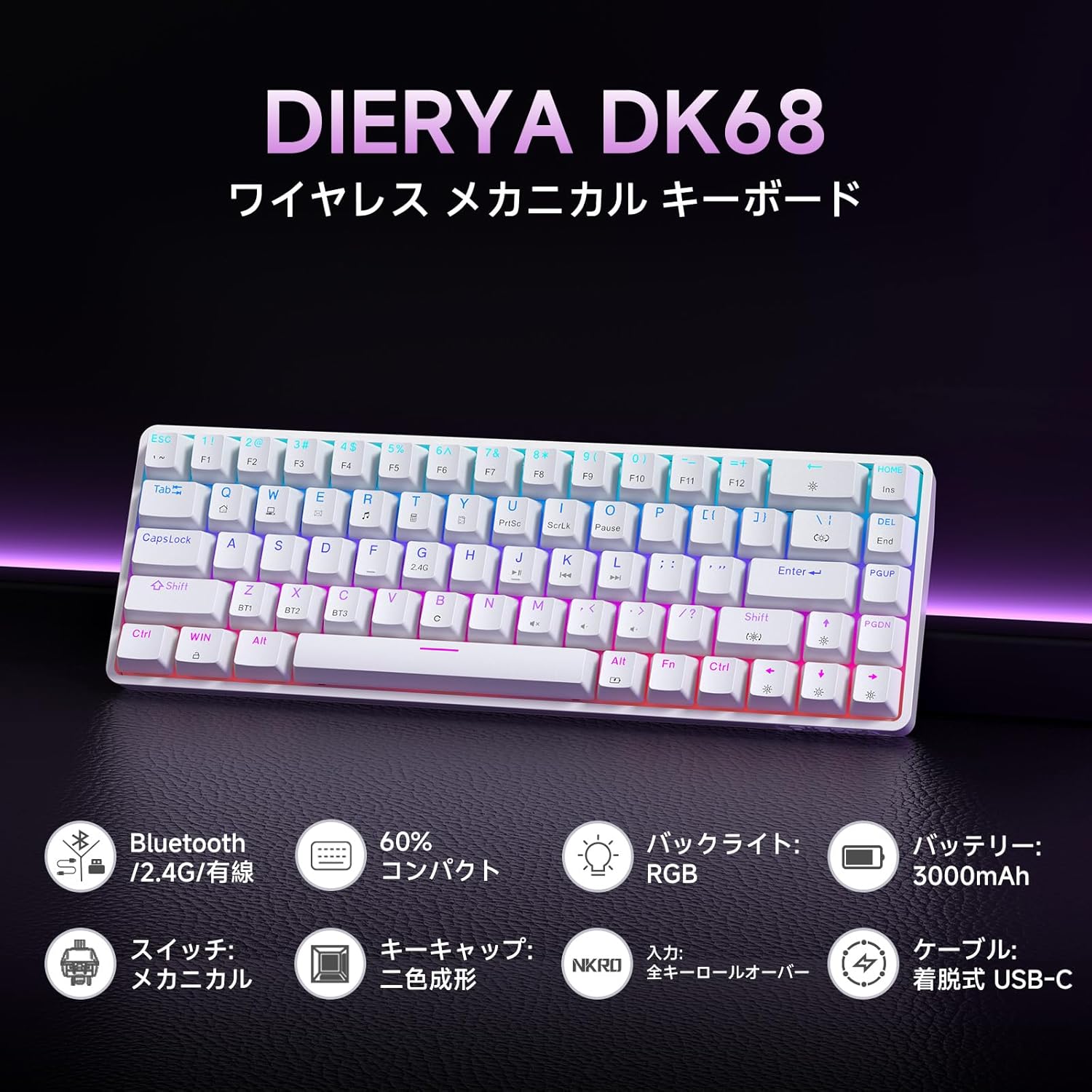
Picha: Mwishoview of the Dierya DK68 keyboard's main features, including Bluetooth/2.4G/Wired connectivity, 60% compact design, RGB backlight, 3000mAh battery, mechanical switches, double-shot keycaps, N-Key Rollover, and a detachable USB-C cable.
Sanidi
1. Kuchaji Kinanda
Before first use, fully charge the keyboard using the provided USB-C cable. Connect the cable to the keyboard's USB-C port and to a power source (e.g., computer USB port, USB wall adapter).
- The charging indicator light will show charging status.
- Chaji kamili kwa kawaida huchukua saa chache.
2. Kuunganisha Kinanda
The DK68 supports three connection modes: USB-C wired, 2.4GHz wireless, and Bluetooth.
Muunganisho wa Waya wa USB-C
- Unganisha kebo ya USB-C iliyotolewa kwenye mlango wa USB-C wa kibodi.
- Unganisha mwisho mwingine wa kebo kwenye mlango wa USB unaopatikana kwenye kompyuta yako.
- Kibodi itatambuliwa kiotomatiki na iko tayari kutumika.
Uunganisho wa wireless wa 2.4GHz
- Tafuta kipokezi cha USB cha 2.4GHz (kwa kawaida huhifadhiwa kwenye sehemu kwenye kibodi au kifungashio).
- Chomeka kipokeaji cha USB kwenye mlango wa USB unaopatikana kwenye kompyuta yako.
- Turn on the keyboard. The keyboard should automatically connect to the receiver.
- If connection is not established, press FN + R to switch to 2.4GHz mode.
Muunganisho wa Bluetooth
The keyboard can store up to three Bluetooth device pairings.
- Washa kibodi.
- Bonyeza na ushikilie FN + Z, FN + X, au FN + C for 3-5 seconds to enter pairing mode for BT1, BT2, or BT3 respectively. The indicator light will flash rapidly.
- On your device (PC, Mac, smartphone, tablet), enable Bluetooth and search for new devices.
- Select "Dierya DK68" from the list of available devices.
- Mara baada ya kuunganishwa, mwanga wa kiashiria utaacha kuwaka na kubaki imara.
- Ili kubadilisha kati ya vifaa vya Bluetooth vilivyooanishwa, bonyeza FN + Z, FN + X, au FN + C kwa ufupi.

Image: Diagram illustrating the three connection modes: USB-C wired, Bluetooth, and 2.4GHz wireless, along with compatibility icons for Windows, Mac, iOS, Android, Xbox, PC, Laptop, and Tablet.
Maagizo ya Uendeshaji
1. FN Key Combinations
Due to the compact 60% layout, many functions are accessed using the FN key in combination with other keys.
| Mchanganyiko | Kazi |
|---|---|
| FN + 1-0 (top row) | F1-F10 |
| FN + - = | F11, F12 |
| FN + Backspace | Toggle Backlight ON/OFF |
| FN + Shift | Badilisha Rangi ya Mwangaza Nyuma |
| FN + | | Badilisha Modi ya Mwangaza Nyuma |
| FN + Kishale cha Juu | Ongeza Mwangaza wa Mwangaza Nyuma |
| FN + Kishale Chini | Punguza Mwangaza wa Mwangaza Nyuma |
| FN + Mshale wa Kushoto | Punguza Kasi ya Mwangaza Nyuma |
| FN + Mshale wa Kulia | Ongeza Kasi ya Mwangaza Nyuma |
| FN + Z/X/C | Switch Bluetooth Device (BT1/BT2/BT3) |
| FN + R | Switch to 2.4GHz Wireless Mode |
| FN + T | Switch to USB-C Wired Mode |
| FN + SHINDA | Funga/Fungua Ufunguo wa Windows |

Image: A visual guide to customizing the RGB backlight on the Dierya DK68 keyboard using FN key combinations for turning the light on/off, changing colors, modes, brightness, and speed.
2. Ubinafsishaji wa Taa ya Nyuma ya RGB
The keyboard features over 20 dynamic RGB lighting effects. Use the FN key combinations listed above to personalize your lighting experience.
- Bonyeza FN + Backspace to toggle the backlight on or off.
- Bonyeza FN + Shift to cycle through different backlight colors.
- Bonyeza FN + | to switch between various lighting effects.
- Tumia FN + Mshale wa Juu/Chini to adjust brightness and FN + Mshale wa Kushoto/Kulia to adjust effect speed.
3. Njia ya Kuokoa Nguvu
To conserve battery life, the keyboard will automatically enter sleep mode after approximately 3 minutes of inactivity. Press any key to wake it up.
Matengenezo
- Kusafisha: Tumia kitambaa laini na kikavu kufuta uso wa kibodi. Kwa usafi wa kina, unaweza kutumia kopo la hewa iliyoshinikizwa ili kuondoa vumbi na uchafu kati ya vifuniko vya vitufe. Epuka kutumia kemikali kali au vifaa vya kukwaruza.
- Hifadhi: Hifadhi kibodi mahali pa baridi, pakavu mbali na jua moja kwa moja na halijoto kali.
- Utunzaji wa Betri: Ili kuongeza muda wa matumizi ya betri, epuka kutoa betri kikamilifu mara kwa mara. Chaji kibodi mara kwa mara, hasa ikiwa itahifadhiwa kwa muda mrefu.
- Uondoaji wa kofia kuu: If you need to remove keycaps for cleaning or switch replacement, use a keycap puller to avoid damage. Pull straight up with gentle force.
Kutatua matatizo
- Kibodi haijibu:
- Hakikisha kibodi imewashwa.
- Angalia kiwango cha betri na chaji ikiwa ni lazima.
- Verify the correct connection mode (USB-C, 2.4GHz, or Bluetooth) is selected.
- For 2.4GHz, ensure the receiver is properly plugged in.
- For Bluetooth, re-pair the device if connection is lost.
- Jaribu kuunganisha kupitia kebo ya USB-C ili kuondoa matatizo ya wireless.
- Funguo ambazo hazijasajiliwa au hazijaandikwa mara mbili:
- Safisha chini ya vifuniko vya vitufe ili kuondoa uchafu wowote.
- Ensure the switches are properly seated.
- RGB backlight not working:
- Ensure the backlight is turned on (FN + Backspace).
- Angalia kiwango cha betri; betri ya chini inaweza kuzima mwangaza wa nyuma.
- Muunganisho wa Bluetooth hauna msimamo:
- Ensure the keyboard is within range of the device.
- Punguza kuingiliwa kutoka kwa vifaa vingine visivyo na waya.
- Try re-pairing the keyboard with your device.
Vipimo
| Kipengele | Maelezo |
|---|---|
| Chapa | DIERYA |
| Nambari ya Mfano | DK68 |
| Mpangilio | 60% (Funguo 68) |
| Muunganisho | Waya ya 2.4GHz Isiyotumia Waya, Bluetooth, USB-C |
| Badilisha Aina | Mechanical Red Switches (Linear, Silent) |
| Nguvu ya Utendaji | 45gf (±15gf) |
| Usafiri wa Uendeshaji | 2.0mm (±0.6mm) |
| Keystroke Lifespan | Takriban. milioni 60 |
| Mwangaza nyuma | RGB (16.8 million colors, 21+ effects) |
| Uwezo wa Betri | Betri ya Lithium ya 3000mAh |
| Battery Life (Backlight ON) | Takriban. 8 masaa |
| Battery Life (Backlight OFF) | Takriban. 90 masaa |
| Wakati wa Kusubiri | Takriban. Masaa 360 (siku 15) |
| Utangamano | Windows, Mac, iOS, Android, Xbox, PC, Laptop, Tablet |
| Vipimo (L x W x H) | 372 x 115 x 51 mm |
| Uzito | 830 g |
| Njia muhimu | Double-shot (OFS height) |
| Kupinga Ghosting | Full N-Key Rollover (NKRO) |

Image: A diagram showing the compact 60% layout of the Dierya DK68 keyboard with its dimensions: 372mm length, 115mm width, and 51mm height, highlighting its 68-key configuration.

Picha: Karibu view of the Dierya DK68's mechanical red switches, detailing their linear and silent operation, 45gf actuation force, 2.0mm travel, and pre-lubricated design for smooth keystrokes.

Image: An exploded diagram of the Dierya DK68 keyboard, showing its internal layers including ABS keycaps, mechanical switches, positioning plate, EVA mat, PCB, high-density sound-absorbing foam, and bottom case, highlighting its robust construction.
Udhamini na Msaada
DIERYA products are designed for durability and performance. For warranty information or technical support, please refer to the official DIERYA webtovuti au wasiliana na huduma kwa wateja wao moja kwa moja. Weka risiti yako ya ununuzi kama dhibitisho la ununuzi kwa madai ya udhamini.


