1. Utangulizi
This manual provides detailed instructions for the setup, operation, and maintenance of your MOBAPAD Huben2 Wireless Switch Controller Pro. Please read this manual thoroughly before using the product to ensure optimal performance and longevity.
2. Taarifa za Usalama
- Weka kidhibiti mbali na maji na vimiminika vingine.
- Usiweke kidhibiti kwenye halijoto kali.
- Epuka kuangusha au kumfanya mdhibiti apigwe kwa nguvu.
- Do not attempt to disassemble or repair the controller yourself. Contact customer support for assistance.
- Tumia kebo ya kuchaji iliyotolewa pekee au kebo ya USB-C iliyoidhinishwa kwa kuchaji.
3. Yaliyomo kwenye Kifurushi
Thibitisha kuwa vipengee vyote vipo kwenye kifurushi chako:
- MOBAPAD Huben2 Wireless Controller Pro
- Kebo ya Kuchaji ya USB-C
- Wireless Dongle (2.4G)
- PU Travel Case
- Replaceable D-pad (Cross/Circle)
- Mwongozo wa Maagizo (hati hii)
4. Mpangilio wa Kidhibiti
Familiarize yourself with the buttons and features of your Huben2 controller.

Kielelezo 4.1: Mbele view of the MOBAPAD Huben2 Wireless Controller Pro. Shows the joysticks, face buttons (A, B, X, Y), D-pad, and central function buttons.
- Vijiti vya Analogi ya Kushoto/Kulia: Capacitive joysticks with 4,096-step precision.
- Vifungo vya A/B/X/Y: Omron mechanical face buttons.
- Pedi ya D: Replaceable cross or circle D-pad.
- L1/R1 (Vifungo vya Mabega): Standard shoulder buttons.
- L2/R2 (Vichochezi): Dual-mode triggers (Hall Effect and Microswitch).
- Vifungo vya M1/M2/M3/M4: Four programmable back buttons.
- Kitufe cha Nyumbani: Huwasha/kuzima na hurudi kwenye skrini ya nyumbani ya mfumo.
- Kitufe cha Picha ya Skrini: Hunasa picha za skrini.
- Plus/Minus Buttons: Standard system menu buttons.
- Kitufe cha Turbo: Huwasha/huzima utendaji kazi wa turbo.
- Bandari ya USB-C: Kwa ajili ya kuchaji na kuunganisha kwa waya.

Kielelezo cha 4.2: Nyuma view showing the four programmable M1, M2, M3, M4 back buttons.
5. Kuweka
5.1 Kuchaji Kidhibiti
Before first use, fully charge the controller. Connect the provided USB-C cable to the controller's USB-C port and the other end to a USB power source (e.g., console, PC, or USB wall adapter). The charging indicator will show the charging status.
- A full charge provides approximately 15 hours of gameplay.

Figure 5.1: The controller features a 1000mAh battery for extended gameplay.
5.2 Njia za Kuunganisha
The Huben2 controller supports three connection methods:

Figure 5.2: The controller supports 2.4G wireless, Bluetooth, and wired connections across various platforms.
- 2.4G Wireless (via Dongle):
- Compatible with Windows PC, Steam, and Android TV.
- Insert the 2.4G wireless dongle into a USB port on your device.
- Washa kidhibiti. Inapaswa kuunganishwa kiotomatiki kwenye dongle.
- Wireless ya Bluetooth:
- Compatible with Nintendo Switch, Nintendo Switch 2, Android, and iOS devices.
- Kwenye kifaa chako, nenda kwenye mipangilio ya Bluetooth na uwashe Bluetooth.
- On the controller, press and hold the Bluetooth pairing button (refer to controller layout for exact location) until the indicator lights flash rapidly.
- Select "MOBAPAD Huben2" from the list of available devices on your system to pair.
- For Nintendo Switch, the controller can wake the console from sleep mode after initial pairing and firmware update via the Mobapad app.
- Muunganisho wa Waya:
- Compatible with Windows PC and Android TV.
- Connect the controller to your device using the USB-C cable. The controller will be recognized automatically.
6. Maagizo ya Uendeshaji
6.1 Washa/Zima
- Washa: Bonyeza kitufe cha Nyumbani.
- Zima umeme: Press and hold the Home button for 3-5 seconds. The controller will also power off automatically after a period of inactivity.
6.2 Hali za Vichocheo Viwili
The L2 and R2 triggers feature dual modes for different gaming experiences:

Figure 6.1: Visual representation of the 2mm Microswitch Trigger and 10mm Hall Linear Trigger modes.
- Microswitch Trigger (2mm): Provides a short, tactile click for rapid input, ideal for FPS games.
- Hall Effect Linear Trigger (10mm): Offers analog input with a longer travel distance, suitable for racing or simulation games.
- Kubadilisha Modi: Use the physical switches located near the L2/R2 triggers to toggle between modes.
6.3 Customizable Features (Back Buttons, Macros, App Support)
The Huben2 controller offers extensive customization options:
- Vitufe vya Nyuma Vinavyoweza Kupangwa (M1-M4): Assign single button presses or complex macros to the four back buttons using the dedicated Mobapad PC/mobile application.
- Rapid-Fire Turbo Mode: Activate turbo functionality for any button. Refer to the Mobapad app or controller manual for specific button combinations to enable/disable.
- Mobapad App: Download the official Mobapad application for Windows or mobile devices to:
- Adjust joystick dead zones and response curves.
- Badilisha kiwango cha mtetemo.
- Unda na udhibiti makro.
- Sasisha programu dhibiti ya kidhibiti.
6.4 HD Rumble and ALPS Linear Motors
The controller features dual ALPS linear motors for precise HD Rumble feedback, reacting to in-game sound and motion with 0ms startup time.
6.5 6-Axis Motion Control
The integrated 6-axis motion sensor provides precise motion control for compatible games.

Figure 6.2: The controller's internal 6-axis sensing motors enable precise motion control.
6.6 Replaceable D-pad and Faceplate
The controller allows for customization of the D-pad and faceplate.
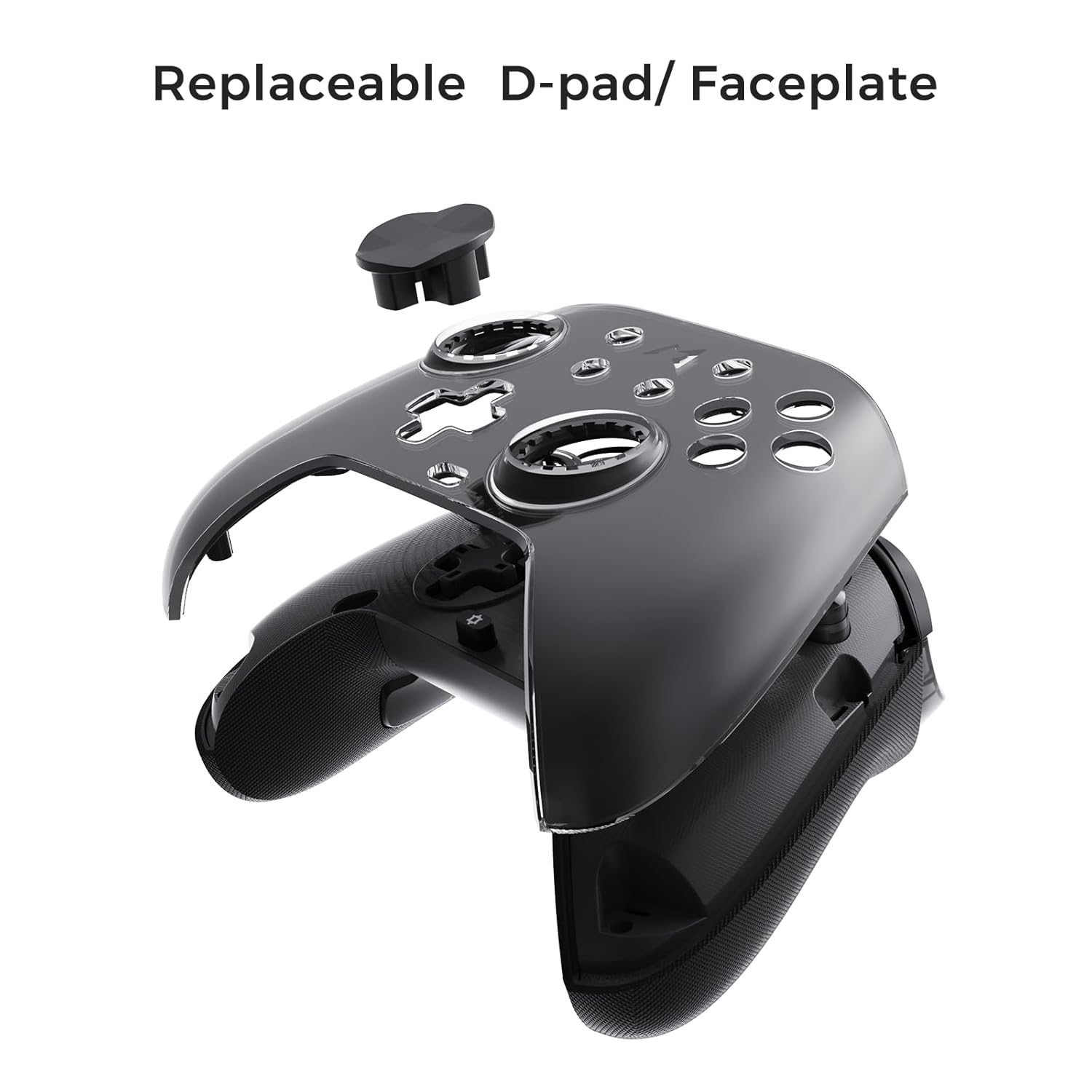
Figure 6.3: The D-pad and faceplate can be replaced for customization or preference.
- To replace the D-pad, gently remove the magnetic faceplate and then lift out the D-pad. Insert the desired D-pad (cross or circle) and reattach the faceplate.
7. Matengenezo
- Kusafisha: Tumia kitambaa laini na kikavu kusafisha kidhibiti. Kwa uchafu mkaidi, safisha kidogoampfunika kitambaa na maji. Usitumie kemikali kali au visafishaji vya kukwaruza.
- Hifadhi: Store the controller in a cool, dry place, away from direct sunlight and extreme temperatures. When not in use for extended periods, store it in the provided PU travel case.
- Utunzaji wa Betri: Ili kuongeza muda wa matumizi ya betri, epuka kutoa chaji kamili ya kidhibiti mara kwa mara. Kichaji mara kwa mara, hata kama hakitumiki kila wakati.
8. Utatuzi wa shida
| Tatizo | Sababu inayowezekana | Suluhisho |
|---|---|---|
| Kidhibiti hakiwashi. | Betri ya chini. | Charge the controller for at least 30 minutes. |
| Kidhibiti hakiunganishi bila waya. | Not in pairing mode; out of range; interference; incorrect mode selected. | Ensure controller is in pairing mode. Move closer to the device. Check for other wireless devices causing interference. Verify correct connection mode (2.4G or Bluetooth). |
| Kuchelewa kwa kuingiza au miunganisho iliyoachwa. | Wireless interference; low battery; outdated firmware. | Reduce distance to device. Charge controller. Update firmware via Mobapad app. Try wired connection. |
| Vifungo au vijiti vya kuchezea havijibu. | Software glitch; physical obstruction; calibration issue. | Restart the controller and the connected device. Check for physical debris. Calibrate joysticks via Mobapad app. |
| HD Rumble not working. | Feature disabled in game/system settings; low battery. | Ensure rumble is enabled in game and system settings. Charge controller. |
If you encounter issues not listed here, please refer to the official MOBAPAD support webtovuti au wasiliana na huduma kwa wateja.
9. Vipimo
| Kipengele | Maelezo |
|---|---|
| Nambari ya Mfano | Mobapad Huben2 H6 |
| Muunganisho | 2.4G Isiyotumia Waya, Bluetooth, Inayotumia Waya (USB-C) |
| Utangamano | Nintendo Switch, Nintendo Switch 2, Windows, Steam, Android, iOS |
| Vijiti vya furaha | Capacitive, 4,096-step precision, 1000Hz polling rate |
| Vichochezi | Dual Mode: 2mm Omron Microswitch, 10mm Hall Effect Linear |
| Vifungo | Omron Mechanical Face Buttons, Programmable Back Buttons (M1-M4) |
| Mtetemo | Dual ALPS Linear Motors (HD Rumble) |
| Udhibiti wa Mwendo | 6-Axis Gyroscope |
| Uwezo wa Betri | 1000mAh Lithium Ion |
| Maisha ya Betri | Hadi saa 15 (takriban) |
| Vipimo | Inchi 6.3 x 4.13 x 2.76 |
| Uzito | Pauni 1.87 |
10. Udhamini na Msaada
MOBAPAD products are designed and manufactured to the highest quality standards. For warranty information, technical support, or customer service inquiries, please visit the official MOBAPAD website or contact their authorized support channels. Please retain your proof of purchase for warranty claims.
Webtovuti: Visit the MOBAPAD Store on Amazon


