1. Bidhaa Imeishaview
The LFF Hummingbird Feeder with Camera offers an innovative way to observe hummingbirds up close. Featuring a 2.5K HD camera with AI bird recognition, solar power, and a durable, weather-resistant design, it provides a unique birdwatching experience.
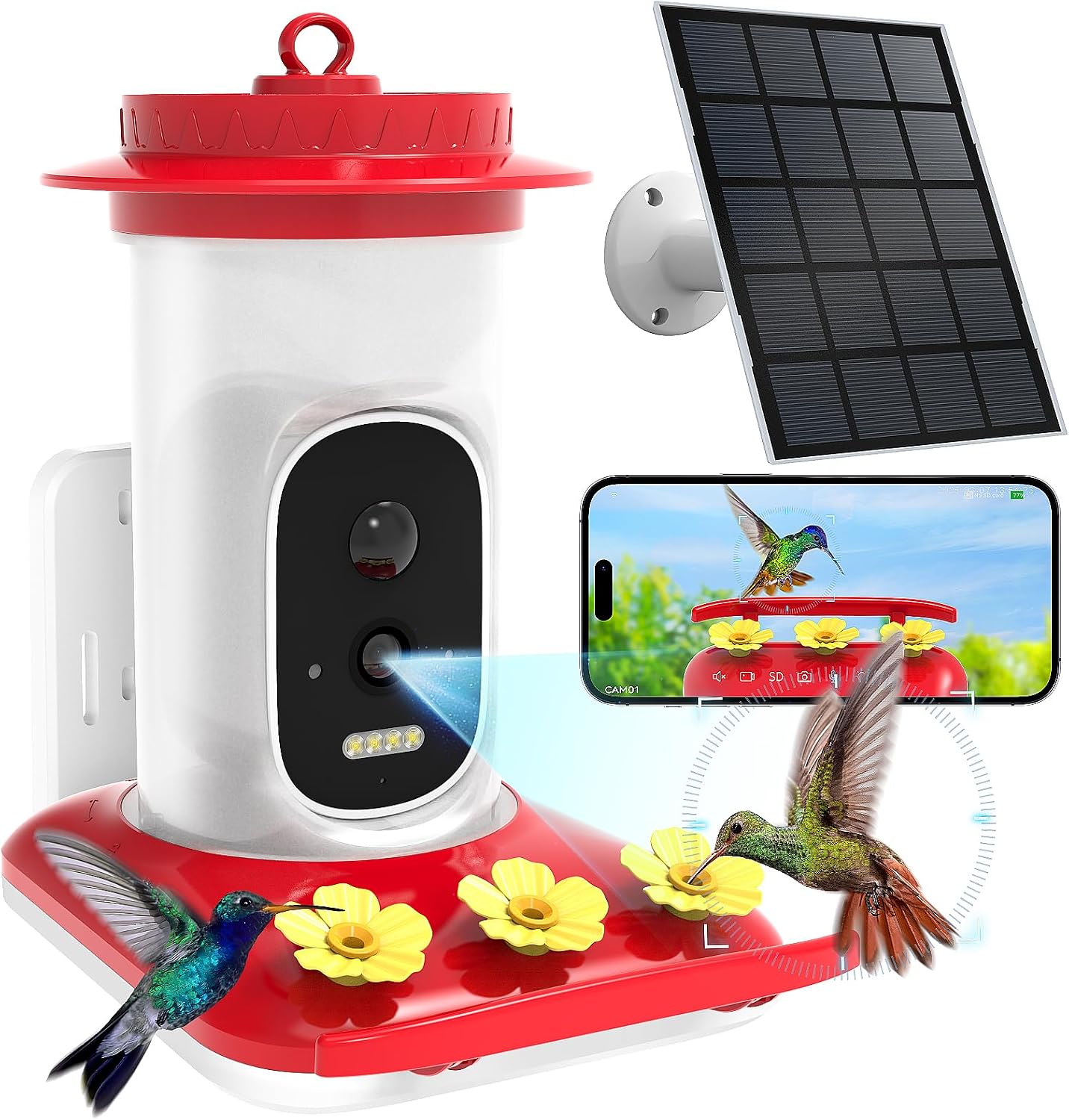
Figure 1: LFF Hummingbird Feeder with Camera, showing the main unit, solar panel, and smartphone app interface.
2. Ni pamoja na nini
Carefully unbox your LFF Hummingbird Feeder and ensure all components are present:
- Hummingbird Feeder Unit (Camera/Water Barrel and Waterfeeder Base)
- Solar Panel with Bracket
- Mabano ya Mlima wa Ukuta
- Antena ya nje
- Hummingbird Drinking Plugs (Yellow flowers)
- Screws za Chassis
- Screw za Kuweka na Nanga za Ukutani
- Binding Ties
- Mwongozo wa Mtumiaji (hati hii)

Figure 2: All included parts of the Hummingbird Feeder system.
3. Kuweka na Kuweka
Follow these steps to set up your hummingbird feeder:
3.1. Prepare the Feeder Base
- Remove the camera module from the hummingbird water feeder slot.
- Carefully insert the yellow hummingbird drinking plugs firmly into the spouts on the feeder base. Ensure they are securely seated to prevent leaks.

Kielelezo 3: Kina view of the feeder base, highlighting the bee-proof design and anti-ant moat.
3.2. Fill the Nectar Reservoir
- Muhimu: Do not open the top cover of the water barrel.
- Invert the water barrel and pour water or hummingbird nectar into the opening at the bottom. Fill to the recommended level as indicated on the barrel.
- Align the latch on the water barrel with the unlock mark on the waterfeeder base. Gently twist clockwise to assemble and fix it securely.

Figure 4: Instructions for filling the nectar reservoir. Note: If water leaks from the flower ports, reverse the pouring orientation during setup.
3.3. Camera Preparation and Installation
- Snap open the silicone cover on the back of the camera to access the power switch and charging port.
- Turn the power switch from "OFF" to "ON" to power on the camera. The indicator light will turn blue.
- Open the silicone cover on top of the camera to access the TF card slot and reset button.
- If needed, press and hold the reset button to reset the device. The camera will announce "Restore factory settings, please don't power off."
- Snap the camera back into the hummingbird feeder slot.
- Align the external antenna with the fixing hole and secure it to the camera.
Video 1: Step-by-step guide on assembling the LFF Hummingbird Feeder, including camera installation and initial power-up.
3.4. Chaguzi za Kuweka
The feeder offers multiple mounting options to suit your outdoor space:
- Mlima wa ukuta: Use the provided wall mount bracket and screws to attach the feeder to a wall.
- Kunyongwa: Utilize the integrated hook to hang the feeder from a branch or shepherd's hook.
- Kufunga: Secure the feeder to a tree trunk or post using the binding ties.

Figure 5: Different ways to mount your hummingbird feeder.
Kidokezo cha Uwekaji: It is advisable to avoid feeding hummingbirds alongside larger birds. Place the feeder at least 10 feet away from areas frequented by larger birds to ensure a safer environment for hummingbirds.

Figure 6: Recommended placement to avoid larger birds.
4. Maagizo ya Uendeshaji
4.1. App Connectivity and Features
Connect the smart hummingbird feeder to your smartphone or tablet via 2.4 GHz Wi-Fi (Not compatible with 5 GHz). Download the Tris Home APP to access the following features:
- 2.5K HD Camera & Night Vision: View optimal color images, even in darkness, with a 160° panoramic lens. The camera supports voice monitoring, two-way audio, photo capture, and video recording.
- AI Recognition & Instant Notification: The system uses sophisticated AI algorithms to accurately identify hummingbird species. Receive instant notifications when a hummingbird arrives. (A free one-month trial for AI Recognition service is included.)
- Sauti ya Njia Mbili: Use the 2-way audio feature to deter larger birds and ensure hummingbirds can feed safely.
- Auto-Capture: The feeder automatically captures moments when hummingbirds visit.
- Hifadhi: Securely save photos and videos using either cloud storage or a TF card (not included).
- Kushiriki: Share your smart hummingbird feeder with friends and family through the Tris Home APP and upload captured moments to social media.

Figure 7: Key features of the smart hummingbird feeder.

Figure 8: AI bird recognition feature identifying a hummingbird species.

Figure 9: Night vision capabilities, providing clear views even after dark.

Figure 10: Instant motion detection notifications to your smartphone.

Figure 11: Options for storing captured photos and videos.

Figure 12: Sharing captured hummingbird moments with friends and family.
4.2. Usimamizi wa Nguvu
The feeder is equipped with a built-in 4000mAh rechargeable battery and an external 3W solar panel for continuous power supply. This dual charging mode ensures uninterrupted operation.

Figure 13: Solar panel and rechargeable battery for continuous power.
5. Matengenezo
Regular maintenance ensures the longevity and optimal performance of your feeder:
- Kusafisha: The feeder's wide-mouth design and tool-free assembly allow for easy disassembly and thorough cleaning. Regularly clean the feeder to prevent mold and bacteria growth, which can harm hummingbirds. Use warm water and a brush. Avoid harsh detergents.
- Kujaza tena: Refill the nectar reservoir as needed. The transparent design allows for easy monitoring of nectar levels.
- Ulinzi wa hali ya hewa: The IP66 waterproof rating ensures the feeder is protected against rain and harsh weather conditions. However, during extreme weather, consider bringing the feeder indoors if possible.

Figure 14: The feeder's IP66 waterproof design.
6. Utatuzi wa shida
| Tatizo | Sababu inayowezekana | Suluhisho |
|---|---|---|
| Water/Nectar leaks from flower ports. | Incorrect assembly of water barrel to base. | Ensure the water barrel is inverted correctly during filling and that the base is twisted firmly clockwise to lock. |
| Kamera haiwaki. | Power switch is OFF or battery is drained. | Ensure the power switch is set to "ON". Charge the camera using the provided solar panel or a USB-C cable. |
| Haiwezi kuunganisha kwenye Wi-Fi. | Incorrect Wi-Fi band (5GHz) or weak signal. | Ensure you are connecting to a 2.4 GHz Wi-Fi network. Move the feeder closer to your Wi-Fi router or use a Wi-Fi extender. |
| AI Recognition not working. | Trial period expired or service not activated. | Check your Tris Home APP for AI Recognition service status. Activate or subscribe if the trial has ended. |
| Hakuna arifa zilizopokelewa. | App notification settings are off or camera is offline. | Check notification settings in the Tris Home APP and on your smartphone. Ensure the camera is connected to Wi-Fi and online. |
7. Vipimo
- Chapa: LFF
- Nambari ya Mfano: TV-GKXMC-Q41-4MP/3W-1.8MM
- Aina Lengwa: Ndege aina ya Hummingbird
- Vipengele Maalum: Bee Resistant, Built-In Ant Moat, Built-In Camera, Leakproof, Portable
- Aina ya Kupachika: Mlima Unaoning'inia
- Vipimo vya Bidhaa: 7.2"L x 5.2"W x 8.3"H
- Chanzo cha Nguvu: Nishati ya jua
- Vipengele vilivyojumuishwa: Mwongozo, Seti ya Kuweka
- Rangi: Nyekundu
- Uzito wa Kipengee: Pauni 2.3
- Mtengenezaji: Shenzhen TRlS VISlON Technology Co.Ltd.
8. Udhamini na Msaada
For warranty information and technical support, please refer to the contact details provided with your product packaging or visit the official LFF webtovuti. Hifadhi risiti yako ya ununuzi kwa madai ya udhamini.


