1. Utangulizi
This manual provides essential instructions for the safe operation, setup, and maintenance of your 4DRC V32 Foam RC Plane. Please read this manual thoroughly before operating the aircraft to ensure proper function and to prevent damage or injury. The 4DRC V32 is a remote-controlled aircraft designed for recreational flight, featuring durable EPP foam construction and various flight modes suitable for beginners and experienced users.
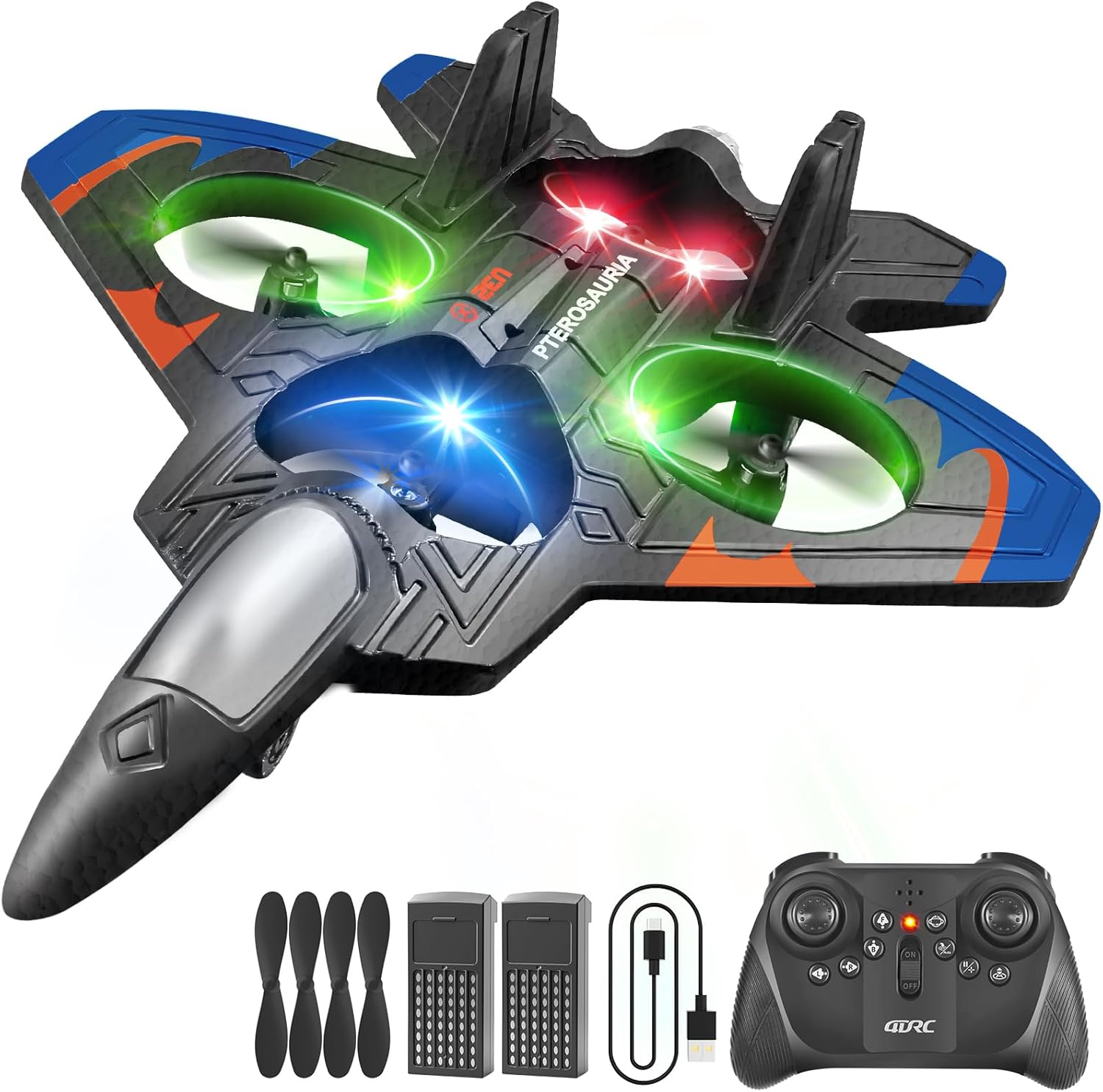
Image 1.1: The 4DRC V32 Foam RC Plane, remote control, two batteries, and spare propellers included in the package.
2. Yaliyomo kwenye Kifurushi
- 1 x 4DRC V32 Foam RC Plane
- 1 x Kisambazaji cha Kidhibiti cha Mbali
- 2 x Rechargeable C Batteries (for plane)
- 1 x Kebo ya Kuchaji ya USB
- Propela 4 za Vipuri
- 1 x Mwongozo wa Mtumiaji (hati hii)
3. Mwongozo wa Kuweka
3.1 Ufungaji na Kuchaji Betri
- Betri ya Ndege: Insert the rechargeable C batteries into the designated battery compartment on the underside of the aircraft. Ensure correct polarity.
- Betri za Kidhibiti cha Mbali: Install 3x AAA batteries (not included) into the remote control transmitter, observing polarity.
- Inachaji: Connect the aircraft battery to the USB charging cable. Plug the USB cable into a standard USB power adapter (5V/1A recommended). The indicator light on the charger will show charging status (e.g., red for charging, green for fully charged). Charging typically takes 60-90 minutes.
Kumbuka: Always ensure batteries are fully charged before flight for optimal performance and safety. Disconnect the charger once charging is complete.

Image 3.1: The low battery alert system and the extended play time provided by two batteries.
3.2 Kuoanisha Udhibiti wa Kijijini
- Place the aircraft on a flat, level surface.
- Turn on the aircraft by pressing the power button. The LED lights on the aircraft will flash.
- Turn on the remote control transmitter. The indicator light on the remote will flash.
- Push the left joystick (throttle) all the way up, then all the way down. The remote control will beep, and the aircraft's LED lights will become solid, indicating successful pairing.
If pairing fails, turn off both the aircraft and remote, then repeat the steps.
4. Maagizo ya Uendeshaji
4.1 Vidhibiti vya Msingi vya Ndege
- Kupaa kwa Ufunguo Mmoja: Press the one-key take-off button on the remote control. The aircraft will automatically ascend to a stable hovering altitude.
- Kijiti cha Kusukuma (Kijiti cha Kushoto cha Kujifurahisha Juu/Chini): Controls the aircraft's altitude. Push up to ascend, pull down to descend.
- Udhibiti wa Mwelekeo (Kijiti cha Kulia cha Kuchezea):
- Mbele/Nyuma: Push up/down to move the aircraft forward or backward.
- Kushoto/Kulia: Push left/right to move the aircraft left or right (strafe).
- Yaw (Kushoto Joystick Kushoto/Kulia): Rotates the aircraft left or right on its vertical axis.
- Kutua kwa Ufunguo Mmoja: Press the one-key landing button. The aircraft will automatically descend and land gently.
Video 4.1: Demonstration of basic flight controls including one-click take-off, barometric height setting, and one-touch landing, along with advanced features like 360° stunt roll and keyboard spin. This video also highlights the modular battery, 2.4GHz stable signal, crash-proof design, and multi-gear speed switch.
4.2 Vipengele vya Ndege vya Kina
- 360° Flip & Stunt Roll: Press the 360° flip button (refer to remote diagram) and then push the right joystick in any direction to perform an aerial flip.
- Hali isiyo na kichwa: Activate Headless Mode by pressing the dedicated button. In this mode, the aircraft's orientation is relative to the pilot, regardless of the aircraft's front direction. This simplifies control for beginners.
- Kushikilia Altitude: The aircraft maintains a stable altitude automatically after take-off, allowing for easier control of horizontal movement.
- Njia za kasi: The 4DRC V32 offers three speed options (low, medium, high). Press the speed switch button to cycle through the modes, adjusting flight responsiveness.
- Jettisoning Mode: This mode allows for hand-launching the aircraft. After pairing, gently toss the aircraft into the air while applying throttle.
- One-Click Rotation / Keyboard Spin: Press the one-click rotation button to make the aircraft perform a continuous spin.

Image 4.2: Visual representation of Headless Mode, Stable Hovering, and Altitude Hold functionalities.

Image 4.3: The three available speed modes (30%, 60%, 100%) for varied flight experiences.

Image 4.4: The aircraft's colorful LED lights, enhancing visibility and aesthetic during flight, especially in low-light conditions.
4.3 Mazingira ya Ndege
The 4DRC V32 is suitable for both indoor and outdoor flight. For outdoor use, choose a calm day with minimal wind to ensure stable flight and prevent loss of control. Avoid flying near obstacles, people, or water bodies. The durable EPP material provides resilience against minor impacts.
5. Matengenezo
- Kusafisha: Gently wipe the aircraft with a soft, dry cloth after each use to remove dust or debris. Avoid using water or harsh chemicals.
- Uingizwaji wa Propela: If propellers are damaged, replace them with the provided spare propellers. Ensure the correct propeller (A or B) is installed on the corresponding motor.
- Utunzaji wa Betri: Store batteries in a cool, dry place away from direct sunlight. Do not overcharge or over-discharge batteries. If not used for an extended period, charge them to about 50% capacity.
- Hifadhi: Store the aircraft and remote control in a safe place to prevent damage.
6. Utatuzi wa shida
| Tatizo | Sababu inayowezekana | Suluhisho |
|---|---|---|
| Aircraft does not respond to remote. | Not paired, low remote battery, out of range. | Re-pair aircraft and remote. Replace remote batteries. Ensure aircraft is within operating range. |
| Ndege haziwezi kupaa au kuruka bila utulivu. | Low aircraft battery, damaged propellers, uneven surface for take-off. | Charge aircraft battery. Replace damaged propellers. Take off from a flat, level surface. |
| Muda mfupi wa ndege. | Betri haijachajiwa kikamilifu, betri ya zamani. | Hakikisha betri imechajiwa kikamilifu. Fikiria kubadilisha betri za zamani. |
| Aircraft drifts during flight. | Need for calibration, wind interference. | Perform one-click calibration (refer to remote diagram). Fly in calmer conditions. |
7. Vipimo
- Mfano: 4DRC V32
- Vipimo vya Bidhaa: Inchi 10 x 2 x 8
- Uzito wa Kipengee: 9.9 wakia
- Umri Unaopendekezwa: Miaka 8 na kuendelea
- Betri ya Ndege: 2 x C batteries (included)
- Masafa ya Udhibiti wa Mbali: GHz 2.4
- Nyenzo: Povu la EPP
- Vipengele vya Ndege: 360° Flip, Stunt Roll, Headless Mode, Altitude Hold, 3 Speed Modes, One-Key Take-off/Landing, LED Lights
8. Udhamini na Msaada
For warranty information or technical support, please refer to the product packaging or contact 4DRC customer service. You can also visit the official 4DRC store on Amazon for more information and contact options: 4DRC Store.


