Utangulizi
The JBL Horizon 3 is a versatile radio alarm clock designed to enhance your daily routine. It features clear digital audio via DAB/DAB+/FM radio and Bluetooth connectivity for streaming from smart devices. Key functions include a sunrise simulation alarm, customizable sleep mode with natural sounds, and internal memory for favorite stations. Its portable design makes it suitable for various environments, from bedside tables to outdoor settings, delivering powerful and clear JBL sound.
This manual provides essential information for setting up, operating, and maintaining your JBL Horizon 3 to ensure optimal performance and longevity.
Sanidi
1. Kufungua na Kuweka
- Ondoa kwa uangalifu vifaa vyote kutoka kwa kifurushi.
- Place the JBL Horizon 3 on a stable, flat surface. Ensure adequate ventilation around the unit.
- For optimal radio reception, extend the spiral antenna fully.

Kielelezo 1: Mbele view of the JBL Horizon 3, displaying the time and alarm status on its digital screen.
2. Uunganisho wa Nguvu
- Connect the provided power cable to the power input port on the back of the unit.
- Chomeka mwisho mwingine wa kebo ya umeme kwenye sehemu ya ukuta.
- The device will power on automatically or can be turned on using the power button.
Kielelezo 2: Chini view of the JBL Horizon 3, illustrating the power connection point and the battery compartment.
3. Initial Setup (Time and Date)
- Upon first power-on, the device may prompt you to set the time and date. Follow the on-screen instructions.
- Alternatively, use the JBL ONE application for easier configuration.
Maagizo ya Uendeshaji
1. Hudhibiti Zaidiview

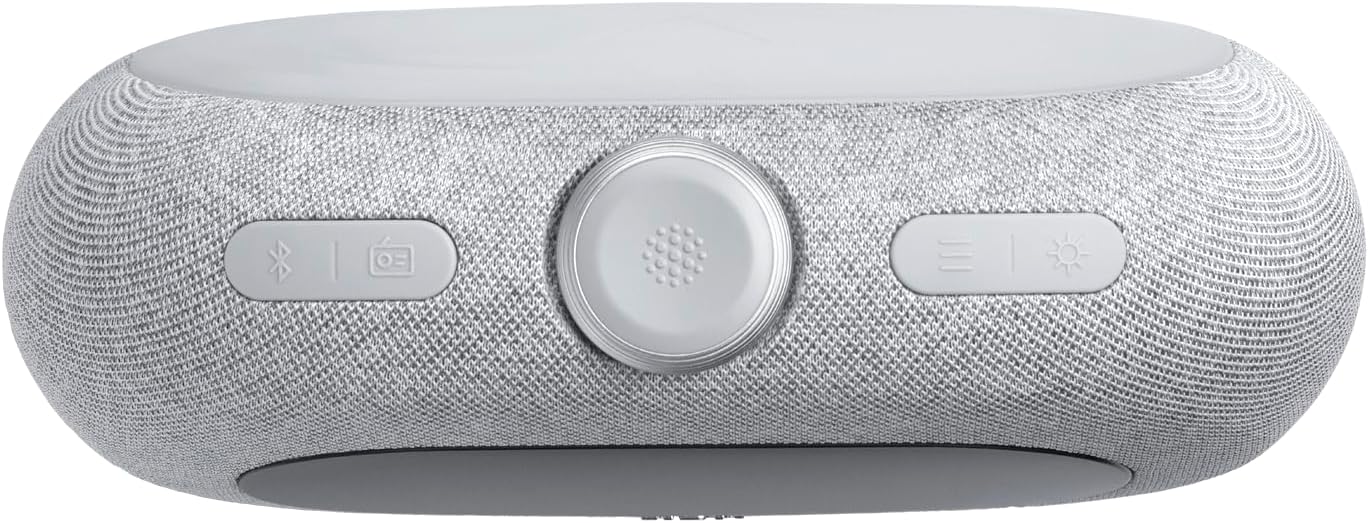
Kielelezo 3: Juu view of the JBL Horizon 3, highlighting the main controls including the rotary dial, function buttons, and alarm presets.
- Upigaji wa Mzunguko: Used for adjusting volume, navigating menus, and setting time/alarms.
- Kitufe cha Nguvu: Huwasha / kuzima kitengo.
- Kitufe cha Bluetooth: Huwasha hali ya kuoanisha ya Bluetooth.
- Radio Button (DAB/FM): Toggles between DAB and FM radio modes.
- Kitufe cha Mwanga wa Mazingira: Controls the ambient light settings.
- Alarm Presets (1, 2, 3): Quick access to saved alarm settings.
2. Radio Operation (DAB/DAB+/FM)
- Bonyeza kwa Redio button to switch between DAB/DAB+ and FM modes.
- In DAB mode, the device will automatically scan for available stations. Use the rotary dial to browse.
- In FM mode, use the rotary dial to tune to a specific frequency or press the scan buttons to find the next available station.
- To save a favorite station, long-press one of the numbered preset buttons (1-3).
3. Utiririshaji wa Bluetooth
- Bonyeza kwa Bluetooth button to enter pairing mode. The display will show "Pairing".
- On your smart device, enable Bluetooth and select "JBL Horizon 3" from the list of available devices.
- Once connected, you can stream audio from your device to the JBL Horizon 3.
4. Mipangilio ya Kengele
- Bonyeza moja ya Alarm Preset buttons (1-3) to configure an alarm.
- Use the rotary dial to set the alarm time, alarm source (radio, natural sound, Bluetooth), and volume.
- Enable the sunrise simulation feature for a gradual wake-up experience.
- To snooze, press the rotary dial when the alarm sounds.
5. Sleep Mode and Ambient Light
- Activate sleep mode to fall asleep to soothing natural sounds or a chosen radio station.
- Tumia Mwanga wa Mazingira button to adjust the color and brightness of the integrated LED light.
- Further customization of sleep sounds and ambient light is available through the JBL ONE application.
Matengenezo
- Kusafisha: Tumia kitambaa laini na kavu kusafisha uso wa kifaa. Usitumie visafishaji vya abrasive au vimumunyisho.
- Hifadhi: Wakati haitumiki kwa muda mrefu, hifadhi kifaa mahali pa baridi na kavu.
- Utunzaji wa Betri: If the device uses an optional battery, ensure it is charged regularly to maintain its lifespan.
Kutatua matatizo
- Hakuna Nguvu: Ensure the power cable is securely connected to both the device and the wall outlet. Check if the outlet is functional.
- Mapokezi Mabaya ya Redio: Fully extend the spiral antenna. Try repositioning the unit to improve signal strength. Perform a new station scan.
- Masuala ya Kuoanisha Bluetooth: Ensure Bluetooth is enabled on your smart device and the JBL Horizon 3 is in pairing mode. Move your device closer to the Horizon 3.
- Kengele Haisikii: Verify that the alarm is enabled and the volume is set to an audible level. Check the alarm time.
- Display Too Bright/Dim: Adjust the display brightness settings via the device controls or the JBL ONE application.
Vipimo
| Kipengele | Maelezo |
|---|---|
| Vipimo vya Bidhaa (L x W x H) | 22.5 x 3.81 x 14.2 cm |
| Uzito | gramu 780 |
| Chapa | JBL |
| Nambari ya Mfano | Upeo wa 3 |
| Rangi | Kijivu |
| Aina ya Kuonyesha | Dijitali |
| Vipengele Maalum | Display, USB Port, LED Light |
| Chanzo cha Nguvu | Corded Electric (with optional battery) |
| Matumizi ya Ndani/Nje | Ndani |
| Nyenzo | Plastic, Metal (frame) |
| Betri Inahitajika | Ndiyo |
| Vipengee vilivyojumuishwa | 1 JBL Horizon 3 unit, 1 spiral antenna, 1 warranty card and safety instructions, 1 quick start guide, Power cables (up to 4 cables depending on regional SKUs) |
Udhamini na Msaada
Taarifa ya Udhamini
The JBL Horizon 3 comes with a dhamana ya mwaka 2. Please refer to the included warranty card and safety instructions for detailed terms and conditions.
Usaidizi wa Wateja
Kwa usaidizi zaidi, usaidizi wa kiufundi, au madai ya udhamini, tafadhali tembelea usaidizi rasmi wa JBL website or contact their customer service. Contact information can typically be found in the included documentation or on the JBL brand webtovuti.


