1. Utangulizi
Asante kwa ununuziasing the AIKELA ZJ-027 5-in-1 Induction Bluetooth Speaker. This versatile device combines a wireless induction speaker, Bluetooth speaker, power bank, phone stand, and LED light, designed to enhance your audio and mobile experience. Please read this manual carefully to ensure proper use and optimal performance.
2. Taarifa za Usalama
- Weka kifaa mbali na maji, unyevu na halijoto kali.
- Usijaribu kutenganisha au kutengeneza kifaa mwenyewe. Wasiliana na usaidizi kwa wateja kwa usaidizi.
- Tumia kebo iliyotolewa tu ya kuchaji au kitu sawia kilichoidhinishwa.
- Epuka kuweka vitu vizito kwenye kifaa.
- Weka mbali na watoto.
3. Yaliyomo kwenye Kifurushi
Thibitisha kuwa vipengee vyote vipo kwenye kifurushi chako:
- AIKELA 5-in-1 Induction Speaker (Model: ZJ-027) x 1
- Kebo ya Kuchaji ya Aina ya C x 1
- Mwongozo wa Mtumiaji x 1
- Mwongozo wa Kuanza Haraka x 1

Image: What you will receive with your AIKELA ZJ-027 speaker.
4. Bidhaa Imeishaview
The AIKELA ZJ-027 is a multifunctional device designed for convenience and enhanced audio. It features:
- Induction Speaker: Play audio by simply placing your phone on the stand, no Bluetooth pairing needed.
- Spika ya Bluetooth: Connect wirelessly via Bluetooth 5.3 for stable, high-quality audio.
- Kituo cha Simu: Adjustable 360° vertical rotation for optimal viewpembe za pembe.
- Benki ya Nguvu: Built-in 3500mAh battery for emergency phone charging.
- Mwangaza wa LED: Colorful ambient lighting with multiple modes.

Image: The AIKELA ZJ-027 5-in-1 Induction Speaker in use, highlighting its multiple functions.

Picha: Kina view of the speaker driver, illustrating its capability for massive, booming sound with crystal-clear quality.
5. Kuweka
5.1 Kutoza malipo kwa Spika
Before first use, fully charge the speaker. Connect the provided Type-C cable to the charging port on the speaker and the other end to a USB power adapter (not included). A full charge takes approximately 2 hours and provides 5-8 hours of playtime, depending on volume levels.

Picha: Muda wa matumizi ya betri na taarifa za muda wa kuchaji.
5.2 Adjusting the Phone Stand
The integrated phone stand can be rotated 360° vertically to achieve your desired viewing angle. Ensure the non-slip silicone on the base, back, and slot keeps your phone secure.
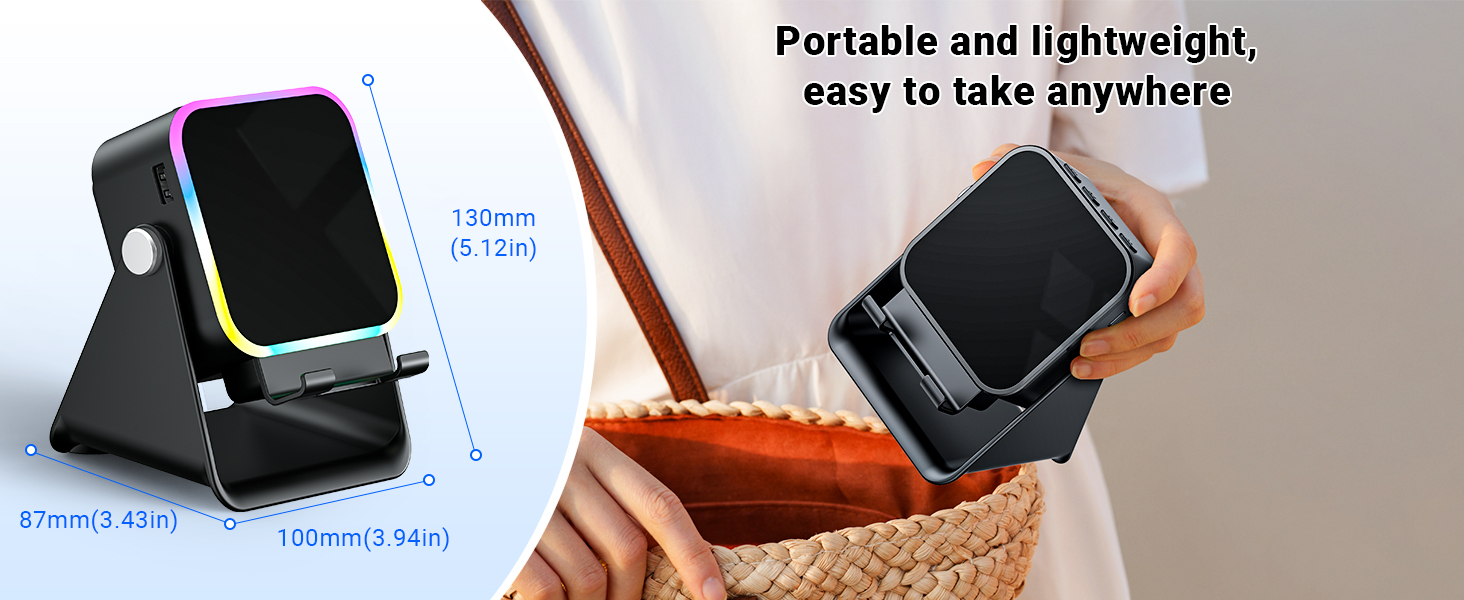
Image: Adjustable stand with 360° rotation and non-slip base for stability.
6. Uendeshaji
6.1 Washa/Zima
Bonyeza kitufe cha nguvu kwa muda mrefu (⏻) kuwasha au kuzima kifaa.
6.2 Switching Modes (Induction / Bluetooth)
After powering on, the device will typically start in Induction Mode. To switch between Induction Mode and Bluetooth Mode, short press the 'M' button.
Video: Demonstrates how to use both Induction and Bluetooth modes, including switching between them and proper phone placement.
6.3 Njia ya Uingizaji
In Induction Mode, no Bluetooth connection is required. Simply place your smartphone correctly on the stand. The speaker's inductive chip will capture and amplify audio directly from your phone.
- Uwekaji wa Simu: Ensure your phone is placed correctly on the stand, typically in portrait orientation, for optimal sound transfer.
- Marekebisho ya Sauti: Adjust your phone's volume to 50% or higher for the best playback experience. You can also use the volume buttons on the speaker.
- Utangamano: Induction mode is primarily compatible with smartphones. It does not support iPads or tablets.
- Zima Kiotomatiki: The speaker will automatically turn off after 10 minutes of standby in Induction Mode.

Image: Guide on how to correctly place your phone and adjust volume for Induction Mode.
Njia ya Bluetooth ya 6.4
For wireless audio streaming, switch to Bluetooth Mode:
- Bonyeza kitufe cha kuwasha/kuzima ili kuwasha spika.
- Short press the 'M' button to switch to Bluetooth Mode (you will hear an audible prompt).
- On your phone or tablet, go to Bluetooth settings and search for "ZJ-027".
- Select "ZJ-027" to pair. For Android devices, enable "Sync volume with phone" in Bluetooth settings after pairing for optimal control.
- Ukishaunganisha, unaweza kucheza sauti kutoka kwa kifaa chako kupitia spika.
In Bluetooth mode, you can place your phone horizontally or vertically on the stand. The Bluetooth range is approximately 10 meters.

Image: Visual representation of Induction Mode (no Bluetooth) and Bluetooth Mode (10m range).
6.5 Kazi za Mwanga wa LED
The speaker features colorful LED lights:
- Badilisha Njia za Kuangaza: Single-click the 'M' button to cycle through different light colors and patterns.
- Washa/Zima Taa: Long-press the 'M' button to turn the LED lights on or off.

Image: Multiple light strip patterns to choose from.
6.6 Power Bank Function (Emergency Charge)
The speaker can act as an emergency power bank for your phone. Connect your phone's charging cable (not included) to the USB-A output port on the speaker and to your phone. This is a wired charging function, not wireless charging.
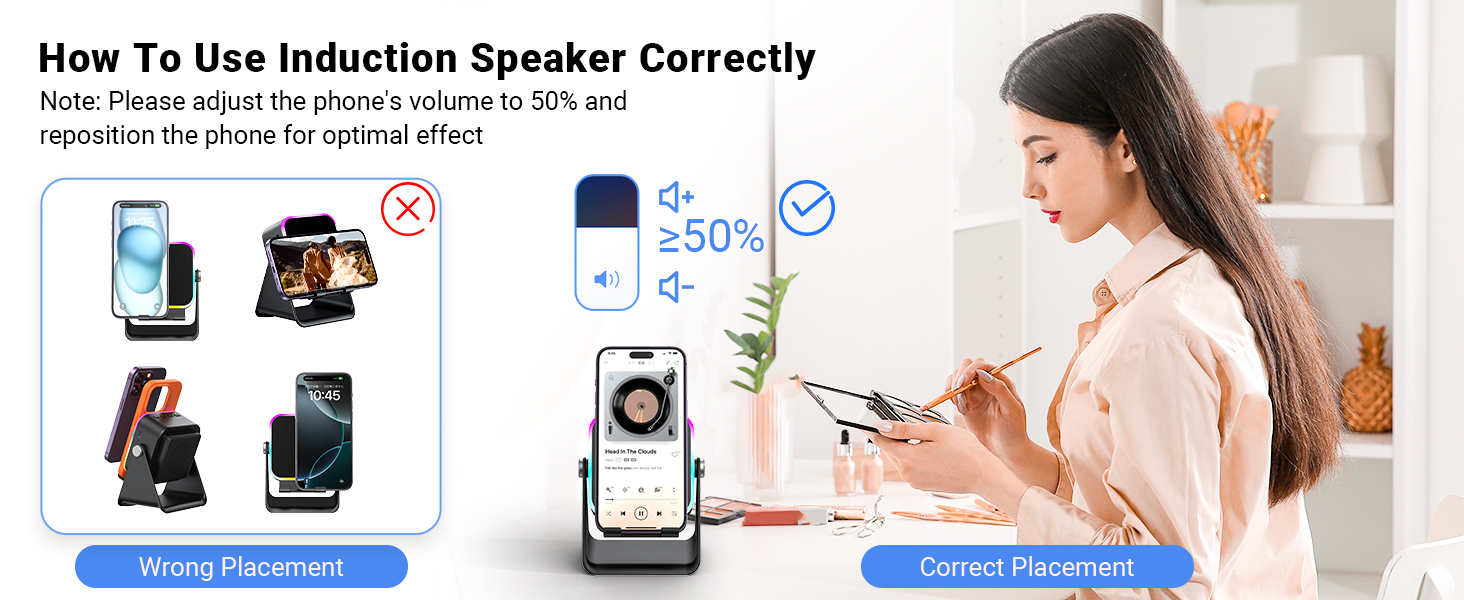
Image: The speaker's 3500mAh power bank function for emergency charging.
7. Matengenezo
- Safisha kifaa kwa kitambaa laini na kavu. Usitumie visafishaji vya abrasive au vimumunyisho.
- Epuka kuweka kifaa kwenye jua moja kwa moja kwa muda mrefu.
- Hifadhi kifaa mahali pa baridi, kavu wakati haitumiki.
8. Utatuzi wa shida
Q1: What should I do if the volume is too low?
- If in Induction mode, place the phone correctly on the holder, and then adjust the phone's volume to 50% or higher.
- If you are using an Android device and using Bluetooth mode, first pair the Bluetooth device. Then enable "Sync volume with phone" in your phone's Bluetooth settings.
Q2: What should I do if the sound cuts in and out in Induction mode?
- Ensure the phone is correctly placed on the holder.
- The working principle of Induction mode is that the speaker's inductive chip captures audio from the phone and amplifies it through the speaker. The louder the phone's volume, the louder the speaker's output. Therefore, we recommend setting the phone's volume to 50% or higher to ensure uninterrupted playback.
9. Vipimo
| Kipengele | Maelezo |
|---|---|
| Jina la Mfano | ZJ-027 |
| Aina ya Spika | Spika wa Spika |
| Vipengele Maalum | Bluetooth Speaker, Built-In Powerbank, Induction Speaker, LED Light, Phone Stand |
| Vifaa Sambamba | Android Phone, iPad, iPhone |
| Rangi | Nyeusi |
| Vipimo vya Bidhaa | 5"D x 2"W x 3"H |
| Uzito wa Kipengee | Kilo 0.34 (wakia 12) |
| Kiwango cha juu cha Masafa ya Bluetooth | Mita 10 |
| Betri | 1 Betri inahitajika (pamoja na) |
| Mtengenezaji | AIKELA |
| Kiwango cha Juu cha Pato la Spika | 1 Watts |
| Teknolojia ya Uunganisho | Bluetooth, Uanzishaji |
| Nyenzo | Acrylonitrile Butadiene Styrene (ABS) |
10. Udhamini na Msaada
AIKELA provides 12 months of support for your Phone Amplifier Speaker. If you encounter any issues or have questions, please contact customer service. You can typically find contact information by navigating to 'Find Order' on the platform where you purchased the product.


