1. Utangulizi
The TP-Link Omada EAP725-Wall BE5000 is a state-of-the-art WiFi 7 Wall Plate Wireless Access Point designed for high-performance wireless networking in demanding environments. It offers advanced features for robust control and a consistent user experience.
Sifa Muhimu:
- BE5000 Wi-Fi 7: Delivers speeds of 4324 Mbps on the 5 GHz band and 688 Mbps on 2.4 GHz.
- Usanidi wa Bandari Inayotumika Zaidi: Includes 1× 2.5G PoE input port, 1× 2.5G pass-through port, and 2× Gigabit RJ45 downlink ports.
- Enhanced Bandwidth: Supports 240 MHz bandwidth for increased simultaneous transmissions.
- Teknolojia ya Multi-RU: Ensures high network performance even under heavy traffic.
- Kazi za Kina: Centralized management, Mesh networking, and Seamless Roaming capabilities.
2. Yaliyomo kwenye Kifurushi
Thibitisha kuwa vipengee vyote vipo kwenye kifurushi:
- 1x EAP725-Wall Access Point
- 1x Mwongozo wa Ufungaji
- 1x Seti ya Kuweka
Note: A power adapter is NOT included as this device is primarily designed for Power over Ethernet (PoE) installations.
3. Bidhaa Imeishaview

Kielelezo 1: Mbele view ya TP-Link Omada EAP725-Wall Access Point.

Kielelezo 2: Nyuma view showing the 2.5G PoE input port.
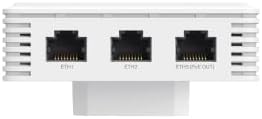
Kielelezo 3: Chini view displaying the 2.5G pass-through port and two Gigabit RJ45 downlink ports.
4. Kuweka
4.1 Kuwasha Kifaa
The EAP725-Wall Access Point is designed to be powered via Power over Ethernet (PoE). It requires a PoE++ (802.3bt) compliant switch or injector for full functionality, especially to utilize the 2.5G PoE input port. Ensure your PoE source can provide adequate power for the device and any downstream devices connected to its PoE pass-through port.
- Connect an Ethernet cable from a PoE++ switch or injector to the 2.5G PoE input port on the back of the EAP725-Wall.
- Kifaa kitawasha kiotomatiki.
4.2 Ufungaji wa Kimwili
The EAP725-Wall is designed for wall plate installation. Use the provided mounting kit to secure the access point to a standard electrical wall box.
- Ensure proper cabling is run to the wall box for the PoE connection.
- Attach the mounting bracket to the wall box.
- Slide the EAP725-Wall onto the mounting bracket until it clicks securely into place.
4.3 Usanidi wa Awali
The EAP725-Wall is part of the Omada SDN (Software Defined Networking) solution, offering centralized management. It can be configured via the Omada Controller software or app.
- Mdhibiti wa Omada: For centralized management of multiple Omada devices, download and install the Omada Controller software on a PC or use a dedicated Omada Hardware Controller.
- Programu ya Omada: For initial setup and basic management, download the TP-Link Omada app on your mobile device.
- Follow the on-screen instructions in the Omada Controller or app to discover and adopt the EAP725-Wall into your network.
- Configure your desired Wi-Fi network (SSID, password, security settings).
Video 1: Bidhaa Imeishaview - A brief visual guide to the EAP725-Wall and its features.
5. Uendeshaji wa Ufikiaji
5.1 Matumizi ya Msingi
Once configured, the EAP725-Wall will broadcast your Wi-Fi network. Client devices (smartphones, laptops, tablets, etc.) can connect to the network using the configured SSID and password.
- The access point supports dual-band operation (2.4 GHz and 5 GHz) for optimal performance across various devices.
- The 2.5G pass-through port and 2x Gigabit RJ45 downlink ports can be used to provide wired network access to devices such as IP phones, computers, or other network-enabled equipment directly from the wall plate.
Vipengele 5.2 vya Juu
- Usimamizi wa Kati: Manage all your Omada EAPs, switches, and routers from a single interface via the Omada Controller.
- Mitandao ya Wavu: Extend Wi-Fi coverage seamlessly by adding more Omada Mesh-compatible access points.
- Kuzurura Bila Mifumo: Client devices automatically switch to the access point with the strongest signal as you move around, ensuring uninterrupted connectivity.
- Msaada wa VLAN: Create separate virtual networks for different user groups or traffic types for enhanced security and network management.
- Mtandao wa Wageni: Provide secure Wi-Fi access for guests with customizable login options and bandwidth limits.
6. Matengenezo
6.1 Sasisho za Firmware
Regular firmware updates are crucial for maintaining optimal performance, security, and access to new features. Firmware updates can be performed via the Omada Controller.
- Access the Omada Controller interface.
- Navigate to the firmware update section for your EAP725-Wall.
- Follow the instructions to download and install the latest firmware.
Ufumbuzi wa 6.2
If you encounter issues, refer to the troubleshooting section in the Omada Controller's help documentation or the TP-Link support webtovuti.
7. Vipimo
| Kipengele | Thamani |
|---|---|
| Nambari ya Mfano | EAP725-Ukuta |
| Kiwango kisicho na waya | 802.11be (Wi-Fi 7), 802.11ax, 802.11ac, 802.11n, 802.11g |
| Darasa la Bendi ya Mara kwa mara | Bendi-mbili |
| Kasi ya Wi-Fi | GHz 5: 4324 Mbps, 2.4 GHz: 688 Mbps |
| Bandari za Ethernet | 1× 2.5G PoE Input, 1× 2.5G Pass-Through, 2× Gigabit RJ45 Downlink |
| Kiwango cha PoE | 802.3bt (PoE ++) |
| Vipengele Maalum | Access Point Mode, Beamforming, Guest Mode, Internet Security, QoS |
| Vipimo | Inchi 7.28 x 4.53 x 2.13 |
| Uzito wa Kipengee | Wakia 12.5 (Pauni 0.78) |
8. Udhamini na Msaada
The TP-Link Omada EAP725-Wall comes with a 5-Year Warranty.
For technical support, warranty claims, or additional resources, please visit the official TP-Link support webtovuti au wasiliana na huduma kwa wateja wao.


