1. Utangulizi
Thank you for choosing the SMSL DS200 Headphone Amp DAC. This device is designed to provide high-fidelity audio playback and amplification for a variety of audio sources and headphones. Please read this manual thoroughly to ensure proper setup and optimal performance.

Kielelezo 1: Mbele view of the SMSL DS200 Headphone Amp DAC.
2. Bidhaa Imeishaview na Sifa Muhimu
The SMSL DS200 combines a high-performance Digital-to-Analog Converter (DAC) with a powerful headphone amplifier, offering versatile connectivity and exceptional audio quality. Key features include:
- Dual CS43131 Chips: Equipped with two Cirrus Logic CS43131 audio decoding chips, achieving ultra-low distortion of 0.00019% (-114dB) for accurate sound reproduction.
- New Third-Generation XMOS XU-316: Features the latest XMOS XU-316 USB audio processing chip, supporting PCM up to 32bit/768kHz and DSD up to DSD256 for high-resolution audio.
- MQA/MQA-CD Support: Full MQA decoding capabilities for studio-grade master quality audio playback, including MQA-CD.
- Muunganisho wa Bluetooth 5.1: Provides stable and high-resolution wireless audio transmission with extended range.
- Balanced and Single-Ended Headphone Outputs: Includes 3.5mm single-ended and 4.4mm balanced headphone outputs.
- High and Low Gain Adjustment: Supports high and low gain modes to accommodate various headphone impedances and sensitivities.
- Chaguo Nyingi za Kuingiza: Offers USB, Optical, Coaxial, and Bluetooth inputs for broad compatibility with different audio sources.

Kielelezo 2: Zaidiview of DS200 key features.

Figure 3: Dual CS43131 decoding chips for extreme distortion control.

Figure 4: New third-generation XMOS XU-316 USB audio processing chip.
3. Yaliyomo kwenye Kifurushi
The SMSL DS200 package includes the following items:
- Kipokea sauti cha SMSL DS200 Amp DAC
- Antena ya Bluetooth
- Kebo ya USB
- Mwongozo wa Mtumiaji
- Kadi ya Huduma

Figure 5: Multiple connection methods for the DS200.
4. Vidhibiti na Violesura
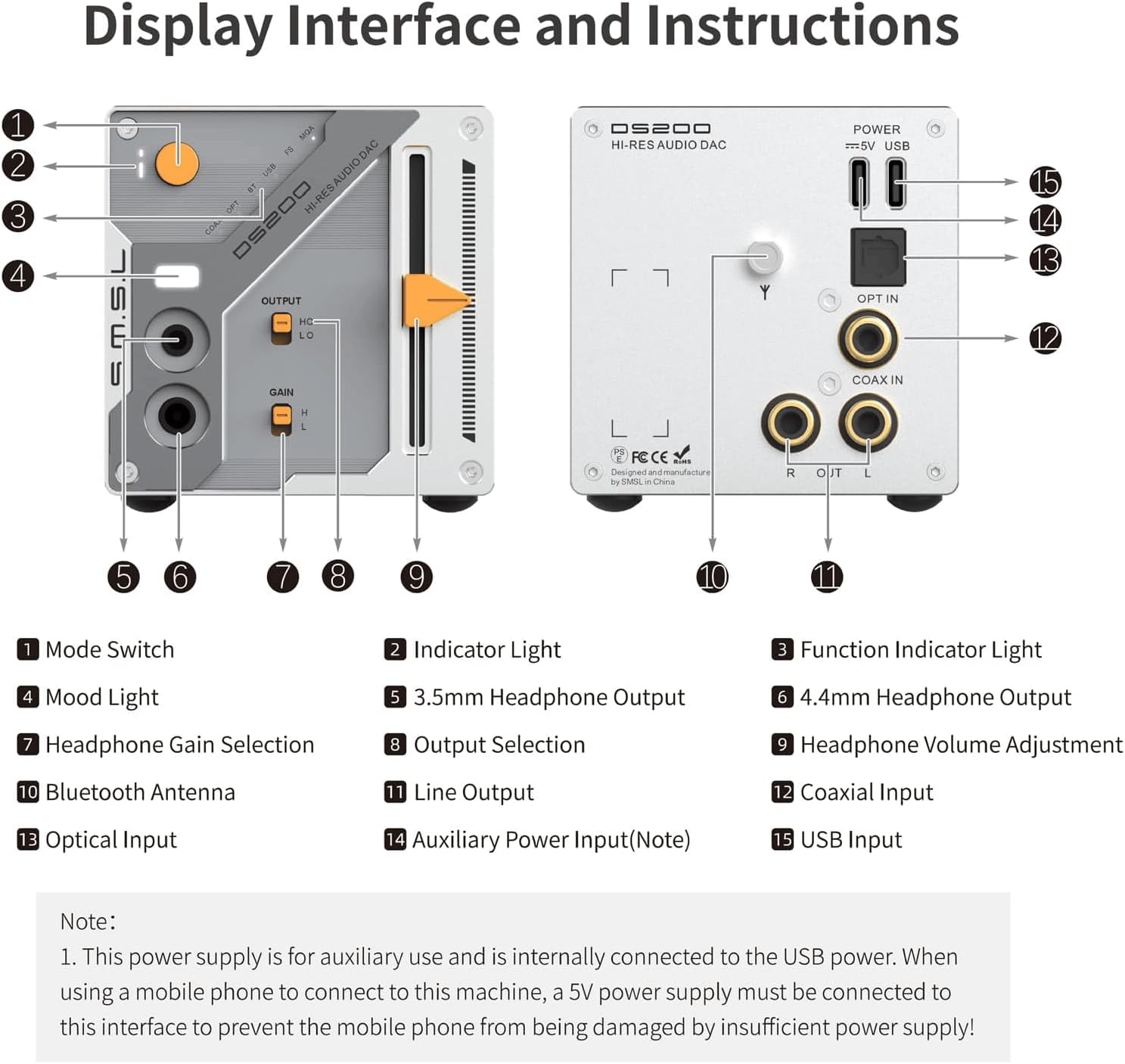
Figure 6: DS200 Display Interface and Instructions.
Jopo la mbele
- Kubadilisha Modi: Huchagua chanzo cha kuingiza.
- Mwanga wa Kiashirio: Displays the current operating status.
- Mwanga wa Kiashiria cha Utendaji: Indicates specific functions or modes.
- Mwangaza wa Mood: Aesthetic lighting feature.
- Kitoa sauti cha 3.5mm: Single-ended headphone jack.
- Kitoa sauti cha 4.4mm: Jack ya headphone yenye usawa.
- Headphone Gain Selection: Toggles between high (H) and low (L) gain for headphones.
- Uteuzi wa Pato: Selects between headphone output (HO) and line output (LO).
- Headphone Volume Adjustment: Slider control for headphone volume.
Paneli ya nyuma
- Pato la Mstari: Matokeo ya RCA ya kuunganisha kwenye nje amplifiers au wasemaji amilifu.
- Uingizaji wa Koaxial: Digital audio input.
- Mbinu ya Kuingiza Data: Digital audio input.
- Antenna ya Bluetooth: Connection point for the Bluetooth antenna.
- Auxiliary Power Input (Note): This power supply is for auxiliary use and is internally connected to the USB power. When using a mobile phone to connect to this machine, a 5V power supply must be connected to this interface to prevent the mobile phone from being damaged by insufficient power supply!
- Uingizaji wa USB: USB-C port for connecting to a computer or other USB audio source.
5. Kuweka
5.1 Nguvu ya Kuunganisha
- Connect the provided USB cable to the USB Input (15) on the rear panel of the DS200.
- Connect the other end of the USB cable to a power source (e.g., a computer USB port or a 5V USB power adapter).
- If connecting a mobile phone, ensure a dedicated 5V power supply is connected to the Auxiliary Power Input (14) to prevent damage to the phone.
5.2 Kuunganisha Vyanzo vya Sauti
- Uingizaji wa USB: Connect a USB cable from your computer or digital player to the USB Input (15).
- Mbinu ya Kuingiza Data: Connect an optical cable from your audio source to the Optical Input (13).
- Uingizaji wa Koaxial: Connect a coaxial cable from your audio source to the Coaxial Input (12).
- Ingizo la Bluetooth: Screw the Bluetooth antenna (11) onto its connector on the rear panel.
5.3 Connecting Audio Outputs
- Vipokea sauti vya masikioni: Connect your headphones to either the 3.5mm Headphone Output (5) or the 4.4mm Headphone Output (6) on the front panel.
- Pato la Mstari: Use RCA cables to connect the Line Output (10) to an external amplifier au wasemaji amilifu.
6. Maagizo ya Uendeshaji
6.1 Washa/Zima
The DS200 powers on automatically when connected to a power source. To turn off, disconnect the power cable.
6.2 Uteuzi wa Ingizo
Press the Mode Switch (1) on the front panel to cycle through available input sources: USB, Optical, Coaxial, and Bluetooth. The selected input will be indicated by the Indicator Light (2) and Function Indicator Light (3).
6.3 Udhibiti wa Kiasi
Adjust the Headphone Volume Adjustment (9) slider on the front panel to control the output volume for connected headphones.
6.4 Headphone Gain Adjustment
When the Output Selection (8) is set to 'HO' (Headphone Output), use the Headphone Gain Selection (7) switch to choose between 'H' (High Gain) for high-impedance headphones or 'L' (Low Gain) for low-sensitivity earplugs.

Figure 7: Headphone High and Low Gain Modes.
6.5 MQA/MQA-CD Playback
The DS200 supports MQA and MQA-CD decoding. When playing MQA content, the device will automatically detect and process the MQA stream, indicated by the Function Indicator Light (3).

Figure 8: MQA CD Support.
6.6 Kuoanisha Bluetooth
- Ensure the Bluetooth antenna (11) is securely attached.
- Select Bluetooth as the input source using the Mode Switch (1).
- On your mobile device, search for available Bluetooth devices and select 'SMSL DS200' to pair.
- The Function Indicator Light (3) will confirm successful pairing.

Figure 9: Bluetooth 5.1 Digital Audio Input.
7. Vipimo
| Kipengele | Vipimo |
|---|---|
| Vipimo vya Bidhaa | Inchi 6.3 x 3.94 x 3.94 |
| Uzito wa Kipengee | Pauni 1.21 |
| Nambari ya Mfano wa Kipengee | DS200 |
| Ingizo | USB/Optical/Coaxial/Bluetooth |
| Matokeo | 3.5mm headphone/4.4mm headphone/Line |
| Kiwango cha Pato | 2.0 Vrms |
| THD+N (Unweighted) | 0.00019% (-114dB) |
| Dynamic Range (Unweighted) | 127dB |
| SNR (Unweighted) | 127dB |
| Vipimo vya Bluetooth | BT 5.1 (Supports SBC) |
| Hali ya USB | Asynchronous |
| Matumizi ya Nguvu | 3W |
| Nguvu ya Kusimama | <0.1W |
| Ukubwa (WxHxD) | 70x70x113mm |
| Uzito | 346g |
| Utangamano wa USB | Windows 7 / 8.1 / 10 / 11, Android, iOS, Mac OSX, Linux |
| USB SampKiwango cha ling | PCM 44.1-768kHz, DSD 2.8224-11.2896MHz |
| Optical/Coaxial SampKiwango cha ling | PCM 44.1-192kHz, DSD64(DoP) |
| USB Bit Depth | 1bit, 16-32bit |
| Optical/Coaxial Bit Depth | 16-24bit |
Figure 10: Detailed specifications of the SMSL DS200.
8. Utatuzi wa shida
- Hakuna Sauti:
- Hakikisha kuwa kebo ya umeme imeunganishwa kwa usalama.
- Verify the correct input source is selected on the DS200.
- Angalia miunganisho yote ya kebo ya sauti.
- Adjust the volume slider to an audible level.
- Confirm your headphones or speakers are properly connected and functioning.
- Sauti Iliyopotoka:
- Check the audio source for distortion.
- Ensure audio cables are not damaged or loosely connected.
- Reduce the volume level on both the DS200 and your audio source.
- Verify the correct gain setting (High/Low) for your headphones.
- Masuala ya Muunganisho wa Bluetooth:
- Hakikisha antena ya Bluetooth imewekwa ipasavyo.
- Confirm Bluetooth input is selected on the DS200.
- Delete previous pairing records on your mobile device and re-pair.
- Ensure your mobile device is within range of the DS200.
9. Matengenezo
- Keep the device away from heat sources, direct sunlight, and moisture.
- Safisha kifaa kwa kitambaa laini na kavu. Usitumie cleaners kioevu au erosoli.
- Epuka kuangusha au kuelekeza kifaa kwenye athari kali.
- Hakikisha uingizaji hewa sahihi karibu na kifaa ili kuzuia overheating.
10. Udhamini na Msaada
The SMSL DS200 comes with a 1-year warranty from the date of purchase. For technical support, warranty claims, or any inquiries, please refer to the contact information provided on the Service Card included in your package or visit the official S.M.S.L webtovuti.


