1. Utangulizi
Thank you for choosing the Ewent EW3295 Backlit Wireless Keyboard. This full-size keyboard offers versatile connectivity options, including Bluetooth 5.0 and 2.4GHz wireless, allowing you to connect up to three devices simultaneously. Its slim design, silent keys, and adjustable backlight provide a comfortable and efficient typing experience. This manual provides detailed instructions for setup, operation, and maintenance to ensure optimal performance of your keyboard.

Figure 1.1: Slim and sturdy design of the EW3295 keyboard.
2. Sifa Muhimu
- Wireless Multi-Device Connection: Connect up to 3 devices simultaneously via Bluetooth 5.0 (x2) or wireless 2.4 GHz. Easily switch between devices with just one button.
- Nuru ya Nyuma inayoweza Kubadilishwa: The keyboard's backlight is dimmable and can be turned off completely, ideal for various lighting conditions.
- Flat & Quiet Design: Flat, silent keys ensure a comfortable and low-noise typing experience, suitable for quiet environments.
- Vifunguo 12 vya Multimedia: Quick access to functions like volume control, email, and other operations.
- Betri Inayoweza Kuchajiwa kwa Muda Mrefu: Equipped with a 300mAh lithium battery and intelligent energy-saving function for extended use.
- Utangamano mpana: Compatible with Windows (XP, 7, 8.1, 10, 11) and Android, suitable for PCs, laptops, and tablets.
- Muundo Imara na wa Kudumu: Made of high-density polycarbonate, lightweight yet durable, with a compact design.
- Italian Layout: Features an Italian QWERTY keyboard layout.
3. Yaliyomo kwenye Kifurushi
Tafadhali angalia yaliyomo kwenye kifurushi unapoondoa sanduku:
- Ewent EW3295 Backlit Wireless Keyboard
- USB-A 2.4GHz Wireless Receiver
- USB-C kwa Kebo ya kuchaji ya USB-A
- Mwongozo wa Mtumiaji (hati hii)
4. Mwongozo wa Kuweka
4.1 Kuchaji Kinanda
The EW3295 keyboard is equipped with a built-in rechargeable 300mAh lithium battery. Before first use, it is recommended to fully charge the keyboard.
- Locate the USB Type-C charging port on the rear panel of the keyboard.
- Connect one end of the provided USB-C charging cable to the keyboard's USB-C port.
- Connect the other end of the USB-A cable to a USB power source (e.g., computer USB port, USB wall adapter).
- The charging indicator light (if present) will illuminate during charging and turn off when fully charged. A full charge takes less than 1 hour and provides over 1 month of use.

Figure 4.1: Rear panel of the keyboard with charging port and receiver compartment.
4.2 Kuunganisha Kibodi
The EW3295 keyboard supports three connection modes: 2.4GHz wireless and two Bluetooth 5.0 channels (BT1, BT2). You can connect up to three devices and switch between them.
Muunganisho Usiotumia Waya wa 4.2.1 2.4GHz
- Locate the USB-A wireless receiver, typically stored in a compartment on the rear panel of the keyboard.
- Plug the USB-A receiver into an available USB port on your computer or device.
- Bonyeza kwa fn+1 keys on the keyboard to switch to 2.4GHz mode. The indicator light for channel 1 will illuminate.
- Kibodi inapaswa kuunganishwa kiotomatiki kwenye kifaa chako.

Figure 4.2: Ewent EW3295 keyboard and its USB wireless receiver.
4.2.2 Muunganisho wa Bluetooth (BT1 / BT2)
- Bonyeza kwa fn+2 keys to select Bluetooth channel 1 (BT1) or fn+3 keys to select Bluetooth channel 2 (BT2). The corresponding indicator light will flash, indicating pairing mode.
- Kwenye kifaa chako (Kompyuta, kompyuta ya mkononi, kompyuta kibao), washa Bluetooth na utafute vifaa vipya.
- Select "EW3295" or a similar name from the list of available Bluetooth devices.
- Follow any on-screen prompts to complete the pairing process. Once connected, the indicator light will stop flashing and remain solid.
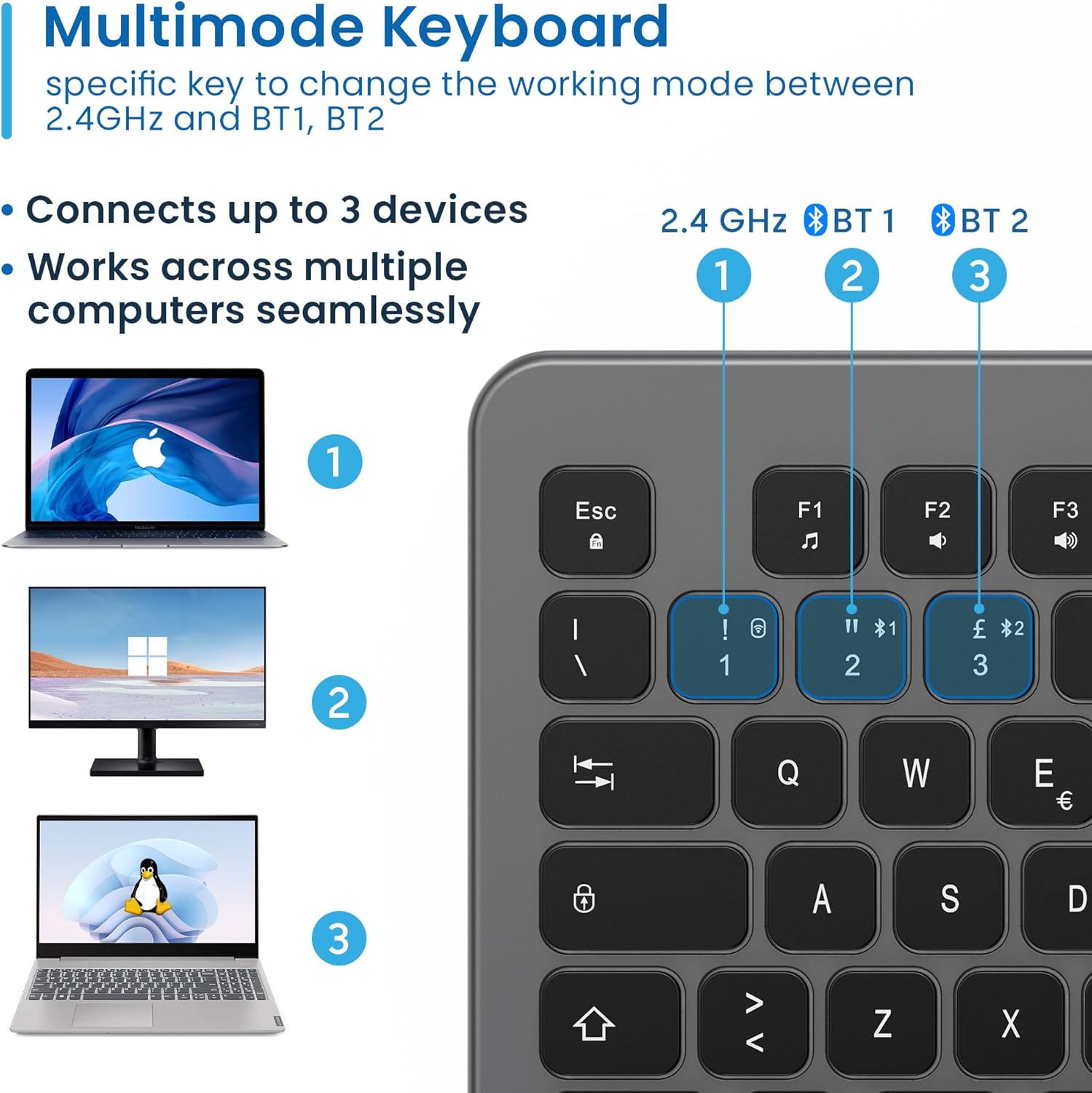
Figure 4.3: Multi-device connectivity options for the EW3295 keyboard.
4.2.3 Kubadilisha Kati ya Vifaa Vilivyounganishwa
Mara vifaa vingi vinapooanishwa, unaweza kubadilisha kati yao kwa urahisi:
- Bonyeza fn+1 to switch to the 2.4GHz connected device.
- Bonyeza fn+2 to switch to the Bluetooth 1 connected device.
- Bonyeza fn+3 to switch to the Bluetooth 2 connected device.
5. Maagizo ya Uendeshaji
5.1 Kuandika Msingi
The EW3295 features a full-size Italian QWERTY layout. Its flat and silent keys provide a comfortable and precise typing experience, reducing noise in quiet environments.

Figure 5.1: Illuminated Italian QWERTY Keyboard Layout.

Figure 5.2: Silent keys for reduced noise.
5.2 Udhibiti wa Mwangaza Nyuma
The keyboard features an adjustable backlight for improved visibility in low-light conditions.
- Taa ya Nyuma IMEWASHA/IMEZIMWA: Bonyeza kwa Kambi ya Scorr key (often labeled with a lightbulb icon) to toggle the backlight on or off.
- Backlight Brightness Up: Bonyeza Fn + Pag ↑ ili kuongeza mwangaza wa taa ya nyuma.
- Backlight Brightness Down: Bonyeza Fn + Pag ↓ kupunguza mwangaza wa taa ya nyuma.
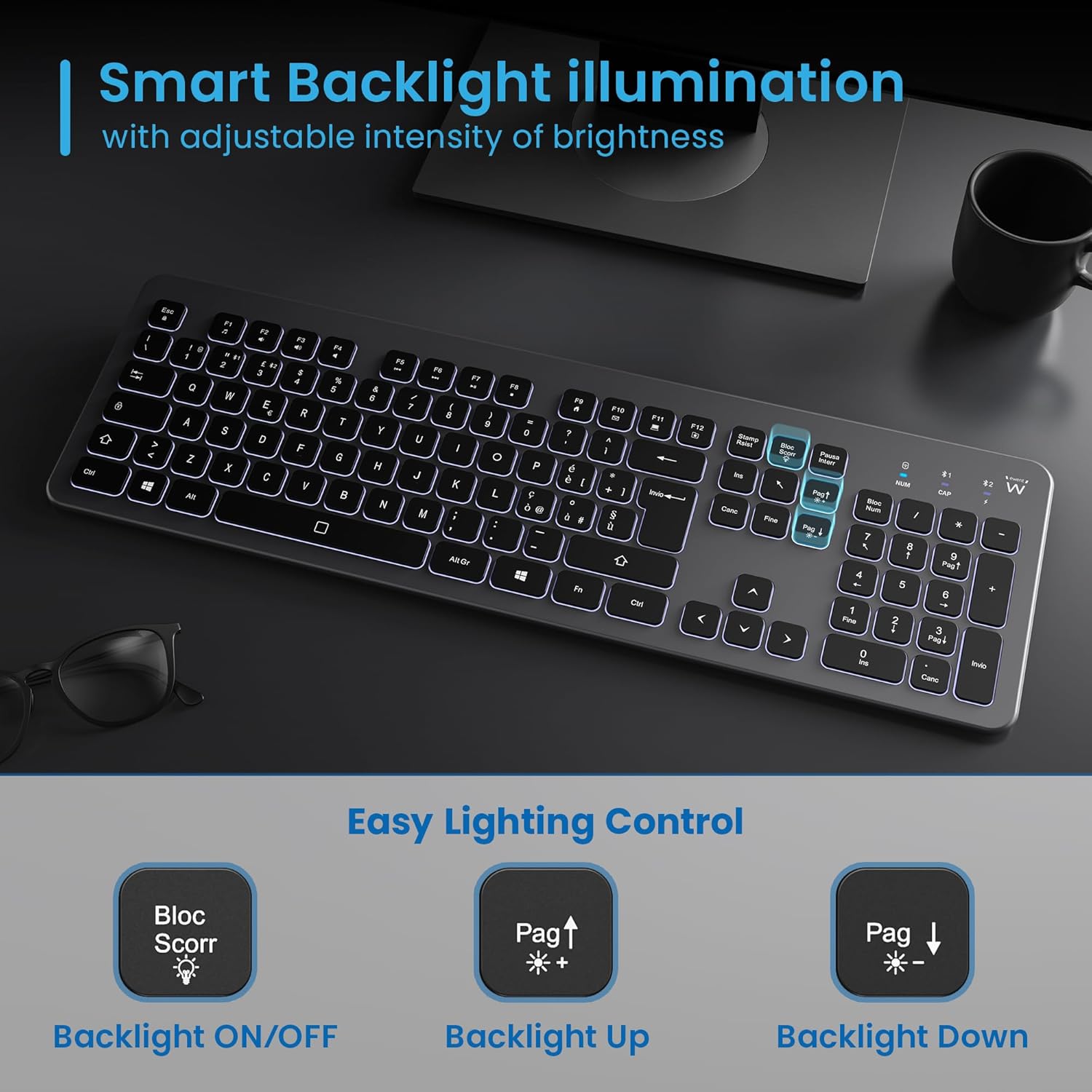
Figure 5.3: Backlight control keys.
5.3 Vifunguo vya Multimedia
The keyboard includes 12 dedicated multimedia keys (F1-F12) that provide quick access to various functions. To use these functions, press the Fn ufunguo wakati huo huo na ufunguo wa F unaotaka.
| Mchanganyiko Muhimu | Kazi |
|---|---|
| Fn + F1 | Kicheza media |
| Fn + F2 | Sauti Chini |
| Fn + F3 | Volume Up |
| Fn + F4 | Nyamazisha |
| Fn + F5 | Wimbo Uliopita |
| Fn + F6 | Wimbo Unaofuata |
| Fn + F7 | Cheza/Sitisha |
| Fn + F8 | Acha |
| Fn + F9 | Ukurasa wa Nyumbani |
| Fn + F10 | Barua pepe |
| Fn + F11 | Kompyuta yangu |
| Fn + F12 | Kikokotoo |
6. Matengenezo na Matunzo
Utunzaji sahihi huhakikisha maisha marefu na utendakazi bora wa kibodi yako.
- Kusafisha: Tumia kitambaa laini, kikavu na kisicho na pamba kusafisha uso wa kibodi. Kwa uchafu mkaidi, kidogo dampjw.org sw kitambaa chenye maji au kisafishaji kisicho na majimaji. Epuka unyevu kupita kiasi.
- Epuka Vimiminika: Do not spill liquids on the keyboard. In case of accidental spills, immediately disconnect the keyboard and allow it to dry completely before re-using.
- Hifadhi: Wakati haitumiki kwa muda mrefu, hifadhi kibodi mahali pa baridi, pakavu mbali na jua moja kwa moja na joto kali.
- Utunzaji wa Betri: To prolong battery life, avoid fully discharging the battery frequently. Charge the keyboard when the low battery indicator appears.
- Hifadhi ya Mpokeaji: When transporting the keyboard, store the USB wireless receiver in its dedicated compartment on the rear panel to prevent loss.
7. Utatuzi wa shida
If you encounter issues with your EW3295 keyboard, please refer to the following common solutions:
| Tatizo | Sababu inayowezekana | Suluhisho |
|---|---|---|
| Keyboard not responding (2.4GHz) | Low battery; Receiver not plugged in; Incorrect channel selected. | Charge the keyboard; Ensure USB receiver is securely plugged in; Press fn+1 to select 2.4GHz mode. |
| Kibodi haijibu (Bluetooth) | Low battery; Bluetooth not enabled on device; Not paired; Incorrect channel selected. | Charge the keyboard; Enable Bluetooth on your device; Re-pair the keyboard (see Section 4.2.2); Press fn+2 or fn+3 to select the correct Bluetooth channel. |
| Backlight haifanyi kazi | Taa ya nyuma imezimwa; Betri iko chini. | Bonyeza Kambi ya Scorr to turn on/off; Increase brightness with Fn + Pag ↑; Charge the keyboard. |
| Funguo zinanata au hazijibu | Dirt or debris under keys; Physical damage. | Clean the keyboard (see Section 6); If physical damage, contact support. |
| Maisha mafupi ya betri | Frequent backlight use; Battery degradation over time. | Reduce backlight brightness or turn it off when not needed; Ensure full charge cycles. |
8. Vipimo
| Kipengele | Maelezo |
|---|---|
| Jina la Mfano | Tastiera Wireless Retroilluminata EW3295 |
| Nambari ya Mfano wa Kipengee | EW3295 |
| Chapa | Ewent |
| Teknolojia ya Uunganisho | Bluetooth 5.0 (x2), 2.4GHz Wireless |
| Maelezo ya Kibodi | Multimedia, Full-size, Italian Layout |
| Vifaa Sambamba | PC (Windows XP, 7, 8.1, 10, 11), Android |
| Aina ya Betri | Betri ya Lithium inayoweza kuchajiwa tena ya 300mAh |
| Mwangaza nyuma | Adjustable Intensiteten |
| Vipimo (L x W x H) | Takriban. 432mm x 122mm x 22mm |
| Uzito | Takriban. 390 g |
| Nyenzo | High-density Polycarbonate |

Mchoro 8.1: Vipimo na uzito wa kibodi.
9. Taarifa za Udhamini
Ewent products are designed and manufactured to the highest quality standards. This product is covered by a limited warranty from the date of purchase. Please refer to the warranty card included with your product or visit the official Ewent website for detailed warranty terms and conditions specific to your region. The warranty typically covers defects in materials and workmanship under normal use.
10. Msaada kwa Wateja
For technical support, troubleshooting assistance, or any questions regarding your Ewent EW3295 keyboard, please contact Ewent customer support. You can typically find contact information (phone, email, support portal) on the official Ewent webtovuti au katika ufungaji wa bidhaa.
Please have your product model number (EW3295) and purchase details ready when contacting support.


