1. Utangulizi
The Beafon Silverline ML10 LTE Desk Phone is designed for ease of use and reliability, offering essential communication features with enhanced safety options. This manual provides detailed instructions for setting up, operating, and maintaining your device.
Vipengele muhimu ni pamoja na:
- 4G LTE Desk Phone connectivity
- Hearing Aid Compatible (HAC M4/T4)
- Programmable SOS emergency numbers with included SOS wristband/necklace (433 MHz range)
- Three quick dial keys for photos or symbols
- Digital announcement when pressing keys
- Extra-large XXL digits on display
- Extra loud ringer (90 dB) and earpiece volume (+40 dB)
- Hands-free function and Bluetooth LE
- SMS functionality and Audio Booster button

2. Taarifa Muhimu za Usalama
Please read all safety instructions before using the device to prevent injury or damage. Keep this manual for future reference.
- Usiweke kifaa kwenye halijoto kali, jua moja kwa moja, au unyevunyevu.
- Tumia vifaa vya ziada na adapta za umeme zilizoidhinishwa pekee.
- Epuka kuangusha au kuelekeza kifaa kwenye athari kali.
- Usijaribu kutenganisha au kutengeneza kifaa mwenyewe. Wasiliana na wafanyikazi wa huduma waliohitimu.
- Keep the device away from medical devices, such as pacemakers, to avoid interference.
3. Yaliyomo kwenye Kifurushi
Hakikisha bidhaa zote zipo kwenye kifurushi:
- Beafon Silverline ML10 LTE Desk Phone unit
- Simu ya mkononi na kamba iliyosokotwa
- Adapta ya nguvu
- USB charger cable (USB-C)
- SOS wristband
- SOS necklace
- Lithium-ion battery (pre-installed or separate)
- Mwongozo wa Mtumiaji (hati hii)
4. Bidhaa Imeishaview
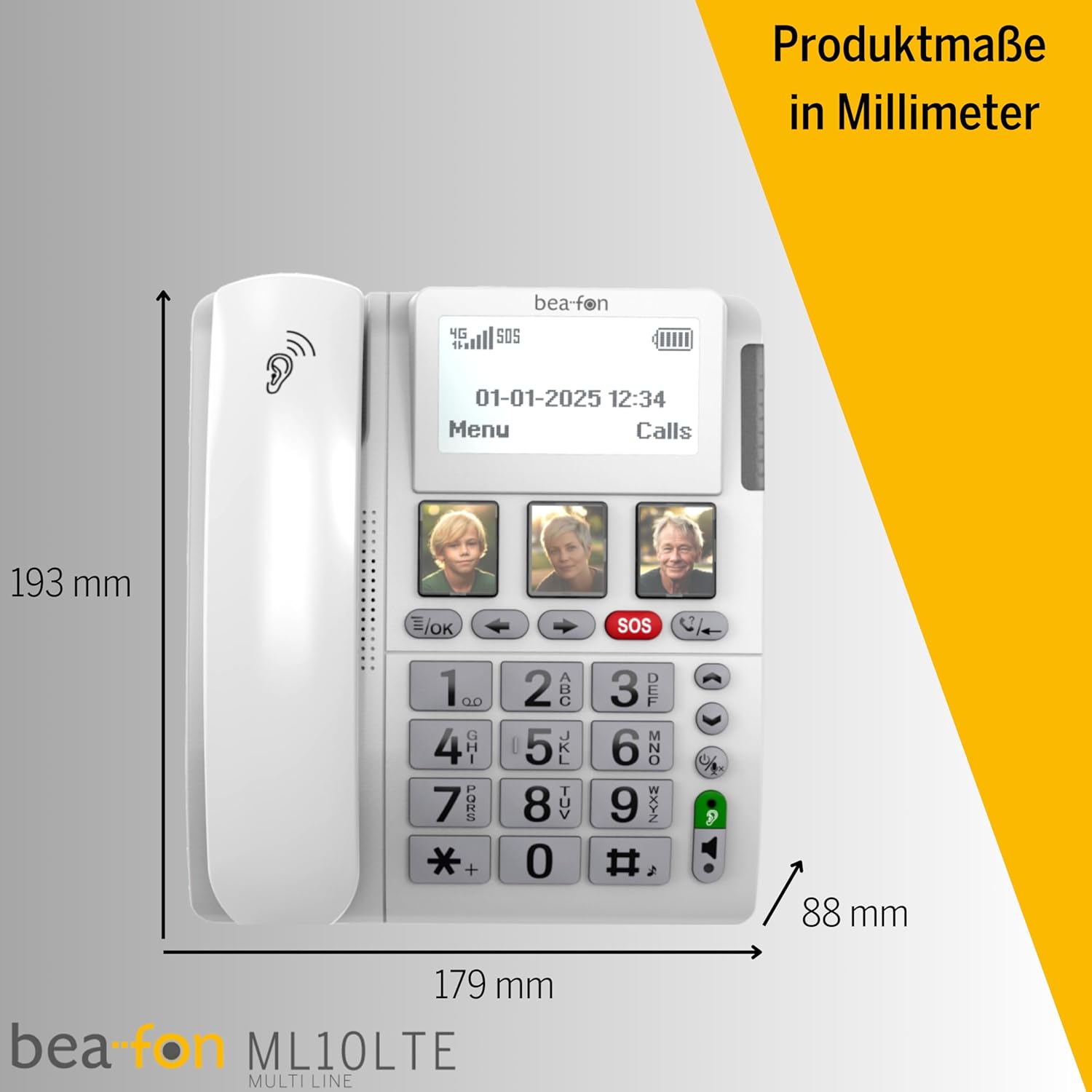
Familiarize yourself with the various parts of your Beafon ML10 desk phone.


5. Kuweka
5.1. Kuingiza SIM Kadi
- Ensure the phone is powered off and disconnected from the power source.
- Locate the SIM card slot, usually on the back or side of the device.
- Insert a Nano SIM card into the designated slot, ensuring correct orientation.
- Funga kifuniko cha nafasi ya SIM kadi kwa usalama.
5.2. Kuunganisha Nguvu
- Connect the USB-C charger cable to the phone's charging port.
- Chomeka adapta ya umeme kwenye sehemu ya ukuta.
- The phone can operate on battery power via 4G LTE, eliminating the need for a fixed line connection.
5.3. Umeme wa Awali na Uteuzi wa Lugha
- Press and hold the Power button until the display turns on.
- Fuata vidokezo kwenye skrini ili kuchagua lugha unayopendelea.
- The phone will automatically search for a 4G LTE network.

6. Maagizo ya Uendeshaji
6.1. Kupiga na Kupokea Simu
- Kupiga simu: Lift the handset, dial the number using the large keypad, and press the green call button.
- Kupokea Simu: When the phone rings (up to 90 dB), lift the handset or press the hands-free button to answer.
- Kazi Isiyo na Mikono: Press the dedicated hands-free button to activate speakerphone during a call.
6.2. Quick Dial Keys
The phone features three programmable quick dial keys (I, II, III) that can be customized with photos or symbols for easy access to frequently called contacts.
- Kupanga: Navigate to the phone's menu, select 'Quick Dial Settings', and assign a contact number to each key. You can also associate a photo or symbol.
- Kwa kutumia: Simply press the desired quick dial key to call the assigned contact.
6.3. Kazi ya Dharura ya SOS
The SOS function allows you to quickly contact pre-selected emergency numbers. It includes an SOS button on the phone and a separate SOS wristband/necklace.
- Nambari za SOS za Kupanga: Access the 'SOS Settings' in the menu to program up to five emergency contact numbers.
- Activating SOS (Phone): Press and hold the red SOS button on the phone. The phone will automatically call the programmed numbers in sequence until an answer is received.
- Activating SOS (Wristband/Necklace): Press the button on the SOS wristband or necklace. This will trigger the phone to initiate the emergency call sequence. The wristband/necklace has a range of 433 MHz.


6.4. Kazi Nyingine
- SMS: The phone supports sending and receiving text messages. Access the 'Messages' menu to compose or read SMS.
- Audio Booster: Press the Audio Booster button during a call to temporarily increase the earpiece volume for clearer audio.
- Bluetooth LE: Use Bluetooth Low Energy to connect compatible wireless accessories.
- HAC Compatibility: The phone is certified HAC M4/T4, making it suitable for users with hearing aids.
7. Matengenezo
7.1. Kusafisha Kifaa
Ili kuweka simu yako katika hali nzuri:
- Futa uso wa simu kwa kutumia laini, damp kitambaa.
- Usitumie kemikali kali au kusafisha abrasive.
- Ensure no moisture enters openings such as the microphone or speaker.
7.2. Utunzaji wa Betri
The phone is powered by a Lithium-ion battery. To prolong battery life:
- Epuka kutoa betri kikamilifu mara kwa mara.
- Charge the phone regularly, especially if not in use for extended periods.
- Hifadhi kifaa mahali pa baridi, kavu wakati haitumiki.
8. Utatuzi wa shida
If you encounter issues with your Beafon ML10, refer to the following common problems and solutions:
| Tatizo | Suluhisho linalowezekana |
|---|---|
| Simu haiwashi | Check if the power adapter is correctly connected and the battery is charged. Ensure the battery is properly inserted. |
| Haiwezi kupiga au kupokea simu | Verify that the SIM card is correctly inserted and activated. Check for network signal strength on the display. Restart the phone. |
| Kitendaji cha SOS hakifanyi kazi | Ensure SOS numbers are correctly programmed. Check the battery level of the SOS wristband/necklace. Verify the wristband/necklace is within range (433 MHz). |
| Ubora duni wa sauti | Adjust the earpiece volume. Ensure the microphone is not blocked. If using hands-free, ensure you are close to the phone. |
| Onyesho ni tupu au limegandishwa | Try restarting the phone by holding the power button. If unresponsive, disconnect power and re-connect. |
9. Vipimo
Technical details of the Beafon Silverline ML10 LTE Desk Phone:
| Kipengele | Maelezo |
|---|---|
| Chapa | Beafon |
| Nambari ya Mfano | 15031162187 |
| Mfumo wa Uendeshaji | RTOS |
| Aina ya Simu | Nano SIM |
| Muunganisho | 4G LTE, Bluetooth LE |
| Muundo wa Betri | Lithium-ion (1 pamoja) |
| Chanzo cha Nguvu | Inaendeshwa na Betri |
| Sauti ya Mlio | Hadi 90 dB |
| Earpiece Volume | +40 dB |
| Utangamano wa Misaada ya Kusikia | HAC M4/T4 |
| SOS Wristband/Necklace Range | 433 MHz |
| Uzito | Gramu 210 |
| Kitambulisho cha mpigaji | Ndiyo |
| Uendeshaji wa Multiline | Uendeshaji wa Mstari Moja |
10. Udhamini na Msaada
Information regarding the specific warranty period and detailed support contact information for the Beafon Silverline ML10 LTE Desk Phone is not available in the provided product data. Please refer to the product packaging or the manufacturer's official website for the most current warranty terms and customer support details.


