1. Kuweka na Kuweka
Follow these steps to properly install your SwitchBot Lock Ultra with Keypad Vision. Ensure your door and existing lock cylinder are compatible before beginning.
1.1 Ukaguzi wa Utangamano
Before installation, verify that your door lock is compatible with the SwitchBot Lock Ultra. The lock is designed for most European door locks.

Image: Please check compatibility before purchase. This image illustrates key and cylinder dimensions to ensure proper fit.

Image: Universal compatibility with adapter kit (sold separately). This shows how an optional adapter kit can extend compatibility to various knob types.
1.2 Ufungaji wa Kimwili
The SwitchBot Lock Ultra is designed for drill-free installation, preserving your existing lock. It features a sleek, full-metal body and a seamless base ring for a gap-free fit.
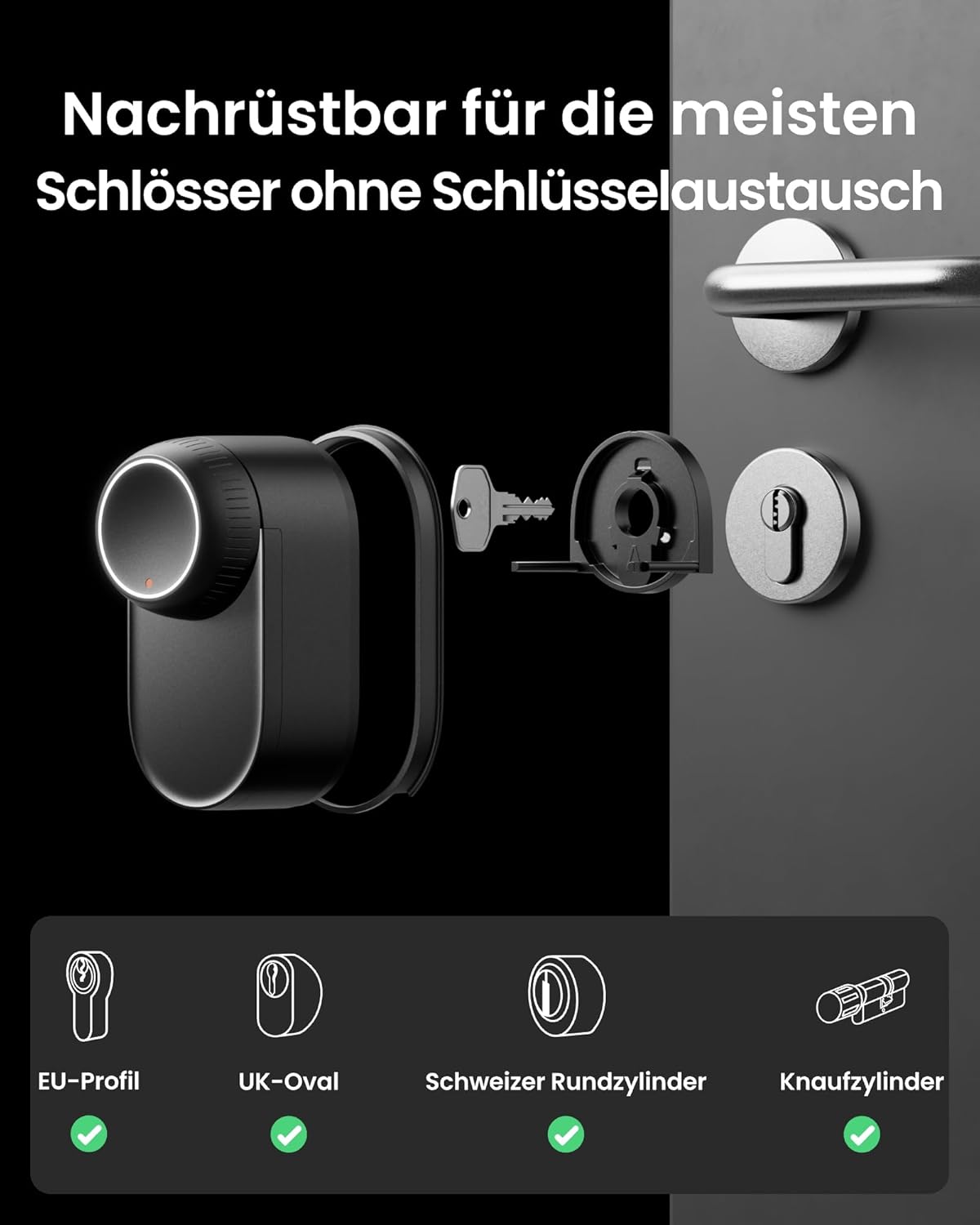
Image: Retrofittable for most locks without key replacement. This image demonstrates the lock's ability to be installed over existing cylinders.

Image: Enhance your door area. This image shows the sleek design of the lock installed on a door, highlighting its aesthetic integration.

Image: Perfect fit. This image illustrates the flush and secure fit of the lock against the door, protecting internal mechanisms.

Image: Seamless backplate. Includes three wood grain stickers in light, medium, and dark tones for a perfect match to your door.
1.3 Video Installation Guides
For detailed visual instructions, please refer to the official installation videos:
Video: SwitchBot Lock Ultra Installation Video (Knob Lock). This video provides step-by-step instructions for installing the Lock Ultra on a knob-style cylinder lock.
Video: SwitchBot Lock Ultra Installation Video (Key Lock). This video guides you through the installation process for the Lock Ultra on a key-operated cylinder lock.
2. Kuendesha Smart Lock Yako
The SwitchBot Lock Ultra offers multiple convenient and secure ways to unlock your door.
2.1 Mbinu za Kufungua
- Utambuzi wa Uso wa 3D: Unlocks automatically as you approach, even with hands full, wet from rain, or in low light conditions. Recognition range: 0.6 to 0.9 meters, height coverage: 1.2 to 2 meters.
- Kidole cha vidole: Quick and precise unlocking via the integrated fingerprint sensor on the Keypad Vision.
- Nenosiri: Use a numerical code on the Keypad Vision.
- Amri ya Sauti: Unlock using voice assistants like Alexa or Google Assistant (requires Matter-compatible Hub Mini).
- Apple Watch & App: Remote access and unlocking via the SwitchBot app or Apple Watch.
- NFC Card: Use a SwitchBot NFC card (sold separately) for quick access.
- Ufunguo wa Kimwili: Traditional key access is always available as a backup.

Image: Unlock the future, your face is the key. This image visually represents the face recognition unlocking feature.

Image: Unlock as you wish. This graphic displays various unlocking methods including face recognition, fingerprint, password, and app control.
Vipengele 2.2 vya Juu
- Kufunga Kiotomatiki: The automatic locking feature activates only when the door is fully closed, thanks to magnetic sensors. An audible warning is provided if the door is not completely shut.
- Hali ya Utulivu: The lock automatically switches to quiet mode at night, operating silently with sound effects deactivated to ensure undisturbed sleep.
- Hali ya Wakati Halisi: Monitor the lock and door status from anywhere via the SwitchBot app (requires SwitchBot Hub).

Image: Automatic locking that reacts to the actual door status. This image shows the lock and a magnetic sensor, indicating smart automatic locking.

Image: Come home late without disturbing anyone. This image highlights the quiet operation of the lock, ideal for nighttime use.
2.3 Video Rasmi za Bidhaa
Video: SwitchBot Smart Lock Ultra Vision Combo. This video provides an overview of the key features and benefits of the Lock Ultra Vision Combo.
Video: SwitchBot Lock Ultra With Keypad Vision. This video showcases the features and functionality of the Lock Ultra when paired with the Keypad Vision.
3. Matengenezo
Proper maintenance ensures the longevity and optimal performance of your SwitchBot Lock Ultra.
3.1 Usimamizi wa Nguvu
The Lock Ultra features a triple power supply system for extended battery life and reliability.
- Main Rechargeable Battery: Provides up to 9 months of battery life.
- Nakala ya Betri: Ensures continued operation even if the main battery is depleted.
- Emergency Supercapacitor: Allows for emergency unlocking even if both batteries are empty.

Image: Triple power supply. This diagram illustrates the three layers of power supply: rechargeable main battery, cold-resistant backup battery, and micro-current emergency unlock.

Image: 12-month battery life. Rechargeable simplicity. This image highlights the long-lasting rechargeable battery and its convenient USB-C charging.

Image: Removable main battery. Open the door even without battery. This image shows the main battery being removed, with the backup battery ensuring continuous operation.

Image: Works under all conditions when charging or in icy cold. This image depicts the Lock Ultra functioning reliably even in extreme cold temperatures down to -40°C.
3.2 Onyo la Betri ya Chini
You will receive reminders when the battery is low, either through the app or directly on the device.

Image: Low battery warning. This image shows the LED indicator on the lock, app notifications, and audible signals for low battery.
4. Utatuzi wa shida
This section addresses common issues you might encounter with your SwitchBot Lock Ultra.
4.1 Face Recognition Issues
If face recognition is not working as expected:
- Ensure your face is within the recognition range (0.6 to 0.9 meters) and height coverage (1.2 to 2 meters).
- The system works smoothly even in low light conditions due to built-in infrared light.
- The 3D structured light technology prevents photo and video attacks, ensuring secure local data processing.

Image: Reliable recognition, even in dark hallways. This image shows the infrared light assisting face recognition in low light.

Image: Protection against photo attacks for complete privacy. This image illustrates the security features preventing unlocking with photos or videos.
4.2 Masuala ya Muunganisho
For smart home integration and remote access, ensure your Matter-compatible Hub Mini is properly set up and connected. The lock supports platforms like HomeKit, Alexa, and Google.
4.3 Masuala ya Nguvu
If the lock is unresponsive due to power, utilize the triple power supply system. The backup battery or emergency supercapacitor can provide temporary power for unlocking.
5. Vipimo
| Kipengele | Maelezo |
|---|---|
| Chapa | SwitchBot |
| Nambari ya Mfano | W5600000 |
| Rangi | Nyeusi |
| Mtindo | WLAN Lock Ultra with Keypad Vision |
| Nyenzo | Alumini |
| Vipimo vya Bidhaa | 6.7 x 12.2 x 6.3 cm |
| Uzito wa Kipengee | Kilo 1.35 |
| Betri Inahitajika | Yes (1 CR123A included) |
| Vipengele Maalum | Fingerprint, 3D Face Recognition, Anti-Peeping Password, One-Touch Lock, Auto-Lock |
| Aina ya Kufungia | Uso |
| Vipengee vilivyojumuishwa | Lock Ultra Accessory installation kit*1 |
6. Udhamini na Msaada
For warranty information, technical support, or any inquiries regarding your SwitchBot Lock Ultra, please visit the official SwitchBot webtovuti au wasiliana na huduma kwa wateja wao moja kwa moja.
Unaweza pia kutembelea SwitchBot Store kwenye Amazon kwa maelezo zaidi ya bidhaa na nyenzo za usaidizi.


