1. Utangulizi
Thank you for choosing the KZ Sora True Wireless Earbuds. These earbuds are designed to provide a superior audio experience with HiFi deep bass stereo sound, advanced Bluetooth 5.4 connectivity, and a comfortable, sweat-resistant design. This manual will guide you through the setup, operation, and maintenance of your new earbuds to ensure optimal performance and longevity.

Image: KZ Sora True Wireless Earbuds resting in their open charging case, showcasing muundo wao maridadi.
2. Ni nini kwenye Sanduku
Tafadhali angalia yaliyomo kwenye kifurushi ili kuhakikisha kuwa bidhaa zote zipo:
- KZ Sora True Wireless Earbuds (Left and Right)
- Kituo cha malipo
- Ear Cushions (S/M/L sizes)
- Mwongozo wa Mtumiaji (hati hii)
- USB-A to USB-C Charging Cable (not explicitly listed in 'whats_in_the_box' but implied by 'fast-charging USB A to USB C cable' in feature bullets)
3. Bidhaa Imeishaview
The KZ Sora earbuds feature a compact and ergonomic design for comfortable wear. The charging case not only protects your earbuds but also provides extended battery life.

Image: The KZ Sora earbuds displayed within their charging case, highlighting their HiFi audio capabilities and professional design.
Vipengele 3.1 Muhimu
- Vipuli vya masikioni: Left and Right earbuds with touch control surfaces.
- Kesi ya Kuchaji: Houses and charges the earbuds, with a USB-C charging port and LED indicator.
- Vidokezo vya Masikio: Silicone ear tips in various sizes (S, M, L) for a secure and comfortable fit.
3.2 Super Linear Internal Magnetic Driver
The KZ Sora incorporates a super-linear wide-band internal magnetic dynamic driver. This advanced technology ensures exceptional depth, accuracy, and resolution across low, mid, and high frequencies, delivering a truly immersive audio experience.

Picha: Ililipuka view diagram illustrating the components of the Super Linear Wideband Internal Magnetic Driver within the KZ Sora earbuds.
4. Kuweka
4.1 Kuchaji vifaa vya masikioni na Kipochi
Kabla ya matumizi ya kwanza, chaji kikamilifu vifaa vya sauti vya masikioni na kipochi cha kuchaji.
- Weka vifaa vya sauti vya masikioni kwenye kisanduku cha kuchaji, ukihakikisha vimekaa vizuri.
- Unganisha kebo ya kuchaji ya USB-C kwenye mlango wa kuchaji kwenye kipochi na upande mwingine kwenye chanzo cha nishati ya USB.
- The LED indicator on the case will show charging status. A full charge for the case takes approximately 1.5 hours.
The earbuds offer over 5 hours of playtime on a single charge, with a total of 25 hours using the charging case.

Image: The KZ Sora earbuds in their charging case, illustrating the fast charging capability and extended battery life of 25 hours total playtime.
4.2 Kuoanisha na Kifaa Chako
The KZ Sora earbuds feature one-step pairing for convenience.
- Open the charging case and take out both earbuds. They will automatically power on and connect to each other.
- Enable Bluetooth on your mobile phone or audio device.
- Tafuta "KZ Sora" in the list of available Bluetooth devices and select it to pair.
- Mara tu zikiunganishwa, vifaa vya masikioni viko tayari kutumika.
5. Kufanya kazi
5.1 Vidhibiti vya Kugusa
The KZ Sora earbuds utilize intuitive touch controls for various functions:
| Kitendo | Kazi |
|---|---|
| Tap once (either earbud) | Cheza/Sitisha muziki, Jibu/Kata simu |
| Bonyeza kwa muda kifaa cha sauti cha masikioni kulia kwa sekunde 2 | Washa Siri / Msaidizi wa Sauti |
| Gusa kifaa cha masikioni cha kushoto mara mbili | Wimbo Uliopita |
| Gusa kifaa cha masikioni kulia mara mbili | Wimbo Unaofuata |
| Long press either earbud for 2 seconds during incoming call | Kataa simu inayoingia |
| Touch either earphone for three seconds | Switch between High-Performance Mode and Standard Mode |
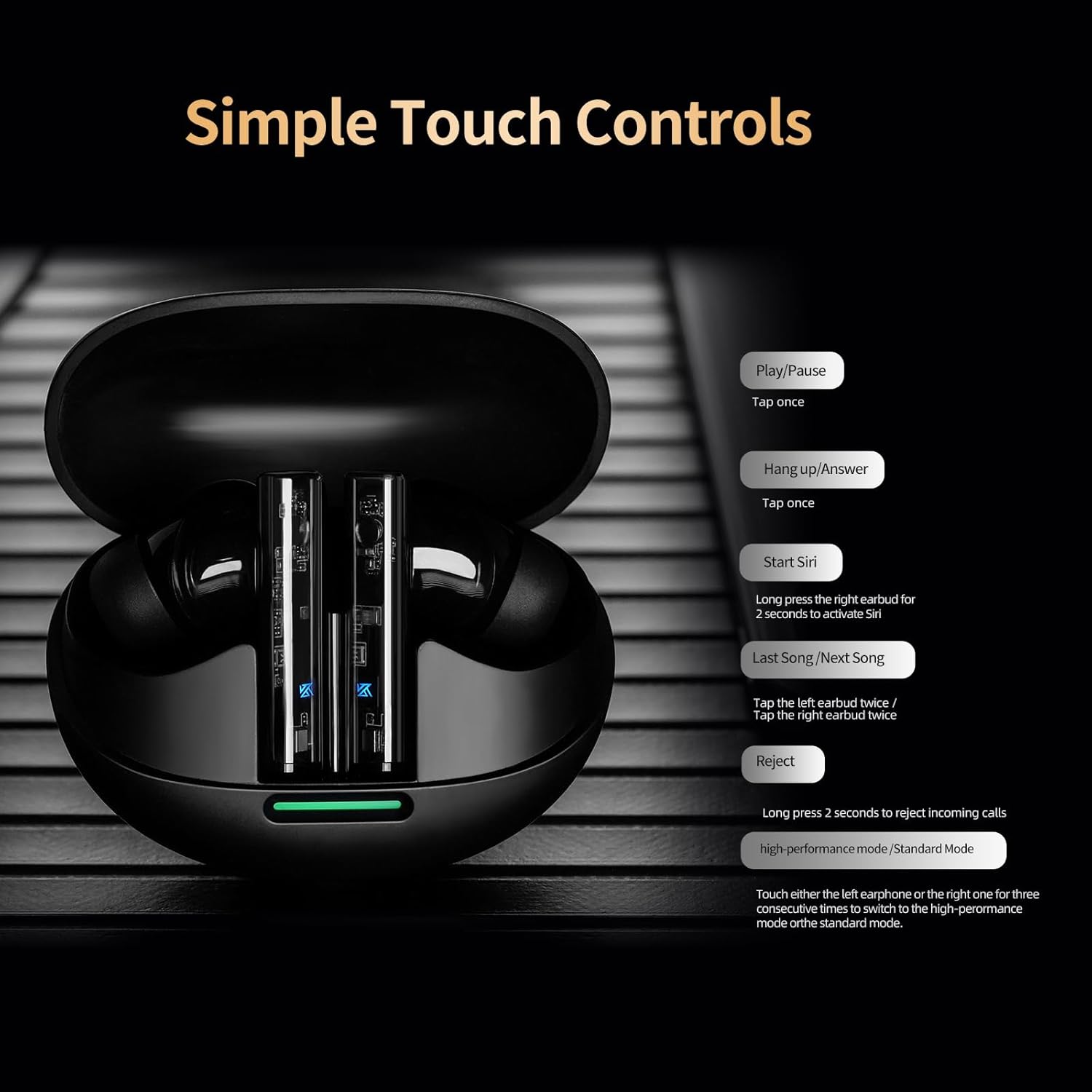
Image: A visual guide to the simple touch controls on the KZ Sora earbuds, detailing actions for music playback, calls, and voice assistant activation.
5.2 Standard and High-Performance Modes
The KZ Sora supports both SBC and AAC transmission protocols, allowing you to switch between standard and high-performance modes.
- Hali ya Kawaida: Ideal for music listening, delivering powerful resolution, a grand soundstage, and balanced frequencies.
- Hali ya Utendaji wa Juu: Reduces latency to as low as 55ms, perfect for gaming to pinpoint sounds and enhance the experience.

Image: Comparison illustrating the KZ Sora's Standard Mode for music listening and High-Performance Mode for gaming, highlighting the low latency.
5.3 Kuvaa vifaa vya masikioni
Choose the ear tips that provide the most comfortable and secure fit. A proper seal is crucial for optimal sound quality and bass response. Insert the earbuds gently into your ear canal and twist slightly to secure them.
6. Matengenezo
Proper maintenance ensures the longevity and performance of your KZ Sora earbuds.
- Kusafisha: Safisha vifaa vya sauti vya masikioni mara kwa mara, hasa ncha za masikio na viambatisho vya kuchaji, kwa kitambaa laini, kikavu, kisicho na pamba. Usitumie kemikali kali au vifaa vya abrasive.
- Hifadhi: Wakati hazitumiki, weka vifaa vya sauti vya masikioni kwenye kisanduku chao cha kuchaji ili kuvilinda kutokana na vumbi, uchafu, na uharibifu wa kimwili.
- Upinzani wa Maji: The earbuds are sweat-resistant and water-resistant. However, they are not waterproof. Avoid submerging them in water or exposing them to heavy rain. Dry them thoroughly if they get wet.
- Utunzaji wa Betri: Ili kuhifadhi muda wa matumizi ya betri, epuka kutoa vipokea sauti vya masikioni na kisanduku kikamilifu mara kwa mara. Vichaji mara kwa mara, hata kama havitumiki kila wakati.
7. Utatuzi wa shida
If you encounter any issues with your KZ Sora earbuds, refer to the following common solutions:
- Vifaa vya masikioni havioani: Place both earbuds back into the charging case, close the lid, wait a few seconds, then open the lid and take them out again. They should automatically connect.
- Vifaa vya masikioni haviunganishi na kifaa: Ensure Bluetooth is enabled on your device and the earbuds are in pairing mode. Forget "KZ Sora" from your device's Bluetooth list and try pairing again.
- Hakuna sauti kutoka kwa sikio moja: Check if both earbuds are charged. Try resetting them by placing them in the case and then taking them out.
- Masuala ya malipo: Ensure the charging cable is securely connected and the charging contacts on both the earbuds and case are clean and free of debris. Try a different USB power source or cable.
- Sauti ya chini au ubora duni wa sauti: Ensure ear tips are properly sealed in your ear canal. Clean any earwax or debris from the earbud nozzles.
If the issue persists, please contact KZ customer support for further assistance.
8. Vipimo
Detailed technical specifications for the KZ Sora True Wireless Earbuds:
| Kipengele | Vipimo |
|---|---|
| Jina la Mfano | KZ Sora |
| Teknolojia ya Uunganisho | Isiyo na waya (Bluetooth 5.4) |
| Msururu wa Bluetooth | Futi 50 |
| Aina ya Kiendesha Sauti | Dereva Mwenye Nguvu |
| Ukubwa wa Dereva wa Sauti | Milimita 10 |
| Majibu ya Mara kwa mara | 20 Hz - 20 KHz |
| Unyeti | 105 dB |
| Impedans | 22 ohm |
| Udhibiti wa Kelele | Kutengwa kwa Sauti |
| Njia ya Kudhibiti | Gusa |
| Uwezo wa Betri ya Kipochi | Milioni 300amp Saa |
| Wastani wa Maisha ya Betri ya Kipochi | Saa 25 (pamoja na kisanduku) |
| Muda wa Kuchaji Betri ya Kipochi | Saa 1.5 |
| Ucheleweshaji wa Sauti | 55 Milliseconds (High-Performance Mode) |
| Kiwango cha Upinzani wa Maji | Haiwezi Kuingia Majini (Haiwezi Kuingia Jasho) |
| Nyenzo | Acrylonitrile Butadiene Styrene (ABS) |
| Uzito wa Kipengee | 3.52 wakia |

Image: A graph illustrating the excellent acoustic curve of the KZ Sora earbuds, demonstrating their sound performance across frequencies.
9. Udhamini na Msaada
KZ products are manufactured to high-quality standards. For warranty information and customer support, please refer to the warranty card included in your product packaging or visit the official KZ webtovuti. Weka uthibitisho wako wa ununuzi kwa madai yoyote ya udhamini.
For technical assistance or inquiries, please contact KZ customer service through their official channels.