1. Utangulizi
Thank you for choosing the KTC H24T27 24-inch QHD 100Hz IPS Monitor. This monitor is designed to provide a superior visual experience for both work and entertainment. Featuring a 2K QHD (2560x1440p) resolution, a smooth 100Hz refresh rate, and an IPS panel, it delivers crisp images and vibrant colors. This manual provides essential information for setting up, operating, maintaining, and troubleshooting your monitor.

Kielelezo 1.1: Mbele view of the KTC H24T27 24-inch QHD 100Hz IPS Monitor.
2. Taarifa za Usalama
Please read and follow these safety instructions carefully to ensure safe operation and prolong the life of your monitor:
- Usiweke kidhibiti kwenye mvua, unyevu, au halijoto kali.
- Hakikisha uingizaji hewa sahihi karibu na kufuatilia.
- Tumia tu adapta ya nguvu iliyotolewa na kufuatilia.
- Epuka kuweka vitu vizito kwenye kamba ya nguvu.
- Usijaribu kutenganisha au kutengeneza kifuatiliaji mwenyewe. Waelekeze wafanyakazi wote waliohitimu huduma.
- Safisha skrini kwa kitambaa laini, kisicho na ute. Epuka kutumia kemikali kali.
3. Kuweka
3.1 Yaliyomo kwenye Kifurushi
Thibitisha kuwa vipengee vyote vipo kwenye kifurushi:
- KTC H24T27 Monitor
- Kufuatilia Stand (Msingi na Shingo)
- Adapta ya Nguvu
- Kebo ya HDMI
- Mwongozo wa Mtumiaji

Figure 3.1: Monitor dimensions and included accessories.
3.2 Kukusanya Stendi
- Ondoa kwa uangalifu kichungi kutoka kwa kifurushi chake, ukihifadhi skrini.
- Ambatanisha shingo ya kusimama kwenye jopo la kufuatilia.
- Funga msingi wa kusimama kwenye shingo ya kusimama kwa kutumia skrubu zilizotolewa.
- Weka ufuatiliaji uliokusanyika kwenye uso thabiti, wa gorofa.
3.3 Uwekaji wa VESA
The monitor supports VESA mounting (100x100mm) for wall mounts or monitor arms. Remove the stand before attaching a VESA-compatible mount.
3.4 Kuunganisha Kifuatiliaji Chako
Connect your monitor to your computer or other devices using the available ports:
- HDMI2.0: Kwa video na sauti ya ubora wa juu.
- DisplayPort (DP 1.4): For high-resolution video and audio, supporting 2560x1440@100Hz.
- USB 2.0: For firmware updates only.
- Simu ya kwanza: Kwa utoaji wa sauti kwa vipokea sauti vya masikioni au spika za nje.
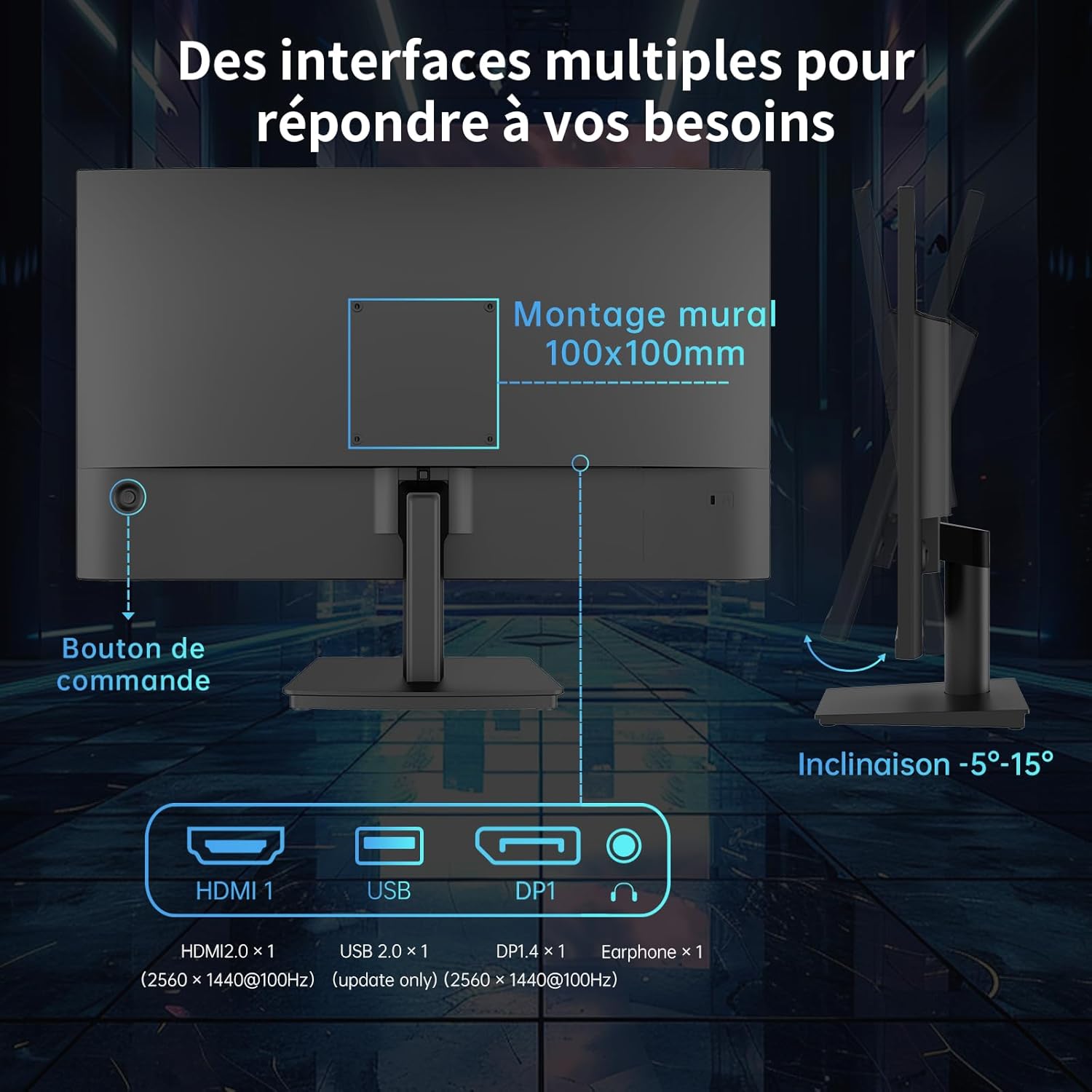
Figure 3.2: Available ports and VESA mounting points on the monitor.
Uunganisho wa Nguvu 3.5
Connect the power adapter to the monitor's power input, then plug the adapter into a power outlet.
4. Maagizo ya Uendeshaji
4.1 Washa/Zima
Press the control button located on the rear of the monitor to power it on or off.
4.2 Menyu ya Onyesho la Skrini (OSD).
The OSD menu allows you to adjust various monitor settings. Use the control button to navigate and select options.
- Press the control button: To open the OSD menu.
- Move the control button up/down/left/right: Ili kupitia chaguzi za menyu.
- Press the control button again: To confirm a selection or enter a sub-menu.
4.3 Mipangilio ya Maonyesho
Adjust image quality and display modes:
- Mwangaza/Utofautishaji: Rekebisha mwangaza wa jumla na utofautishaji wa onyesho.
- Joto la Rangi: Select from preset modes (e.g., Warm, Cool, User) or customize RGB values.
- Njia za Picha: Optimize display settings for different content types (e.g., Standard, Game, FPS, RTS, Movie, Reading).

Kielelezo 4.1: Kutample of different picture modes for optimized viewing.
4.4 Refresh Rate and Adaptive Sync
The monitor supports a 100Hz refresh rate for smoother visuals. It also features FreeSync and G-Sync compatibility to eliminate screen tearing and stuttering during gaming.
- Ensure your graphics card supports FreeSync/G-Sync.
- Enable FreeSync/G-Sync in your graphics card control panel and in the monitor's OSD menu.

Figure 4.2: Visual representation of FreeSync and G-Sync in action.
4.5 Teknolojia ya Utunzaji wa Macho
The monitor incorporates anti-blue light technology to reduce eye strain during prolonged use. This feature can be enabled or disabled via the OSD menu.

Figure 4.3: Comparison of display with and without low blue light technology enabled.
5. Matengenezo
5.1 Kusafisha Monitor
Ili kusafisha kichungi chako, fuata hatua hizi:
- Zima kifuatiliaji na uchomoe kebo ya umeme.
- Futa skrini kwa upole kwa kitambaa laini kisicho na pamba. Kwa alama za ukaidi, nyepesi dampjw.org sw kitambaa chenye maji au kisafishaji skrini kisicho na ukali.
- Futa ufuatiliaji casing na kitambaa laini, kavu.
- Do not spray cleaning liquids directly onto the screen or casing.
6. Utatuzi wa shida
If you encounter issues with your monitor, refer to the following troubleshooting guide:
| Tatizo | Sababu inayowezekana | Suluhisho |
|---|---|---|
| Hakuna nguvu | Cable ya nguvu haijaunganishwa; Njia ya umeme ina hitilafu | Hakikisha kebo ya umeme imeunganishwa vizuri; Jaribu soketi tofauti ya umeme. |
| Hakuna ishara | Kebo ya video haijaunganishwa; Chanzo cha ingizo kisicho sahihi kimechaguliwa | Check video cable connections (HDMI/DP); Select correct input source in OSD. |
| Picha nyeusi/mwangavu mno | Brightness/Contrast settings incorrect | Adjust Brightness and Contrast in the OSD menu. |
| Rangi si sahihi | Color settings incorrect; Faulty video cable | Adjust Color Temperature or RGB settings in OSD; Try a different video cable. |
| Screen tearing/stuttering | FreeSync/G-Sync not enabled or supported | Ensure FreeSync/G-Sync is enabled on both monitor and graphics card. |
7. Vipimo
Detailed technical specifications for the KTC H24T27 monitor:
| Kipengele | Vipimo |
|---|---|
| Chapa | CTC |
| Nambari ya Mfano | H24T27 (24 IPS QHD 100Hz) |
| Ukubwa wa skrini | Inchi 24 |
| Aina ya Paneli | IPS |
| Azimio | QHD 2K (2560 x 1440p) |
| Kiwango cha Kuonyesha upya | 100 Hz |
| Muda wa Majibu | 1 millisecond (MPRT, typical) |
| Uwiano wa Tofauti | 1300:1 |
| Rangi ya Gamut | 122% sRGB (99% sRGB calibrated) |
| ViewAngle | 178° (H/V) |
| Vipengele Maalum | Anti-blue light, FreeSync, G-Sync Compatible, Frameless Design, VESA Mount (100x100mm) |
| Muunganisho | 1x HDMI 2.0, 1x DisplayPort 1.4, 1x USB 2.0 (update only), 1x Earphone out |
| Matumizi ya Nguvu | 36 Watt (typical) |
| Ukadiriaji wa Ufanisi wa Nishati | F |
8. Udhamini na Msaada
KTC monitors come with a standard manufacturer's warranty. Please refer to the warranty card included in your package or visit the official KTC webtovuti kwa sheria na masharti ya udhamini wa kina.
For technical support, product inquiries, or service requests, please contact KTC customer support through the contact information provided on the official KTC website or your retailer's support channels.


