1. Utangulizi na Zaidiview
This DROK Buck-Boost Converter is a versatile DC-DC voltage regulator module designed to provide stable power in various applications. It features an adjustable output voltage from 0.5V to 36V and an adjustable output current from 0A to 4.5A, with a maximum output power of 40W. The module includes an LCD display for real-time monitoring of voltage and current, a 5V fan port for enhanced cooling, and multiple protection features to ensure safe and reliable operation. This manual provides essential information for the proper setup, operation, and maintenance of your converter module.

Mbele view of the DROK Buck-Boost Converter module, highlighting the LCD screen which displays output voltage, current, and power. Control buttons for M/T, V-SET, I-SET, and OK/↓ are visible on the left, and a rotary encoder with a green ON/OFF button is on the right.
2. Bidhaa za Bidhaa
- Wide Input/Output Range: Ingizo voltage DC 6-36V, output voltage DC 0.5-36V.
- Pato Linaloweza Kurekebishwa: Output current 0-4.5A, output power up to 40W.
- Onyesho la LCD: Real-time display of input/output voltage, current, power, capacity, energy, time, and temperature.
- Enhanced Cooling: Includes a 5V fan port for optional fan installation (30mm fan compatible).
- Multi-functional Interface: Built-in buzzer for key operation feedback and warning alerts.
- Multiple Protection Features: Anti-reverse input protection, backflow protection, low input voltage protection (LVP), overvoltage protection (OVP), overcurrent protection (OCP), overtemperature protection (OTP), and overpower protection (OPP).
- Kazi ya Kumbukumbu: Stores up to 11 groups of settings.
3. Vipimo

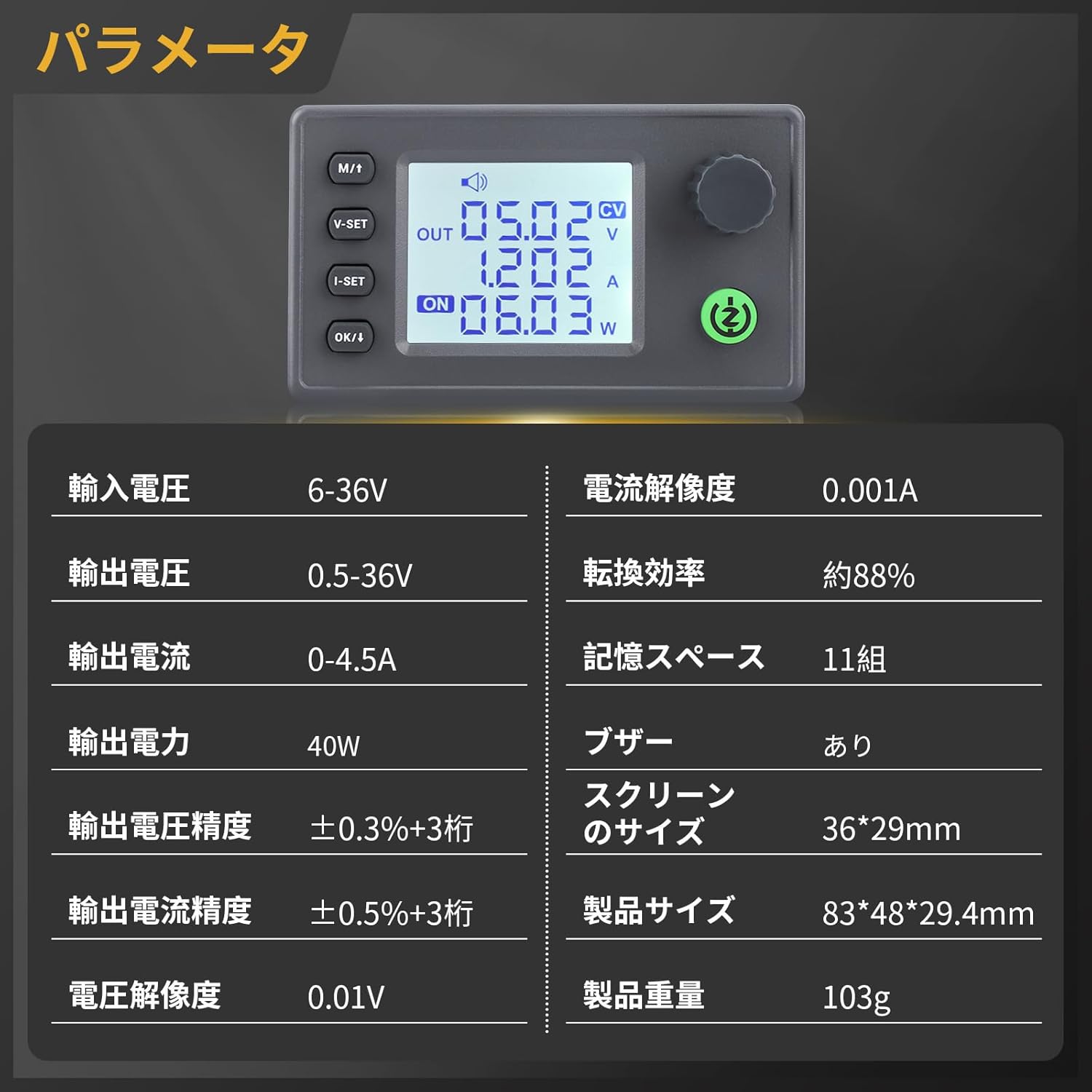
A table detailing the technical parameters of the converter, including input/output ranges, accuracy, and physical dimensions.
| Kigezo | Thamani |
|---|---|
| Uingizaji Voltage Mbalimbali | DC 6-36V |
| Pato Voltage Mbalimbali | DC 0.5-36V |
| Safu ya Sasa ya Pato | 0-4.5A |
| Nguvu ya Pato | 40W (Upeo wa juu) |
| Voltage Usahihi wa Onyesho | ± 0.3% + tarakimu 3 |
| Current Display Accuracy | ± 0.5% + tarakimu 3 |
| Voltage Azimio | 0.01V |
| Azimio la Sasa | 0.001A |
| Ufanisi wa Uongofu | Takriban. 88% |
| Uhifadhi wa Kumbukumbu | 11 Vikundi |
| Buzzer | Imejengwa ndani |
| Ukubwa wa skrini | 36 x 29 mm |
| Vipimo vya Bidhaa (L x W x H) | 83 x 48 x 29.4 mm |
| Uzito wa Bidhaa | 103 g |
| Mtengenezaji | DROKING |
| Nambari ya Sehemu ya Kipengee | 200735_JPN |
4. Safety Information and Protection Features
The DROK Buck-Boost Converter is equipped with multiple protection mechanisms to ensure safe operation. Understanding these features is crucial for preventing damage to the module and connected devices.
- Anti-Reverse Input Protection: Prevents damage if input polarity is accidentally reversed.
- Backflow Protection: Prevents current from flowing back into the input source from the output.
- Ingizo la Chini Voltage Protection (LVP): Automatically cuts off output if the input voltage drops below a set threshold, protecting the input power source.
- Kupindukiatage Ulinzi (OVP): Shuts down output if the output voltage exceeds a preset limit.
- Ulinzi wa Kupindukia (OCP): Disables output if the output current surpasses a configured maximum.
- Overtemperature Protection (OTP): Activates if the module's internal temperature becomes too high, preventing thermal damage.
- Overpower Protection (OPP): Limits or shuts down output if the total output power exceeds the specified maximum.
Always ensure proper wiring and adhere to the specified voltage and current limits to maintain safety and optimal performance.
This image demonstrates various display modes of the LCD screen and highlights the multiple protection features, including Anti-reverse, Undervoltage, Overcurrent, Overtemperature, Backflow, Overvoltage, and Overpower protection.
5. Kuweka na Kuweka
Follow these steps for proper installation of the converter module:
- Wiring: Connect your DC input power source to the 'IN' terminals and your load to the 'OUT' terminals. Ensure correct polarity (positive to positive, negative to negative) to avoid issues, although the module has anti-reverse protection. The plug-in terminals facilitate easy and secure connections.
- Kupachika: The module has mounting holes. Refer to the dimensions diagram for precise placement.
- Optional Fan Installation: For applications requiring higher power or extended operation, a 5V cooling fan (30mm size, 5V/150mA max) can be installed using the dedicated 5V fan port. The fan can be secured with M3.2*19 screws.
- Washa: Once wired, apply power to the input terminals. The LCD screen should illuminate.

This image illustrates the physical dimensions of the converter module and provides various views, including a detailed diagram of the mounting hole dimensions.
Kina view of the converter's internal components, including the built-in buzzer, the 5V fan port, and the convenient plug-in terminals for easy installation and replacement of wiring.
6. Uendeshaji
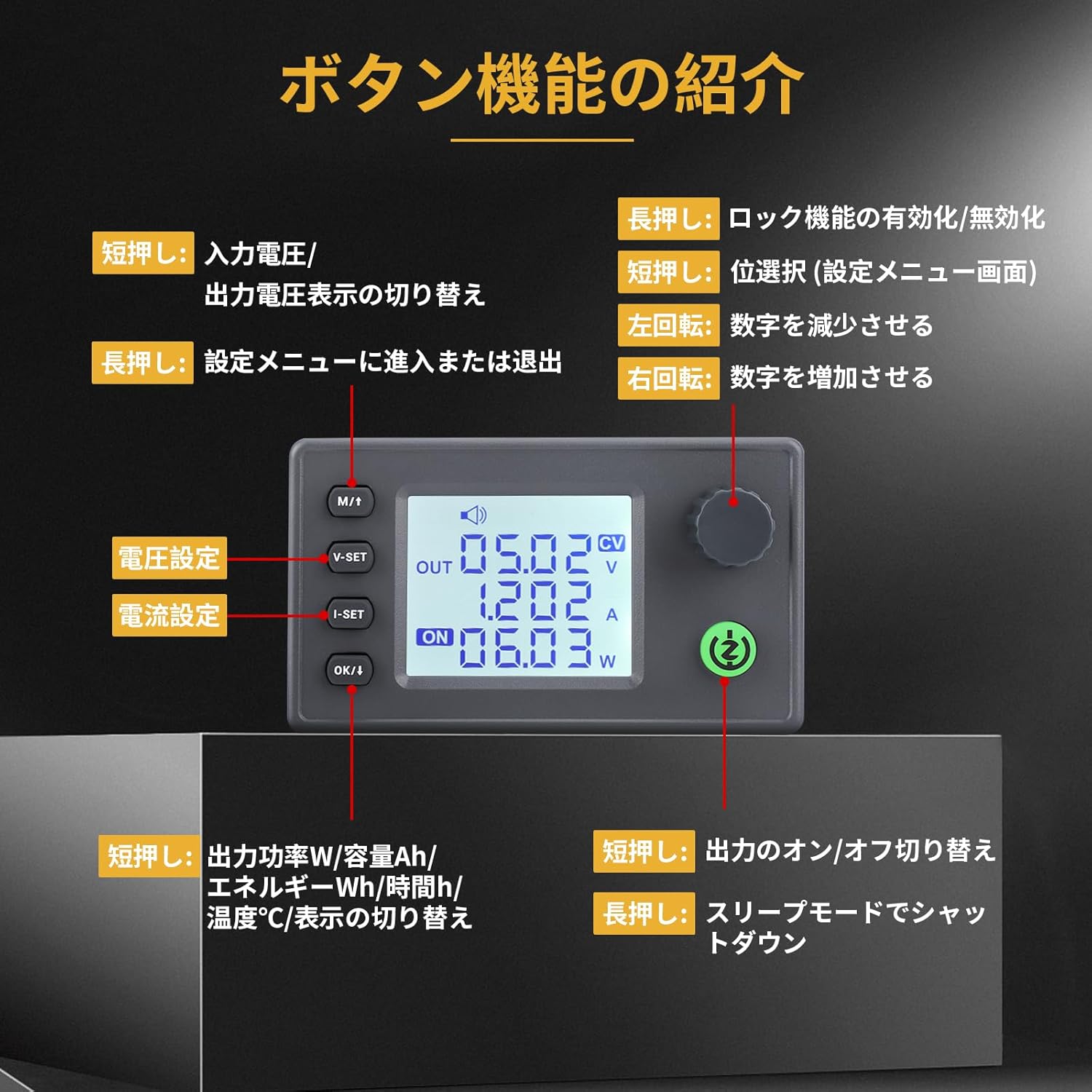
The module features an intuitive interface with buttons and a rotary encoder for control.
6.1 Kazi za Kitufe

An illustration of the control buttons and their functions on the DROK Buck-Boost Converter.
- M/↑ Button:
- Short Press: Toggle between input voltage na pato juzuutage kuonyesha.
- Long Press: Enable/disable the lock function for settings.
- V-SET Button: Inatumika kwa kuweka sauti ya patotage.
- I-SET Button: Used for setting the output current limit.
- OK/↓ Button:
- Short Press: Cycle through display modes for output power (W), capacity (Ah), energy (Wh), time (h), and temperature (°C).
- Long Press: Enter or exit the advanced setting menu.
- Kisimbaji cha Rotary:
- Turn Left: Decrease the selected value.
- Turn Right: Increase the selected value.
- Green ON/OFF Button:
- Short Press: Turn the output ON or OFF.
- Long Press: Enter sleep mode (shutdown).
6.2 Operesheni ya Msingi
- Weka Volu ya Patotage: Bonyeza kwa V-SET button. Use the rotary encoder to adjust the desired output voltage. Bonyeza V-SET tena au OK/↓ kuthibitisha.
- Set Output Current Limit: Bonyeza kwa I-SET button. Use the rotary encoder to adjust the maximum output current. Press I-SET tena au OK/↓ kuthibitisha.
- Turn Output ON/OFF: Bonyeza kwa muda mfupi Kijani IMEWASHWA/ZIMWA button to enable or disable the output. The display will show 'ON' or 'OFF' accordingly.
- Vigezo vya Kufuatilia: Bonyeza kwa muda mfupi OK/↓ button to cycle through various output parameters displayed on the LCD, such as power (W), accumulated capacity (Ah), accumulated energy (Wh), operation time (h), and internal temperature (°C).

This image illustrates the various display modes of the LCD screen, showing input/output voltage, current, power, and other parameters, along with Constant Voltage (CV) and Constant Current (CC) indicators.
7. Configuration Menu (Advanced Settings)
To access the advanced configuration menu, long press the OK/↓ kitufe. Tumia V-SET button to navigate through the different setting parameters (cd00 to cd10 or other indicators). Use the rotary encoder to adjust values. Short press OK/↓ to confirm a setting or move to the next digit/parameter.
- OUP (Over Voltage Ulinzi): Sets the maximum allowable output voltage. Ikiwa pato voltage exceeds this value, the output will be shut off. Default is 37V. Ensure this is set higher than your desired operating output voltage.
- OCP (Juu ya Ulinzi wa Sasa): Sets the maximum allowable output current. If the output current exceeds this value, the output will be shut off.
- LUP (Low Input Voltage Ulinzi): Sets the minimum allowable input voltage. Ikiwa pembejeo voltage drops below this value, the output will be shut off to protect the input power source.
- OPP (Ulinzi wa Nguvu Zaidi): Sets the maximum allowable output power in Watts. If the output power exceeds this value, the output will be shut off.
- OAH (Output Amp-Hour Limit): Sets a limit for accumulated output Amp-hours. If the total Ah exceeds this value, the output will be shut off. To disable, set to '---'.
- OPH (Output Watt-Hour Limit): Sets a limit for accumulated output Watt-hours. If the total Wh exceeds this value, the output will be shut off.
- OHP (Output Time Limit): Sets a maximum operation time for the output. If the time exceeds this value, the output will be shut off.
- OTP (Ulinzi wa Juu ya Joto): Sets the maximum internal operating temperature. If the module's temperature exceeds this value, the output will be shut off.
- PON (Power On Output State): Configures whether the output is ON or OFF automatically when input power is applied to the module.
- ADD (Address): This parameter is typically for communication functions not present in this model (zk-sk40/zk-sk90). Factory default is 001.
- Mwangaza wa Mwangaza Nyuma: Adjusts the brightness of the LCD screen backlight.
- SLP (Screen Sleep Time): Sets the duration (in seconds, max 60) after which the screen display will turn off if no activity is detected. To disable screen sleep, short press the Kijani IMEWASHWA/ZIMWA button until '---' is displayed.
- NYUKI: Toggles the buzzer sound ON or OFF for key presses and warnings.
- Zero (Current Calibration): Used for calibrating the current reading under no-load conditions.
- FRD (Factory Reset): Resets all settings to factory defaults. To perform a factory reset, long press the Kijani IMEWASHWA/ZIMWA button until 'FRD' flashes and then stops. Note that some specific settings, like SLP, might not fully revert to factory defaults.
- CALV (Voltage Calibration): Allows for calibration of the voltage kipimo.
- CALI (Current Calibration): Allows for calibration of the current measurement.
8. Matengenezo
To ensure the longevity and reliable operation of your DROK Buck-Boost Converter, follow these maintenance guidelines:
- Weka Safi: Regularly clean the module with a soft, dry cloth to prevent dust accumulation, especially on the heatsinks and display.
- Hakikisha Uingizaji hewa: Operate the module in a well-ventilated area. If a fan is installed, ensure it is free from obstructions.
- Epuka unyevu: Protect the module from moisture, humidity, and corrosive environments.
- Kagua Viunganisho: Periodically check all wiring connections to ensure they are secure and free from damage.
9. Utatuzi wa shida
If you encounter issues with your converter module, consider the following:
- Hakuna Onyesho/Hakuna Nguvu:
- Check input power source and connections. Ensure input voltage is within the 6-36V range.
- Verify correct input polarity.
- Output Not Turning ON:
- Bonyeza kwa muda mfupi Kijani IMEWASHWA/ZIMWA button to ensure the output is enabled.
- Check if any protection features (OVP, OCP, LVP, OPP, OTP) are active. The display may show a warning. Adjust settings or reduce load if necessary.
- Hakikisha ujazo wa uingizajitage meets the LUP setting.
- Pato Voltage/Current Incorrect:
- Verify the V-SET and I-SET values are correctly configured.
- Consider performing voltage (CALV) and current (CALI) calibration if readings appear inaccurate.
- Buzzer Sounds Continuously:
- This indicates a warning or protection activation. Check the display for error messages related to OVP, OCP, LVP, OPP, OTP, OAH, OPH, or OHP.
- Address the underlying cause (e.g., reduce load, increase input voltage, check temperature).
- Screen Goes Blank:
- Check the SLP (Screen Sleep Time) setting in the configuration menu. Disable it if you prefer the screen to remain on.
10. Udhamini na Msaada
This product is manufactured by DROKING. For warranty information, technical support, or service inquiries, please refer to the documentation provided at the time of purchase or contact your retailer. Keep your purchase receipt as proof of purchase.


