1. Utangulizi
This manual provides essential information for the proper setup, operation, and maintenance of your NUU N30 Cell Phone and NUU Buds A Earbuds. Please read this guide thoroughly before using your devices to ensure optimal performance and longevity. Keep this manual for future reference.
2. Yaliyomo kwenye Kifurushi
Thibitisha kuwa bidhaa zote zipo kwenye kifurushi chako cha bidhaa:
- NUU N30 Cell Phone
- NUU Buds A Earbuds with Charging Case
- Kebo ya Kuchaji ya USB-C
- Zana ya Kuzuia SIM
- Mwongozo wa Kuanza Haraka
- Habari za Usalama na Udhamini

Kielelezo cha 2.1: The NUU N30 Cell Phone and Buds A Earbuds, as included in the bundle. The phone is purple with a large display, and the white earbuds are shown in their charging case.
3. Bidhaa Imeishaview
3.1 NUU N30 Cell Phone
The NUU N30 is an unlocked Android smartphone designed for reliable communication and multimedia consumption.
- Onyesha: 6.7-inch 1600 x 720 display with a 90Hz refresh rate for smooth visuals.
- Mfumo wa Kamera: Equipped with a 50MP Main AF Camera, 8MP Front Selfie Camera, and a 2MP Macro Camera, alongside a Bokeh Camera (VGA) and LED Flash.
- Utendaji: Powered by a MediaTek Helio G81 processor, featuring 6GB RAM and 128GB internal storage.
- Betri: A 5000 mAh battery supports 18W Quick Charge for extended usage.
- Muunganisho: Supports 4G LTE and Bluetooth. Includes a 3.5mm audio jack.
- Usalama: Features a side-mounted Fingerprint ID sensor for secure access.
- Utangamano wa Mtoa huduma: Compatible with T-Mobile, Mint Mobile, Metro, Q Link Wireless, Google Fi, Hello Mobile, Tello Mobile, Lycamobile, Patriot Mobile, Republic Wireless, Simple Mobile, StandUp Wireless, SpeedTalk, and Telcel America. Kumbuka: This device is not compatible with Verizon, AT&T, or Cricket Wireless.
- Udhibiti wa Wazazi: Supports various parental control applications such as Google Family Link, Bark, Qustodio, and Norton Family.

Kielelezo cha 3.1: Nyuma view of the NUU N30 phone highlighting the camera module. Specifications indicate a 50MP Main AF Camera, 2MP Macro Camera, VGA Bokeh Camera, LED Flash, and an 8MP Front Selfie Camera.
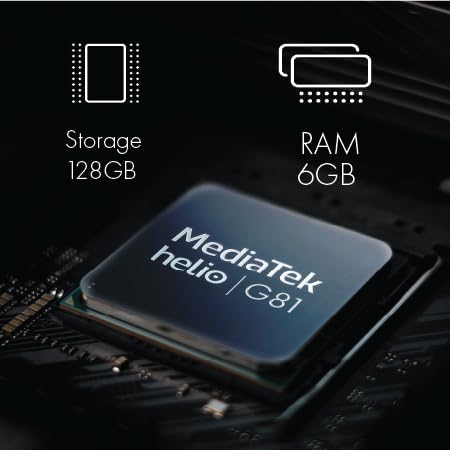
Kielelezo cha 3.2: Ya ndani view of the NUU N30 phone's components, showing the MediaTek Helio G81 processor, 128GB storage, and 6GB RAM.

Kielelezo cha 3.3: The NUU N30 phone with text indicating a 5000 mAh battery and 18W Quick Charge capability.

Kielelezo cha 3.4: A close-up of the NUU N30 phone showing the triple card slot for SIM cards and microSD, and the 3.5mm audio jack.

Kielelezo cha 3.5: A visual representation of the fingerprint ID sensor located on the side of the NUU N30 phone.

Kielelezo cha 3.6: A chart illustrating the U.S. carrier compatibility for the NUU N30 phone, showing supported carriers like T-Mobile, Mint Mobile, and Metro, and unsupported carriers like Verizon, AT&T, and Cricket.
3.2 NUU Buds A Earbuds
The NUU Buds A are wireless earbuds designed for clear audio and communication.
- Teknolojia ya Sauti: Features Feedforward Active Noise Cancellation (ANC) and 10mm neodymium magnetic speaker drivers for efficient environmental noise filtering.
- Ubora wa Simu: Equipped with ENC (Environmental Noise Cancellation) Dual Mic for clear voice calls.
- Maisha ya Betri: Provides up to 8 hours of playtime per charge, with the charging case extending total playtime to up to 30 hours.
- Inachaji: The charging case is powered via USB-C.

Kielelezo cha 3.7: The NUU Buds A earbuds in their charging case. The case contributes to the overall battery life, providing multiple charges for the earbuds.

Kielelezo cha 3.8: An image depicting a person wearing the NUU Buds A earbuds, illustrating the ENC Dual Mic Noise Reduction feature for improved call clarity.
4. Maagizo ya Kuweka
4.1 NUU N30 Cell Phone Setup
- Insert SIM Card(s) and MicroSD Card: Locate the triple card slot on the side of the phone. Use the provided SIM ejector tool to open the tray. Carefully place your Nano-SIM card(s) and an optional microSD card (for expanded storage) into the designated slots. Ensure the cards are correctly oriented before reinserting the tray.
- Chaji Simu: Connect the USB-C charging cable to the phone's charging port and plug the other end into a compatible power adapter. Allow the phone to charge fully before initial use.
- Washa: Press and hold the power button located on the side of the phone until the NUU logo appears.
- Mchawi wa Kuanzisha Awali: Follow the on-screen instructions to select your language, connect to a Wi-Fi network, sign in to your Google account, and set up basic security features.
- Set Up Fingerprint ID: During the initial setup or later via Settings > Security, register your fingerprint(s) for quick and secure unlocking.
4.2 NUU Buds A Earbuds Setup
- Chaji Vipuli vya Masikioni na Kisanduku: Place the earbuds into the charging case. Connect the USB-C cable to the charging case and a power source. The indicator light on the case will show charging status. Ensure both the earbuds and case are fully charged before first use.
- Pair with NUU N30 Phone (or other Bluetooth device):
- Fungua kesi ya malipo. Vifaa vya masikioni vitaingia kiotomatiki modi ya kuoanisha.
- On your NUU N30 phone, go to Settings > Connected devices > Bluetooth.
- Hakikisha Bluetooth imewashwa.
- Select "NUU Buds A" from the list of available devices to connect.
- Once connected, a confirmation message will appear on your phone.
5. Maagizo ya Uendeshaji
5.1 NUU N30 Cell Phone Operation
- Urambazaji Msingi: Use touch gestures to navigate the Android interface. Swipe up from the bottom for the app drawer, swipe down from the top for notifications and quick settings.
- Kupiga simu na kutuma ujumbe: Use the Phone app to dial numbers or select contacts. Use the Messages app for SMS/MMS communication.
- Matumizi ya Kamera: Open the Camera app. Tap to focus, pinch to zoom. Select between Main, Selfie, and Macro modes. Tap the shutter button to capture photos or videos.
- Parental Control Applications: To utilize parental control features, download and install a compatible application (e.g., Google Family Link, Bark, Qustodio, Norton Family) from the Google Play Store and follow the app's specific setup instructions.
5.2 NUU Buds A Earbuds Operation
- Kuvaa vifaa vya masikioni: Insert the earbuds gently into your ears, ensuring a comfortable and secure fit for optimal sound and ANC performance.
- Uchezaji wa Muziki: Once paired, audio from your phone will automatically play through the earbuds. Use the touch controls on the earbuds (refer to the Quick Start Guide for specific gestures) to play/pause, skip tracks, or adjust volume.
- Usimamizi wa Simu: During an incoming call, use the touch controls to answer or end the call. The ENC Dual Mic system will enhance your voice clarity during conversations.
- Kughairi Kelele Inayotumika (ANC): Activate or deactivate ANC via the touch controls on the earbuds to filter out environmental noise.
6. Matengenezo
6.1 NUU N30 Cell Phone Maintenance
- Kusafisha: Tumia kitambaa laini kisicho na pamba kusafisha skrini na mwili wa simu. Epuka vifaa vya abrasive au kemikali kali.
- Utunzaji wa Betri: To prolong battery life, avoid extreme temperatures. Do not leave the phone fully charged or fully discharged for extended periods.
- Masasisho ya Programu: Angalia na usakinishe masasisho ya mfumo mara kwa mara ili kuhakikisha simu yako ina vipengele vya hivi karibuni na viraka vya usalama. Nenda kwenye Mipangilio > Mfumo > Sasisho la mfumo.
6.2 NUU Buds A Earbuds Maintenance
- Kusafisha: Gently wipe the earbuds and charging case with a dry, soft cloth. Remove any earwax buildup from the earbud tips using a small brush or cotton swab.
- Utunzaji wa Kesi ya Kuchaji: Weka anwani za kuchaji kwenye vifaa vya sauti vya masikioni na kipochi katika hali ya usafi na kavu ili kuhakikisha inachaji vizuri.
- Hifadhi: Wakati haitumiki, hifadhi vifaa vya sauti vya masikioni kwenye kipochi chao cha kuchaji ili kuvilinda na kuendelea kuwa na chaji.
7. Utatuzi wa shida
7.1 NUU N30 Cell Phone Troubleshooting
- Phone will not power on: Hakikisha betri imechajiwa. Unganisha simu kwenye chaja kwa angalau dakika 15, kisha jaribu kuwasha tena.
- Hakuna mawimbi ya mtandao: Check if your SIM card is correctly inserted. Verify that your carrier is supported by the NUU N30 (refer to Section 3.1). Ensure airplane mode is off.
- Kamera haifanyi kazi: Restart the phone. Clear the cache and data of the Camera app via Settings > Apps > Camera > Storage.
- Kitambua alama za vidole hakijibu: Hakikisha kidole chako ni safi na kikavu. Sajili tena alama yako ya kidole ikiwa tatizo litaendelea.
7.2 NUU Buds A Earbuds Troubleshooting
- Vifaa vya sauti vya masikioni havioanishi: Ensure Bluetooth is enabled on your phone. Place the earbuds back in the case, close it, then open it again to re-enter pairing mode. Forget the device on your phone's Bluetooth settings and try pairing again.
- Hakuna sauti kutoka kwa vifaa vya sauti vya masikioni: Check the volume level on both your phone and the earbuds. Ensure the earbuds are charged and properly connected.
- Masuala ya malipo: Clean the charging contacts on both the earbuds and the case. Ensure the USB-C cable and power adapter are functioning correctly.
8. Vipimo
8.1 NUU N30 Cell Phone Specifications
| Kipengele | Vipimo |
|---|---|
| Nambari ya Mfano | NUU N30 |
| Mfumo wa Uendeshaji | Android |
| Onyesho | Inchi 6.7, Azimio la 1600 x 720, Kiwango cha Kuburudisha cha 90Hz |
| Kichakataji | MediaTek Helio G81 |
| RAM | GB 6 |
| Hifadhi ya Ndani | GB 128 |
| Kamera kuu | 50 Mbunge |
| Kamera ya Selfie | 8 Mbunge |
| Kamera ya Macro | 2 Mbunge |
| Uwezo wa Betri | 5000 mAh (18W Quick Charge) |
| Muunganisho | 4G LTE, Bluetooth |
| Jack ya sauti | 3.5 mm |
| Usalama | Kitambulisho cha alama ya vidole |
8.2 NUU Buds A Earbuds Specifications
| Kipengele | Vipimo |
|---|---|
| Teknolojia ya Sauti | Feedforward Active Noise Cancellation (ANC) |
| Madereva wa Spika | 10mm Neodymium Magnetic |
| Maikrofoni | ENC Dual Mic (Voice Call Noise Reduction) |
| Wakati wa Kucheza wa Earbud | Hadi saa 8 kwa malipo |
| Jumla ya Muda wa Kucheza (pamoja na kesi) | Hadi saa 30 |
| Kuchaji Bandari | USB-C |
9. Udhamini na Msaada
Your NUU N30 Cell Phone and NUU Buds A Earbuds are covered by a limited manufacturer's warranty. For detailed warranty terms and conditions, please refer to the warranty card included in your package or visit the official NUU Mobile website. For technical support, product registration, or service inquiries, please contact NUU Mobile customer support through their official channels.


