1. Habari ya Usalama kwa Ujumla
Tafadhali soma na uelewe maagizo yote kabla ya kukusanyika na kutumia. Weka mwongozo huu kwa marejeleo ya baadaye.
- Kifaa cha Kuzuia Vidokezo: Always secure the desk to the wall using the provided anti-tipping device to prevent tipping and potential injury. This is crucial for safety, especially in households with children or pets.
- Uwezo wa Uzito: Do not exceed the recommended weight capacity of the desk. Overloading can compromise stability and cause damage.
- Uwekaji: Place the desk on a level, stable surface. Avoid placing it near heat sources, direct sunlight, or in damp mazingira.
- Usalama wa Umeme: The built-in power outlets and USB ports are for indoor use only. Ensure the power cord is not pinched or damaged. Do not overload the outlets.
- Mkutano: Follow the assembly instructions carefully. Do not use power tools unless explicitly stated, as overtightening screws can damage the wood.
2. Yaliyomo kwenye Kifurushi
Before beginning assembly, ensure all parts and hardware are present. Refer to the parts list in your physical instruction manual. If any parts are missing or damaged, please contact customer support.

Kielelezo 1: Zaidiview of the EnHomee 40-Inch Computer Desk with Power Outlets, highlighting its functional design and storage capabilities.
3. Mipangilio na Maagizo ya Mkutano
Assembly typically takes approximately 30 minutes. It is recommended to have a second person assist with certain steps for ease and safety.
3.1 Mwongozo wa Video wa Kusanyiko
Video 1: Official installation guide for the EnHomee Computer Desk with 2 Drawers. This video provides a visual step-by-step walkthrough of the assembly process.
3.2 Mkutano wa Hatua kwa Hatua
- Andaa Vipengee: Unpack all components and lay them out on a clean, soft surface to prevent scratches. Identify each part using the labels provided.
- Kusanya Fremu za Pembeni: Attach the horizontal support bars to the vertical leg pieces using the designated screws and dowels. Ensure all connections are secure.
- Sakinisha Slaidi za Droo: Secure the drawer slides to the inner sides of the desk frame using the appropriate screws. Pay attention to the left (CL) and right (CR) markings.
- Attach Desk Top: Carefully align the assembled side frames with the desk top. Secure the desk top to the frame using the provided hardware.
- Kukusanya Droo: Construct the two wood drawers by attaching the front, back, and side panels, then inserting the bottom panel. Install the drawer knobs.
- Ingiza Droo: Slide the assembled drawers into the installed drawer slides on the desk frame.
- Install Side Pocket: Attach the fabric side pocket to the designated area on the desk using the provided screws.
- Integrate Power Outlets: Place the power outlet unit into the pre-cut slot on the desk top and secure it with screws. Plug the power cord into a wall outlet.
- Sakinisha Kifaa Kinachozuia Kubonyeza: Secure the anti-tipping device to the back of the desk and to a wall stud as per the instructions to prevent accidental tipping.
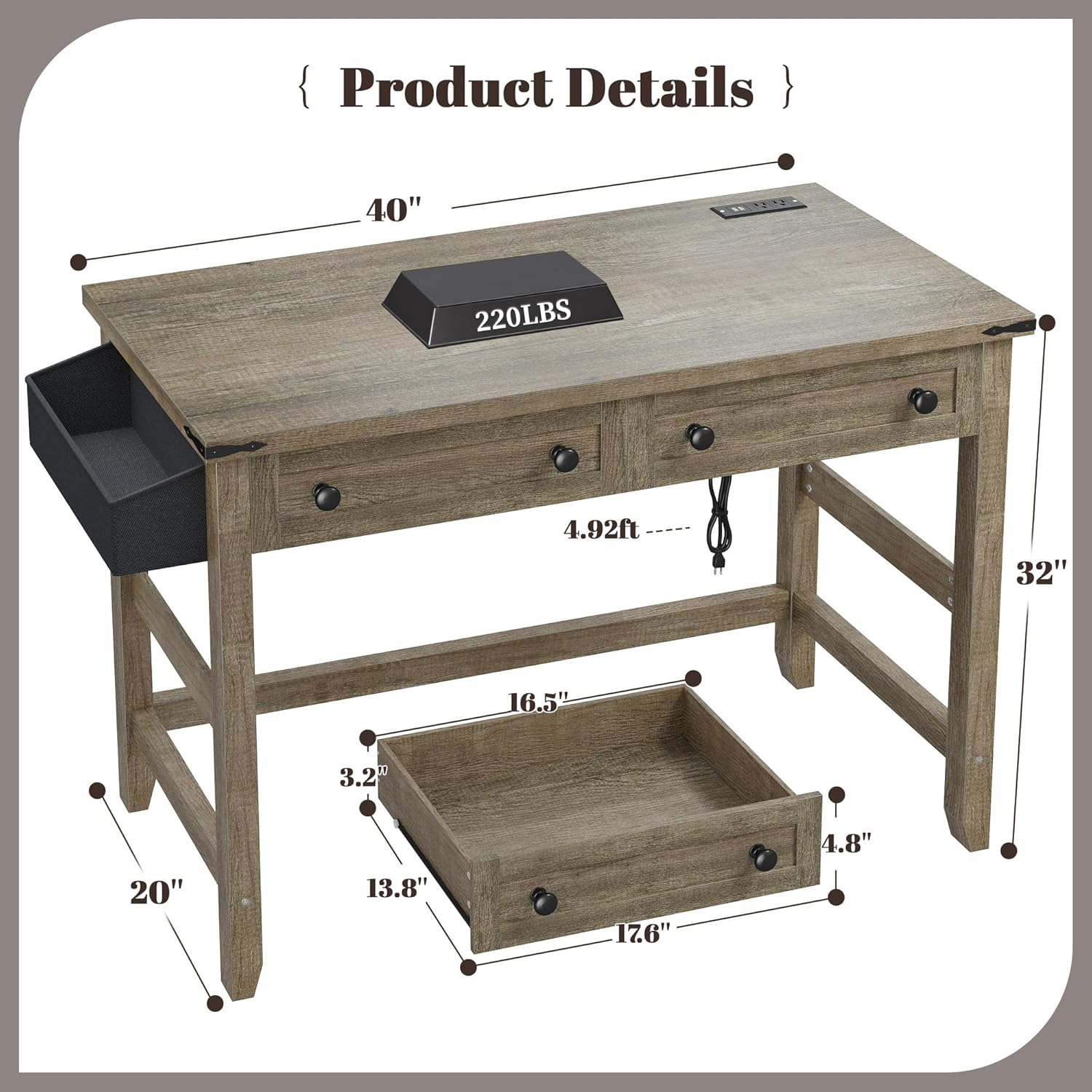
Figure 2: Product dimensions for the EnHomee 40-Inch Computer Desk, including overall size and individual drawer measurements.
4. Maagizo ya Uendeshaji
4.1 Using the Drawers and Side Pocket
The desk features two smooth-gliding wood drawers and a fabric side pocket for organized storage. The drawers are ideal for stationery, documents, or small personal items. The side pocket offers convenient access for items like notebooks, tablets, or charging cables.

Figure 3: The desk's storage solutions, including two spacious drawers and a convenient side pocket, designed to keep your workspace tidy.
4.2 Utilizing Power Outlets and USB Ports
The integrated power strip provides two standard AC outlets and two USB charging ports. This allows for easy access to power for your laptop, smartphone, tablet, and other electronic devices directly on your desk, reducing cable clutter.

Figure 4: The integrated power hub offers convenient charging options for multiple devices directly on the desk surface.
4.3 Matumizi Mengi
This desk is designed for versatility. It can function as a computer desk, writing desk, study desk, or even a vanity in various small spaces such as bedrooms, living rooms, or home offices.

Figure 5: The desk's farmhouse style and compact size make it suitable for use as a vanity or in various small living spaces.
5. Matengenezo
- Kusafisha: Futa uso wa dawati kwa laini, damp kitambaa. Epuka kemikali kali au visafishaji vya abrasive ambavyo vinaweza kuharibu umaliziaji.
- Kumwagika: Promptly clean up any spills to prevent water damage or staining.
- Vifaa: Mara kwa mara angalia skrubu na viunganishi vyote ili kuhakikisha vinasalia kuwa vikali. Funga tena ikiwa ni lazima.
- Slaidi za Droo: If drawers become stiff, apply a small amount of silicone lubricant to the slides.
6. Utatuzi wa shida
- Dawati ni Wobbly: Ensure all screws are tightened. Check that the desk is on a level surface. If wobbling persists, verify that all assembly steps were followed correctly.
- Droo hazitelezi Ulaini: Check for any obstructions in the drawer slides. Ensure the slides are correctly installed and aligned. Apply lubricant if needed.
- Soketi za Umeme/Lango za USB Hazifanyi Kazi: Verify the desk's power cord is securely plugged into a functional wall outlet. Check if the wall outlet itself is receiving power. Do not exceed the maximum load for the power strip.
- Sehemu Zinazokosekana: If any parts were missing upon delivery, please contact EnHomee customer support for assistance.
7. Vipimo
| Kipengele | Maelezo |
|---|---|
| Chapa | EnHomee |
| Mfano | 40-Inch Computer Desk with Power Outlets |
| Vipimo vya Bidhaa | 20"D x 40"W x 32"H |
| Rangi | Mwaloni Mweusi wa Kiajemi |
| Nyenzo | Mbao iliyotengenezwa |
| Vipengele Maalum | Built-in Power Outlets (2 AC, 2 USB), 2 Wood Drawers, 1 Side Pocket, Anti-Tipping Device |
| Mkutano Unaohitajika | Ndiyo |
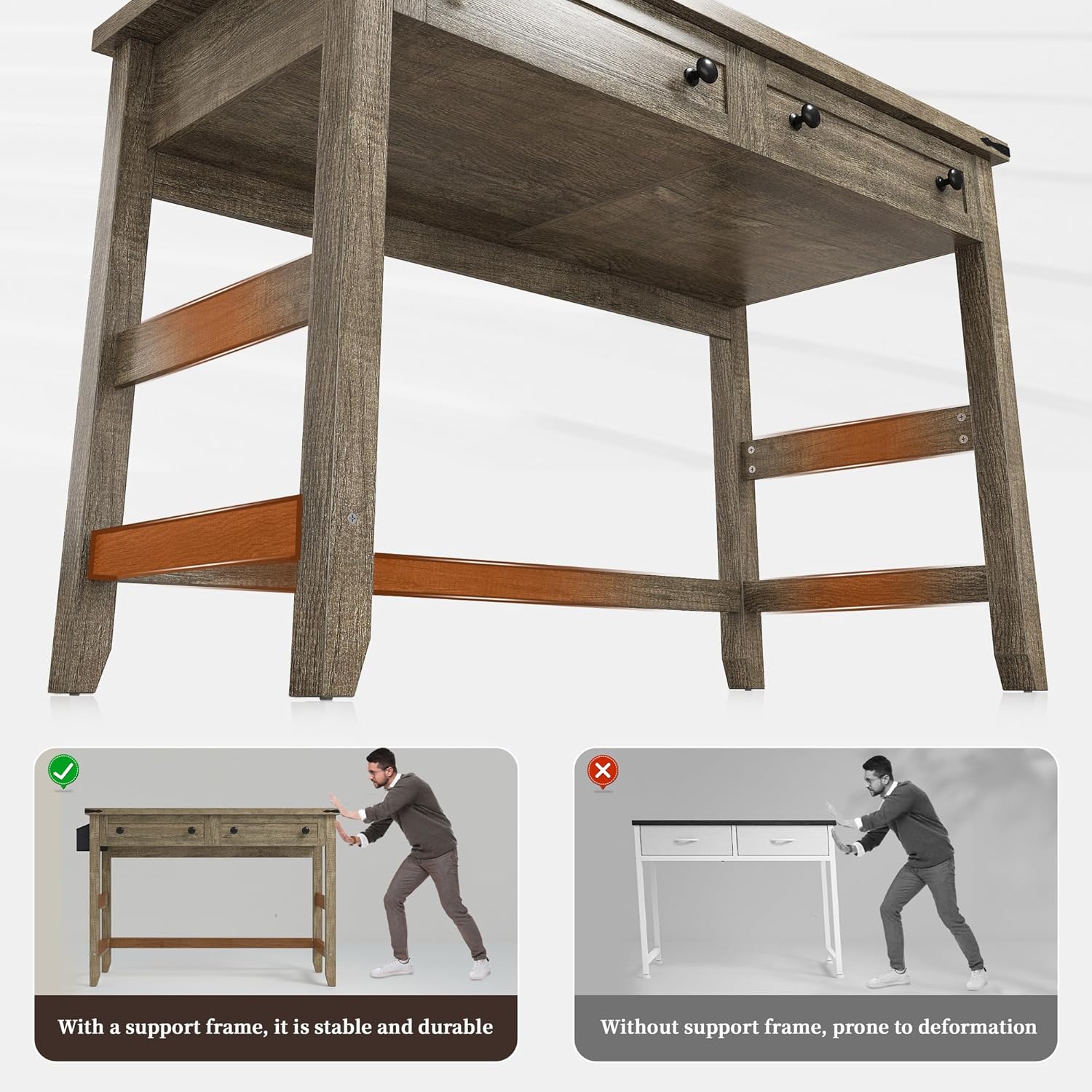
Figure 6: The desk's robust construction with thick wood legs and cross bars ensures stability and durability.
8. Taarifa za Udhamini
This EnHomee product comes with a Udhamini mdogo. Please refer to the warranty card included with your purchase or contact EnHomee customer support for specific terms and conditions regarding coverage and duration.
9. Msaada kwa Wateja
For any questions, concerns, or assistance with your EnHomee 40-Inch Computer Desk, please contact our customer support team. Refer to the contact information provided in your product packaging or visit the official EnHomee webtovuti kwa chaguzi za usaidizi.


