1. Utangulizi
The MiBOXER TRI-C1WR is a versatile AC Triac Dimmer designed for controlling dimmable LED lighting systems. It offers multiple control options including WiFi, 2.4G RF, and traditional push-button functionality. This manual provides detailed instructions for installation, operation, and maintenance to ensure optimal performance and safety.
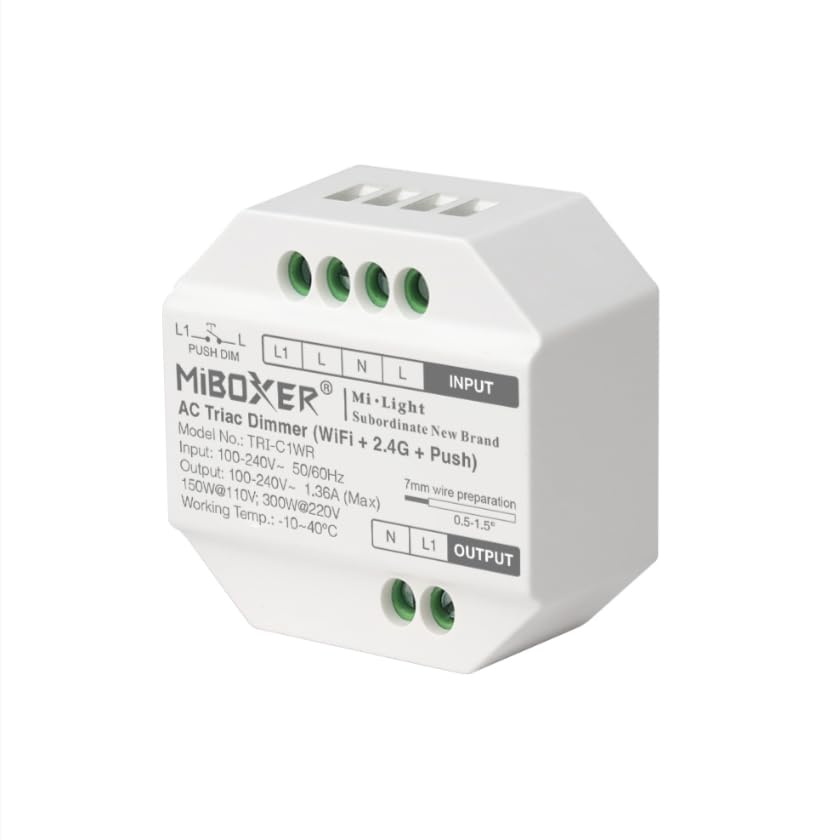
Picha: Mbele view of the MiBOXER TRI-C1WR AC Triac Dimmer, showing input/output terminals and model information.
2. Sifa Muhimu
- Triac Dimming: Ensures smooth and flicker-free dimming for dimmable LED lights and other compatible fixtures.
- Chaguzi nyingi za Udhibiti: Operate via smartphone app for remote access and smart home integration (WiFi Control). Compatible with Miboxer remotes for wireless control up to 30 meters (2.4GHz RF Wireless). Manual control with a standard wall switch (Push-Button).
- Upana VoltagAina: Supports 100-240V AC input for universal compatibility.
- Smart Home Tayari: Works with Amazon Alexa and Google Assistant for voice-controlled lighting.
- Precision Dimming: Adjust brightness levels from 0-100% without flicker or delay.
- Muundo Kompakt: Easy to install and suitable for various lighting environments.
- Pato la Nguvu ya Juu: Supports up to 400W load, depending on the type of lighting.
- Ujenzi wa kudumu: Made from high-quality, fire-resistant materials for added safety.
- Ufanisi wa Nishati: Designed for optimal performance with minimal energy waste.
3. Vipimo
| Kigezo | Thamani |
|---|---|
| Vipimo vya Bidhaa | inchi 2 x 1 x 2; Wakia 2.08 |
| Hali ya Uendeshaji | WASHA ZIMA |
| Ukadiriaji wa Sasa | 1.36 Amps |
| Uendeshaji Voltage | AC 100-240V |
| Aina ya Mawasiliano | Kawaida Imefungwa |
| Aina ya kiunganishi | Chomeka |
| Kituo | Kupitia Hole |
| Aina ya Mzunguko | 1-njia |
| Nyenzo za Mawasiliano | Chuma |
| Mtengenezaji | Miboxer |
4. Yaliyomo kwenye Kifurushi
- 1 x MiBOXER TRI-C1WR AC Triac Dimmer
5. Taarifa za Usalama
- Always disconnect power at the circuit breaker before installing or servicing the dimmer.
- Ufungaji unapaswa kufanywa na fundi umeme aliyehitimu au kwa mujibu wa kanuni za umeme za ndani.
- Usizidi kiwango cha juu cha mzigo wa 400W.
- Hakikisha miunganisho yote ya waya ni salama na imewekewa maboksi ipasavyo.
- Kifaa hiki kimeundwa kwa matumizi ya ndani tu.
- Do not use with non-dimmable light sources.

Image: Illustration of trailing edge (ELV) phase-cut technology and overheat/load protection features of the dimmer.
6. Ufungaji
6.1 Mchoro wa Wiring
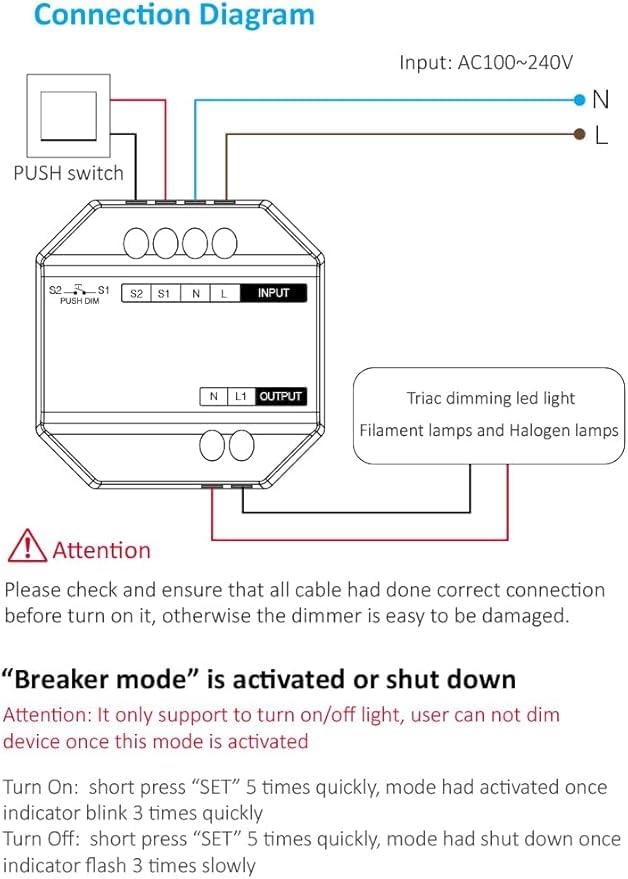
Image: Detailed connection diagram showing input (AC100~240V L and N), output (N and L1 to Triac dimming LED light), and push switch connections (S1, S2, L1, L).
Maagizo 6.2 ya Wiring
- Zima umeme: Before starting, ensure the main power supply to the circuit is turned off at the circuit breaker.
- Muunganisho wa Ingizo: Connect the AC 100-240V Live (L) and Neutral (N) wires to the corresponding "INPUT" terminals on the dimmer.
- Muunganisho wa Pato: Connect the Neutral (N) and Live (L1) wires from the dimmer's "OUTPUT" terminals to your dimmable LED light or compatible fixture.
- Push Switch Connection (Optional): For push-button control, connect your push switch to the S1 and S2 terminals. The L1 and L terminals are also available for push dimming.
- Miunganisho Salama: Ensure all wires are stripped approximately 7mm and securely fastened into their respective terminals.
- Washa: Once all connections are verified and secure, restore power at the circuit breaker.
Tahadhari: Please check and ensure that all cables are correctly connected before turning on the power. Incorrect wiring can damage the dimmer.
7. Uendeshaji
7.1 Mbinu za Kudhibiti
- Udhibiti wa WiFi: Use the MiBOXER or Tuya Smart app on your smartphone for remote control, scheduling, and smart home integration.
- 2.4GHz RF Wireless Control: Compatible with MiBOXER 2.4G RF remotes (sold separately) for wireless dimming and control within a range of up to 30 meters.
- Udhibiti wa Kitufe cha Kushinikiza: A momentary push switch can be used for basic ON/OFF and dimming functions.

Picha: Juuview of control options, including Tuya Smart app interface for brightness adjustment, stepless dimming via remote, and push dimming functionality.
7.2 Breaker Mode
The dimmer features a "Breaker Mode" which allows it to function purely as an ON/OFF switch, disabling dimming capabilities. This mode is useful for specific applications where only switching is required.
- Activate Breaker Mode: Short press the "SET" button 5 times quickly. The indicator will blink 3 times quickly to confirm activation.
- Deactivate Breaker Mode: Short press the "SET" button 5 times quickly again. The indicator will flash 3 times slowly to confirm deactivation.
Tahadhari: In Breaker Mode, the device only supports turning the light ON/OFF. Dimming functionality is disabled.

Image: Visual representation of Breaker Mode, showing a light fixture and a smartphone interface with an ON/OFF toggle, indicating that dimming is not available in this mode.
8. Matengenezo
- Clean the dimmer with a soft, dry cloth. Do not use abrasive cleaners or solvents.
- Ensure proper ventilation around the dimmer to prevent overheating.
- Regularly check wiring connections for tightness, especially after initial installation.
- If the dimmer is not functioning correctly, refer to the troubleshooting section before attempting any repairs.
9. Utatuzi wa shida
| Tatizo | Sababu inayowezekana | Suluhisho |
|---|---|---|
| Nuru haiwashi. | No power, incorrect wiring, faulty bulb, dimmer in Breaker Mode (OFF). | Check circuit breaker. Verify wiring connections. Replace bulb. Check Breaker Mode status. |
| Light does not dim. | Non-dimmable bulb, dimmer in Breaker Mode, incorrect dimmer settings, incompatible load. | Ensure dimmable bulbs are used. Deactivate Breaker Mode. Check app settings. Verify load compatibility. |
| Taa zinazowaka. | Incompatible bulb, minimum load not met, loose wiring. | Use compatible dimmable LED bulbs. Ensure total load meets minimum requirements. Check wiring. |
| Dimmer not responding to WiFi/RF. | Out of range, network issue, pairing issue. | Ensure dimmer is within WiFi/RF range. Check router/network. Re-pair the device with the app or remote. |
10. Udhamini na Msaada
The MiBOXER TRI-C1WR AC Triac Dimmer comes with a standard manufacturer's warranty. For specific warranty details, please refer to the product packaging or contact MiBOXER customer support.
For technical assistance, troubleshooting, or further inquiries, please visit the official MiBOXER webtovuti au wasiliana na idara yao ya huduma kwa wateja.
Mtengenezaji: Miboxer
Tarehe ya Kwanza Inapatikana: Tarehe 5 Desemba 2024


