1. Utangulizi
Welcome to the user manual for your FOXWELL BT301 Battery Tester and NT630 Plus OBD2 Scanner. This comprehensive guide provides detailed instructions on the setup, operation, maintenance, and troubleshooting of both devices. The BT301 is designed for testing 6V and 12V vehicle batteries, while the NT630 Plus offers advanced diagnostic capabilities for OBD2, Anti-lock Braking System (ABS), and Supplemental Restraint System (SRS/Airbag) in vehicles.
Please read this manual thoroughly before operating the devices to ensure correct usage and to prevent damage to the tools or your vehicle.
2. Taarifa za Usalama
Always observe the following safety precautions when working with vehicle electrical systems and diagnostic tools:
- Wear appropriate eye protection (safety goggles) and protective clothing.
- Hakikisha eneo la kazi lina hewa ya kutosha.
- Keep a fire extinguisher nearby when working with batteries.
- Avoid smoking or open flames near vehicle batteries.
- Do not touch hot engine parts or exhaust systems.
- Keep the devices dry and clean. Do not expose them to moisture or extreme temperatures.
- Only use the provided cables and accessories.
- Disconnect the devices from the vehicle when not in use.
3. Yaliyomo kwenye Kifurushi
Thibitisha kuwa vipengee vyote vipo kwenye kifurushi chako:
- Kitengo cha Kujaribu Betri cha FOXWELL BT301
- FOXWELL NT630 Plus OBD2 Scanner Unit
- OBDII Diagnostic Cable (for NT630 Plus)
- Betri Clamp Cable (for BT301)
- USB Cable (for updates)
- Mwongozo wa Mtumiaji (hati hii)
4. Bidhaa Imeishaview
4.1 FOXWELL BT301 Battery Tester
The BT301 is a dedicated 6V and 12V battery tester designed to accurately assess the health of your vehicle's battery, cranking system, and charging system. It supports various battery types including AGM flat plate, AGM spiral, GEL, EFB, and regular flooded batteries.
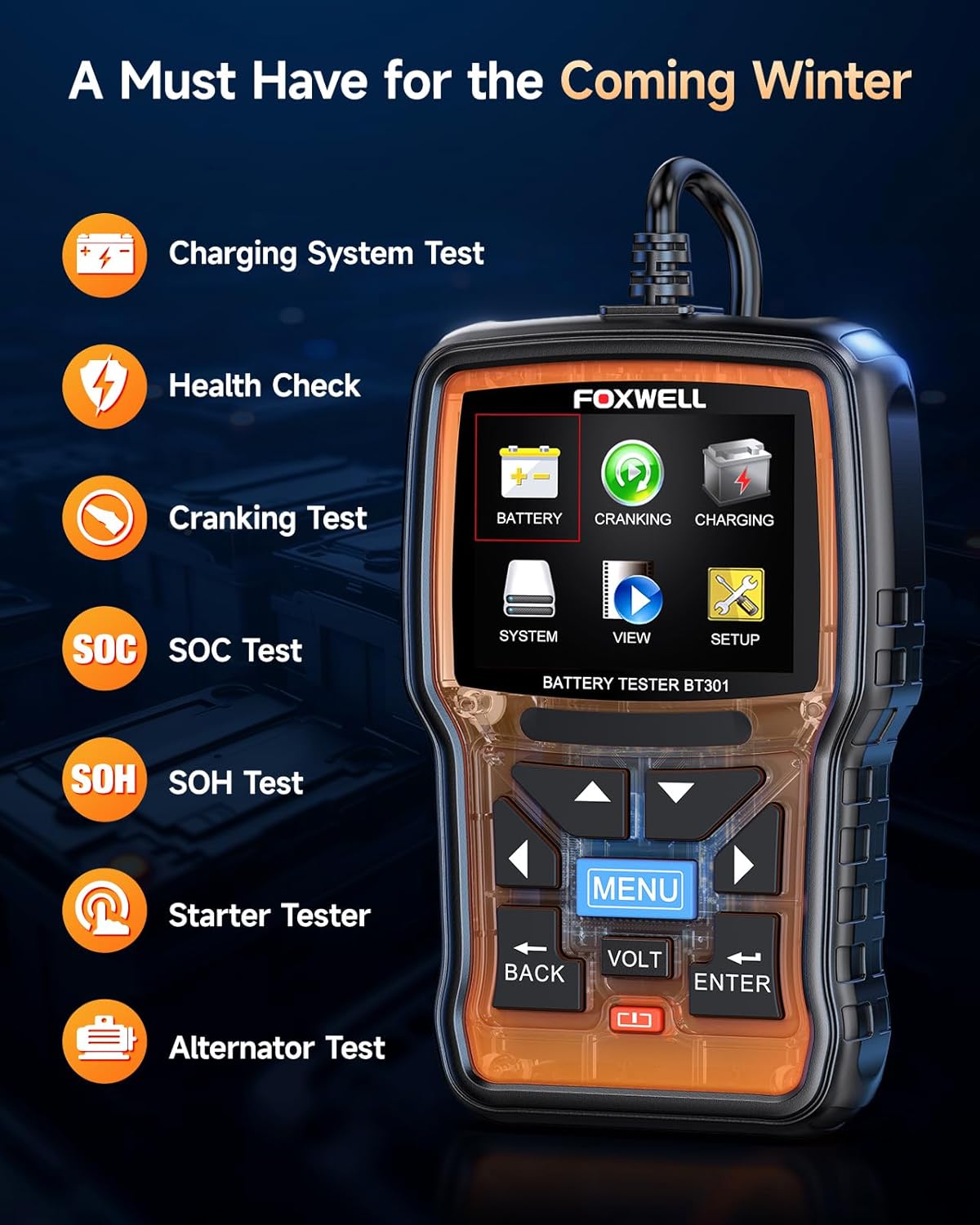
Picha ya 4.1: FOXWELL BT301 Battery Tester displaying its main menu options.
Key Features of BT301:
- Ukaguzi wa Afya ya Betri: Provides a comprehensive analysis of battery condition.
- Mtihani wa Cranking: Evaluates the starter motor's performance.
- Jaribio la Mfumo wa Kuchaji: Assesses the alternator and regulator's output.
- Jaribio la SOC: State of Charge test.
- Mtihani wa SOH: State of Health test.
- Supports 6V and 12V batteries.
- Compatible with various battery types: AGM Flat Plate, AGM Spiral, GEL, EFB, Regular Flooded.
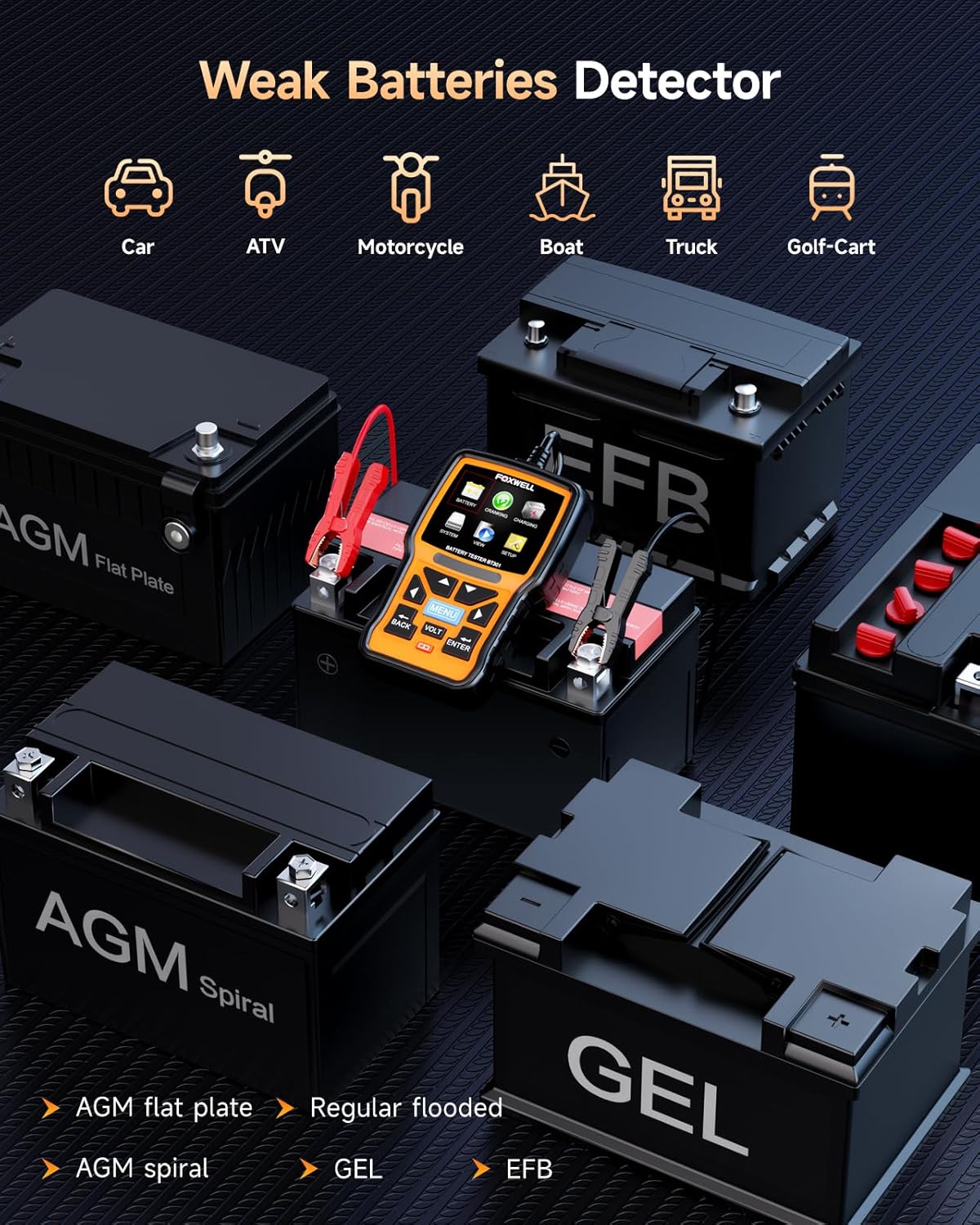
Picha ya 4.2: The BT301 Battery Tester demonstrating compatibility with multiple battery types.
4.2 FOXWELL NT630 Plus OBD2 Scanner
The NT630 Plus is a powerful diagnostic tool that provides full OBD2 functions, along with specialized diagnostics for Anti-lock Braking System (ABS) and Supplemental Restraint System (SRS/Airbag). It also includes advanced service functions such as ABS Auto Bleed, Steering Angle Sensor (SAS) Calibration, Oil Service Light Reset, and Electronic Parking Brake (EPB) Reset.
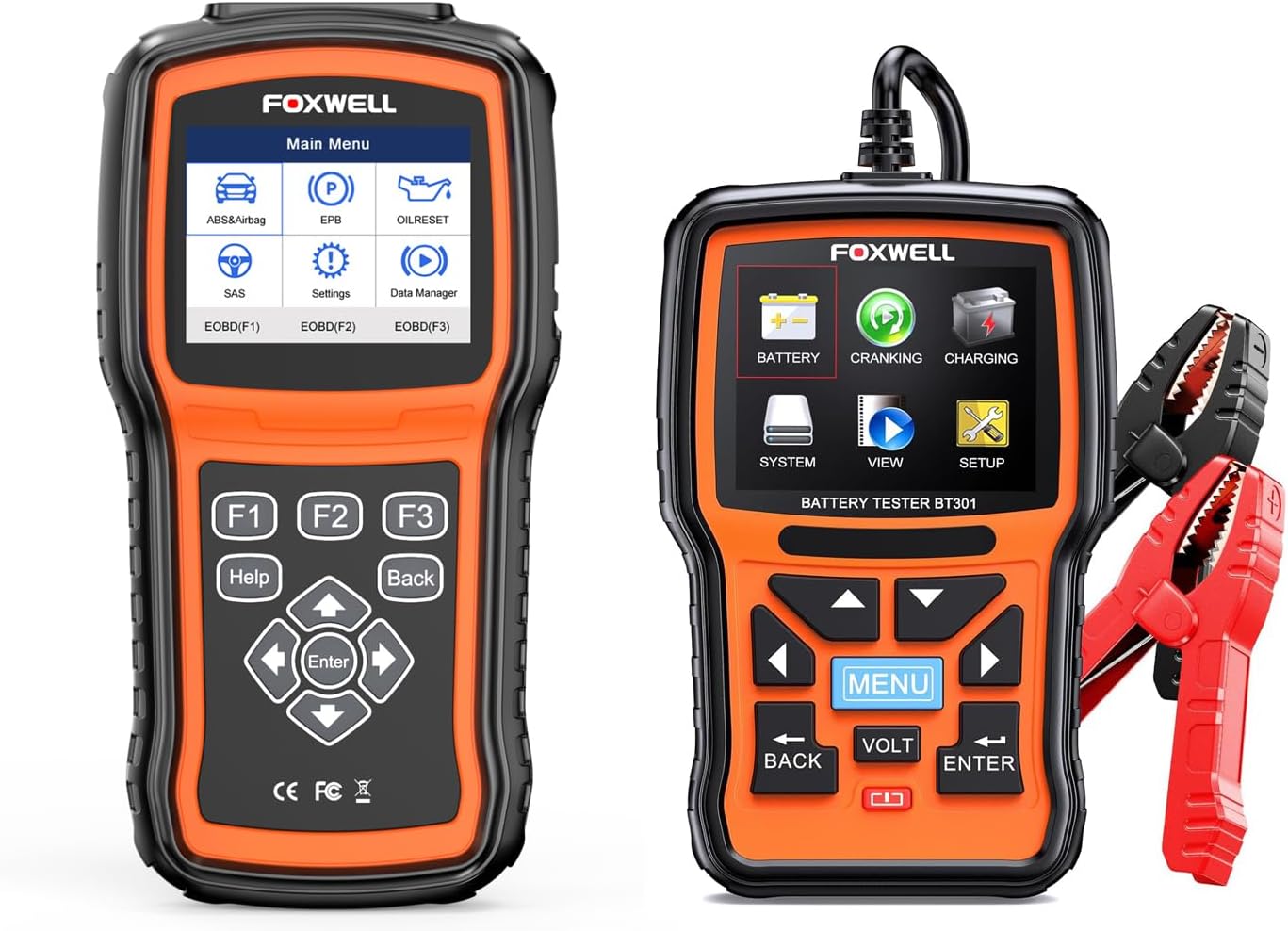
Picha ya 4.3: The FOXWELL NT630 Plus OBD2 Scanner (left) and BT301 Battery Tester (right).
Key Features of NT630 Plus:
- Kazi Kamili za OBD2/EOBD: Read/Clear Codes, Live Data, Freeze Frame, I/M Readiness, O2 Monitor Test, On-Board Monitor Test, Component Test, Vehicle Info, Modules Present.
- ABS System Diagnostics: Reads and clears ABS fault codes, performs active tests, and supports ABS Auto Bleed.
- SRS/Airbag System Diagnostics: Reads and clears SRS fault codes, performs active tests.
- Urekebishaji wa SAS: Huweka upya kitambuzi cha pembe ya usukani.
- Urekebishaji wa Taa ya Huduma ya Mafuta: Huweka upya taa ya huduma ya mafuta baada ya kubadilisha mafuta.
- Upyaji wa EPB: Resets the electronic parking brake after maintenance.
- Automatic VIN identification.

Picha ya 4.4: Visual representation of the three main diagnostic systems covered by the NT630 Plus.
5. Kuweka
5.1 Initial Setup for BT301
Connecting the BT301:
- Hakikisha kuwasha kwa gari kumezimwa.
- Unganisha chanya nyekundu (+) clamp kwa terminal chanya ya betri.
- Unganisha hasi nyeusi (-) clamp kwa terminal hasi ya betri.
- The BT301 will power on automatically.
5.2 Initial Setup for NT630 Plus
Connecting the NT630 Plus:
- Tafuta Kiunganishi cha Kiungo cha Data cha pini 16 (DLC) cha gari, kwa kawaida chini ya dashibodi upande wa dereva.
- Hakikisha kuwasha kwa gari kupo katika nafasi ya 'ON' (injini inaweza kuzimwa).
- Plug the OBDII diagnostic cable into the vehicle's DLC.
- Connect the other end of the cable to the NT630 Plus unit.
- The NT630 Plus will power on automatically.
6. Maagizo ya Uendeshaji
6.1 Using the BT301 Battery Tester
Uelekezaji wa Menyu kuu:
Use the arrow keys (Up, Down, Left, Right) to navigate through menu options. Press the INGIA button to confirm a selection and the NYUMA button to return to the previous screen. The MENU button typically returns to the main menu.
Performing a Battery Test:
- Kutoka kwa menyu kuu, chagua BETRI na vyombo vya habari INGIA.
- Select the appropriate battery type (e.g., Regular Flooded, AGM, GEL) and press INGIA.
- Ingiza Kipigo cha Baridi cha betri Amps (CCA) rating, usually found on the battery label, and press INGIA.
- The BT301 will perform the test and display the results, such as battery voltage, measured CCA, and overall battery health (e.g., 'GOOD BATTERY', 'CHARGE BATTERY', 'REPLACE BATTERY').

Picha ya 6.1: Example of battery test results displayed on the BT301 screen.
Mtihani wa Mfumo wa Kukunja:
- Kutoka kwa menyu kuu, chagua KUPIGA na vyombo vya habari INGIA.
- Fuata maelekezo kwenye skrini ili kuwasha injini.
- The BT301 will analyze the cranking voltage and time, providing a result on the starter's performance.
Jaribio la Mfumo wa Kuchaji:
- Kutoka kwa menyu kuu, chagua KUCHAJI na vyombo vya habari INGIA.
- Fuata maelekezo kwenye skrini, ambayo yanaweza kujumuisha kuamsha injini hadi RPM maalum.
- The BT301 will measure the alternator's output and ripple voltage, indicating the charging system's health.
6.2 Using the NT630 Plus OBD2 Scanner
Uelekezaji wa Menyu kuu:
The NT630 Plus features function buttons (F1, F2, F3) for quick access, along with directional arrows, INGIA, NYUMA, na MSAADA buttons. Use the arrow keys to navigate and INGIA ili kudhibitisha chaguzi.
Utambuzi wa OBD2:
- Kutoka kwa menyu kuu, chagua EOBD(F1) or EOBD(F2) (depending on the specific menu layout) and press INGIA.
- Chagua Soma Misimbo kwa view current, pending, and permanent diagnostic trouble codes (DTCs).
- Chagua Futa Misimbo to erase DTCs and turn off the Check Engine Light (MIL). Ensure the underlying issue is resolved before clearing codes.
- Chagua Data ya Moja kwa Moja kwa view real-time sensor data from the vehicle's engine control unit (ECU).
- Chagua Kufungia Frame kwa view a snapshot of sensor data recorded when an emission-related fault occurred.
ABS System Diagnostics:
- Kutoka kwa menyu kuu, chagua ABS&Airbag na vyombo vya habari INGIA.
- Chagua ABS from the submenu.
- Choose options like Soma Misimbo, Futa Misimbo, au Data ya Moja kwa Moja to diagnose the ABS system.
- Kwa ABS Auto Bleed, select this function and follow the on-screen instructions carefully. This procedure helps remove air from the brake system after component replacement or fluid changes.

Picha ya 6.2: Visual guide to the ABS Auto Bleed function.
SRS/Airbag System Diagnostics:
- Kutoka kwa menyu kuu, chagua ABS&Airbag na vyombo vya habari INGIA.
- Chagua SRS/Airbag from the submenu.
- Choose options like Soma Misimbo or Futa Misimbo to diagnose the Supplemental Restraint System.

Picha ya 6.3: Zaidiview of diagnostic functions available for ABS and SRS/Airbag systems.
Special Functions (NT630 Plus):
- Urekebishaji wa SAS: Chagua SAS from the main menu. This function is used to reset the steering angle sensor after steering system repairs or alignment. Follow the on-screen prompts carefully.
- Urekebishaji wa Taa ya Huduma ya Mafuta: Chagua KURUDISHA MAFUTA from the main menu. This function allows you to reset the oil service light after an oil change, ensuring the vehicle's maintenance schedule is correctly updated.
- Upyaji wa EPB: Chagua EPB from the main menu. This function is essential when servicing components of the electronic parking brake system, such as replacing brake pads. It safely retracts and re-engages the parking brake calipers.

Picha ya 6.4: Visual explanation of the SAS Calibration, Oil/Service Light Reset, and EPB Reset functions.
7. Matengenezo
7.1 Utunzaji wa Kifaa
- Kusafisha: Tumia laini, damp kitambaa cha kusafisha kifaa casing. Usitumie visafishaji vya abrasive au vimumunyisho.
- Hifadhi: Store the devices in a dry, cool environment, away from direct sunlight and extreme temperatures.
- Masasisho ya Programu: Mara kwa mara angalia afisa wa FOXWELL website for software updates to ensure your devices have the latest vehicle coverage and functionalities. Connect the device to a computer using the provided USB cable for updates.
- Ukaguzi wa Cable: Regularly inspect the diagnostic cables and battery clamps for any signs of damage or wear. Replace damaged cables immediately.
8. Utatuzi wa shida
If you encounter issues while using your FOXWELL devices, refer to the table below for common problems and their solutions.
| Tatizo | Suluhisho |
|---|---|
| Kifaa hakiwashi. | For BT301: Ensure battery clamps are securely connected to the correct battery terminals. For NT630 Plus: Verify the OBDII cable is firmly connected to the vehicle's DLC and the ignition is ON. Check vehicle's fuse for the OBDII port. |
| NT630 Plus fails to link with vehicle. | Confirm the vehicle's ignition is ON. Check if the OBDII cable is properly connected. Ensure the vehicle is OBDII compliant (most vehicles from 1996 onwards). Try connecting to a different OBDII compliant vehicle to rule out device issue. |
| BT301 shows 'Battery Error' or inconsistent results. | Ensure battery terminals are clean and free of corrosion. Verify that the correct battery type and CCA rating were entered. Ensure a stable connection of the battery clamps. |
| Cannot clear DTCs with NT630 Plus. | Ensure the ignition is ON and the engine is OFF. If the underlying fault is still present, the codes will reappear immediately. Address the root cause of the DTCs first. |
| Skrini imegandishwa au haifanyi kazi. | Disconnect the device from the vehicle/battery, wait a few seconds, and reconnect. If the issue persists, perform a software update if available. |
9. Vipimo
9.1 FOXWELL BT301 Battery Tester
- Uendeshaji Voltage: 6V - 12V
- Safu ya Mtihani: 100-2000 CCA
- Onyesha: LCD iliyowashwa nyuma
- Halijoto ya Uendeshaji: 0°C hadi 50°C (32°F hadi 122°F)
- Halijoto ya Uhifadhi: -20°C hadi 70°C (-4°F hadi 158°F)
9.2 FOXWELL NT630 Plus OBD2 Scanner
- Onyesha: Color TFT screen
- Uendeshaji Voltage: 8V - 18V (from vehicle battery)
- Muunganisho: OBDII 16-pin DLC, USB
- Halijoto ya Uendeshaji: 0°C hadi 60°C (32°F hadi 140°F)
- Halijoto ya Uhifadhi: -20°C hadi 70°C (-4°F hadi 158°F)
- Protoksi: Supports all OBDII protocols (ISO9141-2, ISO14230-4, SAEJ1850, ISO15765-4)


