Utangulizi
This manual provides essential information for the safe and effective use of your HOMCOM 6-Point Vibrating Massage Office Chair with Heat. Please read these instructions thoroughly before assembly and operation, and retain them for future reference. This executive office chair is designed to provide comfort and support with its adjustable features, massage, and heating functions.

Image: The HOMCOM 6-Point Vibrating Massage Office Chair in pink, shown in an office setting.
Taarifa za Usalama
Daima fuata miongozo ifuatayo ya usalama ili kuzuia majeraha au uharibifu:
- Fuata kwa uangalifu maagizo yote ya mkusanyiko.
- Do not use the massage or heat function while sleeping or if unsupervised.
- Hakikisha miunganisho yote iko salama kabla ya matumizi.
- Usizidi uzani wa juu wa uwezo wa lbs 264 (kilo 120).
- Keep children and pets away from the chair during assembly and operation.
- Epuka kuweka kiti karibu na vyanzo vya joto au kwenye jua moja kwa moja kwa muda mrefu.
Yaliyomo kwenye Kifurushi
Thibitisha kuwa vipengele vyote vipo kabla ya kuanza mkusanyiko. Kifurushi kinapaswa kuwa na:
- Chair components (backrest, seat, armrests, base, wheels, gas lift)
- Udhibiti wa kijijini kwa massage na kazi za joto
- Vifaa na zana za kuunganisha
- Mwongozo wa maagizo

Image: A cardboard box indicating one package, representing the product's packaging.
Kuweka na Kukusanya
Assembly is required for this chair. Detailed, step-by-step instructions are included in the product packaging. Please follow these instructions carefully to ensure proper and safe assembly.
- Sanidi vipengele vyote na uthibitishe dhidi ya orodha ya sehemu kwenye mwongozo uliojumuishwa.
- Assemble the chair base, attaching the wheels and gas lift cylinder.
- Ambatanisha sehemu za mikono kwenye kiti.
- Connect the backrest to the seat and armrests.
- Weka kiti kilichokusanyika na backrest kwenye silinda ya kuinua gesi.
- Hakikisha skrubu na boli zote zimeimarishwa kwa usalama.
For visual guidance, refer to the assembly diagrams provided in your physical manual.
Maagizo ya Uendeshaji
1. Massage and Heat Function
The chair features a six-point vibration massage system and lumbar heating, controlled by a remote.

Image: The remote control for the massage and heat functions, with visual indicators of vibration points on the chair.
- Washa/Zima: Use the power button on the remote to activate or deactivate the massage and heat functions.
- Njia za Massage: Select from various massage modes (e.g., pulse, press, wave) using the mode buttons.
- Viwango vya Nguvu: Adjust the vibration intensity to your preference.
- Kipima muda: Set a duration for the massage session (e.g., 15, 30, 60 minutes).
- Kazi ya Joto: Activate the lumbar heating element for added comfort.
2. Marekebisho ya Urefu
Adjust the seat height to match your desk and sitting preference.

Image: A close-up of the lever used to adjust the chair's height, with 'UP' and 'DOWN' arrows.
- Locate the lever under the right side of the seat.
- To raise the seat, lift the lever while taking your weight off the seat.
- To lower the seat, lift the lever while remaining seated.
- Release the lever to lock the height in position.
3. Kazi ya Kuegemea na Kuinama
The chair offers a reclining backrest and a tilt function for relaxation.

Image: The chair shown in a reclined position, illustrating its 130-degree reclining capability.
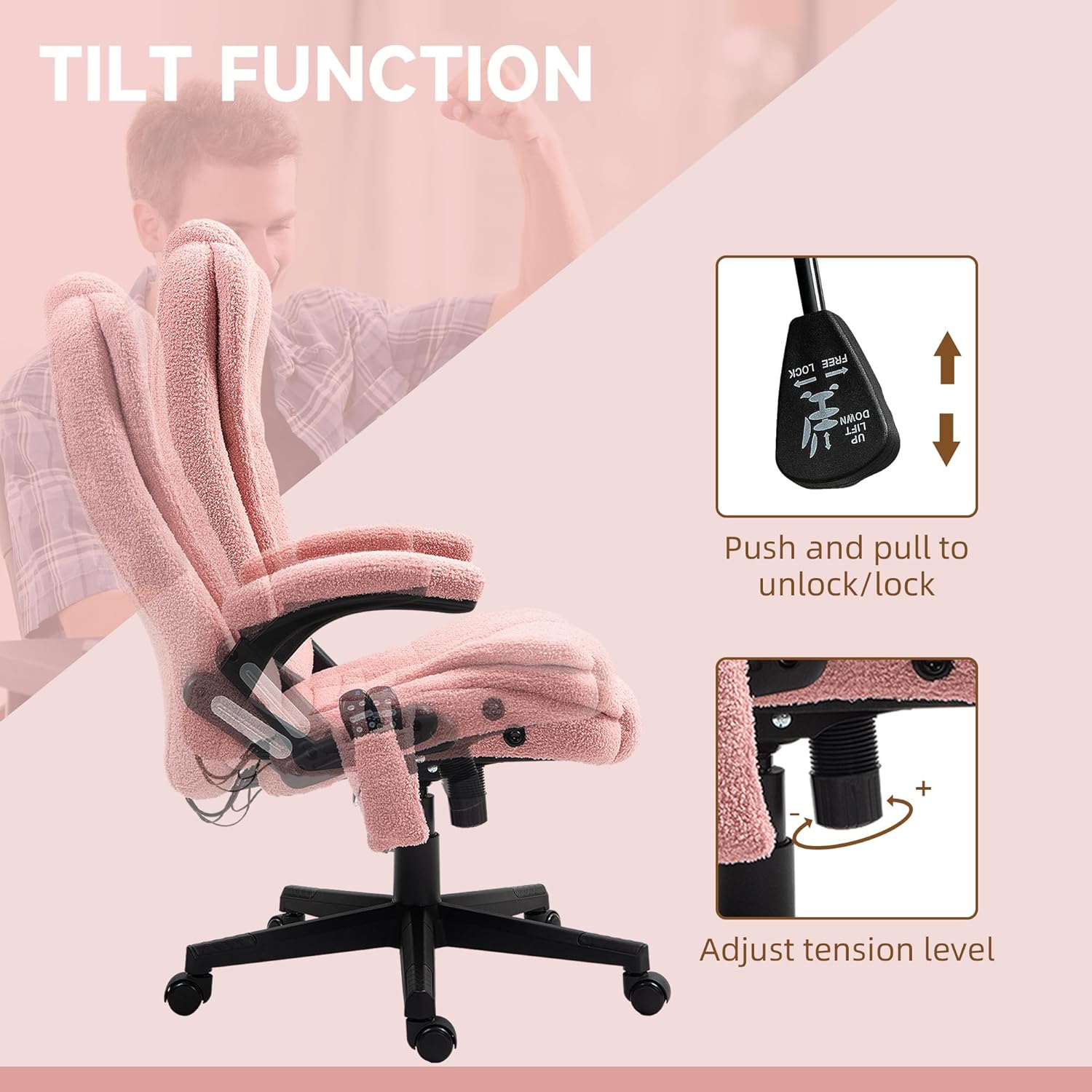
Image: A close-up of the tilt lock lever and the tension adjustment knob located beneath the seat.
- Kuegemea: The backrest can recline up to 125 degrees. Use the lever on the side to adjust the angle.
- Tilt Lock: Pull the lever outwards to enable the tilt function, allowing the chair to rock. Push the lever inwards to lock the chair in an upright position.
- Mvutano wa Tilt: Rotate the round knob located under the seat to adjust the tension of the tilt mechanism. Turn clockwise to increase tension (harder to tilt), counter-clockwise to decrease tension (easier to tilt).
4. Kazi ya Kuzunguka
The chair features a 360-degree swivel for flexible movement.

Image: The chair with an arrow illustrating its 360-degree swivel capability.
- The chair seat and backrest assembly can rotate freely 360 degrees on its base.
Matengenezo
Proper care will extend the life of your office chair:
- Kusafisha: Futa safi na tangazoamp kitambaa. Epuka kemikali kali au visafishaji vya abrasive.
- Ukaguzi: Mara kwa mara angalia boli na skrubu zote ili kuhakikisha zinasalia kuwa ngumu. Kaza tena ikiwa ni lazima.
- Inasonga: Unaposogeza kiti, kiinue badala ya kukivuta ili kuzuia uharibifu kwenye msingi au sakafu.
- Utunzaji wa kitambaa: The teddy velvet-feel fabric is breathable and skin-friendly. Spot clean as needed.
Kutatua matatizo
Ukikumbana na matatizo na mwenyekiti wako, rejelea matatizo na suluhisho zifuatazo za kawaida:
| Tatizo | Sababu inayowezekana | Suluhisho |
|---|---|---|
| Kipengele cha masaji/joto hakifanyi kazi | Power cable disconnected; remote battery low (if applicable); internal wiring issue. | Ensure power cable is securely plugged in. Check remote for power. If issue persists, contact customer support. |
| Mwenyekiti anahisi kutokuwa shwari au kuyumbayumba | Loose assembly hardware; damaged base or gas lift. | Check and tighten all screws and bolts. Ensure the gas lift is properly seated in the base. If parts are damaged, contact customer support. |
| Urekebishaji wa urefu haufanyi kazi | Gas lift malfunction; lever mechanism issue. | Ensure the lever is fully engaged. If the gas lift is faulty, it may need replacement. Contact customer support. |
| Chair does not recline or tilt | Tilt lock engaged; tension too high; mechanism obstruction. | Disengage the tilt lock lever. Adjust the tilt tension knob. Check for any obstructions. |
Vipimo
Key specifications for the HOMCOM 6-Point Vibrating Massage Office Chair:

Image: A diagram illustrating the various dimensions of the office chair.
- Mfano: 921-171V8APK
- Vipimo vya Jumla: 25.5" Upana x 28" Upana x 43.25" -47.25" Upana
- Saizi ya kiti: 20.5" Upana x 19.75" Upana x 17.75" -21.75" Upana
- Urefu wa Backrest: Inchi 28
- Urefu wa Mkono: Inchi 29.5
- Kiwango cha Juu cha Uzito: Pauni 264 (kilo 120)
- Pembe ya Kuegemea: Hadi digrii 125
- Nyenzo: 100% Polyester (Teddy Velvet-Feel Fabric), Foam Fill
- Vipengele: 6-point vibration massage, lumbar heat, adjustable height, reclining backrest, tilt function, 360° swivel, padded armrests.
- Vipengele vilivyojumuishwa: Udhibiti wa Kijijini
Taarifa ya Udhamini
This product is covered by a standard manufacturer's warranty. Please refer to the warranty card included in your product packaging for specific terms, conditions, and duration. Retain your proof of purchase for any warranty claims.
Usaidizi wa Wateja
For further assistance, missing parts, or warranty inquiries, please contact HOMCOM customer support. Contact information can typically be found on the product packaging, the included warranty card, or the official HOMCOM webtovuti.


