1. Bidhaa Imeishaview
The MOBAPAD N1 HD is a versatile wireless controller designed for an enhanced gaming experience across multiple platforms. It features advanced technologies such as Hall Effect Joysticks for precise control, ALPS Dual-Axis Motors for immersive HD vibration, and six-axis motion control. This controller is compatible with Nintendo Switch, PC, iOS, and Android devices, offering seamless connectivity and responsive performance.

Picha: Mbele view of the MOBAPAD N1 HD Wireless Controller, showcasing muundo wake wa ergonomic na mpangilio wa kifungo.
2. Sifa Muhimu
- Utangamano wa Majukwaa mengi: Fully compatible with Nintendo Switch, PC, iOS, and Android devices, ensuring broad usability.
- Vijiti vya Athari ya Ukumbi: Provides smooth, precise, and durable control with minimal wear, ideal for accurate gaming.
- ALPS Dual-Axis Motors with HD Vibration: Delivers realistic and immersive haptic feedback for enhanced gameplay.
- Udhibiti wa Mwendo wa Mihimili Sita: Built-in gyroscope enables enhanced motion control for compatible games.
- NFC for Amiibo Scanning: Supports NFC technology for scanning Amiibo figures on Nintendo Switch.

Image: The controller illustrating its immersive motion control capabilities with swirling lines around it.

Image: The controller positioned in front of a collection of Amiibo figures, highlighting its NFC scanning function.

Image: The controller shown alongside icons for Switch, Android/iOS, and PC, demonstrating its multi-device compatibility.
3. Kuweka na Kuunganisha
Follow these steps to connect your MOBAPAD N1 HD controller to your desired device.
3.1. Inaunganisha kwenye Nintendo Switch
- Kutoka kwenye Menyu ya NYUMBANI, chagua Vidhibiti, basi Badilisha Mshiko/Agizo.
- While the screen is displaying "Press L + R on the controller", press and hold the Kitufe cha Nyumbani on the MOBAPAD N1 HD controller for 3-5 seconds until the player LEDs begin to flash.
- Once connected, the player LED(s) corresponding to the controller number will remain lit.
3.2. Kuunganisha kwenye Kompyuta (Windows)
- Connect the controller to your PC using a USB-C cable. The controller will be recognized as a wired controller.
- For wireless connection, ensure your PC has Bluetooth enabled. Go to Bluetooth & other devices settings.
- Chagua "Ongeza Bluetooth au kifaa kingine" na uchague "Bluetooth".
- Bonyeza na ushikilie Kitufe cha Nyumbani on the controller until the LEDs flash rapidly, indicating pairing mode.
- Select "MOBAPAD N1 HD" from the list of available devices.
3.3. Connecting to iOS/Android Devices
- Washa Bluetooth kwenye kifaa chako cha iOS au Android.
- Go to Bluetooth settings and search for new devices.
- Bonyeza na ushikilie Kitufe cha Nyumbani on the controller until the LEDs flash rapidly.
- Select "MOBAPAD N1 HD" from the list of available devices to pair.
4. Kuendesha Kidhibiti
Familiarize yourself with the controller's layout and functions for optimal gameplay.
4.1. Mpangilio wa Vitufe
- Fimbo ya Analogi ya Kushoto: For movement and camera control. Features Hall Effect technology.
- Fimbo ya Analogi ya kulia: For camera control and aiming. Features Hall Effect technology.
- D-Pad: Directional input for menu navigation and specific game actions.
- Vifungo vya A/B/X/Y: Vifungo vya kawaida vya kitendo.
- Vifungo vya L/R: Vifungo vya mabega.
- Vifungo vya ZL/ZR: Vifungo vya kuchochea.
- Kitufe cha Kuondoa (-): Typically for opening in-game menus or specific functions.
- Kitufe cha Plus (+): Typically for opening in-game menus or specific functions.
- Kitufe cha Nyumbani: Returns to the system's home screen. Also used for pairing and NFC scanning.
- Kitufe cha kunasa: Takes screenshots or video clips (Nintendo Switch).
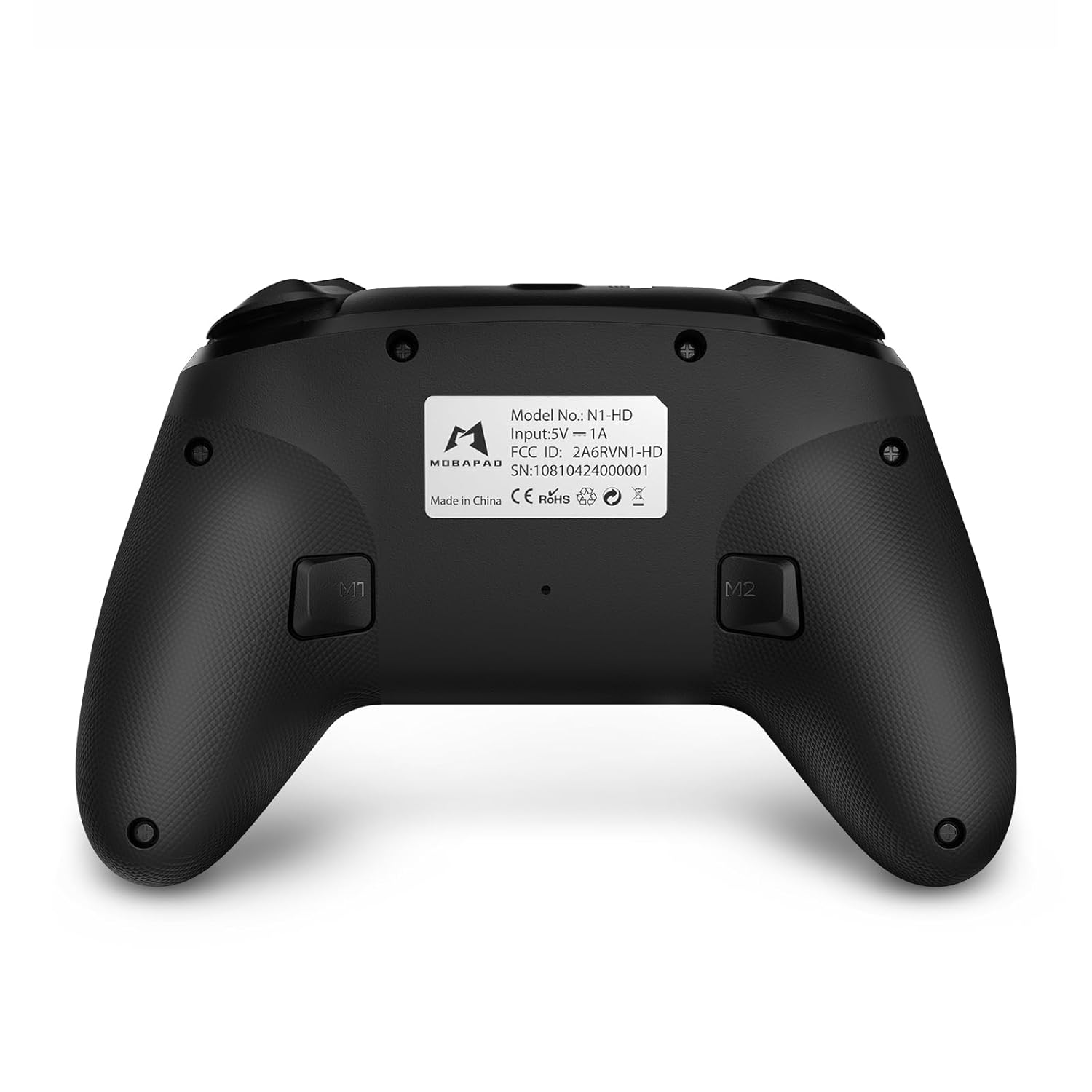
- Vifungo vya M1/M2: Programmable back buttons for custom macros or remapping.
Picha: Sehemu ya mbele yenye maelezo view of the MOBAPAD N1 HD controller, showing all buttons and joysticks.

Picha: Nyuma view of the MOBAPAD N1 HD controller, highlighting the M1 and M2 programmable buttons and product label.
4.2. NFC Functionality (Amiibo Scanning)
To use the NFC function for Amiibo scanning on Nintendo Switch:
- Ensure your controller is connected to the Nintendo Switch.
- In a compatible game, when prompted to scan an Amiibo, place the Amiibo figure directly over the Kitufe cha Nyumbani area on the controller.
- Hold the Amiibo in place until the game registers the scan.
5. Matengenezo na Matunzo
Proper maintenance ensures the longevity and optimal performance of your controller.
- Kusafisha: Tumia kitambaa laini na kikavu kufuta kidhibiti. Kwa uchafu mkaidi, futa kidogoampsw kitambaa na maji. Epuka kemikali kali au vifaa vya abrasive.
- Hifadhi: Hifadhi kidhibiti mahali pa baridi, pakavu mbali na jua moja kwa moja na joto kali.
- Utunzaji wa Betri: The controller contains a Lithium Ion battery. Avoid fully discharging the battery frequently. If storing for extended periods, charge the battery to about 50% to prolong its lifespan. Do not expose the battery to fire or extreme heat.
- Kushughulikia: Epuka kuangusha kidhibiti au kukiathiri kwa nguvu, kwani hii inaweza kuharibu vipengele vya ndani.
6. Utatuzi wa shida
If you encounter issues with your MOBAPAD N1 HD controller, refer to the following common solutions.
| Tatizo | Sababu inayowezekana | Suluhisho |
|---|---|---|
| Kidhibiti hakiunganishi. | Betri iko chini, nje ya uwezo, hali isiyo sahihi ya kuoanisha, kuingiliwa. | Charge the controller fully. Ensure it is within range of the device. Re-enter pairing mode (hold Home button). Move closer to the device or away from other wireless devices. |
| Vifungo au vijiti vya kuchezea havijibu. | Software glitch, physical obstruction, damage. | Restart the controller and the connected device. Check for any debris around the buttons/joysticks. If issues persist, contact customer support. |
| Vibration is weak or absent. | Vibration setting off, game does not support vibration, motor issue. | Check in-game settings and system settings to ensure vibration is enabled. Verify if the game supports vibration feedback. |
| NFC scanning fails. | Incorrect placement, game not prompting scan, controller not connected. | Ensure the Amiibo is placed directly over the Home button area. Confirm the game is prompting for an Amiibo scan. Verify controller is properly connected to the Switch. |
7. Vipimo
| Kipengele | Maelezo |
|---|---|
| Nambari ya Mfano | Mobapad N1 HD Black |
| Vipimo (L x W x H) | Inchi 5.91 x 2.36 x 3.94 |
| Uzito | 7.05 wakia |
| Aina ya Betri | Betri 1 ya Lithium Ion (imejumuishwa) |
| Muunganisho | Wireless (Bluetooth), USB-C (wired) |
| Utangamano | Nintendo Switch, PC, iOS, Android |
| Vipengele Maalum | Hall Effect Joysticks, ALPS Dual-Axis Motors, HD Vibration, Six-Axis Gyroscope, NFC |
8. Udhamini na Msaada
For warranty information or technical support, please contact MOBAPAD customer service. Refer to the official MOBAPAD webtovuti au hati yako ya ununuzi kwa masharti maalum ya udhamini na maelezo ya mawasiliano.
You can visit the official MOBAPAD store on Amazon for more information: MOBAPAD Store


