1. Utangulizi
The OWON HDS271 is a versatile 3-in-1 handheld device, integrating a digital oscilloscope, a multimeter, and a waveform generator into a single compact unit. Designed for field service, education, and general electronics testing, this instrument offers a 70MHz bandwidth oscilloscope, a 24000-count digital multimeter, and a 100KHz signal generator. Its portable design, built-in rechargeable battery, and high-resolution color LCD make it an essential tool for various electrical measurement and analysis tasks.

Mbele view of the OWON HDS271, showcasing its compact design and color display.
2. Taarifa za Usalama
To ensure safe operation and prevent damage to the device, please read and adhere to the following safety precautions:
- Usalama wa Jumla: Always operate the device within its specified voltage, current, and frequency limits. Do not use the device if it appears damaged or is not operating correctly.
- Hatari ya Mshtuko wa Umeme: Avoid contact with live circuits. Use caution when working with voltages above 30V AC RMS, 42V peak, or 60V DC, as these pose a shock hazard. Ensure probes are properly insulated.
- Probe Connections: Connect the ground lead of the oscilloscope probe to earth ground before connecting the probe tip to the circuit under test. Disconnect the probe tip first when finished.
- Usalama wa Betri: Use only the specified charging adapter. Do not expose the battery to extreme temperatures or disassemble it. Dispose of batteries according to local regulations.
- Mazingira: Operate the device in a dry environment, away from moisture, dust, and direct sunlight.
3. Bidhaa Imeishaview
The OWON HDS271 features a clear 3.5-inch color LCD and an intuitive button layout for easy operation. Below is a diagram illustrating the main components and controls of the device.
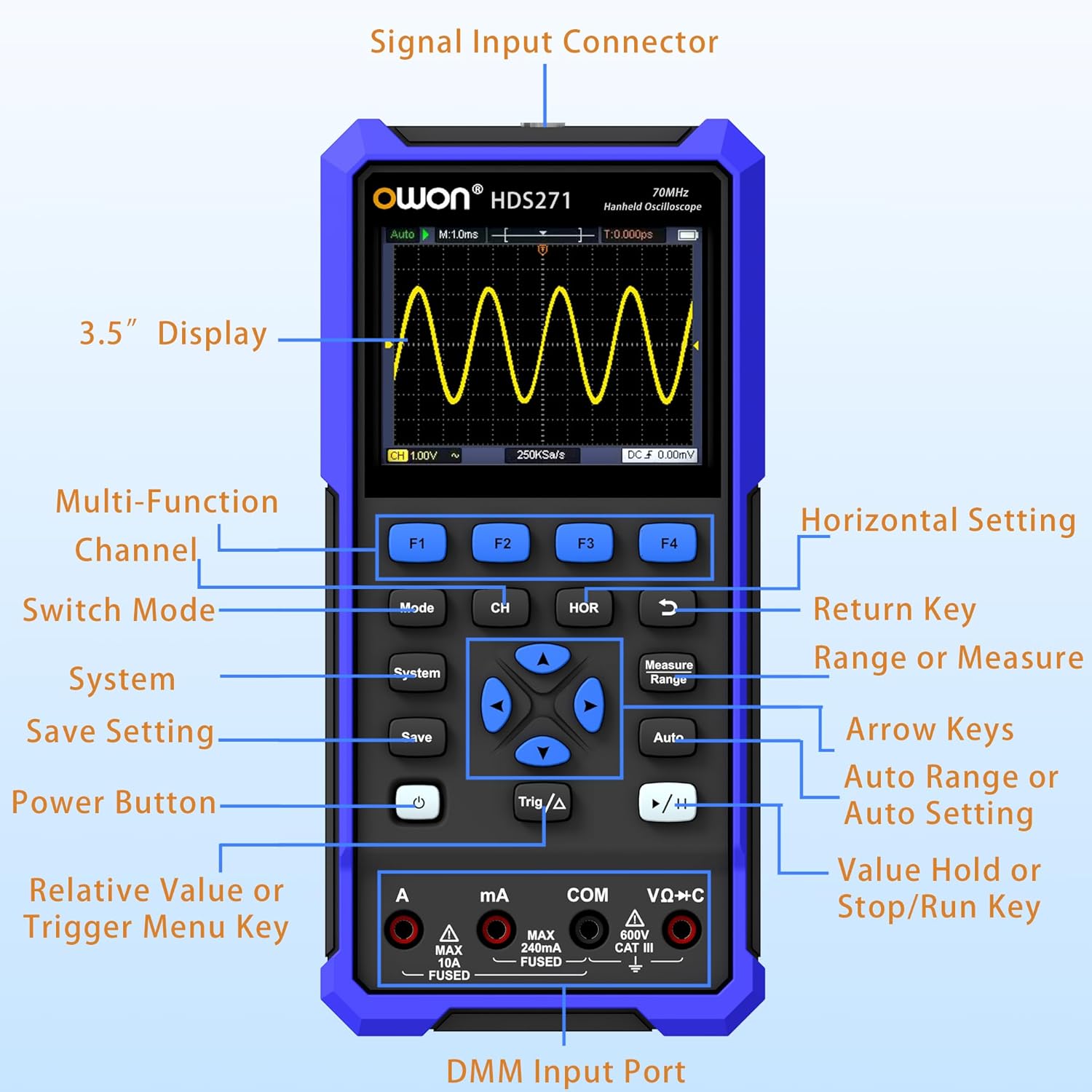
Detailed diagram of the OWON HDS271 front panel, indicating the function of each button, input port, and display area.
Vipengele Muhimu:
- Onyesho la inchi 3.5: High-resolution color LCD for waveform and measurement data.
- Vifungo vya Utendaji (F1-F4): Context-sensitive buttons for menu navigation and quick settings.
- Kitufe cha Hali: Switches between Oscilloscope, Multimeter, and Signal Generator modes.
- CH/1/2 Button: Selects oscilloscope channel or other channel-related settings.
- HOR Button: Adjusts horizontal scale/time base in oscilloscope mode.
- Kitufe cha Mfumo: Accesses system settings and configurations.
- Kitufe cha Kuokoa: Saves waveforms or measurement data.
- Kitufe cha Nguvu: Huwasha au kuzima kifaa.
- Trig/Δ Button: Adjusts trigger settings or enables delta measurements.
- Vifunguo vya Mishale: Navigates menus and adjusts parameters.
- Measure/Range Button: Initiates automatic measurements or adjusts measurement range.
- Kitufe cha Kiotomatiki: Performs auto-setup for oscilloscope or auto-ranging for multimeter.
- Run/Stop (▶/‖) Button: Starts or stops waveform acquisition.
- DMM Input Ports (A, mA, COM, VΩ+C): Connectors for multimeter probes.
- Kiunganishi cha Kuingiza Data: BNC connector for oscilloscope probes and signal generator output.
4. Kuweka
4.1 Kufungua na Ukaguzi wa Awali
Carefully remove the OWON HDS271 and all accessories from the packaging. Inspect the device for any signs of physical damage. If any damage is found, contact your supplier immediately.
4.2 Kuchaji Betri
The HDS271 is equipped with a built-in 2000mAh lithium battery. Before first use, it is recommended to fully charge the device.
- Connect the provided USB Type-C cable to the Type-C port on the device.
- Connect the other end of the USB cable to a compatible USB power adapter (not always included) or a computer's USB port.
- Kiashiria cha kuchaji kwenye kifaa kitaonyesha hali ya kuchaji. Kwa kawaida kuchaji kamili huchukua saa kadhaa.

Karibu-up view of the HDS271's bottom, highlighting the Type-C charging port and indicating the presence of a 2000mAh built-in lithium battery.
4.3 Vichunguzi vya Kuunganisha
- Oscilloscope Probes: Connect the BNC connector of the oscilloscope probe to the Signal Input Connector on the top of the device. Ensure the probe is properly compensated before use.
- Multimeter Leads: Insert the red test lead into the VΩ+C or A/mA input jack and the black test lead into the COM input jack for multimeter measurements.
5. Maagizo ya Uendeshaji
The HDS271 offers three primary functions: Oscilloscope, Multimeter, and Signal Generator. Use the Hali button to switch between these functions.

An illustration demonstrating the three primary functions of the HDS271: oscilloscope waveform display, multimeter voltage reading, and signal generator output.
5.1 Washa/Zima
- Ili kuwasha, bonyeza na ushikilie kitufe cha Nguvu kitufe hadi skrini iangaze.
- Ili kuzima, bonyeza na ushikilie Nguvu kifungo hadi kifaa kizima.
5.2 Hali ya Osiloskopu
In Oscilloscope mode, the HDS271 displays real-time waveforms, allowing for detailed signal analysis.
- Bonyeza kwa Hali button to select Oscilloscope mode.
- Connect the oscilloscope probe to the signal input and the circuit under test.
- Bonyeza kwa Otomatiki button for automatic setup of vertical, horizontal, and trigger settings.
- Tumia CH/1/2 button to select the channel (HDS271 is 1-channel).
- Adjust vertical scale (Volts/Div) and horizontal time base (Sec/Div) using the arrow keys and corresponding menu options (accessed via F-buttons or dedicated buttons like HORA).
- Adjust trigger level and mode using the Trig/Δ button and arrow keys.
- Tumia Pima button to access automatic measurement functions (e.g., Vpp, Vmax, Freq).
- The Run/Stop (▶/‖) button pauses or resumes waveform acquisition.

Wanne wa zamaniamples of waveforms displayed on the HDS271 screen, including mains waveform, TV signal wave, PLC pulse wave, and multi-audio frequency response signal.
Hali ya Vipimo Vingi 5.3
The multimeter function provides precise measurements of various electrical parameters.
- Bonyeza kwa Hali button to select Multimeter mode.
- Connect the test leads to the appropriate DMM input ports (VΩ+C for voltage/resistance/capacitance, A for high current, mA for low current, COM for common ground).
- Select the desired measurement function (e.g., DCV, ACV, Resistance, Capacitance, Diode, Continuity) using the F-buttons or dedicated menu options.
- The device typically features auto-ranging, but manual range selection may be available via the Kipimo/Kiwango kitufe.
- Soma thamani ya kipimo iliyoonyeshwa kwenye skrini.
5.4 Hali ya Jenereta ya Mawimbi
The built-in signal generator can output various waveforms for testing circuits.
- Bonyeza kwa Hali button to select Signal Generator mode.
- Connect the signal output (via the BNC connector) to the circuit or device you wish to test.
- Use the F-buttons and arrow keys to select the desired waveform type (Sine, Square, Sawtooth, Pulse).
- Kurekebisha mzunguko na amplitude of the output signal according to your requirements.
- Ensure the output is enabled before connecting to sensitive circuits.
5.5 PC Software Connectivity
The HDS271 supports PC software connectivity via USB for data logging, waveform analysis, and device control.
- Install the OWON PC software on your computer (software typically available from the manufacturer's webtovuti).
- Connect the HDS271 to your computer using the provided USB Type-C cable.
- Follow the instructions in the PC software to establish a connection and begin data transfer or remote control.
6. Matengenezo
6.1 Kusafisha
To maintain the device's appearance and functionality, clean it regularly.
- Futa sehemu ya nje ya kifaa kwa laini, damp kitambaa. Usitumie visafishaji vya abrasive au vimumunyisho.
- Ensure no moisture enters the device through ports or openings.
6.2 Utunzaji na Uhifadhi wa Betri
Proper battery care extends the lifespan of the device.
- Recharge the battery when the low battery indicator appears.
- If storing the device for an extended period, charge the battery to approximately 50% to 70% capacity.
- Hifadhi kifaa mahali pa baridi, kavu, mbali na jua moja kwa moja na joto kali.
7. Utatuzi wa shida
This section addresses common issues you might encounter with the OWON HDS271.
| Tatizo | Sababu inayowezekana | Suluhisho |
|---|---|---|
| Kifaa hakiwashi | Betri ya chini; Kitufe cha nguvu hakijabonyezwa kwa usahihi | Charge the battery; Press and hold the power button for a few seconds |
| No waveform displayed in OSC mode | Probe not connected; Incorrect vertical/horizontal settings; No signal input | Check probe connection; Use Auto button; Verify signal source |
| Incorrect multimeter readings | Leads connected incorrectly; Wrong measurement function selected; Out of range | Ensure leads are in correct ports; Select appropriate function; Use Auto-ranging or adjust range manually |
| PC software not connecting | USB cable issue; Driver not installed; Software not running | Check USB cable; Install necessary drivers; Ensure software is open and configured |
8. Vipimo
The following table details the technical specifications of the OWON HDS271.

A summary graphic detailing the key specifications for the Digital Multimeter (DMM), Oscilloscope (OSC), and Signal Generator functions of the HDS271.
8.1 Oscilloscope (OSC) Specifications
- Vituo: 1CH
- Kipimo cha data: 70MHz
- SampKiwango: 250MSa/s (real-time)
- Urefu wa Rekodi: 8K
- Kiwango cha Upyaji wa Umbo la Mawimbi: Up to 10,000wfms/s
- Vipengele: Auto Setup, Multiple Measurement Functions, Cursor Measurement, Slow Sweep Mode
8.2 Digital Multimeter (DMM) Specifications
- Onyesha: 4 1/2 Digit, 24,000 Counts
- Kazi za Kipimo: Voltage (AC/DC), Current (AC/DC), Resistance, Capacitance, Diode, Continuity
- Vipengele: True RMS, Auto-Ranging, Data Hold
8.3 Signal Generator (WG) Specifications
- Mara kwa mara: 100KHz
- Waveform Output: Sine, Square, Sawtooth, Pulse
- Pato la Juu Amplitude: 2.5Vpp
8.4 Maelezo ya Jumla
- Onyesha: 3.5 inch High-Resolution Color LCD
- Betri: 2000mAh Lithium Ion (imejumuishwa)
- Mlango wa Kuchaji: USB Type-C
- Muunganisho: USB (for PC software)
- Vipimo vya Bidhaa: Inchi 7.8 x 1.5 x 3.78
- Uzito: Pauni 2.65
- Mtengenezaji: OWON
9. Udhamini na Msaada
OWON products are designed and manufactured to high-quality standards. For information regarding warranty coverage, please refer to the warranty card included with your product or visit the official OWON webtovuti.
For technical support, troubleshooting assistance, or service inquiries, please contact OWON customer support through their official channels. Contact details can typically be found on the OWON webtovuti au katika ufungaji wa bidhaa.


