1. Utangulizi
Thank you for choosing the Duux Bora Smart Dehumidifier. This manual provides essential information for the safe and efficient operation of your device. Please read it thoroughly before use and retain it for future reference.
The Bora dehumidifier is designed to create a healthier indoor environment by effectively managing high humidity levels. It can remove up to 30 liters of moisture per day, helping to prevent mold and bacterial growth. Featuring an integrated hygrostat for automatic humidity regulation and an active carbon filter for odor removal, the Bora ensures cleaner air. Remote control is available via the Duux application.
2. Maagizo Muhimu ya Usalama
Fuata tahadhari za kimsingi za usalama kila wakati unapotumia vifaa vya umeme ili kupunguza hatari ya moto, mshtuko wa umeme na majeraha.
- Soma maagizo yote kabla ya kutumia kifaa.
- Hakikisha usambazaji wa umeme unalingana na ujazotage imebainishwa kwenye lebo ya ukadiriaji.
- Usitumie kiondoa unyevu kwa kamba iliyoharibika au kuziba.
- Weka kifaa mbali na vyanzo vya joto, jua moja kwa moja, na vifaa vinavyoweza kuwaka.
- Usizuie viingilio vya hewa au njia.
- Weka kifaa hicho kwenye uso thabiti na tambarare kila wakati.
- Chomoa kifaa kabla ya kusafisha, matengenezo, au wakati haitumiki.
- Usitumbukize kifaa, uzi wa umeme, au usichomeke kwenye maji au vimiminiko vingine.
- Kifaa hiki hakikusudiwa kutumiwa na watu (pamoja na watoto) walio na uwezo mdogo wa kimwili, hisi au kiakili, au wasio na uzoefu na ujuzi, isipokuwa wamepewa usimamizi au maagizo kuhusu matumizi ya kifaa na mtu anayehusika na usalama wao.
- Watoto wanapaswa kusimamiwa ili kuhakikisha kwamba hawachezi na kifaa.
3. Bidhaa Imeishaview
Familiarize yourself with the components of your Duux Bora Dehumidifier.

Kielelezo cha 3.1: Mbele view of the Duux Bora Dehumidifier, showing its sleek design and a smartphone displaying the control app interface.

Kielelezo cha 3.2: Nyuma view of the dehumidifier, highlighting the removable air filter cover and the continuous drainage port.

Kielelezo cha 3.3: Top panel of the dehumidifier, displaying the digital screen and touch controls for various functions.
Vipengele Muhimu:
- Jopo la Kudhibiti: Located on the top, with digital display and touch buttons.
- Kiingilio/Nchi ya hewa: For drawing in and expelling air.
- Tangi la maji: 4-liter capacity, located at the bottom front.
- Kichujio Kinachotumika cha Kaboni: Located behind the rear air inlet.
- Lango la Mifereji ya Maji Endelevu: For connecting a hose for continuous operation.
- Mabwana: Kwa urahisi wa kutembea.
4. Kuweka
- Kufungua: Ondoa kwa uangalifu kifaa cha kuondoa unyevunyevu kutoka kwenye kifungashio chake. Weka vifaa vyote vya kifungashio kwa ajili ya usafiri au hifadhi ya baadaye.
- Uwekaji:
- Weka kitengo kwenye uso thabiti, usawa.
- Ensure there is at least 20 cm (8 inches) of space around the air inlets and outlets for proper airflow.
- Epuka kuweka kitengo karibu na vyanzo vya joto au kwenye jua moja kwa moja.
- The dehumidifier is suitable for various rooms up to 50 square meters, including basements, laundry rooms, and living areas.
- Muunganisho wa Nishati: Chomeka kebo ya umeme kwenye sehemu ya umeme iliyowekwa chini. Hakikisha ujazotage inalingana na mahitaji ya kitengo (Volts 240).
- Ufungaji wa tanki la maji: Ensure the 4-liter water tank is correctly inserted into the unit.

Kielelezo cha 4.1: The 4-liter water tank being pulled out from the dehumidifier for emptying or inspection.
- Utoaji wa Mifereji Mendeleo (Si lazima): For continuous operation without emptying the water tank, connect a suitable hose (not included) to the continuous drainage port at the back of the unit. Ensure the hose is sloped downwards to allow gravity drainage.
5. Maagizo ya Uendeshaji
5.1. Uendeshaji wa Jopo la Kudhibiti
Kielelezo cha 5.1: Kina view of the control panel with digital display and function buttons.
The control panel allows you to manage all functions of the dehumidifier. Refer to the icons on the panel for specific functions.
- Kitufe cha Nguvu: Huwasha au kuzima kitengo.
- Uteuzi wa Hali: Cycle through various operating modes (e.g., Auto, Continuous, Laundry Drying).
- Mpangilio wa Unyevu: Adjust the desired humidity level using the up/down arrows. The integrated hygrostat will maintain this level.
- Kipima muda: Weka kipima muda cha kuzima kiotomatiki.
- Kasi ya shabiki: Select between 2 fan speeds.
5.2. Smart Control via Duux App
The Duux Bora can be controlled remotely using the Duux application on your smartphone or tablet.

Kielelezo cha 5.2: The Duux mobile application displaying current humidity and control options for the Bora dehumidifier.
- Download the Duux app from your device's app store.
- Follow the in-app instructions to pair your Bora dehumidifier.
- Once connected, you can power the unit on/off, adjust settings, and receive notifications (e.g., when the water tank is full) from anywhere.
5.3. Laundry Drying Mode
The innovative Laundry Drying Mode is designed to efficiently dry clothes indoors.
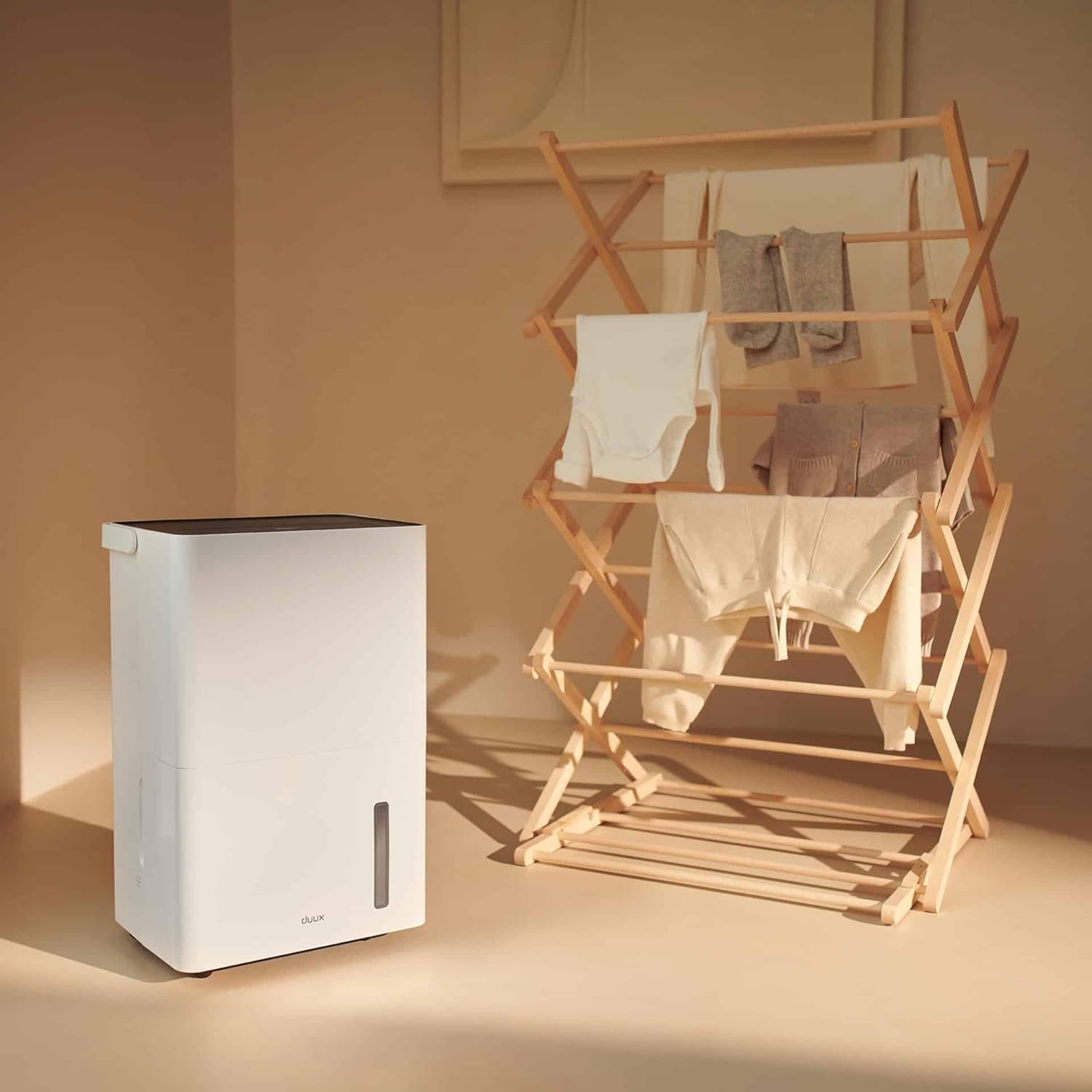
Kielelezo cha 5.3: The dehumidifier positioned near a laundry rack, demonstrating its use in drying clothes.
- Activate this mode via the control panel or the Duux app.
- This mode operates continuously to remove moisture from the air, accelerating the drying process of laundry.
- It can significantly reduce energy consumption compared to traditional tumble dryers.
6. Matengenezo
Utunzaji wa mara kwa mara huhakikisha utendakazi bora na maisha marefu ya kiondoa unyevunyevu chako.
6.1. Kumwaga Tangi la Maji
- When the water tank is full, the unit will automatically shut off and an indicator light will illuminate.
- Toa tanki la maji kwa uangalifu kutoka mbele ya kifaa.
- Mwaga maji yaliyokusanywa kwenye sinki au kukimbia.

Kielelezo cha 6.1: A user emptying the collected water from the dehumidifier's tank into a sink.
- Reinsert the empty water tank firmly into the unit until it clicks into place. The unit will resume operation.
6.2. Kusafisha Kichujio cha Hewa
The active carbon filter should be cleaned regularly (e.g., every two weeks or as needed) to maintain air quality and dehumidifier efficiency.
- Chomoa kiondoa unyevu kutoka kwa mkondo wa umeme.
- Locate the filter cover at the back of the unit.
- Remove the filter cover and carefully pull out the active carbon filter.

Kielelezo cha 6.2: A user demonstrating the removal of the active carbon filter from the rear of the dehumidifier.
- Clean the filter with a vacuum cleaner or wash it gently with lukewarm water. Allow it to air dry completely before reinstallation.
- Reinsert the dry filter and replace the filter cover.
6.3. Usafishaji wa Jumla
- Futa sehemu ya nje ya kitengo kwa laini, damp kitambaa. Usitumie visafishaji vya abrasive au vimumunyisho.
- Hakikisha kifaa kimechomoka kabla ya kusafisha.
7. Utatuzi wa shida
Kabla ya kuwasiliana na usaidizi kwa wateja, tafadhali rejelea maswala na suluhisho zifuatazo za kawaida:
| Tatizo | Sababu inayowezekana | Suluhisho |
|---|---|---|
| Kitengo hakiwashi. | No power supply; Power cord not plugged in; Water tank full or incorrectly inserted. | Check power connection; Empty and reinsert water tank correctly. |
| Kisafisha unyevu hakikusanyi maji. | Room temperature too low; Humidity level already low; Air filter clogged; Unit in fan-only mode. | Ensure room temperature is above 5°C (41°F); Check desired humidity setting; Clean air filter; Select dehumidification mode. |
| Kitengo kina kelele. | Kifaa hakiko kwenye uso tambarare; Kichujio cha hewa kimefungwa; Vipengele vya ndani vinatetemeka. | Weka kwenye uso ulio sawa; Safisha kichujio cha hewa; Ikiwa kelele itaendelea, wasiliana na usaidizi. |
| Masuala ya muunganisho wa programu. | Wi-Fi signal weak; Incorrect pairing procedure; App requires update. | Ensure strong Wi-Fi signal; Re-attempt pairing as per app instructions; Update Duux app. |
| Unpleasant odor from unit. | Active carbon filter needs cleaning or replacement. | Clean or replace the active carbon filter. |
8. Vipimo
| Kipengele | Maelezo |
|---|---|
| Chapa | Duux |
| Nambari ya Mfano | DXDH30 |
| Rangi | Nyeupe |
| Uwezo wa kudorora | Up to 30 Liters/day |
| Uwezo wa Tangi la Maji | 4 lita |
| Voltage | 240 Volts |
| Vipimo vya Bidhaa (L x W x H) | 24.7 x 33.7 x 51 cm |
| Uzito wa Kipengee | Kilo 16.5 |
| Idadi ya Kasi | 2 |
| Kuzima kiotomatiki | Yes (when water tank is full) |
| Vipengele Maalum | Integrated Hygrostat, Active Carbon Filter, Laundry Drying Mode, Smart App Control |
| Sehemu ya Sakafu Iliyopendekezwa | Hadi mita 50 za mraba |
| Vipengee vilivyojumuishwa | Kichujio 1 cha kaboni kinachotumika |
9. Warranty and Spare Parts
Duux products are manufactured to high-quality standards. While specific warranty details are not provided in this manual, please refer to your purchase documentation or the official Duux webtovuti kwa taarifa kamili za udhamini.
Upatikanaji wa Vipuri: Spare parts for the Duux Bora Dehumidifier are available for up to 10 years from the date of purchase, ensuring long-term usability and repairability.
10. Msaada kwa Wateja
If you encounter any issues not covered in the troubleshooting section or require further assistance, please contact Duux customer support.
- Visit the official Duux webtovuti ya Maswali Yanayoulizwa Mara kwa Mara, nyenzo za usaidizi, na maelezo ya mawasiliano.
- Utilize the Duux app for remote monitoring and potential in-app support features.


