1. Utangulizi
The CYCPLUS Smart Indoor Cycling Fan F1 is designed to enhance your indoor cycling experience by providing powerful, adaptive cooling. Featuring a BLDC motor, multiple speed modes, and smart control options via remote or mobile application, this fan integrates seamlessly with your training setup.
2. Yaliyomo kwenye Kifurushi
Thibitisha kuwa bidhaa zote zilizoorodheshwa hapa chini zimejumuishwa kwenye kifurushi chako:
- Fan Main Unit x 1
- Adjustable Stand x 1
- Raising Base x 1
- Ground Base x 1
- Kebo ya Nguvu ya AC x 1
- Adapta ya Nguvu ya DC x 1
- Washer/L-screw x 1
- Screws M5 x 2
- M5 Spare Screws x 2
- M3 Spare Screws x 2
- Bisibisi x 1
- Mwongozo wa Mtumiaji x 1
- Udhibiti wa Kijijini x 1
- Kamba x 2
- Lanyard x 1

Image: All components included in the CYCPLUS Smart Indoor Cycling Fan F1 package.
3. Bidhaa Imeishaview
3.1 Sifa Muhimu
- Mtiririko wa Hewa wenye Nguvu: BLDC motor and centrifugal blades generate winds up to 50km/h for effective cooling.
- Njia 5 za kasi: Adjustable based on ANT+ speed sensor, heart rate monitor, power meter, or smart bike trainer data.
- Dual Base Design: Supports both ground base and adjustable height stand for flexible airflow direction.
- Udhibiti Mahiri: Remote control and CYCPLUS APP for convenient operation and personalized settings.
- Uendeshaji wa Kelele ya Chini: BLDC motor and soft-impact blades ensure quiet workouts.
- Kumbukumbu ya Kiotomatiki: Fan remembers settings and sensors for seamless use.
3.2 Vipengele
The CYCPLUS Smart Indoor Cycling Fan F1 consists of the following main components:
- Fan Main Unit: Houses the motor, blades, and control panel.
- Stendi Inayoweza Kurekebishwa: Allows for height adjustment and elevated placement.
- Ground Base: Provides stable support for floor placement.
- Udhibiti wa Mbali: For wireless adjustment of fan settings.
- Adapta ya Nguvu: Connects the fan to an AC power source.

Image: The CYCPLUS Smart Indoor Cycling Fan F1 on its adjustable stand.

Image: The CYCPLUS Smart Indoor Cycling Fan F1 on its ground base.
4. Maagizo ya Kuweka
4.1 Mkutano
The CYCPLUS Smart Indoor Cycling Fan F1 offers two primary assembly configurations: with the adjustable stand or with the ground base.
4.1.1 Adjustable Stand Assembly
- Attach the adjustable stand to the main fan unit using the provided M5 screws and screwdriver. Ensure a secure fit.
- Connect the raising base to the bottom of the adjustable stand.
- Place the assembled fan on a stable, flat surface.
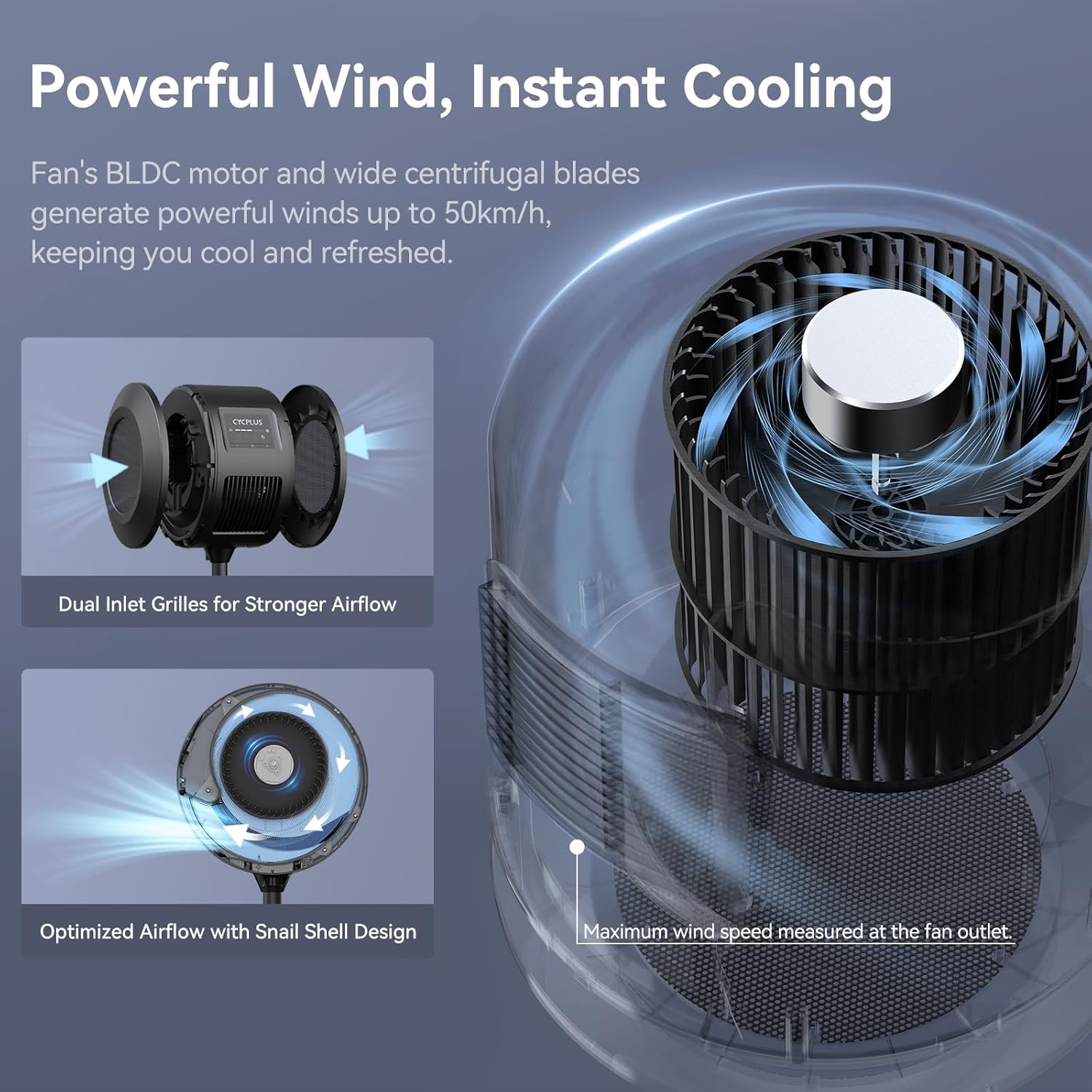
Image: Assembly diagram for the fan with the adjustable stand.
4.1.2 Ground Base Assembly
- Attach the ground base directly to the main fan unit using the provided M5 screws and screwdriver.
- Ensure the fan unit is securely seated in the ground base.
- Place the fan on the floor in your desired training area.
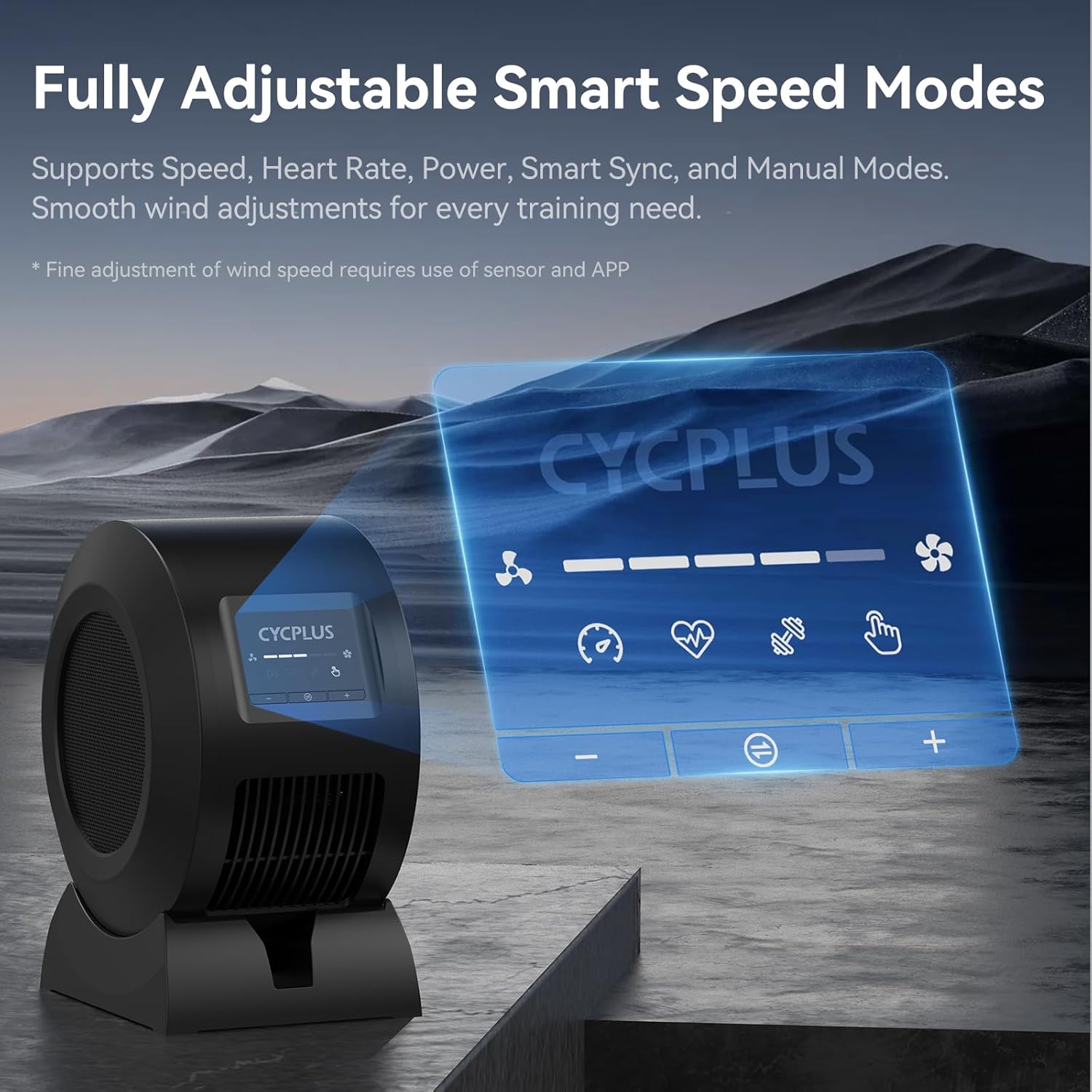
Image: Assembly diagram for the fan with the ground base.
Uunganisho wa Nguvu 4.2
- Connect the DC power adapter to the fan's power input port.
- Plug the AC power cable into the DC power adapter.
- Insert the AC power cable into a standard wall outlet.
- The fan will power on and enter standby mode.
4.3 Uwekaji Bora
For optimal cooling performance, position the fan approximately 1 meter (3 feet) from your training position. The dual base design allows for flexible airflow direction, either directly from the front or angled upwards.

Image: Optimal placement of the fan with adjustable stand, showing airflow and height range.

Image: Optimal placement of the fan with ground base, showing airflow and adjustable angle.
5. Maagizo ya Uendeshaji
5.1 Jopo la Kudhibiti Imeishaview
The fan unit features a simple button panel for basic operation.

Image: Control panel of the fan.
Udhibiti wa Remote wa 5.2
The included remote control allows for convenient adjustment of fan settings from your training position. Once paired, the remote will auto-connect for future use.
- Kuoanisha: Follow the instructions in the remote control's specific manual for initial pairing.
- Kazi: Adjust fan speed, switch between modes, and power on/off.
- Kupachika: Use the provided silicone straps or lanyard to attach the remote to your handlebars or wear it for easy access.
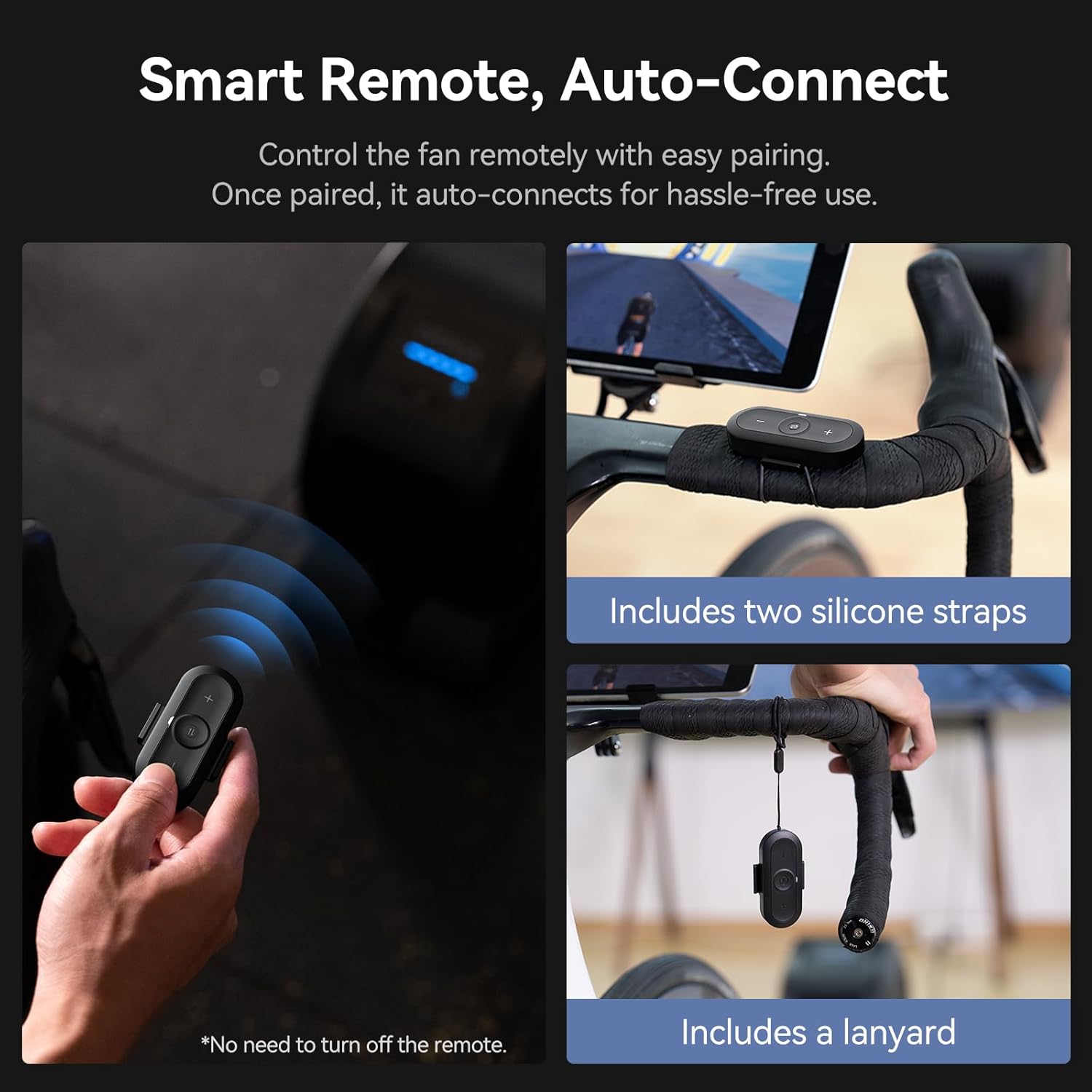
Image: Remote control and mounting options.
5.3 CYCPLUS Mobile Application
For advanced control and personalized settings, download and use the CYCPLUS APP.
- Download the CYCPLUS APP from your device's app store.
- Open the app and follow the on-screen instructions to pair with your fan via Bluetooth.
- Within the app, you can fine-tune workout parameters and tailor the fan's operation to your fitness level.

Image: CYCPLUS mobile application interface for fan control.
5.4 Aina za Mashabiki
The fan supports 5 distinct operating modes:
- Hali ya Kasi: Automatically adjusts fan speed based on your cycling speed (requires ANT+ speed sensor).
- Njia ya Kiwango cha Moyo: Automatically adjusts fan speed based on your heart rate (requires ANT+ heart rate monitor). You can set initial and maximum values.
- Hali ya Nguvu: Automatically adjusts fan speed based on your workout power (requires ANT+ power meter or smart bike trainer). You can set initial and maximum values.
- Njia ya Smart: Connects multiple sensors (speed, heart rate, power) for intelligent, data-driven adjustments.
- Hali ya Mwongozo: Allows you to manually adjust the fan speed to your preference using the remote control or app.

Picha: Juuview of the 5 fan speed modes.

Image: Detailed explanation of data-driven fan modes.
5.5 Auto Memory Function
The fan is equipped with an auto-memory function that remembers your last used settings and connected sensors. This allows for automatic pairing and eliminates the need for repeated adjustments during subsequent uses.

Image: Illustration of the auto-memory feature in use.
6. Matengenezo
Regular maintenance ensures the longevity and optimal performance of your CYCPLUS Smart Indoor Cycling Fan F1.
6.1 Kusafisha
- Nje: Futa nyuso za nje za feni kwa laini, damp kitambaa. Usitumie visafishaji vya abrasive au vimumunyisho.
- Grille: The front grille is removable for easy cleaning of the fan blades. Gently remove the grille and wipe the blades with a dry or slightly damp cloth. Ensure the fan is unplugged before cleaning.

Image: Removable grille for cleaning.
6.2 Hifadhi
Ikiwa haitumiki kwa muda mrefu, hifadhi feni mahali pakavu na penye baridi, mbali na jua moja kwa moja na halijoto kali.
7. Utatuzi wa shida
If you encounter issues with your CYCPLUS Smart Indoor Cycling Fan F1, refer to the following common problems and solutions:
| Tatizo | Sababu inayowezekana | Suluhisho |
|---|---|---|
| Shabiki haiwashi. | Hakuna usambazaji wa nguvu. | Check if the power cable is securely plugged into the fan and the wall outlet. Ensure the outlet is functional. |
| Udhibiti wa mbali haufanyi kazi. | Remote battery low or not paired. | Replace the LR44 battery in the remote. Re-pair the remote with the fan if necessary. |
| Fan not adjusting speed automatically in smart modes. | Sensors not connected or out of range. | Ensure your ANT+ sensors (speed, HR, power) are active and within range. Check sensor connection status in the CYCPLUS APP. |
| App cannot connect to the fan. | Bluetooth disabled or fan not in pairing mode. | Ensure Bluetooth is enabled on your mobile device. Restart the fan and try connecting again. |
| Kelele isiyo ya kawaida au vibration. | Obstruction in fan blades or loose components. | Unplug the fan. Carefully check for any obstructions in the blades. Ensure all assembly screws are tightened. If the issue persists, contact customer support. |
If the problem persists after attempting these solutions, please contact CYCPLUS customer support for further assistance.
8. Vipimo
| Kipengele | Maelezo |
|---|---|
| Jina la Bidhaa | Shabiki wa Siha Mahiri |
| Jina la Mfano | F1 |
| Chapa | CYCPLUS |
| Nguvu Iliyokadiriwa | 68 W |
| Uzito Net | Kilo 5.5 (pauni 12.1) |
| Compatible Input | 100-240V 50/60Hz |
| Pato la Adapta | 36V - 3A (Max) |
| Kasi ya Mzunguko wa Juu | 1280 RPM |
| Kiwango cha juu cha mtiririko wa hewa | 670 m³/saa |
| Kasi ya Upepo wa Max | About 50 km/h |
| Sensor Connection Protocol | ANT+ |
| Mobile Connection Protocol | BLE (Nishati ya Chini ya Bluetooth) |
| Joto la Uendeshaji | 0-40°C (32-104°F) |
| Product Dimensions (Ground Base) | 215mm (D) x 268mm (W) x 370mm (H) |
| Product Dimensions (Adjustable Stand) | 440mm (Base Diameter) x 950-1450mm (Adjustable Height) |
| Betri ya Kidhibiti cha Mbali | Betri 1 ya LR44 (imejumuishwa) |

Image: Detailed technical specifications and dimensions.
9. Udhamini na Msaada
CYCPLUS provides a standard warranty for this product. Please refer to the warranty card included in your package or visit the official CYCPLUS webtovuti kwa sheria na masharti ya udhamini wa kina.
For technical support, troubleshooting assistance, or warranty claims, please contact CYCPLUS customer service through their official webtovuti au maelezo ya mawasiliano yaliyotolewa katika nyaraka za bidhaa yako.
Rasilimali za Mtandaoni:
- CYCPLUS Amazon Store
- Official CYCPLUS Website (refer to product packaging for URL)
10. Taarifa za Ziada
10.1 Hidden Function: Front Wheel Rise
The unused ground base can double as a front wheel rise, enhancing riding comfort by leveling your bike when using a rear wheel trainer.

Image: Ground base used as a front wheel rise.
Note: Suitable for tires with an outer width of less than 32mm.


