1. Utangulizi
This manual provides comprehensive instructions for the installation, operation, and maintenance of your Antec CX700 ATX Mid Tower Gaming Case. Designed for PC enthusiasts, this case features a sleek, modern design with a tempered glass side panel and pre-installed ARGB fans to enhance visual appeal and ensure optimal airflow. Please read this manual thoroughly before beginning assembly to ensure proper setup and safe operation.
2. Vipimo
| Kipengele | Maelezo |
|---|---|
| Chapa | Antec |
| Nambari ya Mfano | CX700 |
| Aina ya Kesi | Mnara wa kati |
| Utangamano wa Ubao wa Mama | ATX |
| Rangi | Nyeusi |
| Nyenzo | Aloi ya chuma, Plastiki |
| Uzito wa Kipengee | Kilo 5.5 (pauni 12.1) |
| Mbinu ya Kupoeza | Hewa |
| Pre-installed ARGB Fans | 3 (Front-mounted) |
| Usaidizi wa Mashabiki (Upeo wa Juu) | Front: 3x120mm, Top: 3x120mm, Rear: 1x120mm, Bottom: 3x120mm |
| Bandari za USB 3.0 | 2 |
| USB Type-C Ports | 1 |
| Bandari za Sauti | Headphone, Microphone |
| GPU Clearance (Max) | 410mm (inchi 16.14) |
| Usaidizi wa HDD | inchi 3.5 |
| SSD Support | inchi 2.5 |
| PSU Length (Max) | 225 mm |
3. Yaliyomo kwenye Kifurushi
- Antec CX700 ATX Mid Tower Gaming Case
- Pre-installed ARGB Fans (3 fans, typically front-mounted as per product title)
- Accessory Box (Screws, cable ties, user manual)
- Paneli ya Upande ya Kioo Iliyokasirishwa
4. Maagizo ya Kuweka
4.1 Kufungua na Kukagua
Carefully remove the case from its packaging. Inspect for any signs of damage during transit. The tempered glass panel is fragile; handle with care.
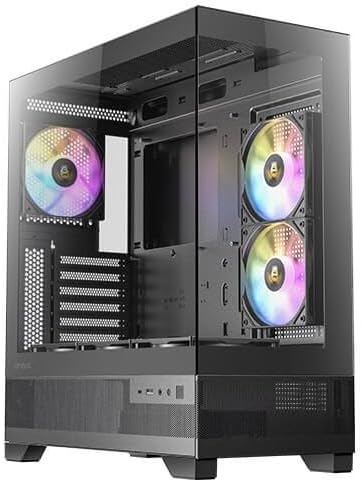
Kielelezo 1: Mbele na upande view of the Antec CX700 case, showcasing the tempered glass panel and pre-installed fans.
4.2 Kuondoa Paneli za Pembeni
To access the interior for component installation, remove the tempered glass side panel and the solid rear side panel.
- Locate the thumbscrews on the rear of the case securing the tempered glass panel.
- Carefully unscrew these thumbscrews.
- Gently pull the tempered glass panel away from the chassis. Lay it flat on a soft, clean surface to prevent scratches or damage.
- Repeat the process for the solid rear side panel if necessary for cable management access.

Kielelezo cha 2: Nyuma view of the Antec CX700 case, showing the rear fan and expansion slots. The side panel is removed for internal access.
4.3 Ufungaji wa Motherboard
Install your ATX motherboard into the designated area. Ensure all standoffs are correctly aligned and secured.
4.4 Ufungaji wa Vipengele
Install your CPU, RAM, GPU (up to 410mm length), storage drives (3.5" HDD, 2.5" SSD), and power supply unit (PSU, up to 225mm length) according to their respective manuals and the case's layout.

Kielelezo 3: Juu view of the Antec CX700 case, highlighting the pre-installed fans and internal layout for component placement.
4.5 Usimamizi wa Cable
Tumia vikato vya kuelekeza kebo na sehemu za kufunga nyuma ya trei ya ubao-mama ili kudhibiti nyaya kwa ufanisi. Hii inaboresha mtiririko wa hewa na aesthetics.
4.6 Front Panel I/O Connections
Connect the front panel I/O cables (USB 3.0, USB Type-C, HD Audio, Power, Reset, LED) to the corresponding headers on your motherboard.
- Kitufe cha Nguvu: Initiates system power.
- Badilisha Kitufe: Huanzisha upya mfumo.
- Bandari za USB 3.0 (x2): Kwa ajili ya uhamishaji wa data wa kasi ya juu.
- USB Type-C Port (x1): For modern device connectivity.
- Jackphone ya Kichwa: Toleo la sauti.
- Jack kipaza sauti: Ingizo la sauti.
5. Maagizo ya Uendeshaji
Once all components are installed and connected, replace the side panels. Connect your peripherals, monitor, and power cable. Press the power button on the top panel to start your system. The pre-installed ARGB fans will illuminate, providing customizable lighting effects.
6. Matengenezo
Regular maintenance ensures optimal performance and longevity of your PC case and components.
- Vichujio vya Vumbi: The case includes magnetic dust filters (e.g., on the top panel) that can be easily removed and cleaned with water or a soft brush. Clean these regularly to maintain airflow and prevent dust buildup inside the case.
- Kusafisha mambo ya ndani: Periodically open the side panels and use compressed air to remove dust from internal components and fans. Ensure the system is powered off and unplugged before cleaning.
- Kioo chenye hasira: Clean the tempered glass panel with a microfiber cloth and a non-abrasive glass cleaner. Avoid harsh chemicals.
7. Utatuzi wa shida
Ukikumbana na matatizo, rejelea hatua zifuatazo za kawaida za utatuzi:
- Mfumo hauwashi:
- Hakikisha ugavi wa umeme umeunganishwa ipasavyo kwenye plagi ya ukutani na swichi ya PSU iko katika nafasi ya 'WASHA'.
- Verify all power cables (24-pin ATX, 8-pin CPU, PCIe for GPU) are securely connected to the motherboard and components.
- Hakikisha kuwa kebo ya kitufe cha nguvu cha paneli ya mbele imeunganishwa kwa usahihi kwenye kichwa cha paneli cha mbele cha ubao-mama.
- Mashabiki Hawazunguki / ARGB Haiwashi:
- Confirm that the fan power cables and ARGB cables are correctly connected to the motherboard or a dedicated ARGB controller.
- Refer to your motherboard manual for proper ARGB header connections and software control.
- Hakuna Toleo la Kuonyesha:
- Ensure your monitor cable is connected to the graphics card (GPU) output, not the motherboard's integrated graphics ports (unless using integrated graphics).
- Weka upya kadi ya picha kwenye sehemu yake ya PCIe.
8. Udhamini na Msaada
The Antec CX700 ATX Mid Tower Gaming Case comes with a standard manufacturer's warranty. For specific warranty terms, duration, and to register your product, please visit the official Antec webtovuti au wasiliana na usaidizi kwa wateja wao. Weka uthibitisho wako wa ununuzi kwa madai ya udhamini.
For further technical assistance or support, please refer to the Antec support resources available online.


