1. Utangulizi
This manual provides essential instructions for the safe and efficient use of your Meizu Note 21 Pro smartphone. Please read this manual thoroughly before operating the device and retain it for future reference.
2. Ni nini kwenye Sanduku
- Meizu Note 21 Pro Smartphone
- Adapta ya Nguvu
- (Other accessories such as USB cable, SIM ejector tool, and documentation may vary by region.)
3. Mpangilio wa Kifaa
Familiarize yourself with the physical components of your Meizu Note 21 Pro.
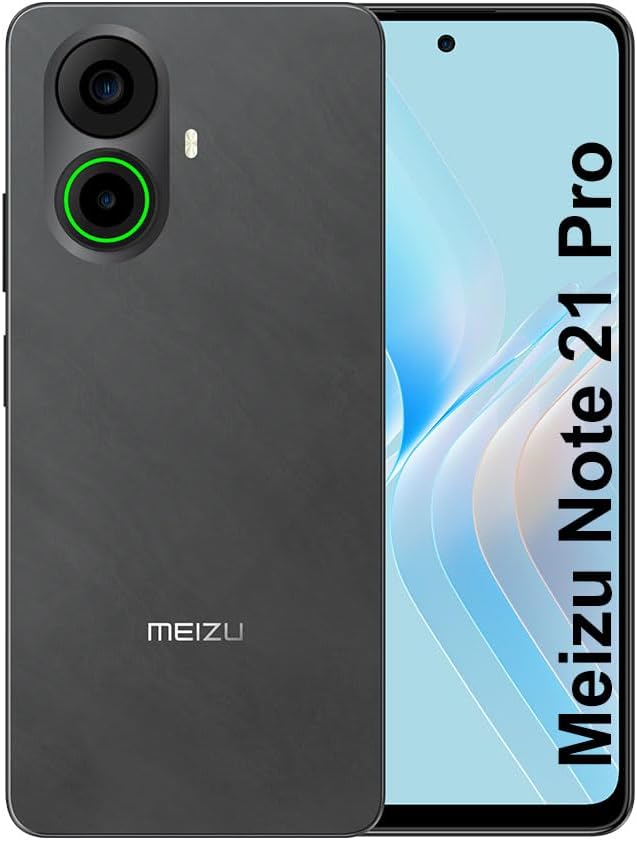
Picha ya 3.1: Mbele na nyuma view of the Meizu Note 21 Pro. The front displays the screen with a punch-hole camera. The rear shows the dual camera module with a green accent ring on one lens, a flash, and the "MEIZU" logo at the bottom.
- Onyesho la Mbele: 6.78-inch FHD+ screen with a 120Hz refresh rate.
- Kamera ya mbele: Iko katika sehemu ya juu ya katikati ya onyesho.
- Kamera za Nyuma: Dual camera system, including a 64MP main camera.
- Kihisi cha Alama ya Vidole vya Upande: Integrated for secure access.
- Mlango wa USB: Kwa malipo na uhamisho wa data.
- Jack ya Sauti ya 3.5mm: Kwa vichwa vya sauti.
- Trei ya Kadi ya SIM/MicroSD: Supports Dual Nano SIM and MicroSD cards.
4. Kuweka
4.1. Kuingiza Kadi za SIM na MicroSD
- Tafuta trei ya SIM kadi kwenye kando ya kifaa chako.
- Ingiza zana ya ejector ya SIM kwenye shimo dogo karibu na trei na sukuma kwa upole hadi trei itoke.
- Weka kadi yako ya Nano SIM na/au kadi ya MicroSD kwenye nafasi zilizotengwa kwenye trei. Hakikisha miguso ya dhahabu inaelekea chini.
- Ingiza tena trei kwa uangalifu kwenye kifaa hadi itakapobofya mahali pake.
4.2. Washa na Usanidi wa Awali
- Press and hold the Power button until the Meizu logo appears.
- Fuata vidokezo kwenye skrini ili kuchagua lugha yako, unganisha kwenye mtandao wa Wi-Fi, na usanidi akaunti yako ya Google.
- During setup, you will be guided to configure security features such as a PIN, pattern, or password.
4.3. Fingerprint Recognition Setup
- Nenda kwa Mipangilio > Usalama na faragha > Kufungua kwa Alama ya vidole.
- Follow the on-screen instructions to register your fingerprint by repeatedly touching the side-mounted sensor.
- Ensure your finger covers the entire sensor area during registration for optimal performance.
5. Kuendesha Kifaa Chako
5.1. Onyesho na Urambazaji
- The 6.78-inch FHD+ display operates at a 120Hz refresh rate for smooth visuals.
- Navigate the Android 14 operating system using touch gestures: tap, swipe, pinch-to-zoom.
- Access quick settings by swiping down from the top of the screen.
5.2. Kazi za Kamera
- Fungua programu ya Kamera kutoka skrini ya kwanza au droo ya programu.
- The rear camera system features a 64MP main sensor for high-resolution photos and a 2MP depth-of-field camera for portrait effects.
- The 13MP front-facing camera is suitable for selfies and video calls.
- Tap on the screen to focus, and use the on-screen shutter button to capture images. Explore various modes like Portrait, Night, and Pro within the camera app.
5.3. Utendaji na Uhifadhi
- The MediaTek G99 Octa Core processor ensures efficient performance for applications and multitasking.
- The device comes with 256GB of internal storage and 8GB of RAM.
- Storage can be expanded using a MicroSD card (sold separately).
5.4. Betri na Kuchaji
- The Meizu Note 21 Pro is equipped with a 5000mAh battery.
- Use the provided Power Adapter for 30W fast charging.
- To charge, connect the USB cable to the phone's USB port and the power adapter, then plug the adapter into a wall outlet.
5.5. Muunganisho
- 4G LTE: Supports various LTE FDD and TDD bands for cellular data. Note: This international version works on T-Mobile in the USA and globally with other carriers.
- Wi-Fi 5: Unganisha kwenye mitandao isiyotumia waya kwa ufikiaji wa mtandao.
- Bluetooth: Oanisha na vifaa visivyotumia waya kama vile vipokea sauti vya masikioni na spika.
- NFC: Kwa malipo yasiyogusana na kuoanisha haraka na vifaa vinavyooana.
- GPS: Kwa huduma za eneo na urambazaji.
6. Matengenezo
- Kusafisha: Use a soft, lint-free cloth to clean the screen and body of the device. Avoid harsh chemicals or abrasive materials.
- Utunzaji wa Betri: Avoid extreme temperatures. Do not fully discharge the battery frequently. For optimal battery longevity, keep the charge between 20% and 80%.
- Masasisho ya Programu: Regularly check for and install system updates to ensure optimal performance and security. Go to Mipangilio > Mfumo > Sasisho la mfumo.
7. Utatuzi wa shida
| Suala | Suluhisho linalowezekana |
|---|---|
| Kifaa hakiwashi | Ensure the battery is charged. Connect the device to the power adapter and try again. If unresponsive, press and hold the Power button for 10-15 seconds to force a restart. |
| Mawimbi duni ya mtandao | Check if the SIM card is correctly inserted. Move to an area with better network coverage. Restart the device. Verify with your carrier that your plan is active. |
| Programu ni polepole au zinaharibika | Close background applications. Clear app cache (Mipangilio > Programu > chagua programu > Hifadhi na akiba > Futa akiba). Restart the device. Ensure sufficient storage space. |
| Kihisi cha alama ya vidole hakifanyi kazi | Ensure your finger and the sensor are clean and dry. Re-register your fingerprint in settings. |
8. Vipimo
- Mfano: Meizu Note 21 Pro
- Mfumo wa Uendeshaji: Android 14
- Kichakataji: MediaTek G99 Octa Core (2.2GHz)
- Onyesha: 6.78 inches FHD+ (1080 x 2160 resolution), 120Hz Refresh Rate
- RAM: GB 8
- Hifadhi ya Ndani: GB 256
- Kamera ya Nyuma: Kina cha 64MP Kuu + 2MP
- Kamera ya mbele: MP 13
- Betri: 5000mAh, 30W Fast Charging
- Muunganisho: 4G LTE (FDD:1,2,3,4,5,7,8,12,17,18,19,20,26,28,66; TDD:38,40,41), 3G WCDMA, 2G Quad Band, Wi-Fi 5, Bluetooth, NFC, GPS
- Jack ya Sauti: 3.5 mm
- Vipimo: Inchi 6.64 x 2.96 x 0.33
- Uzito: Pauni 1.1
9. Udhamini na Msaada
For warranty information and technical support, please refer to the warranty card included with your product or visit the official Meizu webtovuti. Weka uthibitisho wako wa ununuzi kwa madai ya udhamini.
For further assistance, you may contact Meizu customer service through their official channels.


