1. Utangulizi
Thank you for choosing the CUBOT C28 Smartwatch. This device is designed to enhance your daily life with its advanced features, including comprehensive health monitoring, diverse sports modes, and smart notifications. This manual provides detailed instructions to help you set up, operate, and maintain your smartwatch effectively.

Picha 1.1: Kuu view of the CUBOT C28 Smartwatch, showcasing its display with health data and time.
2. Yaliyomo kwenye Kifurushi
Tafadhali angalia yaliyomo kwenye kifurushi unapoondoa sanduku. Ikiwa bidhaa yoyote haipo au kuharibiwa, wasiliana na muuzaji wako.
- CUBOT C28 Smartwatch
- Kebo ya Kuchaji
- Mwongozo wa Mtumiaji
3. Bidhaa Imeishaview
The CUBOT C28 Smartwatch features a robust design with a 2.02-inch HD LCD touchscreen. It is equipped with physical buttons for easy navigation and quick access to functions.

Picha 3.1: Mbele view of the CUBOT C28 Smartwatch, showing the display and physical buttons labeled 'SPORT', 'POWER', and 'MENU'.
Vipengele Muhimu:
- 2.02-inch HD LCD Touchscreen: For clear visuals and interactive control.
- Vifungo vya upande: 'SPORT' for quick access to sports modes, 'POWER' for power on/off and screen control, 'MENU' for menu navigation.
- Kitambuzi cha Mapigo ya Moyo: Located on the back for health monitoring.
- Inachaji Anwani: Nyuma ya kuunganisha kebo ya kuchaji ya sumaku.
4. Kuweka
4.1 Kuchaji Smartwatch
Before first use, fully charge your CUBOT C28 Smartwatch. Connect the magnetic charging cable to the charging contacts on the back of the watch and plug the USB end into a power adapter (not included) or a computer's USB port.
- Uwezo wa Betri: 410 mAh Lithium-Ion.
- Maisha ya Betri: Up to 7 days of daily use, 3 days of intensive use, and 30 days standby.

Image 4.1: The smartwatch screen showing a charging indicator and details on battery endurance.
4.2 Kusakinisha na Kuoanisha Programu
To unlock the full potential of your CUBOT C28, download and install the 'Da Fit' application on your smartphone. The app is available for both Android and iOS devices.
- Download 'Da Fit': Scan the QR code provided in the manual or search for 'Da Fit' in your smartphone's app store. Alternatively, visit http://plus.crrepa.com/app-download/dafit.
- Washa Bluetooth: Hakikisha kuwa Bluetooth imewashwa kwenye simu yako mahiri.
- Ongeza Kifaa: Open the 'Da Fit' app, navigate to 'Add Device', and select 'C28' from the list of available devices.
- Ruhusa za Ruzuku: Follow the on-screen prompts to grant necessary permissions for notifications and other features.
- Thibitisha Kuoanisha: Thibitisha ombi la kuoanisha kwenye simu yako mahiri na saa mahiri.

Image 4.2: Visual guide for downloading the 'Da Fit' app and connecting the smartwatch.
5. Maagizo ya Uendeshaji
5.1 Urambazaji Msingi
- Skrini ya kugusa: Swipe left/right, up/down to navigate through menus and screens. Tap to select.
- Kitufe cha NGUVU: Press to wake/turn off the screen. Long press to power on/off the device.
- Kitufe cha SPORT: Quick access to sports modes.
- Kitufe cha MENU: Fikia menyu kuu.
5.2 Kubinafsisha Nyuso za Saa
Personalize your smartwatch with various watch faces.
- The watch comes with 5 built-in watch faces.
- You can customize one watch face with your own image via the 'Da Fit' app.
- Access additional watch faces from the server through the app.
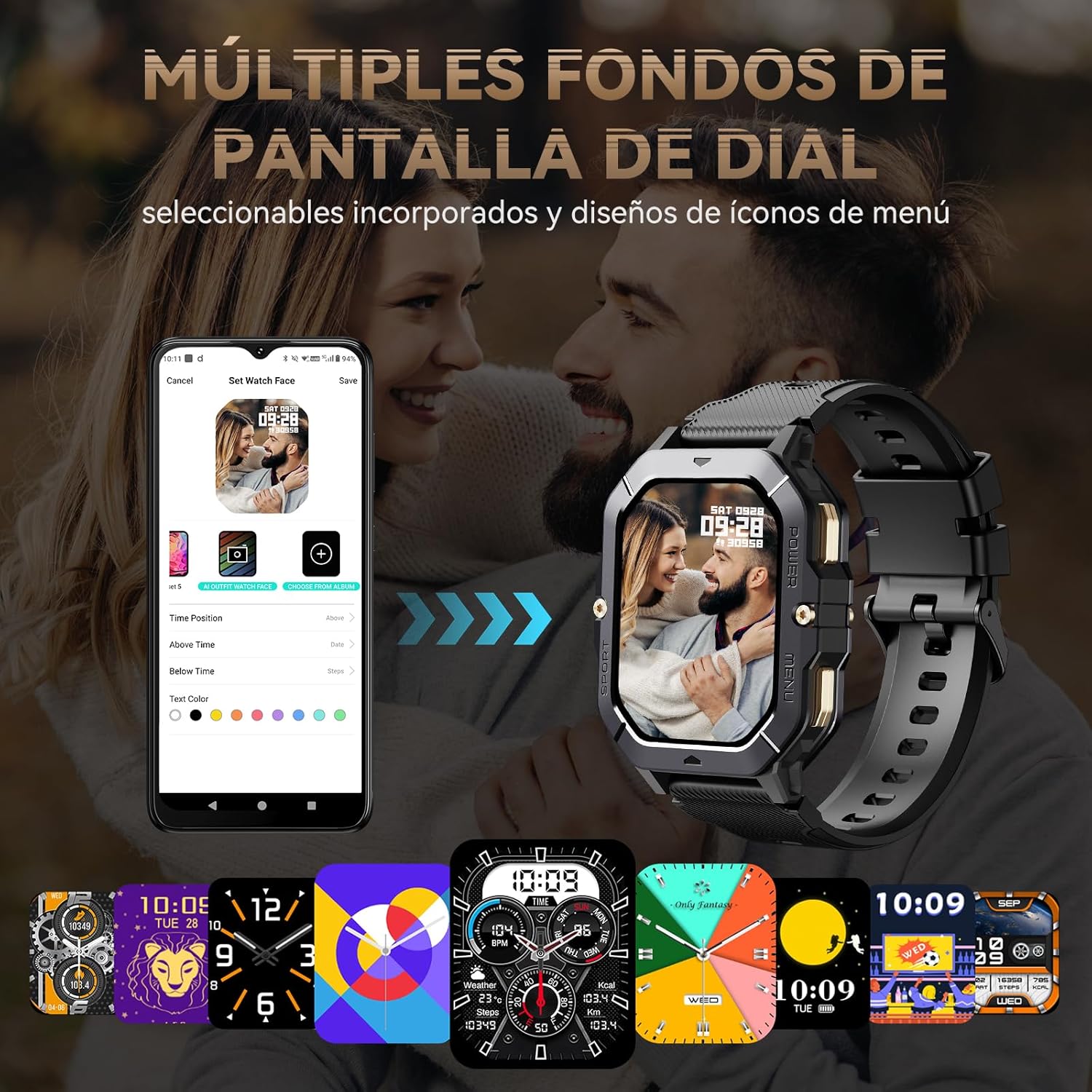
Picha 5.1: Kutamples of customizable watch faces and the app interface for selection.
5.3 Notifications and Bluetooth Calling
Stay connected by receiving notifications and managing calls directly from your wrist.
- Arifa za Ujumbe: Receive real-time alerts for incoming calls, text messages, and social media apps like Facebook, Instagkondoo dume, na Twitter.
- Kupiga simu kwa Bluetooth: Answer or reject calls directly from the smartwatch. You can also view recent calls and access a dial pad.

Image 5.2: The smartwatch showing an incoming call and options for managing calls.
6. Ufuatiliaji wa Afya
The CUBOT C28 provides comprehensive 24-hour health monitoring features to help you track your well-being.
- Ufuatiliaji wa Kiwango cha Moyo: Real-time heart rate tracking using the VC30F sensor.
- Kujaza Oksijeni kwenye Damu (SpO2): Fuatilia viwango vya oksijeni ya damu yako.
- Ufuatiliaji wa Usingizi: Tracks deep sleep, light sleep, and REM sleep patterns.
- Stress Detection: Hutoa maarifa katika viwango vyako vya mafadhaiko.
- Ufuatiliaji wa Afya ya Wanawake: Record and monitor women's health data.

Image 6.1: Health monitoring screen showing heart rate, blood oxygen, sleep, and blood pressure data.
7. Njia za Michezo
With over 120 built-in sports modes, the CUBOT C28 helps you track and analyze your workouts scientifically.
- Includes common activities like walking, outdoor running, and cycling.
- Also features specialized modes such as rugby and mountaineering.
- Each mode provides detailed exercise data to help optimize your training.
- Ufuatiliaji wa GPS: Connects to your smartphone's GPS for accurate tracking of duration, distance, and route.
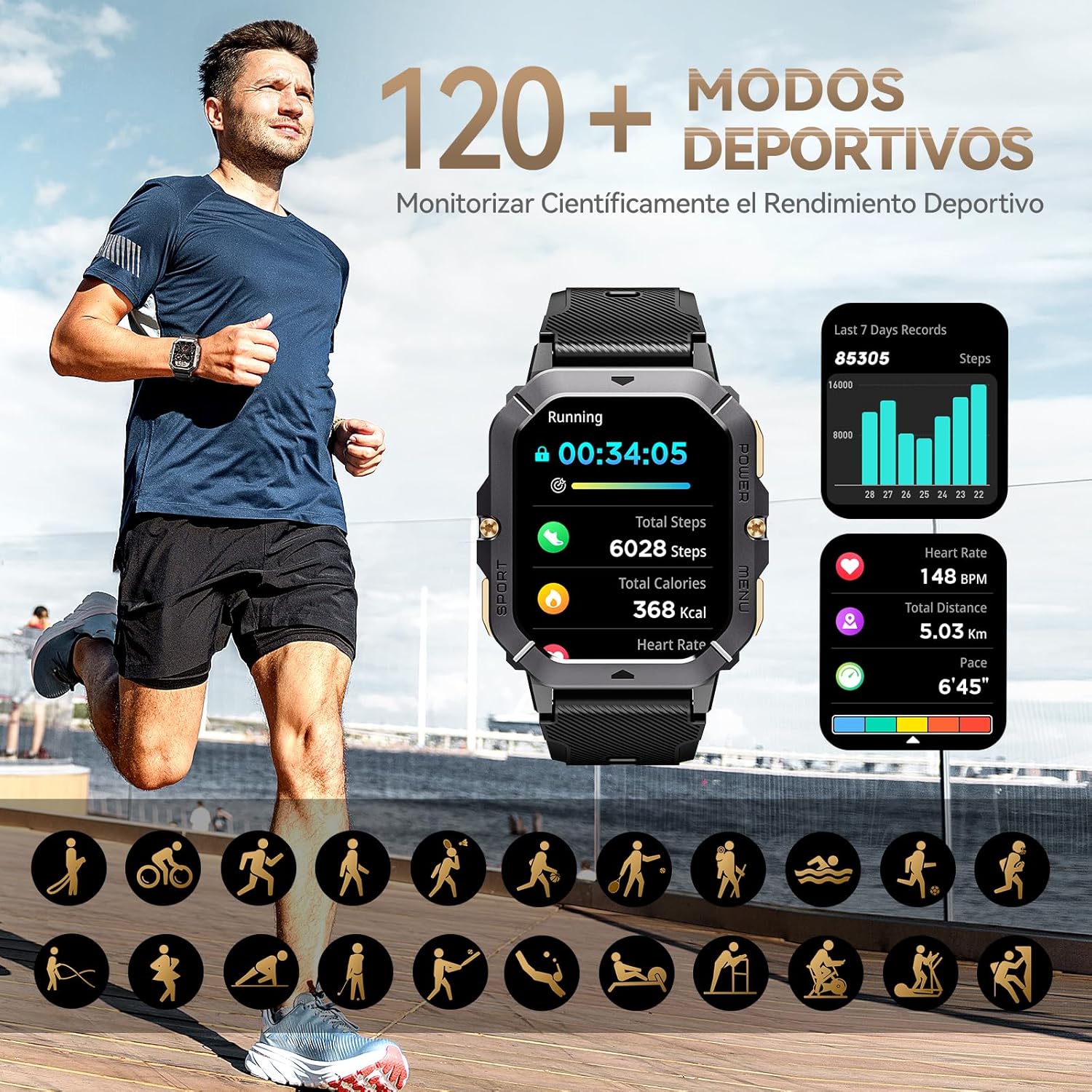
Image 7.1: Smartwatch displaying exercise data, surrounded by icons for various sports activities.
8. Vipengele vya Smart
Beyond health and fitness, the CUBOT C28 offers several smart functionalities for convenience.
- Utabiri wa hali ya hewa: Unganisha kwenye simu yako kwa view real-time weather updates.
- Udhibiti wa Muziki: Play, pause, skip tracks, and adjust volume for music playing on your connected smartphone.
- Alarm Clock & Stopwatch: Set alarms and use the integrated stopwatch for timing activities.
- Udhibiti wa Kamera: Remotely control your smartphone's camera to take photos.
- AI Voice Assistant (DA GPT): Interact with an AI assistant for queries and commands.

Image 8.1: Smartwatch screens showing weather, music control, alarm, and stopwatch functions.
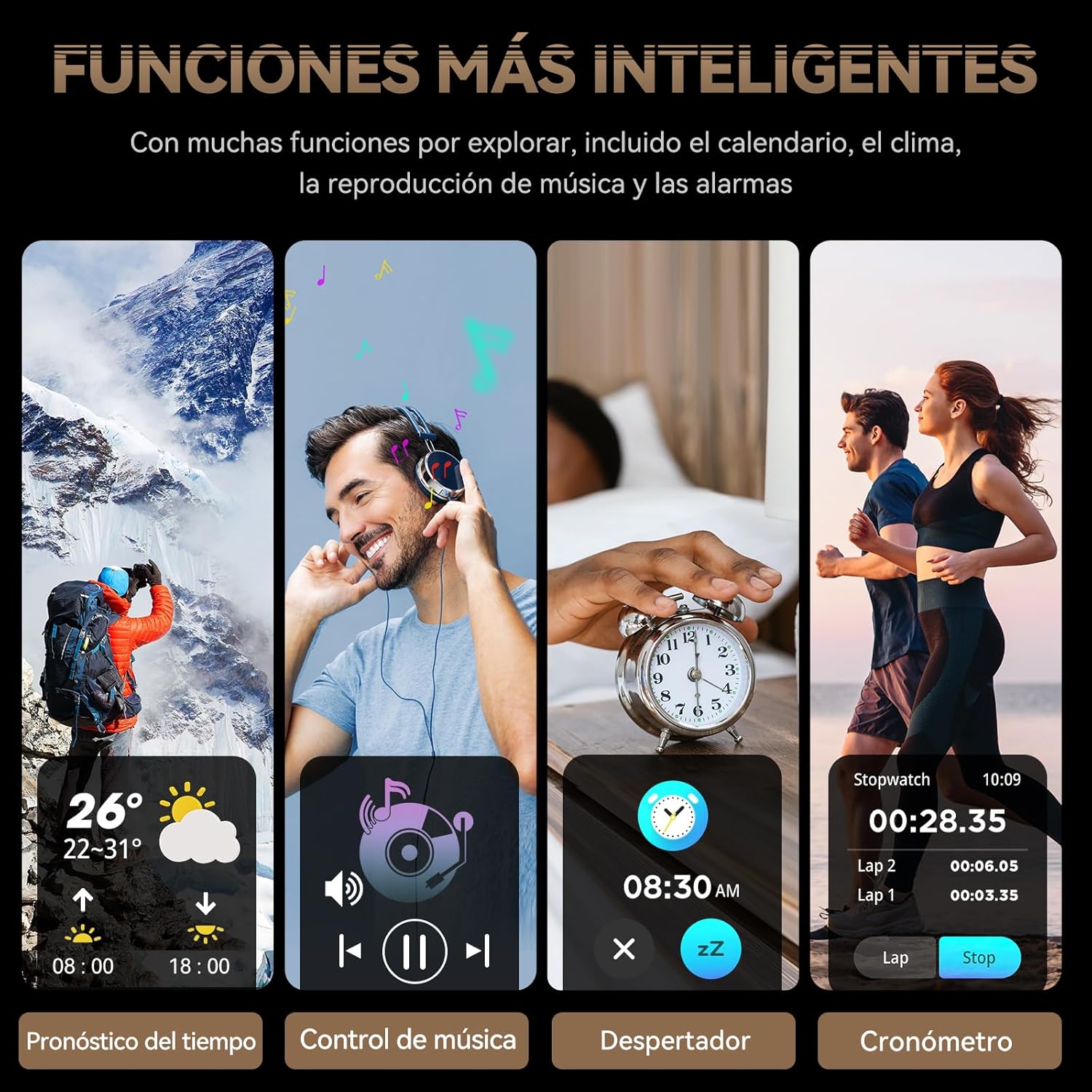
Image 8.2: The smartwatch demonstrating its AI voice assistant feature.
9. Matengenezo
To ensure the longevity and optimal performance of your CUBOT C28 Smartwatch, follow these maintenance guidelines:
- Kusafisha: Regularly wipe the watch and strap with a soft, dry cloth. For stubborn dirt, use a slightly damp cloth and dry thoroughly. Avoid harsh chemicals or abrasive materials.
- Upinzani wa Maji: The watch has a 50-meter (1ATM) water resistance rating, making it suitable for swimming and showering. However, avoid hot water, steam, or prolonged submersion in deep water. Do not operate buttons underwater.
- Uimara: The C28 is designed to be shockproof, drop-proof, and resistant to extreme temperatures (-30°C to 70°C). While robust, avoid unnecessary impacts or exposure to harsh conditions.
- Inachaji: Use only the provided charging cable. Ensure charging contacts are clean and dry before charging.
Image 9.1: The smartwatch demonstrating its ruggedness and water resistance.
10. Utatuzi wa shida
If you encounter issues with your CUBOT C28 Smartwatch, refer to the following common solutions:
- Tazama bila kuwasha: Hakikisha kuwa saa imejaa chaji. Iunganishe kwenye chaja kwa angalau dakika 30.
- Haiwezi kuoanishwa na simu mahiri:
- Hakikisha kuwa Bluetooth imewashwa kwenye simu yako na saa.
- Hakikisha kuwa saa iko ndani ya masafa ya Bluetooth (kwa kawaida mita 10).
- Zima na uwashe tena simu yako na saa mahiri.
- Clear the Bluetooth cache on your phone and try again.
- Arifa hazijapokelewa:
- Check if notification permissions are granted to the 'Da Fit' app on your phone.
- Ensure the 'Da Fit' app is running in the background.
- Verify that 'Do Not Disturb' mode is not active on either the watch or your phone.
- Data ya afya isiyo sahihi:
- Hakikisha kuwa saa inavaliwa vizuri kwenye kifundo cha mkono wako, sio ya kubana sana au kulegeza sana.
- Weka kitambuzi kikiwa safi na bila jasho au uchafu.
- Note that smartwatches are not medical devices; data is for reference only.
- Skrini imegoma kujibu: Try restarting the smartwatch by long-pressing the POWER button.
11. Vipimo
| Kipengele | Vipimo |
|---|---|
| Mfano | C28 |
| Onyesho | 2.02-inch HD LCD Touchscreen |
| Azimio | saizi 320*390 |
| Uwezo wa Betri | 410 mAh Lithium-Ion |
| Wastani wa Maisha ya Betri | 7 days (normal use) |
| Muunganisho | Bluetooth |
| Mfumo wa Uendeshaji | Android Wear (compatible) |
| Uhifadhi wa Kumbukumbu | 128 MB |
| Upinzani wa Maji | 50 meters (1ATM) |
| Vifaa Sambamba | Smartphone, Tablet, Computer |
| Vipimo | 19.8 x 14.3 x 3.5 cm |
| Uzito | 240 g |
12. Udhamini na Msaada
12.1 Taarifa ya Udhamini
Tafadhali rejelea hati zako za ununuzi au za muuzaji rejareja website for specific warranty details regarding your CUBOT C28 Smartwatch. Warranty terms typically cover manufacturing defects for a specified period from the date of purchase.
12.2 Usaidizi kwa Wateja
For technical assistance, troubleshooting not covered in this manual, or other inquiries, please contact the retailer where you purchased the product or visit the official CUBOT webtovuti kwa rasilimali za usaidizi.


