Utangulizi
This manual provides detailed instructions for the setup, operation, maintenance, and troubleshooting of your OBSBOT Tail Air Bundle. This bundle includes the OBSBOT Tail Air 4K smart streaming PTZ camera, a SanDisk Extreme 128 GB microSDXC card, and a Pearstone Standard Series HDMI to HDMI High-Speed Ethernet Cable.
The OBSBOT Tail Air is designed to provide high-quality video capture and streaming with advanced AI tracking capabilities, making it suitable for remote work, content creation, and conference environments.
Ni nini kwenye Sanduku
Tafadhali thibitisha kuwa bidhaa zote zilizoorodheshwa hapa chini zipo kwenye kifurushi chako:
- 1x OBSBOT Tail Air Camera (OSB-2108-CW)
- 1x Kesi ya Hifadhi
- 1x USB-C Male to Dual USB-C Female Splitter
- 1x Kebo ya USB-C
- 1x USB-C hadi Adapta ya USB-A
- 1x SanDisk Extreme 128 GB microSDXC Card (SDSQXA1-128G-AN6MA)
- 1x Pearstone Standard Series HDMI to HDMI High-Speed Ethernet Cable (PEHDA106), 6'
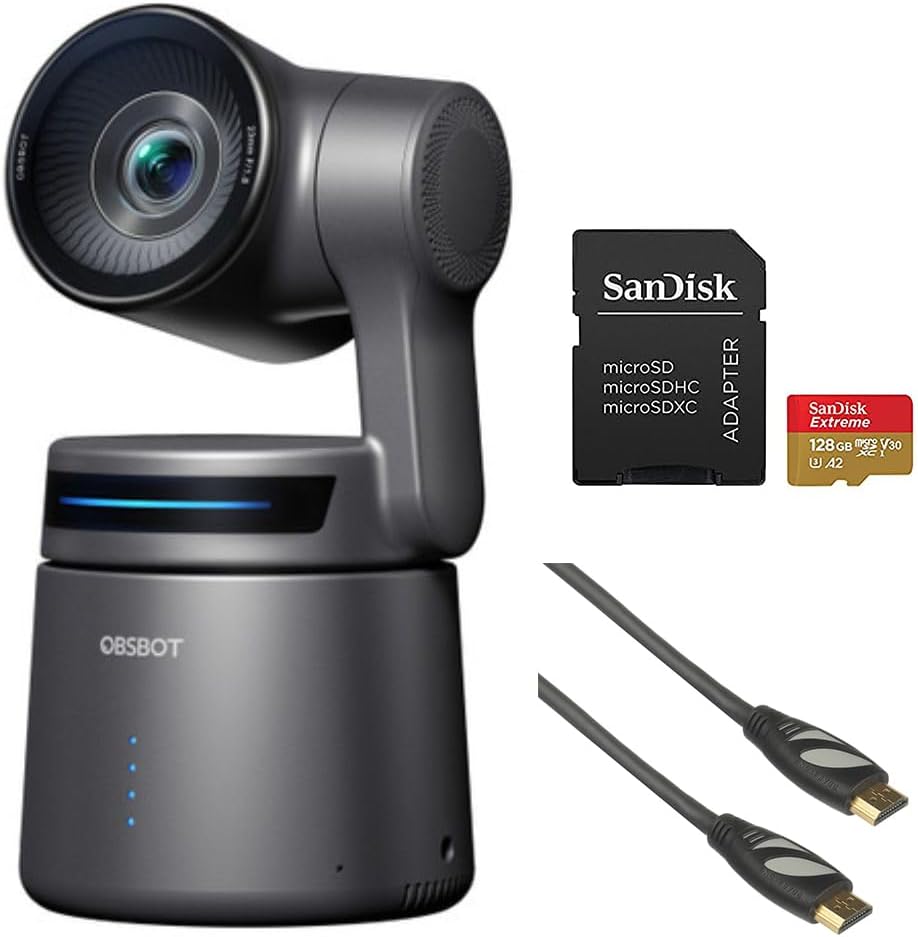
Image: Contents of the OBSBOT Tail Air Bundle, showing the camera, SanDisk Extreme 128 GB microSDXC card, and Pearstone 6' HDMI cable.
Sanidi
1. Uwekaji wa Kamera
Place the OBSBOT Tail Air camera on a stable, flat surface or mount it on a compatible tripod. Ensure the camera has a clear line of sight to the area you intend to capture.
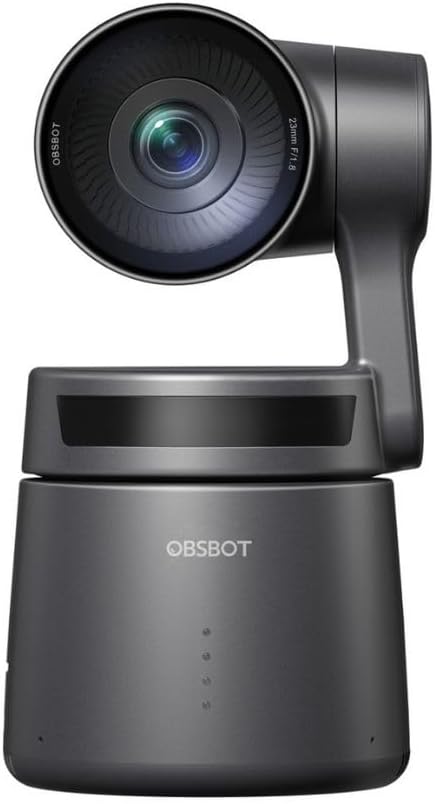
Picha: Mbele view of the OBSBOT Tail Air camera, showing the lens and base.
2. Uunganisho wa Nguvu
- Unganisha kebo ya USB-C kwenye mlango wa USB-C wa kamera.
- Connect the other end of the USB-C cable to a power source (e.g., a USB wall adapter or computer USB port). Use the provided USB-C to USB-A adapter if your power source only has USB-A ports.
- The camera's indicator lights will illuminate upon successful power connection.

Image: OBSBOT Tail Air camera with its blue indicator lights active, signifying power or operational status.
3. Usakinishaji wa Kadi ya MicroSD
To enable local recording, insert the SanDisk Extreme 128 GB microSDXC card into the camera's microSD card slot. Ensure the card is inserted with the correct orientation until it clicks into place.

Image: SanDisk Extreme 128 GB microSDXC card, suitable for high-speed data storage.
4. Chaguzi za Muunganisho
The OBSBOT Tail Air offers multiple connectivity options:
- USB: Connect the camera to a computer via USB-C for use as a webcam or for data transfer.
- HDMI: Use the Pearstone HDMI cable to connect the camera's micro-HDMI output to a display or capture card for high-quality video output.
- Ethernet/PoE: For network connectivity and Power over Ethernet (PoE), an optional adapter is required. This enables NDI|HX3 support for professional streaming setups.
- Wi-Fi: Connect the camera to your wireless network for remote control and streaming via the OBSBOT app.

Picha: Nyuma view of the OBSBOT Tail Air camera, highlighting its various connectivity ports including USB-C and micro-HDMI.

Image: Pearstone Standard Series HDMI to HDMI High-Speed Ethernet Cable, 6 feet in length.
Operating the OBSBOT Tail Air
1. Nguvu ya Awali Imewashwa
Once powered, the camera will perform a self-calibration. The lens will pan and tilt to its home position. Wait for the indicator lights to stabilize before proceeding.
2. OBSBOT App Control
For full control and advanced features, download the official OBSBOT app on your smartphone or tablet. Connect the camera to the app via Wi-Fi or USB.
- Udhibiti wa Mbali: Pan, tilt, and zoom the camera remotely.
- Ufuatiliaji wa AI: Activate and manage AI human, animal, or object tracking.
- Udhibiti wa Ishara 2.0: Learn and utilize various hand gestures for quick control of tracking, recording, and zoom.
- Mipangilio: Adjust video resolution (up to 4K), frame rate, exposure, white balance, and other camera parameters.
3. AI Tracking Features
The Tail Air features advanced AI tracking:
- Ufuatiliaji wa Binadamu: Automatically follows a designated person, keeping them centered in the frame.
- Animal Tracking: Capable of tracking pets or other animals.
- Ufuatiliaji wa kitu: Can track specific objects, useful for demonstrations or product showcases.
To activate tracking, use the OBSBOT app or specific gesture controls.
4. Kurekodi na Kutiririsha
- Rekodi za Karibu: Video footage can be recorded directly to the inserted microSD card.
- Utiririshaji wa Moja kwa Moja: The camera supports direct streaming to platforms via the OBSBOT app or through NDI|HX3 (with optional adapter) for professional broadcast setups.
- Ingizo la Sauti: Utilize the 3.5mm audio input jack for external microphone connection to enhance audio quality.
Matengenezo
1. Kusafisha
- Tumia kitambaa laini na kikavu kusafisha mwili wa kamera.
- For the lens, use a lens cleaning cloth and specialized lens cleaning solution. Avoid abrasive materials.
- Usitumie sabuni kali au vimumunyisho.
2. Hifadhi
When not in use, store the camera in its provided storage case in a cool, dry place, away from direct sunlight and extreme temperatures.
3. Sasisho za Firmware
Regularly check for firmware updates via the OBSBOT app to ensure optimal performance and access to new features. Follow the app's instructions carefully during updates.
Kutatua matatizo
| Tatizo | Sababu inayowezekana | Suluhisho |
|---|---|---|
| Kamera haiwaki. | Loose power connection; faulty cable/adapter; insufficient power source. | Check all cable connections. Try a different USB port or power adapter. Ensure power source meets camera requirements. |
| AI tracking not working. | Poor lighting; subject too far/close; camera obstruction; AI tracking not activated. | Ensure adequate lighting. Position subject within optimal range (1-5 meters). Clear any obstructions. Activate tracking via the OBSBOT app or gesture. |
| Kadi ya MicroSD haitambuliki. | Card not inserted correctly; card corrupted; incompatible card. | Reinsert the card. Try formatting the card (this will erase data). Ensure the card is a genuine SanDisk Extreme 128 GB microSDXC or similar compatible card. |
| No video output via HDMI. | HDMI cable faulty; display input not selected; camera not in video output mode. | Check the Pearstone HDMI cable for damage. Ensure the display is set to the correct HDMI input. Verify camera settings in the OBSBOT app. |
| Masuala ya muunganisho wa programu. | Wi-Fi interference; incorrect network; camera not discoverable. | Ensure camera and device are on the same Wi-Fi network. Restart both camera and app. Check for app updates. |
Vipimo
| Kipengele | Maelezo |
|---|---|
| Mfano | OBSBOT Tail Air (OSB-2108-CW) |
| Kihisi | 1/1.8" CMOS 8MP |
| Azimio la Kukamata Video | Hadi 4K |
| Teknolojia ya Uunganisho | USB-C, Micro-HDMI, Wi-Fi, Ethernet (with optional adapter) |
| Ingizo la Sauti | Jack 3.5 mm |
| Kufuatilia | AI Human/Animal/Object Tracking |
| Udhibiti | Gesture Control 2.0, OBSBOT App |
| Hifadhi | MicroSDXC (SanDisk Extreme 128 GB included) |
| UPC | 810160682202 |
Udhamini na Msaada
For warranty information and technical support, please refer to the official OBSBOT webtovuti au wasiliana na huduma kwa wateja wao moja kwa moja. Weka risiti yako ya ununuzi kama uthibitisho wa ununuzi.
OBSBOT Official Webtovuti: www.obsbot.com


