1. Utangulizi
The LSC Smart Connect Solar IP Camera is designed to provide reliable outdoor surveillance with the convenience of solar power. This camera offers 1080p video recording, two-way audio, and night vision capabilities up to 10 meters. It integrates seamlessly with the LSC Smart Connect app, allowing for remote monitoring and control. Key features include a light and sound alarm, flash function, and privacy mode to enhance security.
This manual provides essential information for the proper setup, operation, and maintenance of your LSC Smart Connect Solar IP Camera, ensuring optimal performance and longevity.
2. Yaliyomo kwenye Kifurushi na Usanidi
Before beginning installation, please ensure all components are present and undamaged.

Picha ya 2.1: The LSC Smart Connect Solar IP Camera packaging, showing the camera, solar panel, and app interface. This image represents the complete product package as received.
2.1 Vipengele Zaidiview
The package typically includes the LSC Smart Connect Solar IP Camera unit, a solar panel for continuous power, and mounting accessories.
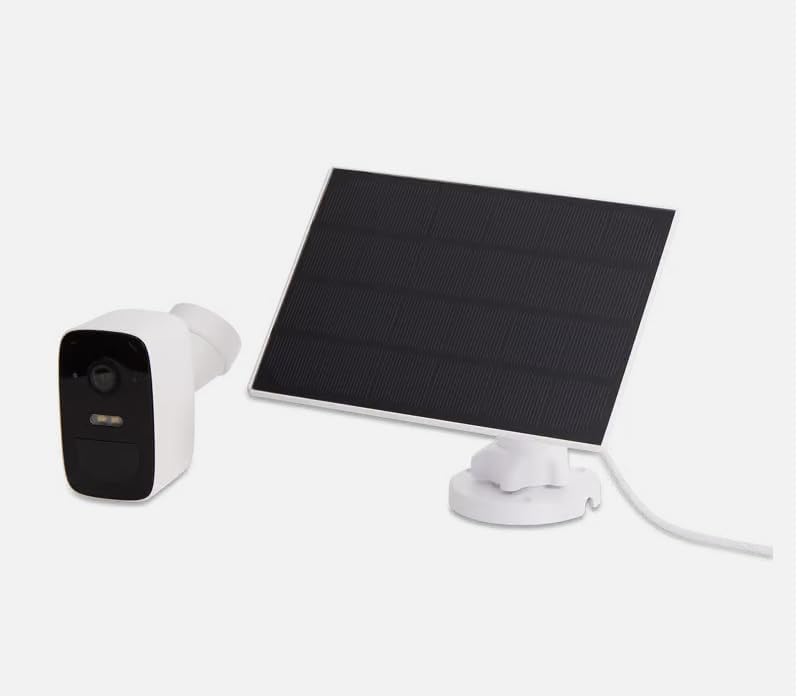
Picha ya 2.2: The LSC Smart Connect Solar IP Camera shown alongside its separate solar panel. This illustrates the two main components of the surveillance system.
2.2 Hatua za Awali za Usanidi
- Pakua Programu: Download the "LSC Smart Connect" app from your smartphone's app store (iOS or Android).
- Fungua Akaunti: Fungua programu na ujiandikishe kwa akaunti mpya au ingia ikiwa tayari unayo.
- Washa Kamera: Ensure the camera is charged or connected to the solar panel. The camera should enter pairing mode (indicated by an LED light).
- Ongeza Kifaa: In the app, select "Add Device" or the "+" icon. Follow the on-screen instructions to connect the camera to your 2.4GHz Wi-Fi network. Ensure your Wi-Fi signal is strong at the installation location.
- Kupachika: Choose a suitable outdoor location for the camera and solar panel. The solar panel should receive direct sunlight for most of the day. Use the provided screws and mounting brackets for secure installation. The camera supports wall mounting.
For detailed mounting instructions, refer to the quick start guide included in your product packaging.
3. Maagizo ya Uendeshaji
Once your camera is set up and connected, you can begin monitoring and utilizing its features through the LSC Smart Connect app.
- Ishi View: Fungua programu na uchague kamera yako ili view malisho ya moja kwa moja.
- Sauti ya Njia Mbili: Use the microphone icon in the app to speak through the camera and the speaker icon to hear audio from the camera's vicinity.
- Maono ya Usiku: The camera automatically switches to night vision in low-light conditions, providing clear images up to 10 meters.
- Utambuzi wa Mwendo na Arifa: Configure motion detection sensitivity and set up push notifications to receive alerts on your smartphone when activity is detected.
- Vipengele vya Kengele: Activate the light and sound alarm or flash function via the app to deter intruders.
- Kurekodi na Uchezaji: The camera supports local storage (e.g., microSD card, not included) or cloud storage (subscription may be required) for recording. Access recorded footagkupitia kipengele cha uchezaji cha programu.
- Hali ya Faragha: Utilize the privacy function to temporarily disable recording and live view for specific periods.
4. Matengenezo
Regular maintenance ensures the optimal performance and longevity of your LSC Smart Connect Solar IP Camera.
- Kusafisha: Safisha lenzi ya kamera na paneli ya jua mara kwa mara kwa kutumia kifaa laini, damp cloth to remove dust, dirt, and debris. Avoid abrasive cleaners.
- Ufanisi wa Paneli ya jua: Ensure the solar panel is free from obstructions (e.g., leaves, snow) that could block sunlight and reduce charging efficiency.
- Sasisho za Firmware: Check the LSC Smart Connect app regularly for firmware updates. Keeping the camera's firmware updated ensures access to the latest features and security enhancements.
- Ukaguzi wa Muunganisho: Periodically verify the Wi-Fi connection strength and camera status in the app.
5. Utatuzi wa shida
If you encounter issues with your LSC Smart Connect Solar IP Camera, refer to the following common troubleshooting steps:
- Kamera Nje ya Mtandao:
- Angalia nguvu ya mawimbi ya Wi-Fi kwenye eneo la kamera.
- Ensure the camera is receiving adequate power from the solar panel or is sufficiently charged.
- Anzisha upya kipanga njia chako cha Wi-Fi na kamera.
- Verify that the camera is connected to a 2.4GHz Wi-Fi network.
- Ubora duni wa Picha:
- Safisha lensi ya kamera.
- Hakikisha kuwa hakuna vizuizi mbele ya lenzi.
- Angalia kasi ya muunganisho wako wa intaneti.
- Utambuzi wa Mwendo haufanyi kazi:
- Verify motion detection settings in the app (sensitivity, detection zones).
- Ensure notifications are enabled on your smartphone and in the app.
- Betri Haichaji:
- Hakikisha paneli ya jua ni safi na inapokea jua moja kwa moja.
- Angalia muunganisho kati ya paneli ya jua na kamera.
If issues persist, consult the LSC Smart Connect app's help section or the manufacturer's support resources.
6. Vipimo
| Kipengele | Vipimo |
|---|---|
| Azimio la Kurekodi Video | 1080p |
| Rangi | Nyeusi/Nyeupe |
| Teknolojia ya Mawasiliano ya Wireless | Wi-Fi (GHz 2.4) |
| Aina ya Ufungaji | Screw-in / Wall Mount |
| Mbele ya Maono ya Usiku | Mita 10 |
| Vipimo vya Kipengee (L x W x H) | 15 x 6 x 15 cm |
| Mtengenezaji | LSC. |
| Nambari ya Mfano | 3203968 |
| ASIN | B0D899HFXL |
| Matumizi ya Bidhaa Iliyopendekezwa | Usalama wa Nje |
| Teknolojia ya Uunganisho | Bila waya |
| Vifaa Sambamba | Simu mahiri |
| Aina ya Kidhibiti | SmartThings (via LSC Smart Connect App) |
| Matumizi ya Ndani/Nje | Nje |
7. Udhamini na Msaada
For warranty information, please refer to the documentation included with your purchase or contact the retailer/manufacturer directly. Typically, products come with a limited warranty covering manufacturing defects.
For technical support, frequently asked questions, or further assistance, please visit the official LSC Smart Connect website or utilize the support section within the LSC Smart Connect mobile application.
Rasilimali za Mtandaoni:
- LSC Smart Connect App (available on iOS App Store and Google Play Store)
- Manufacturer's Official Website (for product updates and support)


