1. Utangulizi
This manual provides comprehensive instructions for the installation, operation, and maintenance of your DieseRC Smart WiFi 2-Channel Relay Module with Bluetooth Transmitter. This device allows for remote control of various electrical appliances via Wi-Fi, Bluetooth, and voice commands through compatible smart home systems.

Image 1.1: The DieseRC Smart WiFi 2-Channel Relay Module and its accompanying Bluetooth remote control.
2. Bidhaa Imeishaview
The DieseRC Smart WiFi Relay Module is designed for versatile control of electrical devices. It features two independent relays, Wi-Fi connectivity for app control, Bluetooth for remote control, and compatibility with voice assistants.
2.1 Sifa Muhimu
- Uunganisho wa wireless: Supports 2.4 GHz Wi-Fi for remote control via the eWelink app.
- Udhibiti wa Bluetooth: Includes a Bluetooth transmitter for local remote operation.
- Udhibiti wa Sauti: Inatumika na Amazon Alexa na Google Home kwa uendeshaji bila mikono.
- Dual Relays: Two independent 10A relays with Normally Open (NO), Common (COM), and Normally Closed (NC) terminals.
- Ingizo la Nguvu Linalonyumbulika: Operates on DC 5V or DC 7V-48V.
- Muundo Kompakt: Dimensions of 60x32x17 mm (2.4x1.3x0.7 inches) for easy integration.
- Njia nyingi za Uendeshaji: Configurable as toggle mode or inching mode.
2.2 Utambulisho wa Vipengele

Picha 2.1: Kina view of the relay module showing terminals and indicators.
- NO (Normally Open) Pin: Contact is open when the relay is de-energized.
- COM (Common) Pin: Common terminal for the relay contact.
- NC (Normally Closed) Pin: Contact is closed when the relay is de-energized.
- Relay Indicator Light: Illuminates when the corresponding relay is active.
- Open the key / Pairing button: Used for pairing with the eWelink app and Bluetooth remote.
- WiFi Network Indicator Light: Inaonyesha hali ya muunganisho wa Wi-Fi.
- Input USB 5V/0.5A: Micro USB port for 5V DC power input.
- +V / -V Terminals: Screw terminals for DC 7V-48V power input.
3. Vipimo
| Kipengele | Vipimo |
|---|---|
| Nambari ya Mfano | EW748 |
| Chapa | DieseRC |
| Vipimo (L x W x H) | 60 x 32 x 17 mm (inchi 2.4 x 1.3 x 0.7) |
| Uzito | Gramu 118 (takriban.) |
| Uingizaji Voltage | DC 5V (via USB) or DC 7V-48V (via screw terminals) |
| Ukadiriaji wa Sasa | 10A kwa relay |
| Aina ya Mawasiliano | Normally Open (NO), Common (COM), Normally Closed (NC) |
| Muunganisho wa Waya | Wi-Fi 2.4GHz, Bluetooth |
| Utangamano wa Programu | eWelink (Android & iOS) |
| Utangamano wa Msaidizi wa Sauti | Amazon Alexa, Google Home |
| Njia za Uendeshaji | Toggle Mode, Inching Mode |
| Uthibitisho | CE |
4. Kuweka
4.1 Kuwezesha Moduli
The module can be powered in two ways:
- USB 5V: Connect a standard Micro USB cable to the USB port on the module and a 5V/0.5A power adapter.
- DC 7V-48V: Connect the positive (+) and negative (-) wires of your DC power supply to the corresponding +V and -V screw terminals on the module. Ensure correct polarity.

Image 4.1: Powering the module via USB 5V or DC 7V-48V terminals.
4.2 eWelink App Installation and Pairing
- Download the eWelink App: Changanua msimbo wa QR hapa chini au utembelee http://app.coolkit.cc/dl.html to download the eWelink app for your Android or iOS device.
- Sajili/Ingia: Open the eWelink app and create an account or log in if you already have one.
- Ingiza Njia ya Kuoanisha: Power on the DieseRC module. Press and hold the "Open the key / Pairing button" on the module for approximately 5-7 seconds until the Wi-Fi indicator light blinks rapidly.
- Ongeza Kifaa katika Programu: In the eWelink app, tap the "+" icon to add a new device. Follow the on-screen instructions to select "Quick Pairing Mode" or "Compatible Pairing Mode" as needed.
- Unganisha kwa Wi-Fi: Enter your 2.4GHz Wi-Fi network name (SSID) and password when prompted. The module does not support 5GHz Wi-Fi.
- Kuoanisha Kamili: Once connected, the Wi-Fi indicator light on the module will stop blinking and remain solid. The device will appear in your eWelink app.

Image 4.2: QR code for eWelink app download.
4.3 Bluetooth Remote Pairing
The included Bluetooth remote control (RM2.4G) is pre-paired with the module. If re-pairing is necessary:
- Hakikisha kuwa moduli imewashwa.
- Press and hold the pairing button on the module until the Wi-Fi indicator light blinks.
- Press any button on the Bluetooth remote. The module's indicator light should confirm successful pairing.
5. Maagizo ya Uendeshaji
5.1 eWelink App Control
Once paired, you can control the module from anywhere using the eWelink app:
- Open the eWelink app and select your device.
- You will see virtual buttons for each relay (e.g., Channel 1, Channel 2). Tap to toggle the relay on/off.
- The app allows for scheduling, timers, and sharing control with family members.

Image 5.1: Remote control of devices via the eWelink app.
5.2 Voice Control (Alexa/Google Home)
To enable voice control, link your eWelink account with Amazon Alexa or Google Home:
- Fungua programu ya Alexa au Google Home.
- Nenda kwenye "Ujuzi na Michezo" (Alexa) au "Works with Google" (Google Home).
- Tafuta "eWelink" and enable the skill/service.
- Link your eWelink account using your credentials.
- Discover devices. Your DieseRC module will appear.
- Sasa unaweza kutumia amri za sauti kama vile:
- "Alexa, turn on Channel 1."
- "Hey Google, turn off Channel 2."

Image 5.2: Voice control integration with smart home assistants.
5.3 Kidhibiti cha Mbali cha Bluetooth
Use the included Bluetooth remote for local control:
- Press buttons 1 or 2 to control the respective relays.
- "ALL ON" and "ALL OFF" buttons control both relays simultaneously.
6. Njia za Uendeshaji
The module supports two main operating modes, configurable via the eWelink app:
- Geuza Modi: Each press of the button (app, voice, or remote) will switch the relay state (ON to OFF, or OFF to ON). This is suitable for lights or devices that need to stay on until manually turned off.
- Inching Mode (Momentary): The relay will turn ON for a set duration (e.g., 0.5 seconds) after a button press, then automatically turn OFF. This is ideal for momentary actions like garage door openers or electric locks. The duration can be configured in the eWelink app.

Image 6.1: The module can be configured to act as a momentary switch (push button) or a toggle switch (rocker switch).
7. Michoro ya Wiring
Muhimu: Ensure power is disconnected before performing any wiring. If you are unsure about electrical wiring, consult a qualified electrician.
7.1 Relay Contact Configuration

Image 7.1: Illustration of NO, COM, and NC terminals for each relay.
- NO (Normally Open) to COM: The circuit is open when the relay is off and closes when the relay is on.
- NC (Normally Closed) to COM: The circuit is closed when the relay is off and opens when the relay is on.
7.2 Kutample Wiring Scenarios
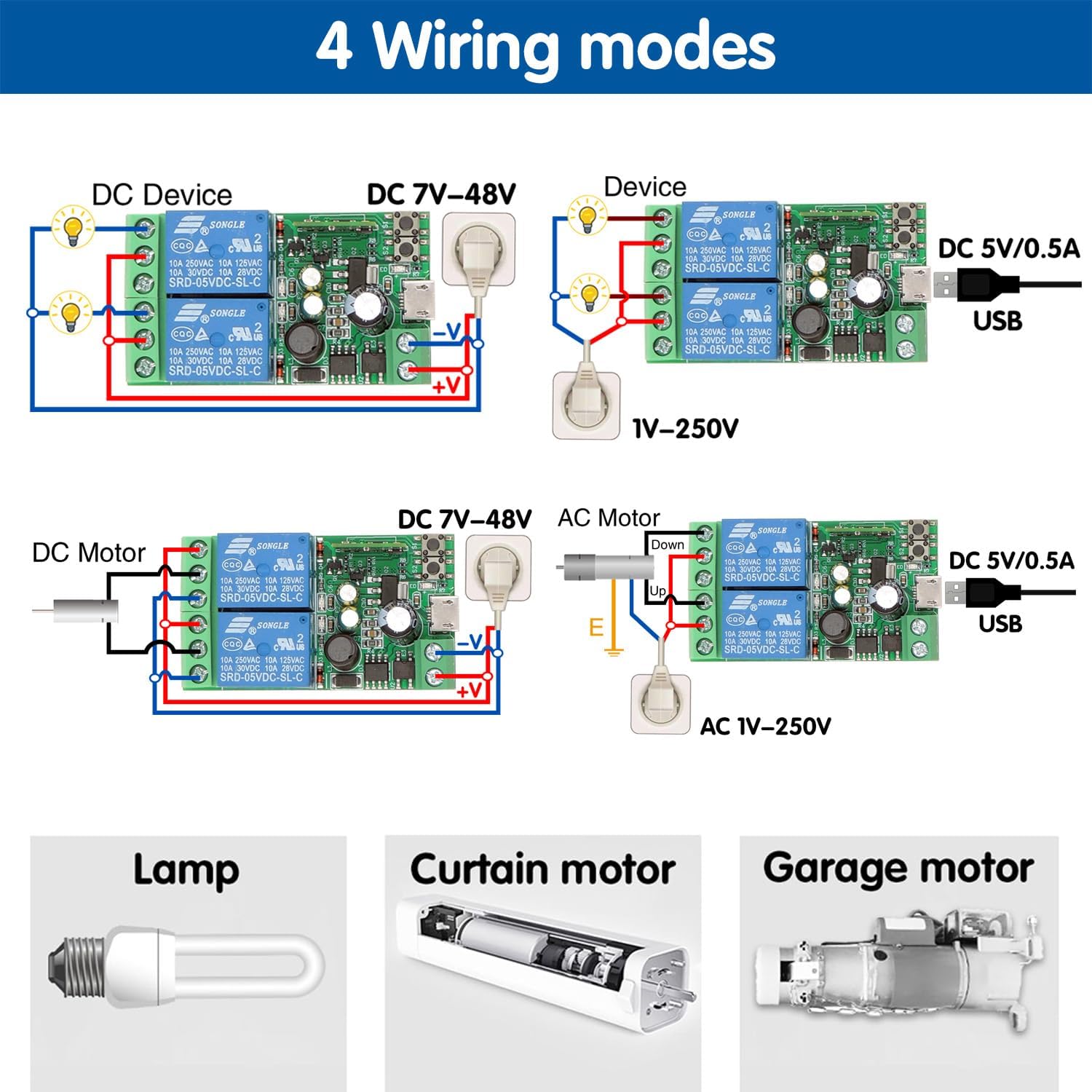
Image 7.2: Various wiring configurations for different applications.
- DC Device (DC 7V-48V): Connect the DC power supply to the module's +V and -V terminals. Connect the device's power input to the relay's COM and NO terminals.
- AC Device (1V-250V): Power the module via USB 5V. Connect the AC power source to the device and route one of the AC lines through the relay's COM and NO terminals.
- DC Motor (DC 7V-48V): For controlling a DC motor, two relays can be used for forward/reverse or on/off control, depending on the motor type and desired functionality.
- Garage Door/Curtain Motor: The module can be integrated into existing control circuits for garage doors or curtain motors, typically using the inching mode to simulate a momentary button press.
For specific applications, refer to the device's wiring requirements and ensure compatibility with the relay's specifications (10A, 250VAC/30VDC).
8. Matengenezo
- Weka moduli katika mazingira makavu, mbali na unyevu na halijoto kali.
- Usiweke moduli kwenye jua moja kwa moja au vitu vinavyoweza kusababisha babuzi.
- Regularly check wiring connections for security.
- Ensure the power supply matches the module's specifications.
- Periodically check for eWelink app updates to ensure optimal performance and security.
9. Utatuzi wa shida
- Module not powering on:
- Check power connections (USB 5V or DC 7V-48V).
- Ensure the power adapter provides sufficient voltage and current (at least 0.5A).
- Haiwezi kuunganisha kwa Wi-Fi:
- Ensure your Wi-Fi network is 2.4GHz. The module does not support 5GHz.
- Thibitisha nenosiri lako la Wi-Fi ni sahihi.
- Place the module closer to your Wi-Fi router during pairing.
- Reset the module by holding the pairing button until the Wi-Fi indicator blinks rapidly, then try pairing again.
- App control not working:
- Angalia muunganisho wako wa mtandao.
- Ensure the module's Wi-Fi indicator is solid, indicating a stable connection.
- Restart the eWelink app.
- Udhibiti wa sauti haujibu:
- Verify that your eWelink account is correctly linked to Alexa/Google Home.
- Ensure the device is discovered in your Alexa/Google Home app.
- Check your voice commands for accuracy.
- Bluetooth remote not working:
- Hakikisha kuwa kidhibiti cha mbali kina betri zinazofanya kazi.
- Re-pair the remote with the module as described in Section 4.3.
10. Udhamini na Msaada
For warranty information and technical support, please refer to the product packaging or contact DieseRC customer service through the retailer where the product was purchased. You can also visit the official DieseRC website kwa msaada zaidi.


