1. Utangulizi
This manual provides instructions for the safe operation, maintenance, and troubleshooting of your FLEX 24V Brushless Cordless 1/2-Inch Hammer Drill Turbo Mode Kit, model FX1271T-2B. Please read this manual thoroughly before using the tool to ensure proper and safe operation.
The FLEX FX1271T-2B is a powerful 24V brushless cordless hammer drill designed for demanding drilling and driving applications. It features a 1/2-inch full-metal ratcheting chuck, two-speed settings, a Turbo Mode for increased speed, and an anti-kickback safety feature. This kit includes the drill, a 2.5Ah Lithium-Ion Battery, a 5.0Ah Lithium-Ion Battery, and a 160W Fast Charger.
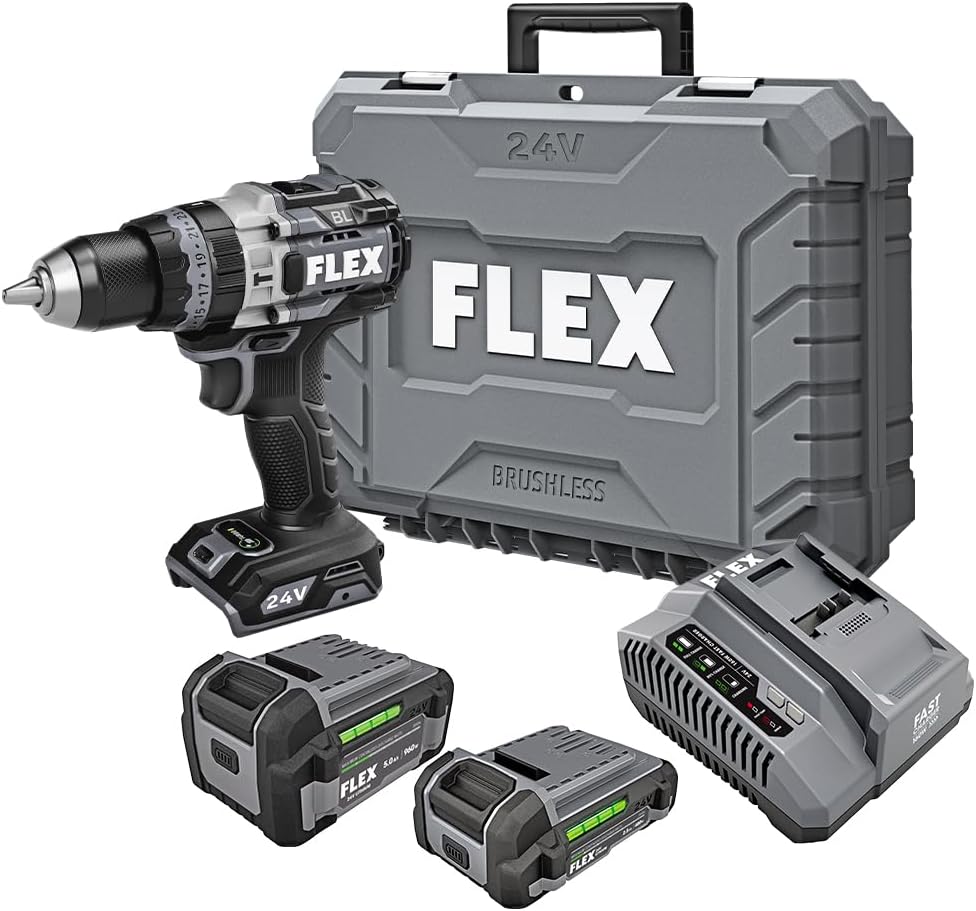
Figure 1: FLEX 24V Brushless Cordless 1/2-Inch Hammer Drill Kit (FX1271T-2B) including drill, two batteries, charger, and carrying case.
2. Maagizo ya Usalama wa Jumla
ONYO: Soma maonyo yote ya usalama, maagizo, vielelezo, na vipimo vilivyotolewa na zana hii ya nguvu. Kukosa kufuata maagizo yote yaliyoorodheshwa hapa chini kunaweza kusababisha mshtuko wa umeme, moto, na/au majeraha mabaya.
2.1 Usalama wa Eneo la Kazi
- Weka eneo la kazi safi na lenye mwanga. Maeneo yenye vitu vingi au giza hukaribisha ajali.
- Usitumie zana za nguvu katika angahewa zinazolipuka, kama vile maji yanayoweza kuwaka, gesi au vumbi. Zana za nguvu huunda cheche ambazo zinaweza kuwasha vumbi au mafusho.
- Weka watoto na watazamaji mbali wakati wa kutumia zana ya nguvu. Kukengeushwa kunaweza kukufanya ushindwe kujidhibiti.
2.2 Usalama wa Umeme
- Plugi za zana za nguvu lazima zilingane na plagi. Usiwahi kurekebisha plagi kwa njia yoyote. Usitumie plagi za adapta zilizo na zana za nguvu za udongo (zilizowekwa msingi). Plugs zisizobadilishwa na vituo vinavyolingana vitapunguza hatari ya mshtuko wa umeme.
- Epuka mguso wa mwili na nyuso zenye udongo au chini, kama vile mabomba, radiators, safu na friji. Kuna hatari ya kuongezeka kwa mshtuko wa umeme ikiwa mwili wako ni ardhi au msingi.
- Usifichue zana za nguvu kwa mvua au hali ya mvua. Maji yanayoingia kwenye chombo cha nguvu yataongeza hatari ya mshtuko wa umeme.
2.3 Usalama wa kibinafsi
- Vaa kinga ya macho kila wakati. Tumia miwani ya usalama, miwani ya usalama, au ngao ya uso.
- Vaa kinga ya kusikia unapotumia kifaa hicho kwa muda mrefu.
- Vaa vizuri. Usivae nguo zisizo huru au vito. Weka nywele na nguo zako mbali na sehemu zinazosonga.
- Kaa macho, tazama unachofanya, na utumie akili unapotumia zana ya nishati.
2.4 Matumizi na Utunzaji wa Zana
- Usilazimishe chombo cha nguvu. Tumia zana sahihi ya nishati kwa programu yako.
- Tenganisha pakiti ya betri kutoka kwa zana ya nishati kabla ya kufanya marekebisho yoyote, kubadilisha vifuasi au kuhifadhi zana za nguvu.
- Hifadhi zana za nguvu zisizofanya kazi mahali ambapo watoto wanaweza kufikia na usiruhusu watu wasiofahamu zana ya umeme au maagizo haya kuendesha zana ya umeme.
- Dumisha zana za nguvu na vifaa. Angalia ikiwa kuna mpangilio mbaya au kufunga kwa sehemu zinazosonga, kuvunjika kwa sehemu na hali nyingine yoyote ambayo inaweza kuathiri utendakazi wa zana ya nguvu.
2.5 Matumizi na Utunzaji wa Zana ya Betri
- Chaji tena ukitumia chaja iliyobainishwa na mtengenezaji. Chaja ambayo inafaa kwa aina moja ya pakiti ya betri inaweza kuleta hatari ya moto inapotumiwa na pakiti nyingine ya betri.
- Tumia zana za nguvu zilizo na vifurushi maalum vya betri pekee. Utumiaji wa vifurushi vingine vya betri unaweza kusababisha hatari ya kuumia na moto.
- Wakati kifurushi cha betri hakitumiki, kiweke mbali na vitu vingine vya chuma, kama vile klipu za karatasi, sarafu, funguo, misumari, skrubu au vitu vingine vidogo vya chuma, vinavyoweza kuunganisha kutoka terminal moja hadi nyingine. Kufupisha vituo vya betri pamoja kunaweza kusababisha kuungua au moto.
- Chini ya hali ya unyanyasaji, kioevu kinaweza kutolewa kutoka kwa betri; kuepuka kuwasiliana. Ikiwa mawasiliano yanatokea kwa bahati mbaya, suuza na maji. Ikiwa kioevu kinagusa macho, tafuta msaada wa matibabu. Kioevu kilichotolewa kutoka kwa betri kinaweza kusababisha mwasho au kuungua.
3. Vipengele vilivyojumuishwa
Your FLEX 24V Brushless Cordless 1/2-Inch Hammer Drill Kit (FX1271T-2B) includes the following items:
- FLEX 24V Brushless Cordless 1/2-Inch Hammer Drill
- (1) FLEX 24V 2.5Ah Lithium-Ion Battery (FX0111-1)
- (1) FLEX 24V 5.0Ah Lithium-Ion Battery (FX0121-1)
- FLEX 160W Fast Charger
- Hushughulikia Msaidizi
- Kesi ya kubeba

Figure 2: The FLEX Advantage highlights the included 2.5Ah and 5.0Ah Lithium-Ion batteries, emphasizing their power, runtime, and fast charging capabilities.
4. Kuweka na Matumizi ya Awali
4.1 Kuchaji Betri
- Connect the 160W Fast Charger to a standard power outlet.
- Telezesha kifurushi cha betri kwenye chaja hadi kibofye mahali pake.
- The charger's indicator lights will show the charging status. A fully charged battery will be indicated by a solid green light.
- Ikisha chaji, ondoa betri kwenye chaja.
4.2 Kusakinisha Betri
- Align the battery pack with the battery port on the base of the drill handle.
- Telezesha betri kwenye mlango hadi ijifungie mahali pake salama. Hakikisha kuwa imekaa kikamilifu ili kuzuia kuhama kwa bahati mbaya wakati wa operesheni.
- To remove the battery, press the release button(s) on the sides of the battery pack and slide it out.
4.3 Kuambatanisha Kishikio Kisaidizi
For improved control and safety, especially during high-torque applications or hammer drilling, attach the auxiliary handle.
- Legeza kishikio cha msaidizi clamp kwa kuizungusha kinyume na saa.
- Slide the handle over the front of the drill body, positioning it to your preferred angle.
- Kaza clamp by rotating it clockwise until the handle is securely fastened.

Figure 3: The drill with the auxiliary handle attached, providing enhanced control and stability, particularly when the anti-kickback feature engages.
4.4 Installing Drill Bits or Accessories
- Hakikisha drill imezimwa na betri imeondolewa kwa usalama.
- Grip the rear collar of the 1/2-inch full-metal ratcheting chuck and rotate the front collar counter-clockwise to open the chuck jaws.
- Insert the drill bit or accessory fully into the chuck jaws.
- Rotate the front collar clockwise to tighten the chuck jaws firmly around the bit. The ratcheting mechanism will provide an audible click when securely tightened.
- Gently pull on the bit to ensure it is properly secured.

Figure 4: Detail of the 1/2-inch full-metal ratcheting chuck, designed for secure bit retention and durability.
5. Maagizo ya Uendeshaji
5.1 Kuwasha/Kuzima na Kudhibiti Kasi
- Anzisha Swichi: Squeeze the trigger switch to turn the drill on. Release it to turn the drill off.
- Kasi inayobadilika: The trigger switch is pressure-sensitive, allowing for variable speed control. Pressing the trigger further increases the speed.
- Kiteuzi cha Mbele/Nyuma: Located above the trigger, push the selector left for forward rotation (drilling/driving) and right for reverse rotation (removing screws). Center position locks the trigger for safety.
5.2 Gear Selection (2-Speed)
The drill features a 2-speed gearbox for optimal performance across various applications.
- Gear 1 (Kasi ya Chini, Torque ya Juu): Slide the gear selector switch to position '1'. Ideal for driving screws, drilling large holes, or applications requiring maximum torque.
- Gear 2 (Kasi ya Juu, Torque ya Chini): Slide the gear selector switch to position '2'. Suitable for fast drilling of smaller holes in wood or metal.
NOTE: Always ensure the drill is stopped before changing gear settings to prevent damage to the gearbox.
5.3 Mode Selection (Drill, Drive, Hammer Drill)
Rotate the collar behind the chuck to select the desired operating mode:
- Hali ya Kuchimba (Aikoni ya Kuchimba): For drilling holes in wood, metal, and plastics.
- Drive Mode (Screw Icon): For driving screws. The clutch settings (numbered ring) allow you to adjust the torque to prevent over-driving screws or damaging materials.
- Hali ya Kuchimba Nyundo (Aikoni ya Nyundo): For drilling into masonry, brick, and concrete. This mode combines rotary action with a hammering motion.
5.4 Njia ya Turbo
The Turbo Mode button, located on top of the drill, provides an immediate increase in speed for faster results when needed.
- Bonyeza kwa TURBO button during operation to engage maximum speed.
- Release the button to return to the previously selected speed setting.

Figure 5: The Turbo Mode button, when pressed, provides increased speed for rapid task completion.
5.5 Anti-Kickback Feature
The drill is equipped with an advanced anti-kickback braking technology. If the drill bit binds during operation, the system will detect the sudden rotational force and rapidly stop the motor to reduce the risk of kickback and potential injury.
5.6 Mwangaza wa LED uliounganishwa
An LED light is integrated into the drill to illuminate the work area, improving visibility in dimly lit conditions. The light activates when the trigger is pressed.

Figure 6: The integrated LED light provides illumination for improved visibility in dark work environments.
5.7 Drilling into Masonry (Hammer Drill Mode)
When drilling into masonry, brick, or concrete:
- Select Hammer Drill Mode.
- Ensure the auxiliary handle is securely attached and held firmly with both hands.
- Use appropriate masonry drill bits.
- Apply steady, firm pressure to the drill, allowing the hammering action to break up the material.

Figure 7: The FLEX hammer drill in action, demonstrating its capability to drill into tough materials with 1,400 in-lbs of torque.
6. Matengenezo
6.1 Kusafisha
- Always disconnect the battery pack before performing any cleaning or maintenance.
- Use a soft brush or compressed air to clean dust and debris from the ventilation openings.
- Futa kifuniko cha kifaa kwa tangazoamp kitambaa. Usitumie kemikali kali au visafishaji vya abrasive.
- Weka taya za chuck safi na zisiwe na uchafu ili kuhakikisha kunashikana vizuri.
6.2 Hifadhi
- Store the tool, batteries, and charger in a cool, dry place, away from direct sunlight and moisture.
- Ensure batteries are partially charged (not fully depleted or fully charged for long-term storage) before storing.
- Store the tool in its carrying case to protect it from damage.
7. Utatuzi wa shida
| Tatizo | Sababu inayowezekana | Suluhisho |
|---|---|---|
| Drill haina kuanza. | Betri haijachajiwa au kusakinishwa vibaya. Forward/Reverse selector in center (locked) position. | Charge battery and ensure it is securely installed. Move selector to forward or reverse position. |
| Kupoteza nguvu wakati wa operesheni. | Chaji ya betri iko chini. Ulinzi wa upakiaji umewashwa. | Chaji upya betri. Reduce pressure on the tool; allow it to cool down. |
| Kidogo huteleza kwenye chuck. | Chuck haijaimarishwa vya kutosha. Taya za chuck ni chafu au zimechakaa. | Retighten chuck firmly. Clean chuck jaws. If problem persists, chuck may need replacement. |
| Mtetemo au kelele nyingi. | Sehemu ya kuchimba visima iliyoharibiwa au iliyoinama. Vipengele vilivyolegea. | Replace drill bit. Check for loose screws or parts. If problem persists, discontinue use and contact service. |
8. Vipimo
| Kipengele | Maelezo |
|---|---|
| Nambari ya Mfano | FX1271T-2B |
| Voltage | 24 Volts |
| Ukubwa wa Chuck | Inchi 1/2 |
| Aina ya Chuck | Full-Metal Ratcheting |
| Kiwango cha juu cha Torque | Pauni 1400 za Inchi |
| Kasi ya Juu ya Mzunguko | 2500 RPM |
| Idadi ya Kasi | 2 |
| Uwezo wa Betri (Imejumuishwa) | 2.5 Ah, 5.0 Ah Lithium-Ion |
| Charger Type (Included) | Chaja ya haraka ya W 160 |
| Vipengele Maalum | Turbo Mode, Anti-Kickback, LED Light, Brushless Motor |
| Uzito wa Kipengee | Pauni 15.37 (Kit) |
| Vipimo vya Bidhaa | 7.2"L x 4"W x 10"H (Tool) |
| Uwezo wa Kuchimba (Mbao) | Inchi 2 |
| Uwezo wa Kuchimba (Chuma) | Inchi 2 |
9. Udhamini na Msaada
9.1 FLEX Limited Lifetime Warranty
This FLEX tool is protected by the FLEX Limited Lifetime Warranty. To qualify for this warranty, you must register your new FLEX tool, battery, or charger within 30 days of purchase through December 31, 2025. Registration can be completed at registermyFLEX.com.
Please refer to the official FLEX website or your product packaging for full terms and conditions of the warranty.
9.2 Usaidizi kwa Wateja
For technical assistance, replacement parts, or warranty claims, please contact FLEX customer support. Contact information can typically be found on the FLEX official webtovuti au kwenye ufungaji wa bidhaa yako.
When contacting support, please have your model number (FX1271T-2B) and purchase date available.


