1. Bidhaa Imeishaview
The ATOMSTACK A6 Pro is a versatile 2-in-1 laser engraving and cutting machine designed for both beginners and enthusiasts. Featuring a unibody frame, it requires no assembly, allowing for immediate use right out of the box. It boasts a 6000mW output laser power with advanced beam compression technology for stable cuts and precise engraving on a variety of materials.
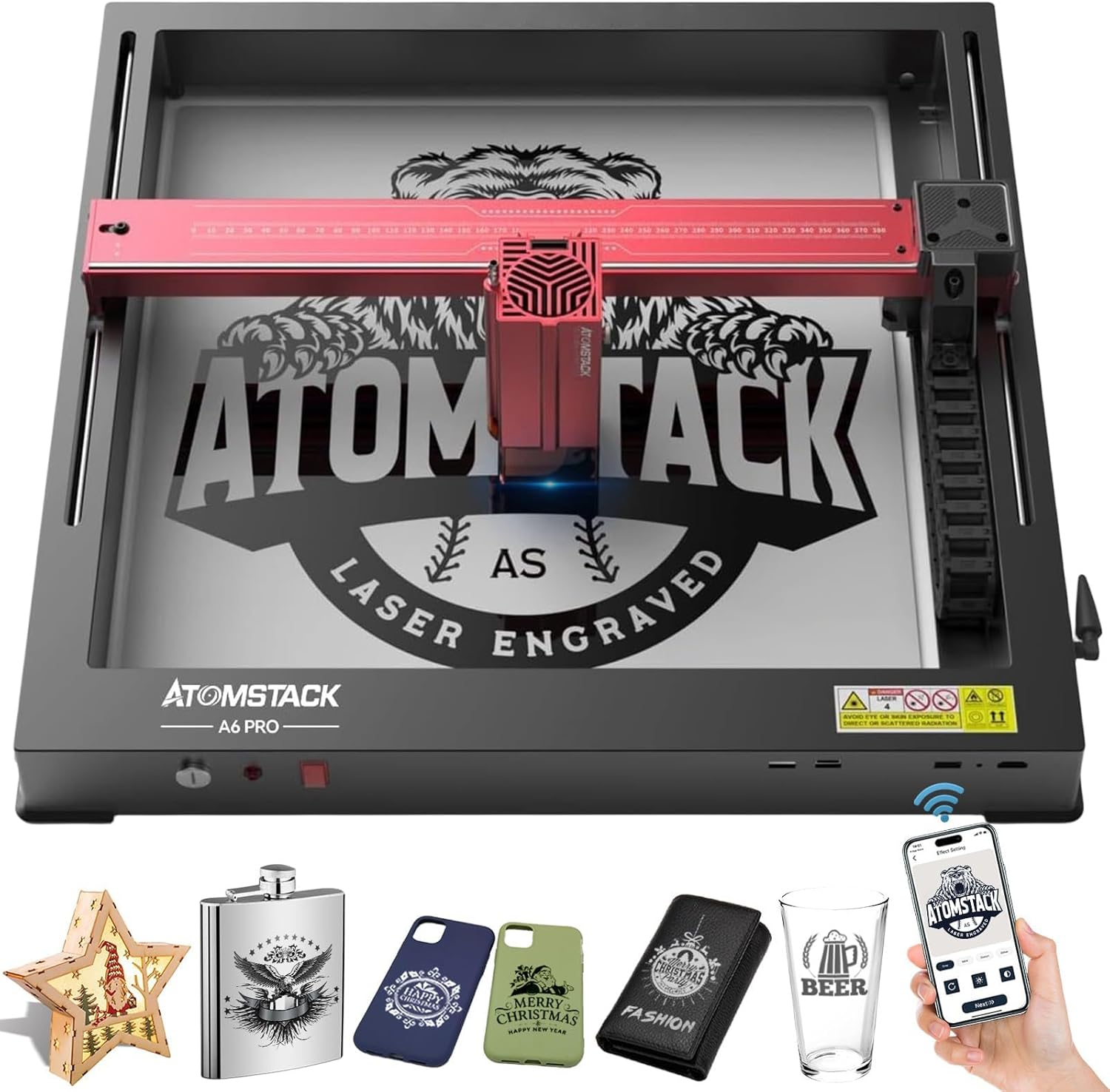
Figure 1: ATOMSTACK A6 Pro Laser Engraver with various engraved sampchini.
2. Taarifa za Usalama
Operating a laser engraver requires strict adherence to safety guidelines to prevent injury. The ATOMSTACK A6 Pro is a Laser Class 4 device. Always wear the provided UV-filtering eye protection during operation. Ensure the machine is placed on a stable, level surface. The integrated tilt detector will trigger an alarm if the machine is moved or tilted excessively during operation. An emergency stop button is provided for immediate shutdown in critical situations.
- Vaa ulinzi wa macho kila wakati.
- Ensure proper ventilation to dissipate fumes and smoke.
- Usiache mashine bila tahadhari wakati wa operesheni.
- Weka vifaa vinavyoweza kuwaka mbali na eneo la kazi.
- Jijulishe na utaratibu wa kuacha dharura.
- Weka watoto na wanyama kipenzi mbali na mashine ya uendeshaji.
3. Yaliyomo kwenye Kifurushi
The ATOMSTACK A6 Pro comes pre-assembled in a unibody frame, minimizing setup time. Upon unboxing, verify that all components are present and undamaged.

Figure 2: The ATOMSTACK A6 Pro is ready to use directly from its packaging.
Vipengee vilivyojumuishwa:
- ATOMSTACK A6 Pro Laser Engraver (Unibody Frame)
- Laser Module (6000mW output)
- Adapta ya Nguvu
- Kebo ya USB
- UV-Filtering Eye Protection Goggles
- Mwongozo wa Mtumiaji (hati hii)
- Basic Material Samples for Testing
4. Kuweka
The ATOMSTACK A6 Pro is designed for minimal setup. Its unibody frame means no complex assembly is required.
Hatua za Kuweka Awali:
- Ondoa: Carefully remove the engraver from its packaging.
- Uwekaji: Place the machine on a stable, flat, and heat-resistant surface in a well-ventilated area.
- Unganisha Nguvu: Plug the power adapter into the machine and then into a suitable power outlet.
- Connect to Computer (Optional): Connect the engraver to your computer using the provided USB cable if you plan to use PC software.
- Install Software/App: Download and install the recommended software (AtomStack Studio, LightBurn, or LaserGRBL for PC) or the ATOMSTACK mobile app (for Android/iOS) on your control device.
Video 1: Unboxing and quick setup of the ATOMSTACK A6 Pro, demonstrating its no-assembly design.
5. Maagizo ya Uendeshaji
The ATOMSTACK A6 Pro offers multiple control methods for flexibility in your projects.

Figure 3: Diverse control methods for the ATOMSTACK A6 Pro.
Mbinu za Kudhibiti:
- Programu ya PC: Use AtomStack Studio (exclusive, free), LightBurn, or LaserGRBL for detailed control and design.
- Programu ya Simu mahiri: Control the engraver via Wi-Fi using the ATOMSTACK mobile app (available on Android and Apple App Store).
Engraving and Cutting Process:
- Muundo: Create or import your design using your chosen software/app.
- Uwekaji Nyenzo: Place the material to be engraved or cut within the working area. The enlarged working area of 365x305mm (14.37x12 inches) allows for multitasking.
- Marekebisho ya Kuzingatia: Utilize the fixed-focus design for rapid and precise focusing in approximately 10 seconds. The newly added cross laser positioning feature provides clear visibility of the laser's location for perfect alignment.
- Mipangilio: Adjust laser power, speed, and passes according to the material type and desired effect. Refer to the material compatibility section for general guidelines.
- Anza Operesheni: Initiate the engraving or cutting process from your control device.
- Power Failure Recovery: The advanced automatic power failure recovery system memorizes the exact engraving position and resumes from the paused point, ensuring uninterrupted production and material saving.
Video 2: Demonstration of the ATOMSTACK A6 Pro's engraving and cutting capabilities on various materials.
6. Materials Compatibility
The ATOMSTACK A6 Pro is capable of engraving and cutting a wide range of materials due to its 6000mW output laser power and ultra-fine laser focus area (0.05x0.05mm).

Figure 4: Diverse materials compatible with the ATOMSTACK A6 Pro.
Engraving Capabilities:
- Directly engrave stainless steel, ceramics, and glass.
- Achieves clear effects on wood, leather, paper, acrylic, and more.
Cutting Capabilities:
- Cuts 3mm paulownia wood, 3mm black acrylic, and 3mm plywood in a single pass.
- Cuts 6mm thick plywood and 6mm black acrylic in multiple passes.
- Suitable for basswood, pine wood, bamboo, and leather.

Figure 5: The ATOMSTACK A6 Pro provides stable laser cuts on various materials.
7. Advanced Features and Technology
- Usahihi wa Juu: Mechanical precision can reach 0.02mm, benefiting from the unibody frame and modular assembly.
- Amazing Work Speed: Maximum engraving speed up to 600mm/s, significantly faster than traditional frame machines.
- 32-Bit Smart Motherboard: Features the ATOMSTACK self-developed ESP-32 built-in motherboard for intelligent and simple operation.
- 4-Way Limit Switches: Located on X and Y axes to prevent equipment collision with edges.
- Danger Alert System: Includes flame detector and gyroscope (tilt detector) to trigger emergency stops for safety.
- Tank Chain Design: New wiring harness design for aesthetics and extended machine lifespan.
- Kufuli ya Usalama: Prevents unauthorized use, especially by children, and deters theft.
- Dual-Axis Guideway: High-precision wear-resistant slide rails and 4-way hard limiters reduce wear and tear.
- Detachable Eye Protection: Laser shield with magnetic absorption protects eyes and prevents laser lenses from smoke and dust accumulation.

Figure 6: The ATOMSTACK A6 Pro offers significantly faster engraving speeds.
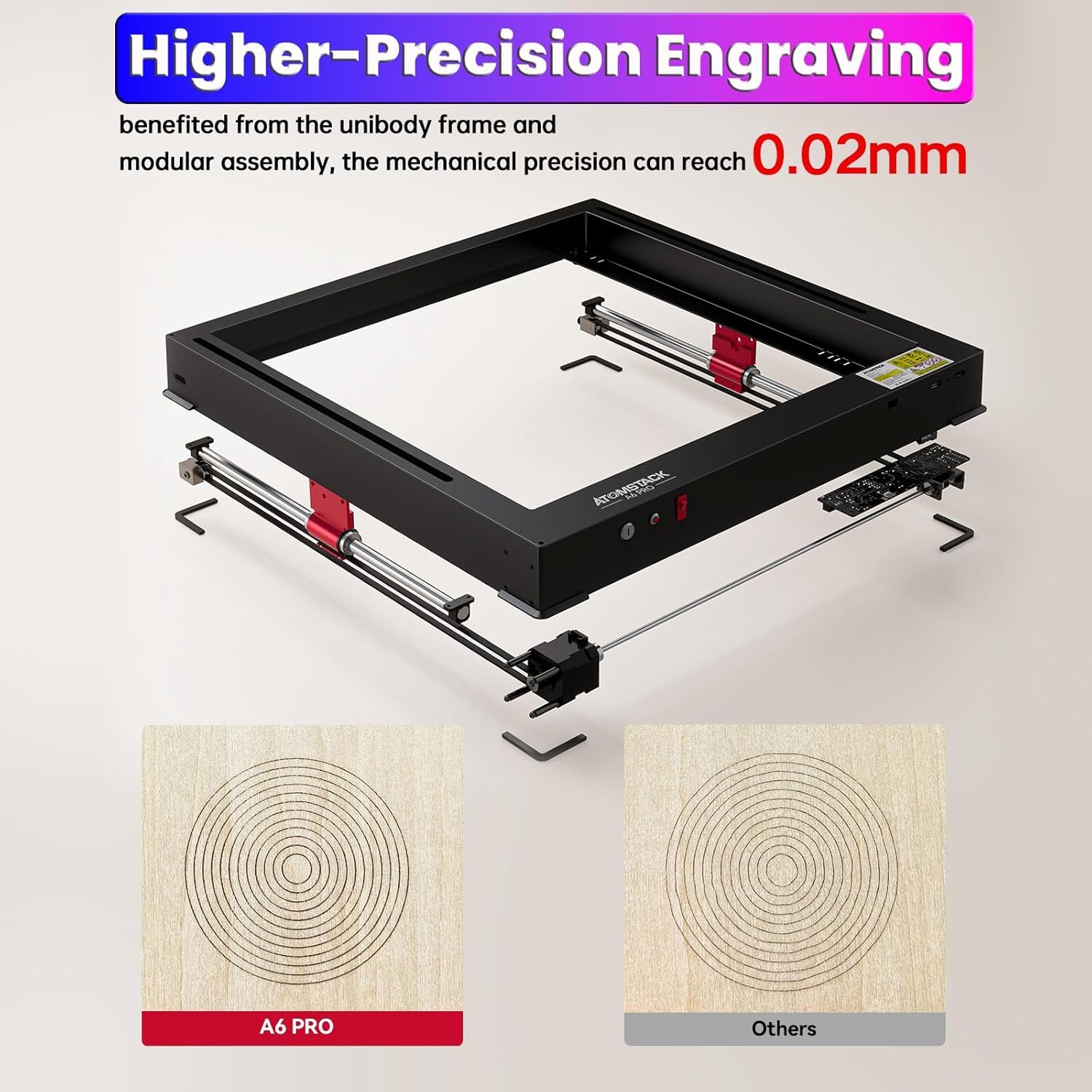
Figure 7: The ATOMSTACK A6 Pro provides higher precision engraving.
8. Matengenezo
Matengenezo ya mara kwa mara huhakikisha uimara na utendaji bora wa ATOMSTACK A6 Pro yako.
- Kusafisha: Regularly clean the laser lens and the working area to prevent dust and debris buildup, which can affect engraving quality. Use a soft, lint-free cloth.
- Upakaji mafuta: Periodically check and lubricate the guide rails to ensure smooth movement of the laser module.
- Sasisho za Firmware: Check the ATOMSTACK official website or app for any available firmware updates to ensure your machine has the latest features and improvements.
- Hifadhi: When not in use, store the engraver in a clean, dry environment away from direct sunlight and extreme temperatures.
9. Utatuzi wa shida
Sehemu hii inatoa mwongozo wa jumla kwa masuala ya kawaida. Kwa utatuzi wa kina wa matatizo, rejelea rasilimali rasmi za usaidizi za ATOMSTACK.
| Tatizo | Sababu inayowezekana | Suluhisho |
|---|---|---|
| Laser haitoi mwangaza au matokeo dhaifu | Incorrect focus; dirty lens; low power setting; material incompatibility. | Adjust focus; clean lens; increase power setting; verify material compatibility. |
| Engraving/Cutting not precise | Loose belts/components; unstable surface; incorrect speed setting. | Check and tighten components; ensure stable surface; adjust speed. |
| Machine not connecting to PC/App | USB cable issue; Wi-Fi connectivity problem; driver issue; software conflict. | Try different USB port/cable; check Wi-Fi connection; reinstall drivers/software. |
| Emergency stop triggered unexpectedly | Machine tilted; flame/smoke detected; limit switch activated. | Check machine stability; ensure proper ventilation; verify limit switch clearance. |
10. Vipimo
| Kipengele | Maelezo |
|---|---|
| Mfano | A6 Pro |
| Nguvu ya Pato la Laser | 6000mW (6W) |
| Ukubwa wa doa la laser | 0.05 x 0.05mm (Ultra-fine compressed spot) |
| Usahihi wa Kuchonga | 0.02 mm |
| Engraving Speed (Max) | 600mm/s |
| Eneo la Kazi | 365 x 305mm (inchi 14.37 x 12) |
| Nyenzo ya Fremu | Aluminum Alloy (Unibody) |
| Mbinu za Kudhibiti | PC Software (AtomStack Studio, LightBurn, LaserGRBL), Smartphone App (Wi-Fi) |
| Vipengele vya Usalama | 4-Way Limit Switches, UV-Filtering Eye Protection, Tilt Detector, Emergency Stop Button, Safety Lock |
| Chanzo cha Nguvu | AC/DC |
| Voltage | 24 Volts |
| Uzito wa Kipengee | Pauni 17.91 |
| Vipimo vya Bidhaa | Inchi 23.22 x 23.22 x 7.08 |
11. Udhamini na Msaada
The ATOMSTACK A6 Pro comes with a Udhamini wa mtengenezaji wa mwaka 1. For technical support, troubleshooting assistance, or warranty claims, please contact ATOMSTACK customer service through their official webtovuti au maelezo ya mawasiliano yaliyotolewa kwenye kifungashio cha bidhaa yako.
Visit the official ATOMSTACK Store for additional accessories and product information: Duka Rasmi la ATOMSTACK


