1. Utangulizi
The Antec C8 is a full-tower E-ATX PC case designed for high-performance computing. It features a dual-chamber layout, seamless tempered glass panels, and extensive cooling support to accommodate modern components. This manual provides detailed instructions for setup, installation, operation, and maintenance of your Antec C8 PC case.

Figure 1: Antec C8 Full-Tower PC Case with internal components and RGB lighting.
2. Sifa Muhimu
- Kamili-View Muundo: Seamless tempered glass front and side panels offer a panoramic view ya vipengele vyako vya ndani.
- Dual Chamber Layout: Separates the main components (CPU, GPU, Motherboard) from the power supply and drives for optimized thermal performance and cable management.
- Usaidizi Mkubwa wa Kupoeza: Accommodates up to three 140mm fans or two 160mm fans on both the top and bottom. Supports thick 360mm radiators simultaneously on the top, bottom, and side.
- Usanifu usio na zana: Features 0.8mm and 1.0mm thick steel construction with quick-release panels for easy assembly and maintenance.
- Utangamano wa Kadi ya Michoro: Ample width to support wider RTX 40 series GPUs. Supports vertical GPU riser brackets (after removal of horizontal slots) and includes 8 reusable PCIe slot covers.
- Usimamizi wa Kebo wa Kina: Equipped with interior and rear Velcro straps, along with rubber grommets for routing cables, providing up to 90mm clearance.
- Chaguo Rahisi za Hifadhi: Modular drive trays support up to two 3.5" HDDs and four 2.5" SSDs.
- Modern I/O Panel: Includes a mainstream Type-C (10Gbps) port, USB 3.0 ports, and a Mic/Audio 2-in-1 port, complete with dust plugs.

Figure 2: Seamless tempered glass panels for a full-view uzuri.

Kielelezo 3: Kina view of cable management features in the rear chamber.
3. Mipangilio na Usakinishaji
3.1. Uondoaji wa Jopo
The Antec C8 features tool-less panels for easy access to internal components. To remove the side and top panels, gently pull them away from the chassis. The bottom dust filter is a pull-out design.

Figure 4: Side panel removal for easy access.

Figure 5: Top panel removal revealing the mounting area.

Figure 6: Rear panel removed to access the second chamber.
3.2. Ufungaji wa Motherboard
The Antec C8 supports E-ATX motherboards. Install your motherboard into the main chamber, securing it with the provided screws. Ensure all standoffs are correctly aligned.
3.3. Ufungaji wa Kadi ya Michoro
Kesi hiyo inatoa ample space for wider RTX 40 series GPUs. You can install your graphics card horizontally into the PCIe slots. For vertical GPU mounting, remove the horizontal PCIe slot covers and install a compatible vertical GPU riser bracket (sold separately).

Figure 7: Graphics card installation options.
3.4. Ufungaji wa Ugavi wa Nguvu
The power supply mounts at the bottom of the rear chamber. The case supports power supplies up to 210mm in length and includes a stylish PSU bracket with a rubber pad to prevent scratches.

Figure 8: Power supply unit installation.
3.5. Ufungaji wa Kifaa cha Hifadhi
Utilize the modular drive trays for installing your storage devices. The case supports two 3.5" HDDs and four 2.5" SSDs.

Figure 9: Modular drive trays for storage.
3.6. Usimamizi wa Cable
The dual-chamber design and included Velcro straps and rubber grommets facilitate excellent cable management. Route cables through the designated channels to maintain a clean interior and optimize airflow.
3.7. Ufungaji wa Mfumo wa baridi
The Antec C8 offers versatile cooling options. Fans are not included with this model.
- Top & Bottom: Supports three 140mm fans or two 160mm fans.
- Upande: Supports three 120mm or two 140mm fans.
- Nyuma: Supports one 120mm or one 140mm fan.
For liquid cooling, the case supports thick 360mm radiators on the top, bottom, and side simultaneously.

Figure 10: Vertical cooling airflow demonstration.

Figure 11: Bottom fan configuration with full cut-out design.
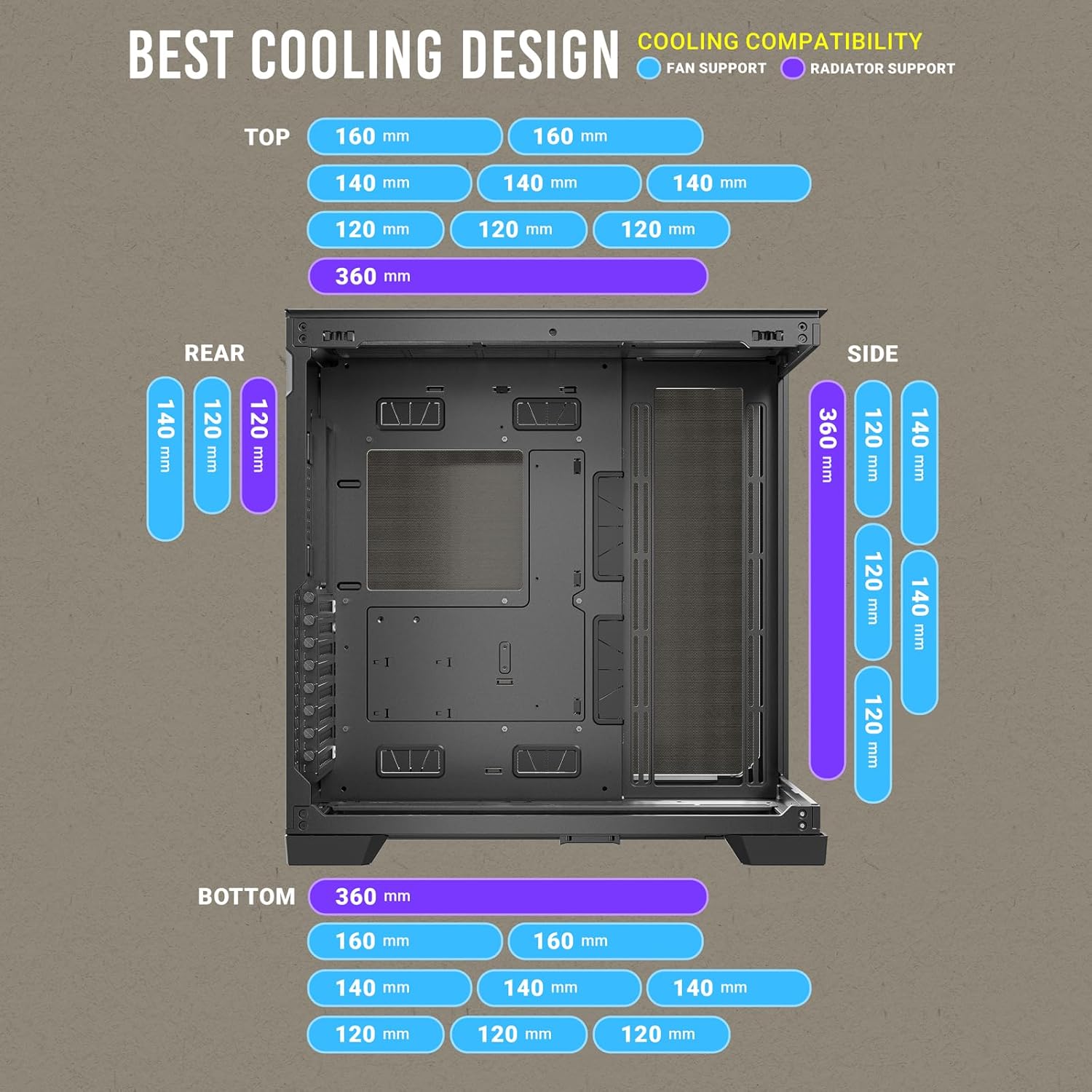
Figure 12: Comprehensive cooling compatibility chart.
4. Maagizo ya Uendeshaji
4.1. Paneli ya I/O ya Mbele
The front I/O panel provides convenient access to essential ports:
- Kitufe cha Nguvu
- Weka Kitufe Upya
- Bandari za USB 3.0 (x2)
- Type-C (10Gbps) Port (x1)
- Headphone/Mic Combo Jack (x1)

Figure 13: Front I/O Panel layout.
5. Matengenezo
5.1. Vichungi vya vumbi
The Antec C8 includes a pull-out dust filter at the bottom for easy cleaning. Regularly clean the dust filters to maintain optimal airflow and prevent dust buildup inside the case.

Figure 14: Bottom pull-out dust filter for easy maintenance.
5.2. Cleaning the Case
Tumia laini, damp cloth to clean the exterior surfaces of the case. For tempered glass panels, use a glass cleaner and a microfiber cloth to avoid scratches. Ensure the system is powered off and unplugged before cleaning.
6. Vipimo
| Kipengele | Vipimo |
|---|---|
| Chapa | Antec |
| Jina la Mfano | C8 |
| Aina ya Kesi | Mnara Kamili |
| Utangamano wa Ubao wa Mama | ATX iliyopanuliwa |
| Nyenzo | Kioo chenye hasira |
| Uzito wa Kipengee | Pauni 10.48 |
| Vipimo vya Bidhaa (LxWxH) | Inchi 18.7 x 8.26 x 11.92 |
| Idadi ya USB 3.0 Bandari | 2 |
| Aina ya Kuweka Ugavi wa Umeme | Mlima wa Chini |
| Mbinu ya Kupoeza | Maji |
7. Video Rasmi ya Bidhaa
Video 1: Antec C8 motion. This video provides a dynamic overview of the Antec C8 PC case, highlighting its design and features.
8. Utatuzi wa shida
If you encounter any issues during installation or operation, please review the following general troubleshooting steps:
- Masuala ya Nguvu: Ensure all power cables (PSU, motherboard, GPU, drives) are securely connected. Verify the power supply switch is in the 'ON' position.
- Utendaji wa Kupoeza: Check that all fans are spinning correctly and are connected to the motherboard or fan controller. Ensure dust filters are clean and not obstructing airflow.
- Kipengele Kufaa: Double-check component dimensions against case specifications to ensure compatibility.
- Viunganisho Vilivyolegea: Re-seat all major components (RAM, GPU, storage drives) and check all data and power cables.
9. Udhamini na Msaada
Kwa taarifa za udhamini na usaidizi wa kiufundi, tafadhali rejelea Antec rasmi webtovuti au wasiliana na huduma kwa wateja wao. Weka uthibitisho wako wa ununuzi kwa madai ya udhamini.


