1. Utangulizi
The Radioddity GM-30 is a General Mobile Radio Service (GMRS) handheld radio designed for reliable two-way communication. It features a robust set of functionalities including multiple channels, scanning capabilities, and NOAA weather alerts, making it suitable for various outdoor and professional applications. This manual provides essential information for the proper setup, operation, and maintenance of your GM-30 radio.
2. Kuweka
2.1 Yaliyomo kwenye Kifurushi
The Radioddity GM-30 package includes the following components:
- 1 x GM-30 radio unit
- 1 x betri ya 1500mAh
- 1 x betri ya 2200mAh
- 1 x Speaker microphone
- 1 x Programming cable
- 1 x Original antenna
- 1 x Kisikizio
- 1 x klipu ya mkanda
- 1 x kamba ya mkono
- 1 x USB-C power cable with adapter

Image: The Radioddity GM-30 GMRS Handheld Radio shown with all included accessories, including the radio unit, two batteries, speaker mic, programming cable, antenna, earpiece, belt clip, wrist strap, and USB-C charging components.
2.2 Ufungaji na Kuchaji Betri
To install the battery, align the battery pack with the back of the radio and slide it into place until it clicks securely. The GM-30 supports USB Type-C charging directly on the battery pack or via the radio unit. Use the provided UL-certified adapter and USB-C cable for safe charging.

Image: Two lithium-ion batteries (1500mAh and 2200mAh) provided with the Radioddity GM-30 radio.

Image: The Radioddity GM-30 radio unit connected via its USB Type-C charging port.
2.3 Kiambatisho cha Antena na Vifaa
Screw the antenna clockwise onto the connector at the top of the radio until it is finger-tight. Attach the belt clip to the rear of the radio using the provided screws. The speaker microphone and earpiece connect to the side port of the radio.

Image: A Radioddity GM-30 radio with a speaker microphone connected, highlighting its K-plug compatibility.
3. Operesheni ya Msingi
3.1 Washa/Zima na Kiasi
Rotate the top knob clockwise to power on the radio. Continue rotating to adjust the volume. Rotate counter-clockwise until a click is heard to power off the radio.
3.2 Uchaguzi wa Chaneli
The GM-30 features 30 default channels (22 GMRS, 8 repeaters) and 24 additional GMRS repeater channels. Use the up/down arrow keys on the keypad to navigate through channels in channel mode. The display sync feature shows channel name, number, and frequency.
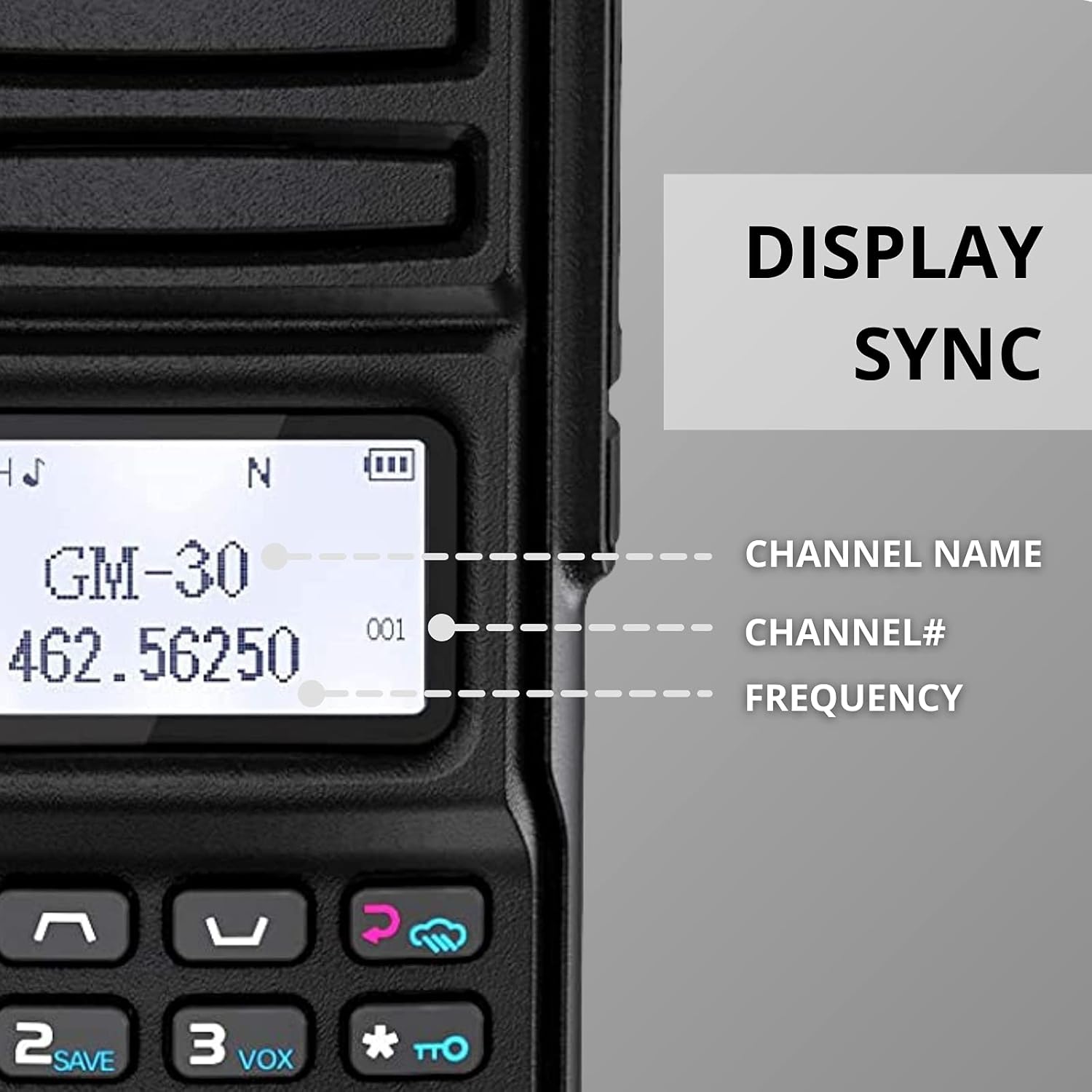
Image: The Radioddity GM-30 radio display showing synchronized information including channel name, channel number, and frequency.
3.3 Kutuma na Kupokea
To transmit, press and hold the Push-To-Talk (PTT) button on the side of the radio. Speak clearly into the microphone. Release the PTT button to receive. Ensure you are on the same channel as the person you wish to communicate with.
Video: This video demonstrates the range capabilities of the Radioddity GM-30 GMRS radio in comparison to another radio model, highlighting its effective communication distance.
4. Vipengele vya Juu
4.1 Dual-Band Scanning & NOAA Weather
The GM-30 supports UHF & VHF monitoring in channel (CH) and VFO modes. It also includes a NOAA weather receiver and scanner for real-time weather alerts. Activate scanning via the menu or designated function buttons.
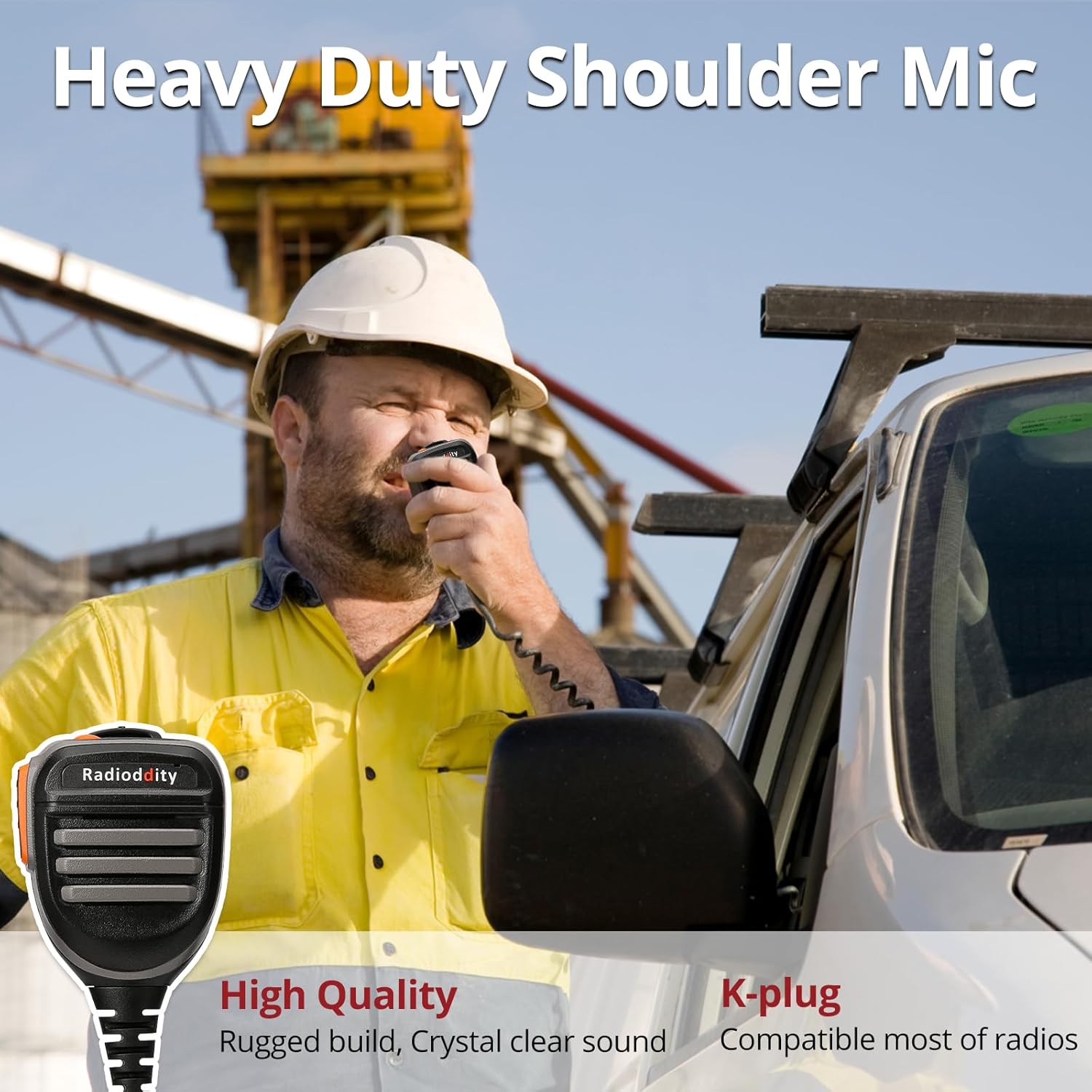
Image: The Radioddity GM-30 radio display showing the NOAA weather channel, indicating its weather alert capabilities.
4.2 FM Radio and Flashlight
The radio includes an FM radio function for entertainment. A built-in flashlight is available for illumination in low-light conditions or for signaling purposes. The flashlight can be activated via a dedicated button on the radio.
4.3 VOX, Squelch, and TOT
The GM-30 supports Voice Operated Exchange (VOX) for hands-free transmission, Squelch to suppress background noise, and Time-Out Timer (TOT) to prevent accidental continuous transmission.
5. Kupanga programu
The Radioddity GM-30 can be programmed via PC using Chirp-compatible software or directly through the keypad. The programming cable is included for PC connectivity.

Image: The Radioddity GM-30 radio connected to a laptop, illustrating its PC programming capability with Chirp software.
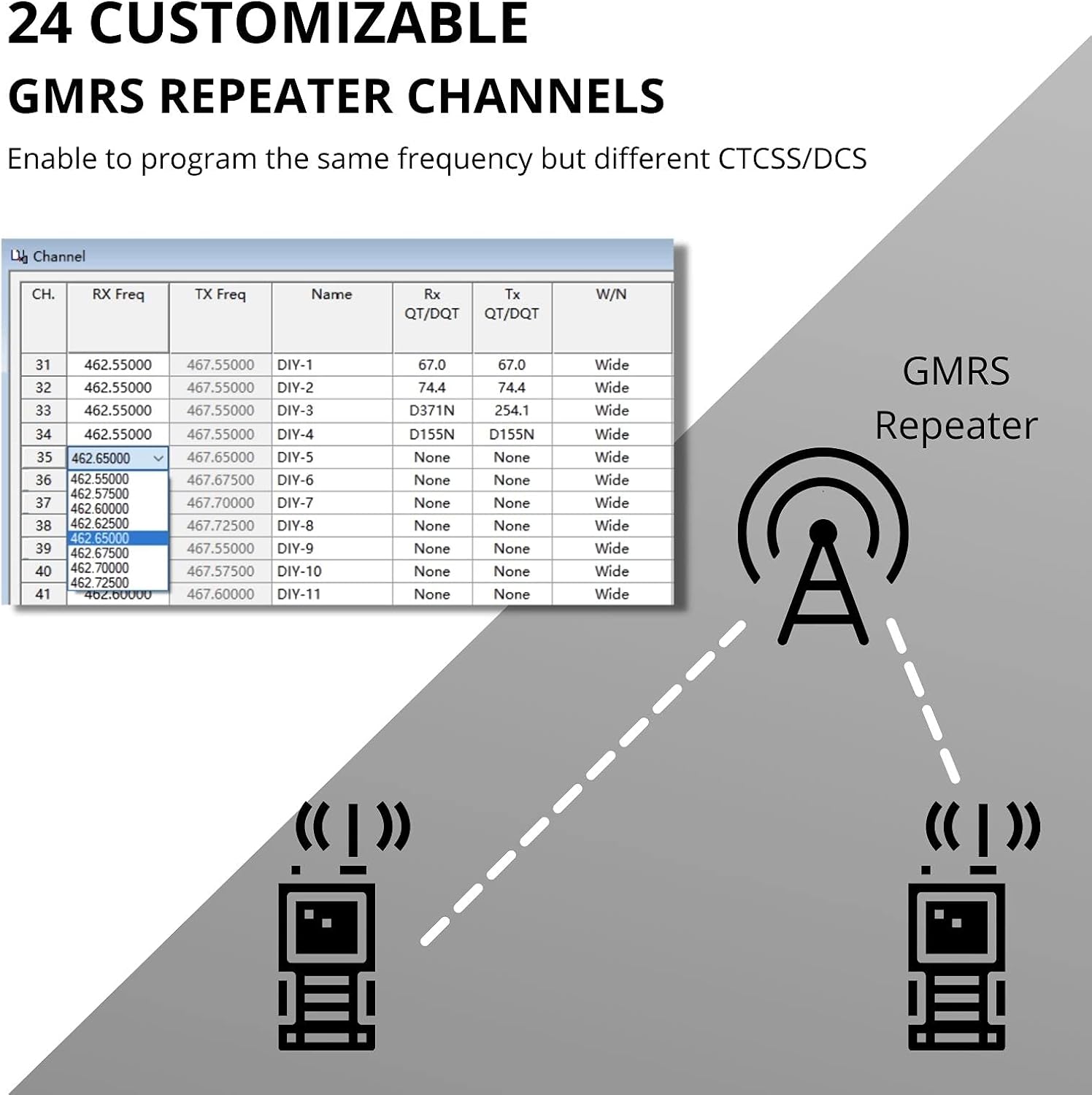
Image: A screenshot of the programming software interface, showing options for customizing GMRS repeater channels with different CTCSS/DCS codes.
Video: This video provides instructions on how to set up DIY repeater channels for the Radioddity GM-30 GMRS radio using CPS software, demonstrating advanced programming capabilities.
6. Matengenezo
6.1 Utunzaji wa Betri
Always use the UL-certified charger and USB-C cable provided to ensure safe and reliable charging. Avoid overcharging and exposing batteries to extreme temperatures. Store batteries in a cool, dry place when not in use.
6.2 Kusafisha
Safisha sehemu ya nje ya redio kwa laini, damp cloth. Do not use harsh chemicals or abrasive cleaners. Ensure all ports are closed when cleaning to prevent moisture ingress.
7. Utatuzi wa shida
If you encounter issues with your Radioddity GM-30, refer to the following common troubleshooting steps:
- Hakuna Nguvu: Hakikisha betri imechajiwa kikamilifu na imewekwa ipasavyo. Angalia kisu cha umeme.
- Hakuna Mapokezi/Usambazaji: Verify that you are on the correct channel and frequency. Check antenna connection. Ensure the squelch level is not set too high.
- Ubora duni wa Sauti: Check volume levels. Ensure the microphone is not obstructed.
- Masuala ya Kuchaji: Verify the USB-C cable and adapter are securely connected. Ensure the power source is active.
For further assistance, contact Radioddity customer support.
8. Vipimo
| Kipengele | Maelezo |
|---|---|
| Uzito wa Kipengee | Pauni 1.76 |
| Vipimo vya Kifurushi | Inchi 7.95 x 4.72 x 4.29 |
| Nambari ya Mfano wa Kipengee | GM 30 |
| Betri | Betri 2 za Lithium Ion zinahitajika (pamoja na) |
| Aina ya Kuonyesha | LCD |
| Masafa ya Marudio | TX: 462.5625-467.7125MHz, RX: 65-108MHz, 136-174MHz, 400-470MHz |
| Upeo wa Masafa ya Kuzungumza | 5 maili |
| Idadi ya Vituo | 250 |
| Voltage | 7.2 Volts |
| Kiwango cha Upinzani wa Maji | Sugu ya Maji |
9. Udhamini na Msaada
9.1 Taarifa ya Udhamini
The Radioddity GM-30 GMRS Handheld Radio comes with an 18-month warranty from the date of purchase. This warranty covers manufacturing defects and ensures the product meets its specified performance standards. Please retain your proof of purchase for warranty claims.
9.2 Usaidizi kwa Wateja
For technical support, troubleshooting, or warranty inquiries, please visit the official Radioddity website or contact their customer service team. Additional tutorials and resources may be available online to assist with common questions and advanced programming.


