1. Utangulizi
The Lenco SCD-860 is a versatile portable audio device featuring DAB+ and FM radio reception, Bluetooth connectivity for wireless audio streaming, and a top-loading CD player. It includes a 2.4-inch TFT color display, dual alarm functions, and stereo speakers. This manual provides essential information for the safe and efficient operation of your device.
2. Taarifa za Usalama
Please read these safety instructions carefully before using the device and retain them for future reference. Incorrect use may result in electric shock, fire, or other hazards.
- Usiweke kifaa kwenye mvua au unyevu ili kuzuia moto au mshtuko wa umeme.
- Hakikisha uingizaji hewa mzuri karibu na kitengo. Usizuie fursa za uingizaji hewa.
- Tumia tu adapta ya umeme inayotolewa na kitengo.
- Usifungue kitengo casing. Rejelea huduma zote kwa wafanyikazi waliohitimu.
- Tupa betri kwa kuwajibika kulingana na kanuni za eneo lako.
3. Yaliyomo kwenye Kifurushi
Thibitisha kuwa vipengee vyote vipo wakati wa kufungua:
- Lenco SCD-860 Unit
- Cable ya Nguvu ya AC
- Mwongozo wa Mtumiaji (hati hii)
4. Bidhaa Imeishaview
Familiarize yourself with the main components and controls of your Lenco SCD-860.
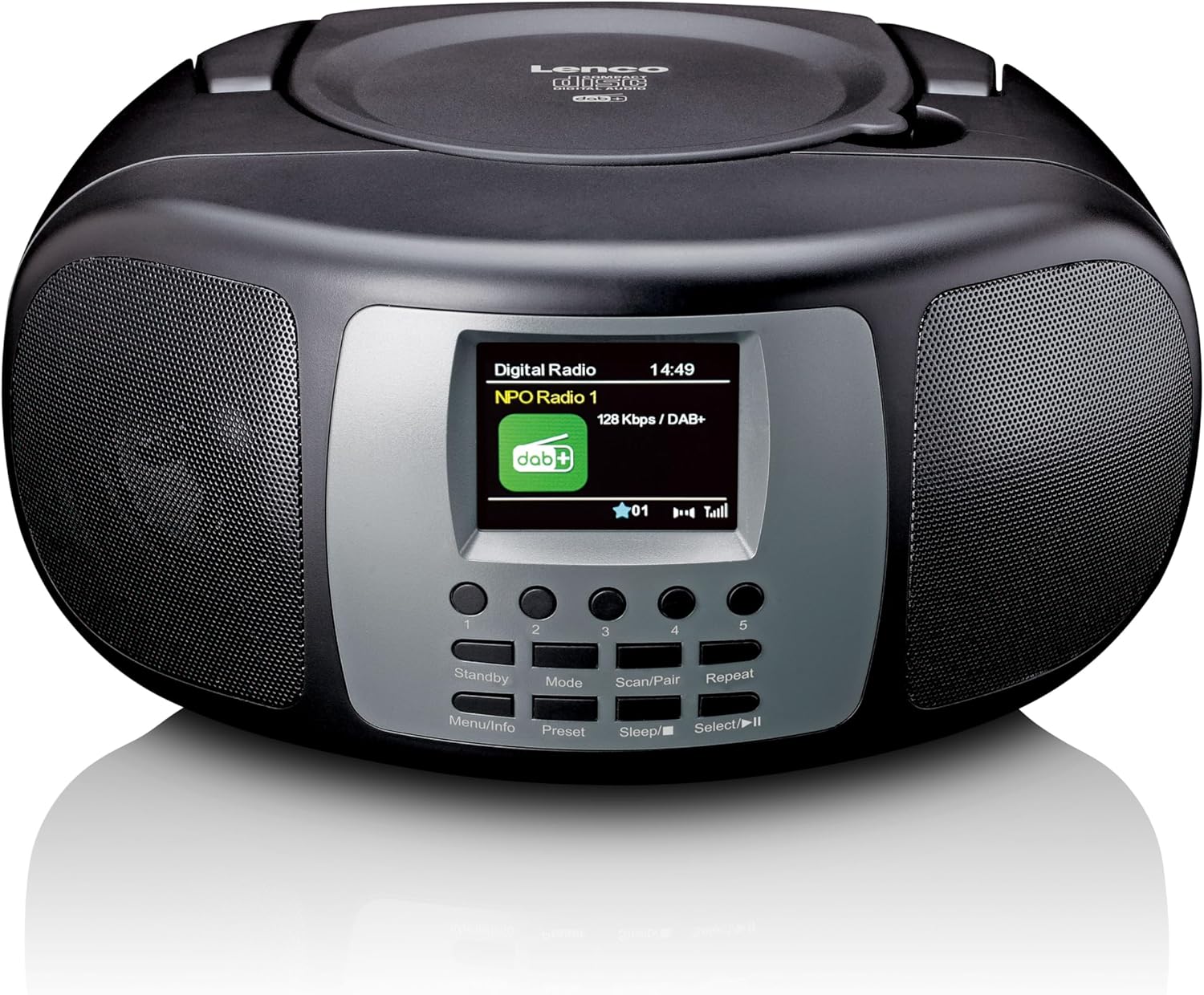
Kielelezo 4.1: Mbele View. This image displays the front of the Lenco SCD-860, highlighting the central 2.4-inch TFT color display, the array of control buttons below it, and the two integrated speakers on either side. The top-loading CD compartment is visible on the upper surface.

Figure 4.2: CD Compartment Open. This image shows the Lenco SCD-860 with its top-loading CD compartment lid open, revealing a compact disc placed inside, ready for playback. The display and control buttons are also visible.

Figure 4.3: Left Side Controls. This image illustrates the left side of the Lenco SCD-860, featuring the headphone output jack, the power ON/OFF switch, and the rotary volume control knob.
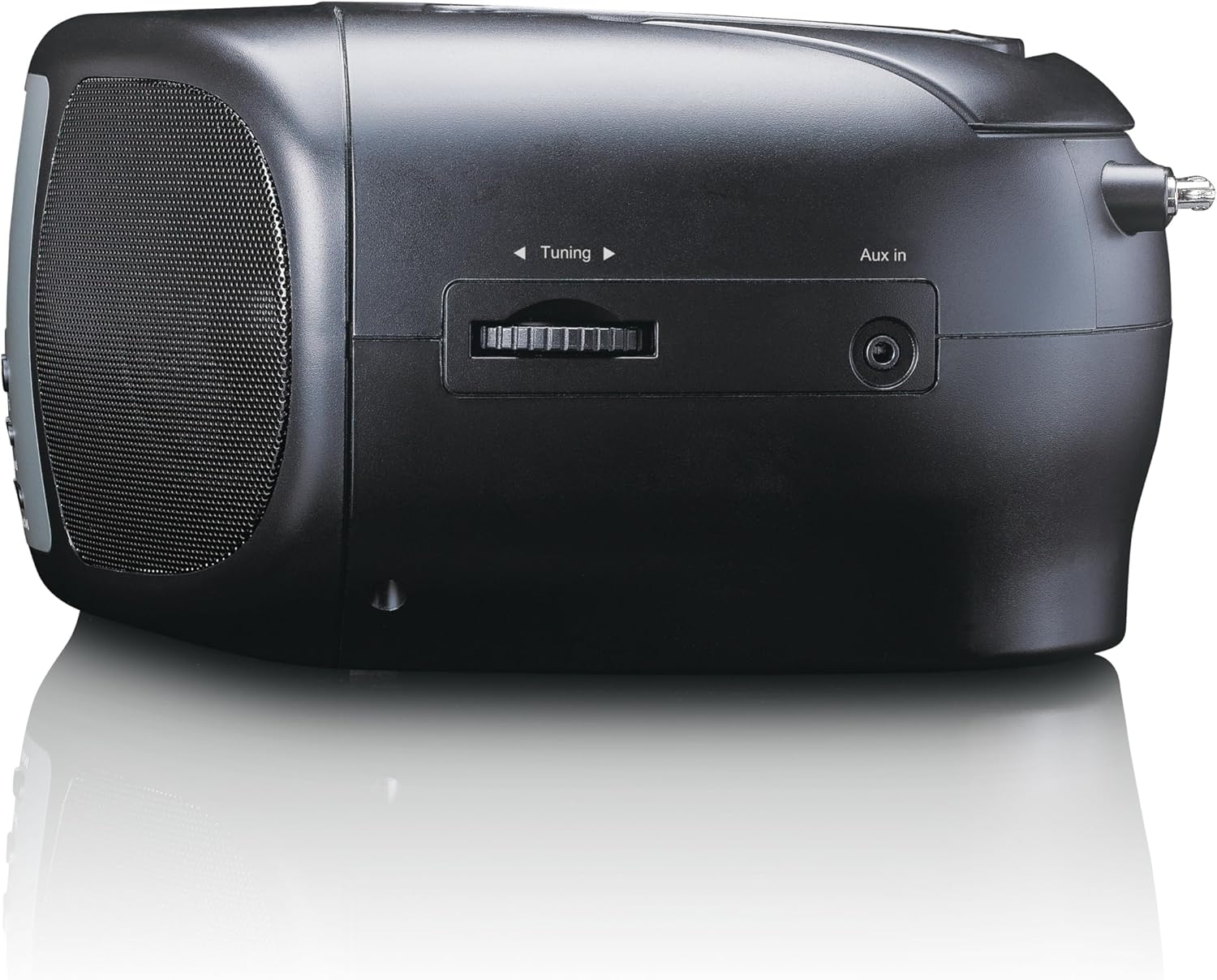
Figure 4.4: Right Side Controls. This image shows the right side of the Lenco SCD-860, highlighting the rotary tuning knob for radio frequency selection and the AUX input jack for connecting external audio devices.

Kielelezo cha 4.5: Nyuma View. This image displays the rear of the Lenco SCD-860, featuring the AC power input socket and the fully extended telescopic antenna for improved radio reception.
4.1. Vifungo vya Kudhibiti
- Standby/Menu/Info: Power on/off, access menu, display information.
- Mode/Preset: Switch between modes (DAB+, FM, CD, Bluetooth, AUX), save/recall radio presets.
- Scan/Pair/Sleep: Scan for radio stations, pair Bluetooth devices, activate sleep timer.
- Repeat/Select/Play/Pause: Repeat CD track/all, confirm selection, play/pause CD/Bluetooth.
- Kitufe cha Kurekebisha: Adjust radio frequency, navigate menus.
- Kitovu cha Sauti: Rekebisha kiwango cha kutoa sauti.
- Vifungo 1-5: Direct access to preset radio stations.
5. Kuweka
5.1. Kuwasha Kifaa
The SCD-860 can be powered by AC mains or batteries.
5.1.1. Nguvu ya AC
- Connect the supplied AC power cable to the AC IN socket on the rear of the unit (refer to Figure 4.5).
- Chomeka mwisho mwingine wa kebo kwenye sehemu ya kawaida ya ukuta.
5.1.2. Nguvu ya betri
For portable use, the unit requires 6 x 'C' size batteries (not included).
- Fungua kifuniko cha sehemu ya betri chini ya kitengo.
- Insert 6 'C' size batteries, ensuring correct polarity (+/-).
- Funga kifuniko cha sehemu ya betri kwa usalama.
5.2. Kuweka Antenna
For optimal DAB+ and FM radio reception, fully extend the telescopic antenna located at the rear of the unit (refer to Figure 4.5). Adjust its position for the best signal quality.
6. Maagizo ya Uendeshaji
6.1. Washa/Zima
Telezesha kidole Nguvu switch on the left side of the unit to the ON position. Press the Kusubiri button on the front panel to turn the unit on or put it into standby mode.
6.2. Uteuzi wa Njia
Bonyeza kwa Hali button repeatedly to cycle through available modes: DAB+, FM, CD, Bluetooth, AUX.
6.3. Uendeshaji wa Redio ya DAB+
- Switch to DAB+ mode using the Hali kitufe.
- The unit will automatically scan for available DAB+ stations upon first use or if no stations are found. To initiate a manual scan, press the Changanua kitufe.
- Tumia Tuning Knob to scroll through the list of available stations. Press Chagua (often integrated with Repeat/Select/Play/Pause button) to confirm your selection.
- Ili kuhifadhi kituo kama kipangilio kilichowekwa awali, bonyeza na ushikilie Weka mapema button (often integrated with Mode button), then use the Tuning Knob to select a preset number (1-5) and press Chagua kuthibitisha.
- To recall a preset, briefly press the corresponding numbered button (1-5).
6.4. Uendeshaji wa Redio ya FM
- Badili hadi modi ya FM kwa kutumia Hali kitufe.
- Ili kuchanganua kiotomatiki vituo, bonyeza na ushikilie Changanua button. The radio will scan and stop at the next strong station.
- For manual tuning, rotate the Tuning Knob kurekebisha mzunguko.
- Saving and recalling presets works similarly to DAB+ mode, using the Weka mapema button and numbered buttons (1-5).
6.5. Uendeshaji wa Bluetooth
- Badili hadi modi ya Bluetooth kwa kutumia Hali button. The display will show "Bluetooth Pairing" or similar.
- Activate Bluetooth on your external device (smartphone, tablet, etc.).
- Tafuta "SCD-860" in your device's Bluetooth list and select it to pair.
- Once paired, you can stream audio from your device to the SCD-860. Use the Cheza/Sitisha button on the unit or your external device to control playback.
6.6. Uendeshaji wa Kicheza CD
- Badilisha hadi hali ya CD kwa kutumia Hali kitufe.
- Open the top-loading CD compartment cover (refer to Figure 4.2).
- Weka CD upande wa lebo ukiangalia juu.
- Close the CD compartment cover. The unit will read the CD and begin playback automatically.
- Tumia Cheza/Sitisha kitufe cha kusitisha au kuendelea kucheza.
- Bonyeza kwa Rudia button to cycle through repeat modes (repeat one track, repeat all tracks).
- The unit supports programmable CD playback for up to 20 tracks. Refer to the full manual for detailed programming instructions.
6.7. Pembejeo ya AUX
Unganisha kifaa cha sauti cha nje (kwa mfano, kicheza MP3) kwenye AUX Katika jack on the right side of the unit (refer to Figure 4.4) using a 3.5mm audio cable (not included). Switch to AUX mode using the Hali button. Audio will play through the SCD-860 speakers.
6.8. Kazi ya Kengele
The SCD-860 features a dual alarm function. Detailed instructions for setting and managing alarms are typically found in the full product manual. Generally, you will access the alarm settings via the Menyu (long press Standby/Menu/Info) and use the Tuning Knob na Chagua button to configure alarm times, sources (buzzer, radio, CD), and volume.
6.9. Matumizi ya Vipaza sauti
Connect headphones to the 3.5mm headphone jack on the left side of the unit (refer to Figure 4.3) for private listening. The internal speakers will be muted automatically.
7. Matengenezo
- Kusafisha: Futa kitengo kwa kitambaa laini, kavu. Usitumie visafishaji vya abrasive au vimumunyisho.
- Utunzaji wa CD: Shikilia CD kando ya kingo zake. Safisha CD chafu kwa kitambaa laini, kisicho na utepe, ukifuta kutoka katikati hadi nje.
- Hifadhi: If not used for extended periods, remove batteries and store the unit in a cool, dry place.
8. Utatuzi wa shida
| Tatizo | Sababu inayowezekana | Suluhisho |
|---|---|---|
| Hakuna nguvu | Kebo ya umeme haijaunganishwa; Betri zimeisha au zimeingizwa vibaya. | Check AC cable connection; Replace batteries or ensure correct polarity. |
| Hakuna sauti | Kiasi cha chini sana; Vipokea sauti vya sauti vilivyounganishwa; Umechagua hali isiyo sahihi. | Increase volume; Disconnect headphones; Select correct mode (DAB+, FM, CD, Bluetooth, AUX). |
| Mapokezi duni ya redio | Antenna not extended or poorly positioned; Weak signal area. | Panua kikamilifu na urekebishe antenna ya telescopic; Jaribu kuhamisha kitengo hadi eneo tofauti. |
| CD haichezi | CD inserted incorrectly; CD is dirty or scratched; Incorrect mode. | Ensure CD is label-side up; Clean or replace CD; Select CD mode. |
| Uoanishaji wa Bluetooth umeshindwa | Bluetooth not enabled on external device; SCD-860 not in pairing mode; Devices too far apart. | Enable Bluetooth on your device; Ensure SCD-860 is in Bluetooth mode; Move devices closer (within 10m). |
9. Vipimo
| Kipengele | Maelezo |
|---|---|
| Nambari ya Mfano | SCD-860BK |
| Chapa | Lenco |
| Teknolojia ya Uunganisho | Bluetooth |
| Vipengele Maalum | Bluetooth, DAB+/FM Radio, CD Player, Color Display, Dual Alarm |
| Vifaa Sambamba | Headphones, Earphones, MP3 Player, Smartphone, Laptop, Speaker, Tablet, USB Stick |
| Nguvu ya Pato | 2 x 2 W RMS |
| Onyesho | 2.4-inch TFT LCD Color Display |
| CD Memory | Programmable for 20 tracks |
| Bendi za Redio Zinatumika | DAB+ (Band III 174-240 MHz), FM |
| Chanzo cha Nguvu | AC Mains, 6 x 'C' Batteries (not included) |
| Viunganishi | AUX Input, 3.5mm Audio Output (Headphone) |
| Vipimo (L x W x H) | Sentimita 24 x 22 x 11.5 cm (takriban.) |
| Rangi | Nyeusi |
10. Udhamini na Msaada
Kwa taarifa za udhamini na usaidizi wa kiufundi, tafadhali rejelea kadi ya udhamini iliyojumuishwa na bidhaa yako au tembelea Lenco rasmi webtovuti. Weka uthibitisho wako wa ununuzi kwa madai yoyote ya udhamini.
For further assistance, please contact Lenco customer service through their official channels.


