1. Utangulizi
The SHX SHXA700 Infrared Heating Panel is designed to provide efficient and comfortable heating for your living spaces. Featuring a modern, frameless design with a white carbon crystal surface, it seamlessly integrates into any room. This 700W panel offers WiFi connectivity, remote control operation, and a programmable thermostat for optimal energy saving and comfort. This manual provides essential information for the safe and effective use of your heating panel.

Figure 1: SHX SHXA700 700W WiFi Infrared Heating Panel, front view. A clean, white rectangular infrared heating panel, showcasinmuundo wake mdogo.
2. Maagizo ya Usalama
Tafadhali soma maagizo yote ya usalama kwa makini kabla ya usakinishaji na matumizi. Kushindwa kufuata maagizo haya kunaweza kusababisha mshtuko wa umeme, moto, au jeraha la kibinafsi.
- Hakikisha ugavi wa umeme ujazotage inalingana na lebo ya ukadiriaji kwenye kifaa.
- Do not operate the heater with a damaged cord or plug. If the cord is damaged, it must be replaced by the manufacturer, its service agent, or similarly qualified persons to avoid a hazard.
- Do not cover the heater. Covering the heater can cause overheating.
- Maintain a minimum distance of 100 cm from the front of the heater to any objects, and 20 cm from the sides and top to walls or other surfaces.
- This appliance is rated IP44, making it suitable for use in bathrooms. However, it must not be installed directly above a bath, shower, or swimming pool.
- Usiingize vitu vyovyote kwenye nafasi za hita.
- The heater is equipped with overheating protection. If the heater overheats, it will automatically shut off. Unplug the heater and allow it to cool down before restarting.
- Weka watoto na wanyama kipenzi mbali na hita wakati wa operesheni.
- Daima ondoa hita kabla ya kusafisha au matengenezo.
3. Yaliyomo kwenye Kifurushi
Carefully unpack the box and ensure all items are present and undamaged. If any items are missing or damaged, contact your retailer.
- Jopo la Kupokanzwa kwa infrared
- Mwongozo wa Mtumiaji
- Udhibiti wa Kijijini
- Skurubu na Doweli za kupachika ukutani
- Optional Feet for freestanding placement
4. Bidhaa za Bidhaa
The SHX SHXA700 Infrared Heating Panel offers a range of features designed for convenience and efficiency:
- Nguvu ya Pato la 700W: Provides effective heating for rooms up to 14 m².
- Integrated WiFi Functionality: Control your heater remotely via a smartphone app.
- Udhibiti wa Mbali: Convenient operation with the included remote.
- Kipima Muda cha Saa 24: Program specific operating times for energy saving.
- Thermostat Inayoweza Kubadilishwa: Dumisha halijoto ya chumba unachotaka.
- Ulinzi wa joto kupita kiasi: Kipengele cha usalama kilichoimarishwa.
- Ukadiriaji wa IP44: Inafaa kwa matumizi katika damp mazingira kama bafu.
- Ubunifu wa Kisasa: Frameless white carbon crystal surface for aesthetic integration.
- Onyesho la LCD: Clear display for settings and status.

Figure 2: SHX Infrared Heating Panel features. An infographic highlighting the main features of the SHX SHXA700 infrared heating panel, including WiFi connectivity, remote control, 24-hour timer, adjustable thermostat, and overheating protection. It also indicates suitability for up to 14m² rooms.
5. Kuweka na Kuweka
The SHX SHXA700 heating panel can be installed either wall-mounted or freestanding using the optional feet.
5.1 Kuweka Ukuta
- Choose a suitable location on a wall, ensuring sufficient clearance from other objects (refer to Safety Instructions).
- Mark the drilling points on the wall using the provided template or by measuring the panel's mounting holes.
- Drill holes and insert the provided dowels.
- Secure the mounting brackets to the wall using the provided screws.
- Carefully hang the heating panel onto the mounting brackets, ensuring it is securely seated.
- Chomeka kebo ya umeme kwenye sehemu inayofaa ya umeme.
5.2 Freestanding Placement
- Attach the optional feet to the bottom of the heating panel using the provided screws.
- Place the panel on a stable, level surface, ensuring it is not easily tipped over.
- Ensure sufficient clearance from other objects (refer to Safety Instructions).
- Chomeka kebo ya umeme kwenye sehemu inayofaa ya umeme.

Figure 3: SHX Infrared Heating Panel in various room settings. A collage of four images demonstrating the SHX infrared heating panel's versatile placement options in different rooms: a living room, a bedroom, a bathroom, and an office, illustrating its modern design integration.

Figure 4: SHX SHXA700 Infrared Heating Panel dimensions. A diagram illustrating the physical dimensions of the SHX SHXA700 infrared heating panel, showing its width (1200mm), height (500mm), and depth (45mm), along with its weight (2.9 kg).
6. Maagizo ya Uendeshaji
The heating panel can be operated using the integrated control panel on the back or the included remote control.
6.1 Jopo la Kudhibiti Imeishaview
The control panel is located on the back of the unit and includes buttons for power, WiFi, temperature adjustment, timer, and an LCD display.
6.2 Operesheni ya Msingi
- Washa/Zima: Bonyeza kitufe cha kuwasha/kuzima kwenye paneli ya kudhibiti au kidhibiti cha mbali ili kuwasha au kuzima hita.
- Marekebisho ya Halijoto: Use the '+' and '-' buttons to set your desired temperature. The LCD display will show the current and target temperatures.
- Kazi ya Kipima Muda: Press the timer button to activate and set the 24-hour timer. Follow the on-screen prompts to program the desired operating duration.

Figure 5: SHX Infrared Heating Panel control panel and remote control. A close-up view of the heating panel's integrated control unit on the side, featuring power, WiFi, LCD display, 24-hour timer, and indicator light buttons, alongside the included remote control for easy operation.
7. WiFi Connectivity & App Control
The SHX SHXA700 heating panel features integrated WiFi, allowing for smart control via your smartphone.
- Pakua Programu: Download the "Tuya Smart" app from your smartphone's app store (available for iOS and Android).
- Sajili/Ingia: Fungua akaunti au ingia kwenye akaunti yako ya Tuya Smart iliyopo.
- Ongeza Kifaa: Follow the in-app instructions to add your SHX heating panel. This typically involves putting the heater into pairing mode (refer to the app's guide for specific steps, usually by holding the WiFi button on the control panel).
- Unganisha kwa WiFi: Select your home WiFi network and enter the password.
- Udhibiti: Once connected, you can control the heater's power, temperature, timer, and other settings directly from the app.
- Ujumuishaji wa Smart Home: The Tuya Smart app supports integration with voice assistants like Amazon Alexa and Google Home, allowing for voice control of your heating panel.

Figure 6: SHX Infrared Heating Panel WiFi and integrated timer features. An image showing the heating panel's WiFi symbol and a smartphone displaying the "Tuya Smart" app interface, along with logos for Alexa and Google Home, indicating smart home compatibility and a 24-hour timer function.
8. Matengenezo
Regular cleaning and maintenance will ensure the longevity and optimal performance of your heating panel.
- Kusafisha: Always unplug the heater and allow it to cool completely before cleaning. Wipe the surface with a soft, damp kitambaa. Usitumie visafishaji vya abrasive, vimumunyisho, au kemikali kali, kwani hizi zinaweza kuharibu uso.
- Hifadhi: Ikiwa utahifadhi hita kwa muda mrefu, hakikisha ni safi na kavu. Hifadhi mahali pa baridi, kavu, ikiwezekana katika ufungaji wake wa asili.
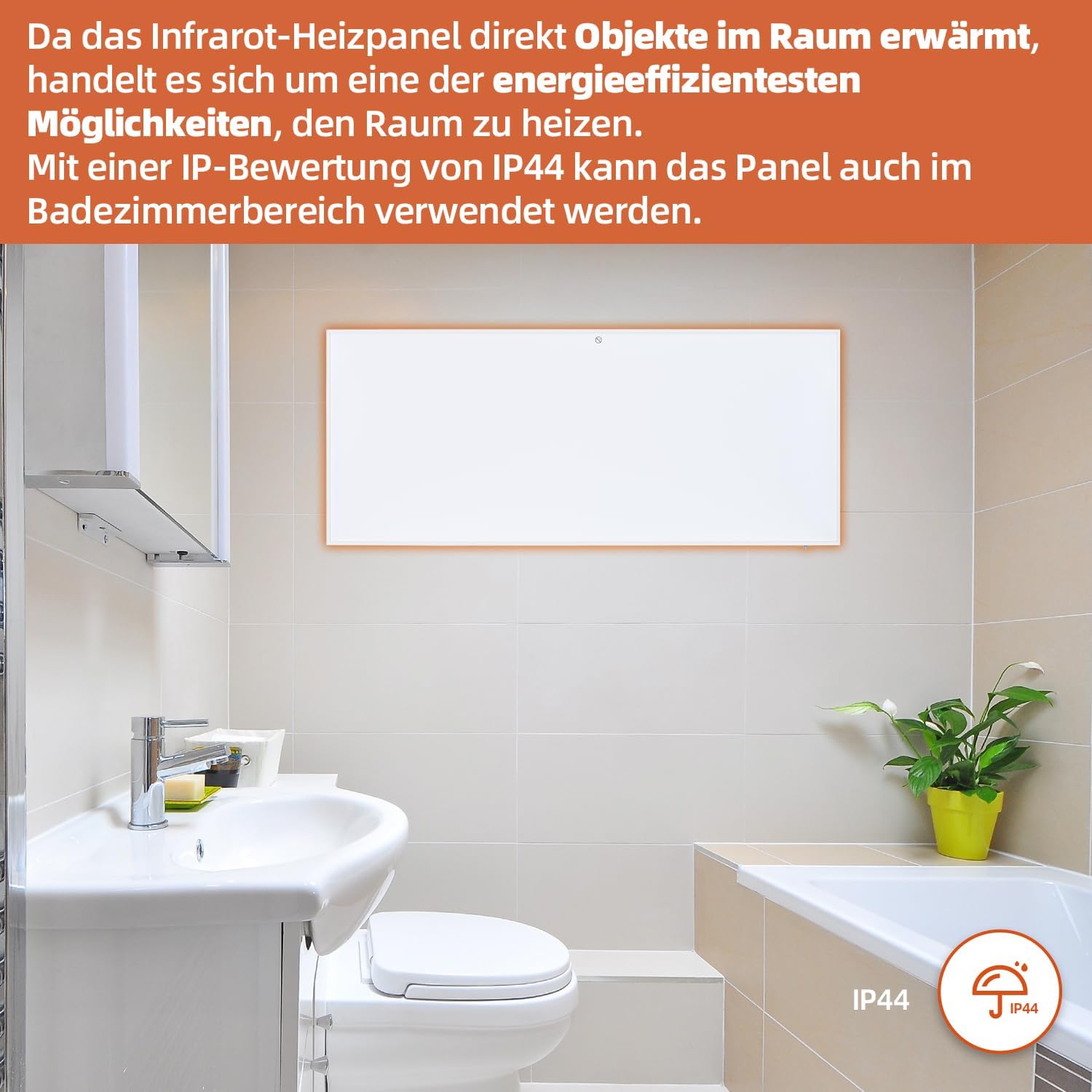
Figure 7: SHX Infrared Heating Panel with IP44 rating. The infrared heating panel mounted in a modern bathroom setting, emphasizing its IP44 water resistance rating, making it safe for use in damp mazingira.
9. Utatuzi wa shida
If you encounter any issues with your SHX heating panel, refer to the following common problems and solutions:
| Tatizo | Sababu inayowezekana | Suluhisho |
|---|---|---|
| Hita haina kuwasha. | No power supply. Overheating protection activated. | Check if the power cord is securely plugged in and the outlet is functional. Unplug the heater, allow it to cool for 30 minutes, then plug it back in. |
| WiFi connection fails. | Incorrect WiFi password. Heater not in pairing mode. Router issues. | Ensure correct WiFi password. Put the heater into WiFi pairing mode (refer to app instructions). Restart your WiFi router. Ensure the heater is within WiFi range. |
| Udhibiti wa mbali haufanyi kazi. | Betri zimekufa au zimeingizwa vibaya. Kizuizi kati ya remote na hita. | Replace the batteries in the remote control (requires 2 AAA batteries). Ensure there is a clear line of sight between the remote and the heater's receiver. |
| Heater not heating effectively. | Temperature setting too low. Room size exceeds heater capacity. Drafts. | Increase the target temperature. Ensure the room size is within the recommended range (up to 14 m²). Seal any drafts in the room. |
10. Vipimo
| Vipimo | Thamani |
|---|---|
| Chapa | SHX |
| Nambari ya Mfano | SHXA700-WiFi |
| Rangi | Nyeupe |
| Vipimo vya Bidhaa (L x W x H) | 120 x 50 x 4.5 cm |
| Uzito | Kilo 2.9 |
| Nguvu | 700 Watts |
| Voltage | Volti 220 (AC) |
| Darasa la Ufanisi wa Nishati | A hadi G |
| Kiwango cha Kelele | 1 decibels |
| Vipengele Maalum | WiFi Compatible, Overheating Protection, Programmable Thermostat, Remote Control, Energy Efficient |
| Chanzo cha Nguvu | Umeme wa Cord |
| Njia ya Kupokanzwa | Radiant |
| Matumizi Iliyopendekezwa | Indoor, Home |
| Aina ya Kuweka | Wall Mount, Floor Mount (with optional feet) |
| Batri Inahitajika kwa Kijijini | Betri 2 za AAA |
| Nchi ya Asili | China |
11. Udhamini na Msaada
The SHX SHXA700 Infrared Heating Panel comes with a dhamana ya mwaka 2 kuanzia tarehe ya ununuzi. Tafadhali hifadhi uthibitisho wako wa ununuzi kwa madai ya udhamini.
For technical support, warranty claims, or any questions regarding your product, please contact your retailer or the manufacturer's customer service. Contact information can typically be found on the product packaging or the manufacturer's official webtovuti.


