Utangulizi
This user manual provides detailed instructions for the operation and maintenance of your MOBI Connect Smart 4 in 1 Wi-Fi Air Purifier & Humidifier. This device is designed to improve indoor air quality by purifying and humidifying the air, offering a healthier and more comfortable living environment. Please read this manual thoroughly before use to ensure proper function and safety.

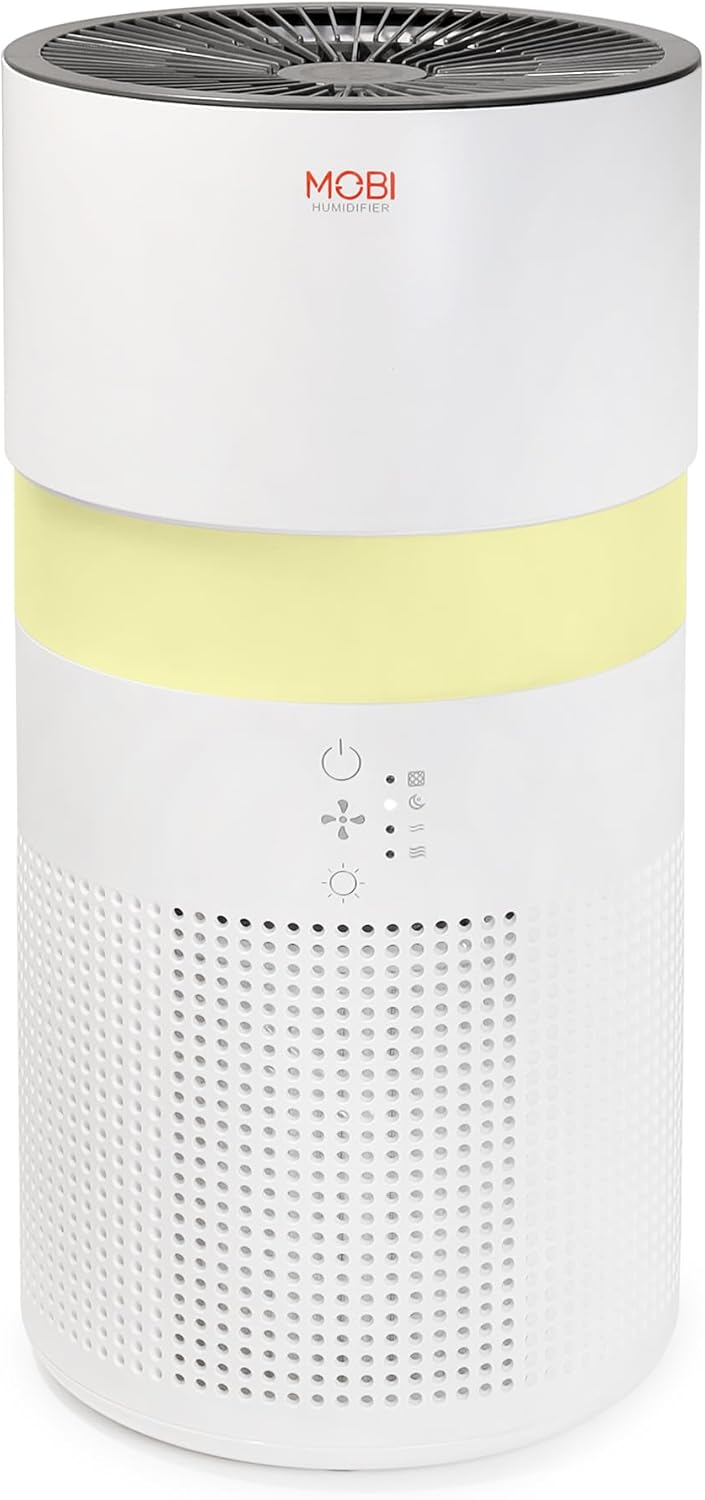
Image: The MOBI Connect Smart 4 in 1 Wi-Fi Air Purifier & Humidifier, a compact white cylindrical device with a light band and control panel.
Taarifa Muhimu za Usalama
Ili kupunguza hatari ya moto, mshtuko wa umeme au majeraha, fuata tahadhari za kimsingi za usalama kila wakati unapotumia kifaa hiki.
- Always place the device on a firm, level surface.
- Usizuie viingilio vya hewa au njia.
- Weka kifaa mbali na maji na unyevu.
- Chomoa kifaa kabla ya kusafisha au matengenezo.
- Usitumie kifaa ikiwa kamba ya umeme au plagi imeharibika.
- Weka mbali na watoto na kipenzi.
- Only use original MOBI replacement filters.
Bidhaa Imeishaview
Familiarize yourself with the components and controls of your air purifier and humidifier.
Picha: Karibu view of the control panel on the MOBI Air Purifier, showing power, fan speed, light, and humidifier icons.
Vipengele vya Jopo la Kudhibiti:
- Kitufe cha Nguvu: Turns the unit on/off and activates pairing mode.
- Kiashiria cha Kasi ya Mashabiki: Displays current fan speed (Sleep, Medium, High).
- Humidifier Indicator: Shows humidifier status.
- Kitufe cha Njia Nyepesi: Cycles through light modes (Off, Gradient, Fixation).
- Kiashiria cha Kubadilisha Kichujio: Huangaza wakati uingizwaji wa kichujio unahitajika.
Mwongozo wa Kuweka
Follow these steps to set up your MOBI Connect Smart 4 in 1 Wi-Fi Air Purifier & Humidifier and connect it to the MOBI Smart App.
Mpangilio wa Awali:
- Fungua kifaa na uondoe vifaa vyote vya ufungaji.
- Ensure the filter is correctly installed inside the unit. Refer to the 'Maintenance' section for filter installation.
- Weka kifaa kwenye uso thabiti, gorofa.
- Plug the power adapter into the device and then into a wall outlet. The device will enter pairing mode, indicated by a red blinking LED.
Muunganisho wa Programu:
- Pakua MOBI Smart App kutoka duka la programu la kifaa chako.
- Open the app and sign up for an account if you don't have one.
- Accept all requested permissions (Bluetooth, Location, Notifications) for full functionality.
- On the app's home screen, tap 'Add Device' or the '+' icon in the top right corner.
- The app will search for nearby devices. If your device is blinking red, it should appear in the 'Discovering devices' area. Tap 'Add'.
- If not automatically discovered, select 'Mobi Air Purifier' from the 'Add Manually' list.
- Enter your 2.4GHz Wi-Fi network username and password. (Note: 5GHz networks are not supported).
- Follow the on-screen instructions to activate the device for pairing. If the red LED is not blinking, press and hold the power button until it starts blinking.
- Once the device is blinking red, tap 'Finish network configuration' and then 'Next' in the app.
- The app will connect to the device. Once connected, tap the blue button with the white plus sign next to 'MOBI Smart Air Care 4 IN 1' and then 'Done' in the top right corner.
Video: A detailed guide on how to connect and set up the MOBI Smart 4-in-1 Air Purifier & Humidifier using the MOBI Smart App, including app permissions, device discovery, Wi-Fi setup, and pairing instructions.
Maagizo ya Uendeshaji
Control your MOBI Connect Smart 4 in 1 Wi-Fi Air Purifier & Humidifier using the physical buttons on the device or through the MOBI Smart App.
Using the Device Buttons:
- Washa/Zima: Press the power button once to turn the unit on or off.
- Rekebisha Kasi ya Mashabiki: Press the fan speed button to cycle through Sleep, Medium, and High settings.
- Control Night Light: Press the light button to cycle through Off, Gradient (color flow), and Fixation (single color) modes.
- Kazi ya Humidifier: Press the humidifier button to activate or deactivate the humidification feature.
Using the MOBI Smart App:
The app provides comprehensive control and additional features.
- Badili: Power the device on or off remotely.
- Kasi ya Upepo: Select Sleep, Medium, or High wind speed options.
- Muda wa Kuhesabu: Set a timer for 2, 4, or 6 hours for automatic shut-off.
- Mipangilio: Access advanced options:
- Uzuiaji wa maambukizo ya UV: Enable or disable the UV disinfection feature.
- Weka upya Kichujio: Reset the filter life indicator after replacing the filter.
- Hali ya Mwanga: Choose between Off, Gradient (cycling colors), or Fixation (select a single color).
- Ratiba: Create custom schedules for when the device should turn on or off.
- Ujumuishaji wa Smart Home: Monitor your home's air quality and integrate with other MOBI Smart devices.
- Aromatherapy Pad: Add essential oils to the designated pad to diffuse scents into the air.

Image: The MOBI Air Purifier showcasing its 7 color-changing LED night light feature, adding ambiance to any room.

Image: The MOBI Air Purifier next to a smartphone displaying the MOBI Smart App interface, highlighting smart home control features.
Matengenezo
Matengenezo ya mara kwa mara huhakikisha utendaji bora na huongeza muda wa matumizi wa kifaa chako.
Kubadilisha Kichujio:
The MOBI Connect Smart 4 in 1 Wi-Fi Air Purifier & Humidifier uses a 3-stage filtration system (Pre-Filter, Carbon, and HEPA filter). The filter replacement alert will notify you when it's time to change the filter.

Image: A visual representation of the 3-stage HEPA filtration system, showing the layers of the filter.
- Chomoa kifaa kutoka kwa umeme.
- Remove the bottom cover of the unit.
- Ondoa kichujio cha zamani kwa uangalifu.
- Insert the new MOBI replacement filter, ensuring it is seated correctly.
- Badilisha kifuniko cha chini.
- Chomeka kifaa tena.
- In the MOBI Smart App, go to 'Settings' and select 'Reset Filter' to reset the filter life indicator.

Image: The MOBI Air Purifier with a new filter, illustrating the filter replacement alert system.
Kusafisha Kifaa:
- Futa sehemu ya nje ya kifaa kwa laini, damp kitambaa. Usitumie cleaners abrasive.
- Clean the water tank regularly to prevent mineral buildup and mold growth. Use a mild detergent and rinse thoroughly.
- Ensure all parts are completely dry before reassembling and using the device.
Kutatua matatizo
If you encounter issues with your device, refer to the following common problems and solutions.
| Tatizo | Sababu inayowezekana | Suluhisho |
|---|---|---|
| Kifaa hakiwashi. | Haijachomekwa; tatizo la soketi ya umeme; waya iliyoharibika. | Ensure power cord is securely plugged in. Test outlet with another device. Check for cord damage. |
| Kifaa hakiunganishi kwenye Wi-Fi. | Incorrect Wi-Fi password; 5GHz network; device not in pairing mode. | Verify Wi-Fi password. Ensure you are connecting to a 2.4GHz network. Press and hold power button to enter pairing mode (red blinking LED). |
| Air quality not improving. | Dirty filter; incorrect fan speed; room size too large. | Check filter indicator and replace if necessary. Increase fan speed. Ensure device is suitable for your room size. |
| Kiyeyushi hakitoi ukungu. | Water tank empty; humidifier function off; mineral buildup. | Refill water tank. Activate humidifier function via app or button. Clean water tank and humidifier components. |
Vipimo
| Kipengele | Maelezo |
|---|---|
| Vipimo vya Bidhaa | 6.5"D x 6.5"W x 13"H (inchi 6.5 x 6.5 x 13) |
| Nambari ya Mfano wa Kipengee | 70692 |
| Uzito | Pauni 3 |
| Rangi | Nyeupe |
| Ufunikaji wa Eneo la Sakafu | Hadi futi za mraba 350 |
| Mfumo wa Kuchuja | 3-Stage (Pre-Filter, Activated Carbon, HEPA) |
| Aina ya Humidifier | Forced-air water tank method |
| Nuru ya Usiku | 7 Unique LED Colors, Adjustable Modes (Off, Gradient, Fixation) |
| Kiwango cha Kelele | 24dB (Hali ya Kulala) |
| Kiwango cha Mzunguko wa Hewa | 5x per hour |
| Muunganisho | Wi-Fi (2.4GHz required) |
| Vyeti | UL Certified, RoHS Certified |
| Wattage | 680 watts |
Udhamini na Msaada
MOBI products are designed with quality and reliability in mind. For warranty information and customer support, please refer to the official MOBI webtovuti au wasiliana na huduma kwa wateja wao moja kwa moja.
For frequently asked questions (FAQ) and feedback, you can also access these sections within the MOBI Smart App under the device settings.


