1. Bidhaa Imeishaview
The EPOMAKER Aura75 is a 75% layout mechanical keyboard kit designed for customization and versatile connectivity. It features a compact design, hot-swappable switch sockets, and dynamic RGB backlighting. This kit supports multiple connection modes and is compatible with various operating systems.
Sifa Muhimu:
- 75% Layout: Optimized for functionality and space efficiency.
- Muunganisho wa Njia tatu: Inasaidia miunganisho ya waya ya 2.4GHz isiyotumia waya, Bluetooth 5.0, na USB-C.
- PCB Inayoweza Kubadilishwa kwa Moto: Allows for easy installation and removal of 3-pin and 5-pin mechanical switches without soldering.
- Mwangaza wa Nyuma wa RGB Unaobadilika: Features per-key RGB lighting and unique side lighting effects.
- Kitufe cha kazi nyingi: Provides control over volume and RGB brightness.
- Unyonyaji wa Sauti: Equipped with silicone pads and IXPE switch cushioning for a quieter typing experience.
- Ujenzi wa kudumu: Crafted with a robust injection-molded casing and PC plate.
2. Mwongozo wa Kuweka
Yaliyomo kwenye Kifurushi:
- EPOMAKER Aura75 Keyboard Kit
- Cable ya USB-C
- 2.4GHz Dongle Isiyo na Waya
- Kivutio cha Keycap
- Kubadili Kivuta
2.1 Kusakinisha Swichi na Vifuniko vya Kitufe
The Aura75 is a barebone kit, meaning switches and keycaps are not pre-installed. You will need to install your preferred 3-pin or 5-pin mechanical switches and keycaps.
- Align the pins of your mechanical switch with the hot-swappable socket on the PCB.
- Gently press the switch until it clicks into place. Ensure the pins are straight to avoid bending.
- Rudia kwa nafasi zote za swichi unazotaka.
- Place your chosen keycaps onto the installed switches, pressing firmly until they are secure.
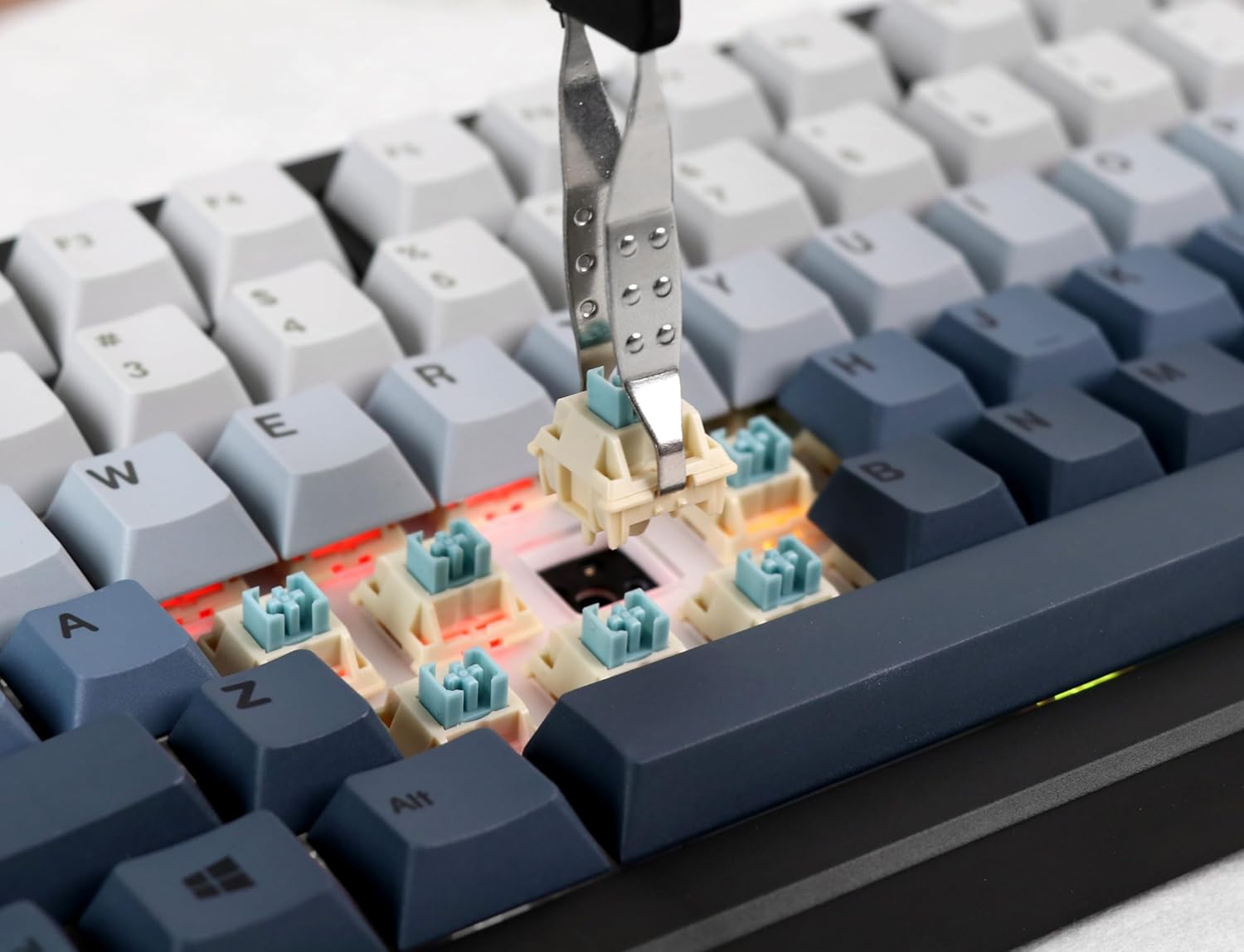
Image: Proper installation of a mechanical switch into the hot-swappable PCB.

Image: The hot-swappable barebone kit featuring south-facing RGB LEDs and tuned plate-mounted stabilizers.
2.2 Connecting the Keyboard:
The Aura75 offers three connectivity options:
- Waya ya USB-C: Unganisha kibodi moja kwa moja kwenye kifaa chako kwa kutumia kebo ya USB-C iliyotolewa.
- 2.4GHz Isiyo na Waya: Insert the 2.4GHz USB dongle into your device. Flip the switch on the back of the keyboard to the 2.4G position.
- Bluetooth 5.0: Flip the switch on the back of the keyboard to the Bluetooth position. Press FN + 1/2/3 to enter pairing mode for up to three different devices. The indicator light will flash, then become solid upon successful connection.
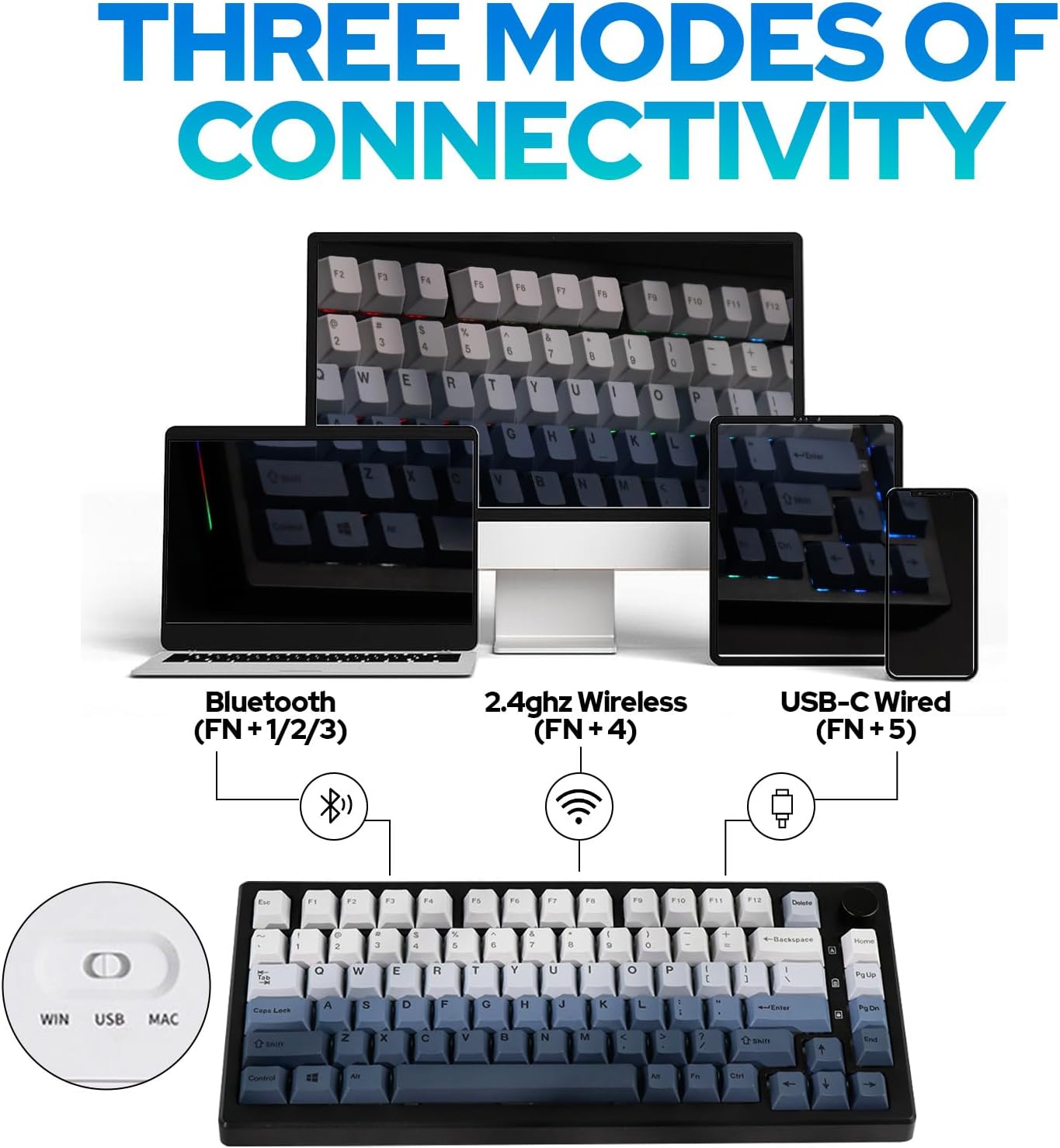
Picha: Juuview of the three connectivity modes: Bluetooth (FN+1/2/3), 2.4GHz Wireless (FN+4), and USB-C Wired (FN+5).

Picha: Kina view of the keyboard's rear, highlighting the connectivity switch, 2.4GHz dongle storage, and USB-C port.
2.3 Adjusting Keyboard Height:
Kibodi ina sehemu mbilitage adjustable feet on the underside to customize the typing angle for ergonomic comfort.
3. Maagizo ya Uendeshaji
3.1 RGB Backlight Control:
The Aura75 features extensive RGB lighting options, including per-key and side lighting.
- FN + \|: Cycle through different backlight effects (Light Effect 1-20).
- FN + Home/PU: Cycle through different backlight colors/brightness (Light Effect 1-10).
- FN + L: Washa/zima taa ya nyuma.
- FN + L_Ctrl: Toggle sidelight effect on/off.
- FN + L_Alt: Cycle through sidelight colors.
- FN + Z/X: Adjust sidelight brightness/speed.

Picha: Onyesho la kibodiasing its RGB backlight and unique side light effects.

Image: FN key combinations for adjusting backlight effects, colors, brightness, and speed.
3.2 Multifunction Knob:
The knob located on the top right of the keyboard serves dual functions:
- Zungusha: Adjusts system volume or RGB brightness.
- Bonyeza: Toggles between volume control and RGB brightness control.

Image: The multifunction knob, used to switch between volume and RGB brightness adjustments.
3.3 Operating System Mode Switching:
The keyboard supports both Windows and Mac operating systems.
- Hali ya Windows: Bonyeza FN + W.
- Njia ya Mac: Bonyeza FN + E. If this does not work, try FN + Swali.
3.4 Software Programming:
The EPOMAKER Aura75 is programmable using the dedicated EPOMAKER software. This software allows for:
- Urekebishaji wa funguo
- Uundaji wa makro
- Customizing lighting effects
- Setting sleep modes

Image: The EPOMAKER software interface for advanced keyboard customization.
4. Matengenezo
Regular maintenance helps ensure the longevity and optimal performance of your EPOMAKER Aura75 keyboard.
- Kusafisha Keycaps: Use a keycap puller to remove keycaps. Clean them with a mild soap solution and a soft cloth, then air dry completely before reattaching.
- Cleaning the PCB/Switches: Use compressed air to remove dust and debris from between switches. For deeper cleaning, carefully remove switches with a switch puller and clean the PCB with a soft brush.
- Huduma ya Cable: Epuka kupinda kwa kasi au kuvuta kebo ya USB-C kupita kiasi ili kuzuia uharibifu.
- Utunzaji wa Betri: For wireless modes, ensure the keyboard is charged regularly. Avoid fully depleting the battery for extended periods.
5. Utatuzi wa shida
Masuala ya Kawaida na Suluhisho:
- Kibodi haijibu:
- Hakikisha kibodi imechajiwa kikamilifu au imeunganishwa kupitia USB-C.
- Check the connectivity switch on the back of the keyboard (Wired, 2.4G, Bluetooth).
- For 2.4GHz, ensure the dongle is securely inserted.
- For Bluetooth, re-pair the device if necessary.
- Incorrect key functions in Mac OS:
- Ensure the keyboard is set to Mac mode by pressing FN + E. If this does not resolve the issue, try pressing FN + Swali.
- RGB lights not working or flickering:
- Check brightness settings using the multifunction knob or FN key combinations.
- Hakikisha kibodi haiko katika hali ya nguvu ndogo.
- Update keyboard firmware using the EPOMAKER software.
- Accidental key presses (high sensitivity):
- Some users may find the actuation point of certain switches sensitive. Adjust your typing style or consider different switch types if customization is desired.
6. Vipimo
| Kipengele | Maelezo |
|---|---|
| Chapa | MPIGAJI |
| Nambari ya Mfano | Aura75 |
| Mpangilio | 75% |
| Teknolojia ya Uunganisho | 2.4GHz Waya Isiyotumia Waya, Bluetooth 5.0, USB-C Waya |
| Vifaa Sambamba | Dashibodi ya Michezo, Kompyuta Mpakato, Kompyuta, Simu Mahiri, Kompyuta Kibao |
| Vipengele Maalum | Backlit, Ergonomic, Hot-Swappable, Programmable Keys |
| Mwangaza Nyuma wa Kibodi | RGB |
| Nyenzo | Plastiki |
| Uzito wa Kipengee | Pauni 2.12 |
| Vipimo vya Kifurushi | Inchi 14.92 x 8.11 x 1.77 |
| Mtengenezaji | MPIGAJI |
| Kwanza Inapatikana | Mei 6, 2023 |
7. Udhamini na Msaada
Kwa taarifa za udhamini na usaidizi wa kiufundi, tafadhali rejelea EPOMAKER rasmi webtovuti au wasiliana na huduma kwa wateja wao moja kwa moja. Hifadhi risiti yako ya ununuzi kwa madai ya udhamini.
Official EPOMAKER Store: Tembelea Duka la EPOMAKER
8. Rasilimali za Ziada
Video za Bidhaa:
EPOMAKER Sea Salt Switch VS Sea Salt Silent Switch
Video: A comparison between EPOMAKER Sea Salt Switches and Sea Salt Silent Switches, demonstrating their sound and feel differences.
AURA75 Keyboard Kit Typing Sound
Video: Demonstrates the typing sound profile of the AURA75 Keyboard Kit, highlighting its acoustic characteristics.
F75 purple gaming keyboard
Video: Muhtasari mfupiview of the F75 keyboard, showcasing its design and RGB lighting in a purple variant.
Typing Video Epomaker AULA F75 Black Pink Gradient
Video: A short typing demonstration on an Epomaker AULA F75 keyboard with a black and pink gradient keycap set.


