1. Utangulizi
Thank you for choosing the LEHMANN Planetary Stand Mixer. This manual provides essential information for the safe and efficient operation, maintenance, and troubleshooting of your appliance. Please read it thoroughly before first use and keep it for future reference.

Image 1: LEHMANN Planetary Stand Mixer with its main components.
2. Vipengele vya Bidhaa
Familiarize yourself with the parts of your stand mixer:
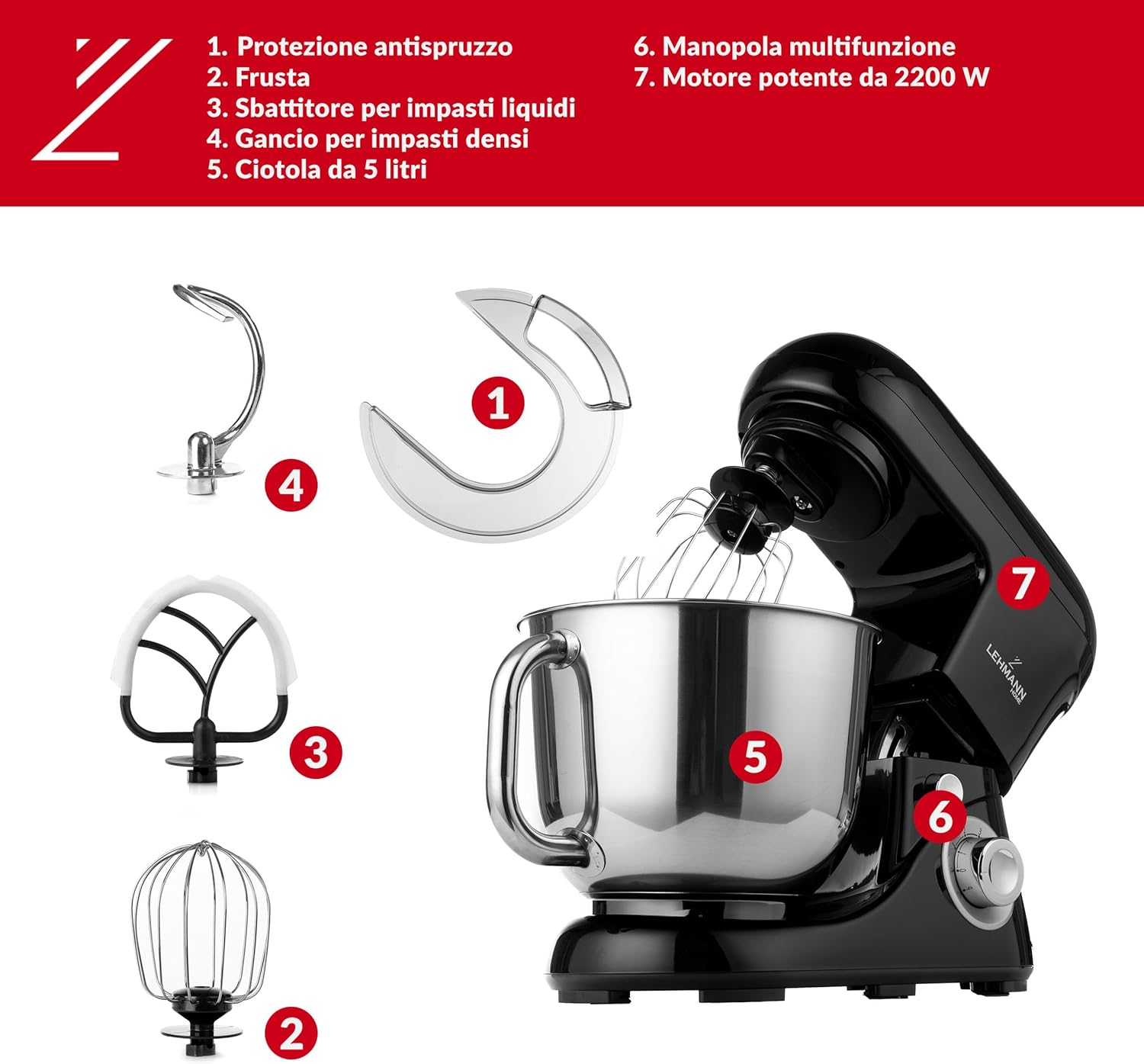
Image 2: Detailed diagram of the mixer's parts.
- Kilinzi cha Splash: Huzuia viungo kumwagika kutoka kwenye bakuli wakati wa kuchanganya.
- Piga kelele: Used for whipping cream, egg whites, and light batters.
- Beater (with silicone scrapers): Ideal for mixing medium-heavy batters, such as cake mixes and cookie dough.
- Hook ya unga: Imeundwa kwa ajili ya kukanda unga mzito kama vile mkate na unga wa pizza.
- Bakuli la Chuma cha pua la Lita 5: Large capacity bowl for various preparations.
- Kitufe cha kazi nyingi: Controls speed settings and pulse function.
- Nguvu ya 2200W Motor: Provides robust performance for all mixing tasks.
3. Maagizo ya Usalama
- Daima chomoa kifaa kutoka kwa umeme kabla ya kukiunganisha, kukivunja, au kukisafisha.
- Usizamishe kitengo cha gari kwenye maji au kioevu kingine chochote.
- Keep hands, hair, clothing, as well as spatulas and other utensils away from moving parts during operation to prevent injury and damage to the mixer.
- Ensure the mixer is placed on a stable, flat, and dry surface during use.
- Chombo hiki hakikusudiwa kutumiwa na watu walio na uwezo mdogo wa kimwili, hisi, au kiakili, au wasio na uzoefu na ujuzi, isipokuwa wamepewa usimamizi au maagizo kuhusu matumizi ya kifaa na mtu anayehusika na usalama wao.
- Do not operate the mixer with a damaged cord or plug, or after the appliance malfunctions or has been dropped or damaged in any manner.
- Avoid using attachments not recommended or sold by the manufacturer, as this may cause fire, electric shock, or injury.
4. Kuweka
Follow these steps to set up your mixer for first use:
- Kufungua: Ondoa kwa uangalifu vifaa vyote kutoka kwa kifurushi. Hifadhi kifurushi kwa uhifadhi au usafiri wa siku zijazo.
- Uwekaji: Place the mixer on a clean, dry, and stable countertop. The non-slip feet will ensure stability during operation.
- Kuunganisha bakuli: Place the stainless steel mixing bowl into its base and turn it clockwise until it locks securely in place.
- Lifting the Head: Press the tilt-head release button (usually located on the side or back of the mixer) and lift the motor head upwards until it locks.
- Attaching Mixing Tools: Select the appropriate mixing tool (whisk, beater, or dough hook) for your recipe. Insert the shaft of the tool into the attachment hub and turn it counter-clockwise until it clicks into place.
- Kuinamisha Kichwa: Gently push the motor head down while pressing the tilt-head release button until it locks into the operating position.
- Attaching Splash Guard: If desired, attach the splash guard to the motor head before lowering it, ensuring it covers the bowl opening.

Image 3: The tilt-head mechanism allows for easy attachment and removal of accessories and the mixing bowl.
5. Maagizo ya Uendeshaji
Your LEHMANN Planetary Stand Mixer offers 6 speed settings and a pulse function for versatile mixing.
Speed Control and Pulse Function

Image 4: The multifunction knob for speed selection and pulse.
- Speed Settings (1-6): Turn the multifunction knob to select your desired speed. Start with lower speeds for initial mixing and gradually increase as needed.
- Kazi ya Mapigo (P): Turn the knob to 'P' for short bursts of high-speed mixing. This is useful for quickly incorporating ingredients or for achieving specific textures. Release the knob to stop the pulse function.
Using the Mixing Attachments

Image 5: The three primary mixing attachments and their recommended uses.
- Piga kelele: Use for aerating mixtures, such as whipping egg whites, cream, or making light batters. Start at low speed and gradually increase to high.
- Mpigaji: Ideal for general mixing tasks like combining ingredients for cakes, cookies, and pastries. Use medium speeds.
- Hook ya unga: Specifically designed for kneading heavy doughs like bread, pizza, and pasta. Use low to medium speeds.
Mlinzi Splash

Image 6: The splash guard helps keep your workspace clean and features an opening for adding ingredients.
The included splash guard helps prevent ingredients from splattering during mixing. It features a convenient opening to add ingredients while the mixer is operating.
6. Matengenezo na Usafishaji
Proper cleaning and maintenance will extend the life of your mixer.
- Kabla ya kusafisha: Always unplug the mixer from the power outlet and allow it to cool down completely.
- Kitengo cha magari: Futa sehemu ya nje ya kitengo cha gari na tangazoamp kitambaa. Usitumie cleaners abrasive au kuzamisha kitengo katika maji.
- Bakuli la kuchanganyia: The stainless steel mixing bowl is dishwasher safe. Alternatively, wash it with warm, soapy water and dry thoroughly.
- Attachments (Whisk, Beater, Dough Hook): Wash the attachments with warm, soapy water and rinse thoroughly. Ensure they are completely dry before storing. Some attachments may be dishwasher safe; refer to specific care instructions if provided.
- Kilinzi cha Splash: Wash with warm, soapy water and rinse.
- Hifadhi: Store the mixer and its accessories in a clean, dry place.
7. Utatuzi wa shida
If you encounter any issues, refer to the following table for common problems and solutions:
| Tatizo | Sababu inayowezekana | Suluhisho |
|---|---|---|
| Mchanganyiko hauanza. | Haijaunganishwa; swichi ya umeme imezimwa; kufuli ya usalama haijaunganishwa. | Ensure the mixer is properly plugged in. Turn the power switch on. Make sure the motor head is fully lowered and locked. |
| Kelele isiyo ya kawaida wakati wa operesheni. | Attachment not properly installed; too much load; foreign object. | Check if the attachment is securely locked. Reduce the amount of ingredients. Stop the mixer and check for any foreign objects. |
| Attachments not reaching ingredients at the bottom of the bowl. | Attachment height needs adjustment. | Refer to the manufacturer's instructions for adjusting attachment height, if applicable. |
8. Vipimo
| Kipengele | Maelezo |
|---|---|
| Chapa | LEHMANN |
| Mfano | LHOPM-1305C |
| Nguvu | 2200 W |
| Uwezo wa bakuli | 5 lita |
| Mipangilio ya Kasi | Kasi 6 + Kazi ya Mapigo |
| Vipimo vya Bidhaa | 42 x 25 x 40 cm |
| Uzito wa Kipengee | 4.7 kg |
| Vipengele Maalum | Non-slip feet, Low noise, Safety lock, Adjustable speed control, Robust design |
| Kuzima kiotomatiki | Ndiyo |
9. Udhamini na Msaada
Your LEHMANN Planetary Stand Mixer is covered by a manufacturer's warranty. Please refer to the warranty card included with your purchase for specific terms and conditions. For technical support, spare parts, or any other inquiries, please contact LEHMANN customer service through the retailer where you purchased the product or visit the official LEHMANN webtovuti.


