1. Utangulizi
Welcome to the Kinstone 10.1" 4G LTE Android Tablet user manual. This guide provides comprehensive instructions for setting up, operating, and maintaining your new tablet. Designed for both work and play, this tablet features an octa-core processor, 8GB RAM, 128GB internal storage (expandable up to 1TB), an 8000mAh battery, and dual SIM slots for enhanced connectivity.

Mchoro 1.1: Mbele na nyuma view of the Kinstone 10.1" Android Tablet, showcasing muundo wake maridadi na moduli ya kamera.
2. Bidhaa Imeishaview
2.1 Vipengele na Sifa
Your Kinstone tablet is equipped with advanced features for a superior user experience. Key components include:
- Onyesha: 10.1-inch Full HD IPS screen with 1920x1200 resolution, 178° wide viewing angle, and low blue light technology for eye comfort.
- Kichakataji: High-performance octa-core processor (hexa-core @2.0 GHz Cortex-A55 and dual-core @1.8 GHz Cortex-A75) with 2025 AI Chip.
- Kumbukumbu na Uhifadhi: 8GB RAM and 128GB internal storage, expandable up to 1TB via microSD card.
- Kamera: 13MP rear camera and 5MP front camera.
- Betri: Betri ya 8000mAh kwa matumizi ya muda mrefu.
- Muunganisho: 4G VoLTE dual SIM support, Bluetooth 5.0, 2.4/5G dual-band Wi-Fi.
- Sauti: Dual speakers for stereo effect.
- Bandari: Type-C charging port, 3.5mm earphone jack.

Kielelezo 2.1: Zaidiview of the Android 12 OS features, highlighting efficiency, safety, entertainment, and display enhancements.

Figure 2.2: Visual summary of the Kinstone Android tablet's core features and specifications.
3. Kuweka
3.1 Kuchaji Awali
Before first use, fully charge your tablet. Connect the provided Type-C charging cable to the tablet's charging port and the other end to the charger. Plug the charger into a power outlet. The charging indicator will show the charging status. A full charge typically takes approximately 2 hours.

Figure 3.1: Illustration of the tablet's long-lasting 8000mAh battery life, supporting various activities.
3.2 Kuwasha / Kuzima
- Kuwasha: Press and hold the Power button until the Kinstone logo appears on the screen.
- Kuzima: Bonyeza na ushikilie kitufe cha Kuwasha/Kuzima hadi menyu ya chaguo za kuwasha ionekane. Chagua "Zima" na uthibitishe.
- Ili Kuanzisha Upya: Kutoka kwenye orodha ya chaguzi za nguvu, chagua "Anzisha upya".
3.3 Mchawi wa Kuweka Awali
Ukiwasha kwa mara ya kwanza, kompyuta kibao itakuongoza kupitia mchawi wa usanidi wa awali. Fuata vidokezo vilivyo kwenye skrini ili:
- Chagua lugha yako.
- Unganisha kwenye mtandao wa Wi-Fi.
- Sign in with your Google account (or create one).
- Sanidi kufunga skrini (PIN, muundo, nenosiri, au Kitambulisho cha Uso).
- Review na kukubali sheria na masharti.
4. Maagizo ya Uendeshaji
4.1 Kusogeza Kiolesura cha Android
Kompyuta yako kibao inaendesha kwenye Android 12, ikitoa kiolesura cha mtumiaji kinachoweza kubadilika. Ishara za kawaida ni pamoja na:
- Gonga: Ili kuchagua kipengee au kufungua programu.
- Telezesha kidole: Kutembeza kwenye skrini au orodha.
- Bana-ili-kuza: Kukuza au kupunguza picha na web kurasa.
- Bonyeza kwa muda mrefu: Ili kufikia menyu za muktadha au kuhamisha aikoni za programu.
4.2 Kuweka Maombi
Applications can be downloaded and installed from the Google Play Store. Ensure you are connected to the internet before downloading.
- Fungua Play Store programu.
- Tafuta the desired application.
- Gonga Sakinisha na ufuate maagizo kwenye skrini.
4.3 Kutumia Kitambulisho cha Uso
The tablet supports Face Recognition for unlocking. To set up Face ID:
- Nenda kwa Mipangilio > Usalama na faragha > Kufungua kwa uso.
- Fuata mawaidha ili kusajili uso wako.

Figure 4.1: Display features, including Face Recognition for secure and fast unlocking.
5. Muunganisho
5.1 Muunganisho wa Wi-Fi
Connect to Wi-Fi for internet access:
- Nenda kwa Mipangilio > Mtandao na intaneti > Mtandao.
- Washa Wi-Fi.
- Chagua mtandao unaotaka na ingiza nenosiri ikiwa inahitajika.

Figure 5.1: Connectivity options, including dual-band Wi-Fi for fast and stable connections.
5.2 Kuoanisha Bluetooth
Pair your tablet with Bluetooth devices like headphones or speakers:
- Nenda kwa Mipangilio > Vifaa vilivyounganishwa > Mapendeleo ya muunganisho > Bluetooth.
- Washa Bluetooth.
- Select the device you wish to pair from the list of available devices.
5.3 4G LTE and Dual SIM
The tablet supports 4G VoLTE with dual SIM slots, allowing for simultaneous calls and browsing. You can use two SIM cards or one SIM card and one microSD card.
- Tafuta trei ya SIM kadi upande wa kompyuta kibao.
- Tumia kifaa cha kutoa SIM kilichotolewa ili kufungua trei.
- Insert your Nano-SIM cards and/or microSD card into the designated slots.
- Gently push the tray back into the tablet.

Figure 5.2: Dual card slot functionality for SIM cards and expandable storage.
6. Matumizi ya Kamera
Your tablet is equipped with a 13MP rear camera and a 5MP front camera for capturing photos and videos, and for video calls.
- Fungua Kamera programu kutoka skrini ya nyumbani au droo ya programu.
- Badilisha kati ya kamera za mbele na za nyuma kwa kutumia ikoni ya kamera.
- Gusa kitufe cha kufunga ili kupiga picha au kitufe cha kurekodi ili kuanza/kusimamisha kurekodi video.
- Access various camera modes and settings within the app.
7. Usimamizi wa Betri
Betri ya 8000mAh hutoa ampNguvu ya umeme kwa matumizi ya kila siku. Ili kuboresha muda wa matumizi ya betri:
- Punguza mwangaza wa skrini.
- Turn off Wi-Fi, Bluetooth, and 4G when not in use.
- Funga programu za usuli.
- Enable battery saver mode in Mipangilio > Betri.
The tablet supports fast charging via its Type-C port.
8. Usimamizi wa Uhifadhi
Your tablet comes with 128GB of internal storage, which can be expanded up to 1TB using a microSD card.
- To check storage usage: Go to Mipangilio > Hifadhi.
- To free up space: Delete unnecessary files, uninstall unused apps, or move large files kwa kadi ya microSD.

Figure 8.1: Visual representation of the tablet's generous storage capabilities.
9. Matengenezo
To ensure the longevity and optimal performance of your Kinstone tablet:
- Keep the tablet clean using a soft, lint-free cloth. Avoid harsh chemicals.
- Protect the screen with a screen protector (one is included).
- Avoid exposing the tablet to extreme temperatures, direct sunlight, or moisture.
- Regularly update the operating system and applications to the latest versions.
- Perform periodic backups of important data.
10. Utatuzi wa shida
Ukikumbana na matatizo na kompyuta yako kibao, rejelea suluhisho zifuatazo za kawaida:
| Tatizo | Suluhisho linalowezekana |
|---|---|
| Kompyuta kibao haiwashi | Ensure the battery is charged. Press and hold the power button for at least 10-15 seconds to force a restart. |
| Matatizo ya muunganisho wa Wi-Fi | Restart your Wi-Fi router. Go to Settings > Network & internet > Internet, forget the network, and reconnect. Ensure the tablet is within range. |
| Programu zinaganda au zinaanguka | Close the app and reopen it. Clear the app's cache (Settings > Apps > [App Name] > Storage & cache > Clear cache). Ensure the app is updated. |
| Utendaji polepole | Funga programu ambazo hazijatumika. Futa akiba na ya muda files. Check storage space and free up if necessary. Restart the tablet. |
| Betri inaisha haraka | Reduce screen brightness. Disable unnecessary features like GPS, Bluetooth, or Wi-Fi when not in use. Check battery usage in settings to identify power-hungry apps. |
If problems persist, contact Kinstone customer support for further assistance.
11. Vipimo
Detailed technical specifications for your Kinstone tablet:
| Kipengele | Vipimo |
|---|---|
| Nambari ya Mfano | KST102SA_ROW |
| Mfumo wa Uendeshaji | Android 12 |
| Ukubwa wa skrini | Inchi 10.1 |
| Azimio la skrini | Pixels 1920x1200 |
| Kichakataji | 2 GHz Octa-Core (Unisoc) |
| RAM | 8 GB DDR4 SDRAM |
| Hifadhi ya Ndani | GB 128 (Kumbukumbu ya Flash) |
| Hifadhi inayoweza kupanuliwa | Hadi TB 1 kupitia MicroSD |
| Graphics Coprocessor | Mali-G57 MP1 |
| Aina ya Wireless | 802.11a, 802.11ac (2.4G/5G Dual-band Wi-Fi) |
| Bluetooth | 5.0 |
| Kamera ya Nyuma | 13 Mbunge |
| Kamera ya mbele | 5 Mbunge |
| Uwezo wa Betri | 8000 mAh (Lithium Polymer) |
| Wastani wa Maisha ya Betri | Saa 8 |
| Uzito wa Kipengee | Pauni 2 |
| Vipimo vya Bidhaa | Inchi 15.8 x 24.1 x 0.8 |
| Rangi | Kijivu |
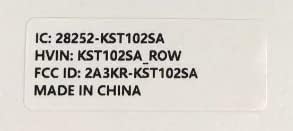
Figure 11.1: Product label with model number and regulatory information.
12. Udhamini na Msaada
12.1 Huduma ya Udhamini
Kinstone provides a warranty service for your tablet. Within three months from the date of purchase, Kinstone offers replacement services for eligible issues, not repair. Please retain your proof of purchase.
12.2 Usaidizi kwa Wateja
For any questions, technical assistance, or warranty claims, please contact Kinstone customer support. You may also be eligible to receive a compatible leather case by contacting the seller after receiving your tablet.
Visit the official Kinstone store for more information and support: Kinstone Store on Amazon


