1. Utangulizi
This manual provides essential information for the setup, operation, and maintenance of your HYTE Y40 Modern Aesthetic Panoramic Tempered Glass Mid-Tower ATX Computer Gaming Case. Please read this manual thoroughly before installation and use to ensure proper functionality and safety.

Kielelezo 1: Mbele view of the HYTE Y40 White Gaming Case, showcasing paneli zake za kioo zenye panoramiki.
2. Sifa Muhimu
- Panoramic Tempered Glass: Features precisely beveled edges and 2-piece panoramic tempered glass for an unobstructed view ya vipengele vya ndani.
- PCIE 4.0 Riser Cable: Includes a color-matched PCIE 4.0 Luxury Riser Cable for vertical GPU mounting, supporting the latest graphics cards.
- Mtiririko wa Hewa ulioimarishwa: Designed with 4 full slots for GPU support and additional airflow space for high-intensity processing.
- Mashabiki waliosakinishwa awali: Comes with 2x120mm fans pre-installed (one beneath the power supply shroud and one at the rear) for immediate cooling.
- Usimamizi wa Kebo wa Kina: Robust cable management strategy with dedicated spaces and tie-downs behind the motherboard shelf and within the power supply shroud.
- Usaidizi wa Radiator: Side mount accommodates up to a 280mm radiator with a combined thickness of up to 120mm, suitable for custom liquid cooling loops.
3. Maelezo ya kiufundi
| Vipimo | Maelezo |
|---|---|
| Jina la Mfano | Y40 |
| Nambari ya Mfano wa Kipengee | CS-HYTE-Y40-BW |
| Aina ya Kesi | Mnara wa kati |
| Utangamano wa Ubao wa Mama | ATX |
| Nyenzo | Kioo chenye hasira |
| Rangi | Nyeupe |
| Vipimo vya Bidhaa (LxWxH) | Inchi 17.2 x 9.4 x 18.4 |
| Uzito wa Kipengee | Pauni 19 |
| Aina ya Kuweka Ugavi wa Umeme | Mlima wa Chini |
| Mbinu ya Kupoeza | Hewa |
| Fan Size (Pre-installed) | 120 Millimeters (2x) |
| Idadi ya USB 3.0 Bandari | 1 |
4. Kuweka na Kuweka
This section outlines the general steps for assembling your PC components within the HYTE Y40 case. For detailed instructions on specific component installation, please refer to the respective component manuals.
4.1 Kutayarisha Kesi
Before installing any components, ensure the case is placed on a stable, flat surface. Remove the tempered glass side and front panels by loosening the captive thumb screws and carefully lifting them away. This provides full access to the interior.
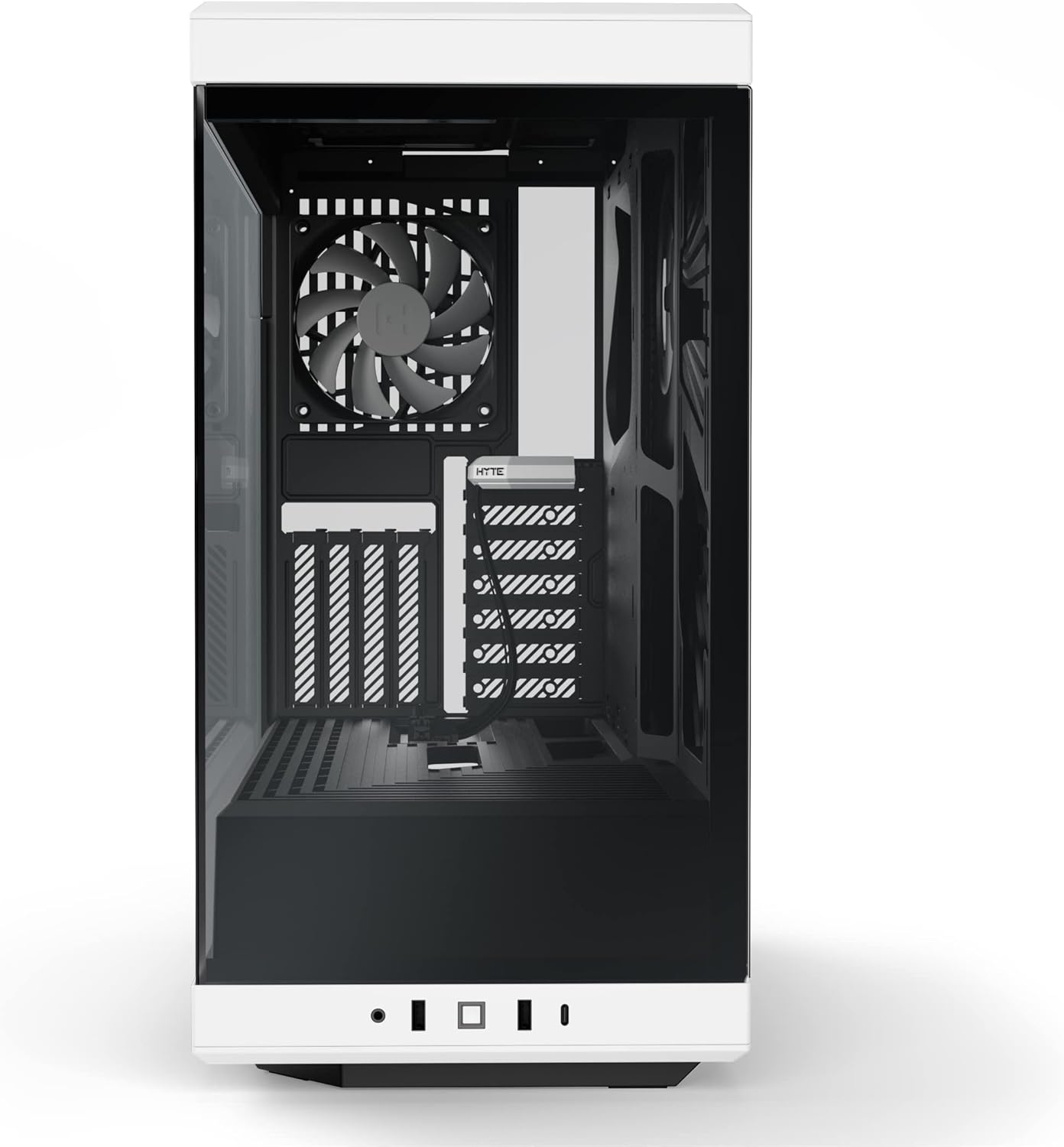
Figure 2: HYTE Y40 case with the side panel removed, showing the interior layout.
4.2 Ufungaji wa Motherboard
Align your ATX motherboard with the standoffs inside the case. Secure the motherboard using the provided screws. Ensure all necessary cables (e.g., 24-pin ATX, 8-pin CPU) are routed through the designated cutouts for clean cable management.

Figure 3: Motherboard installed within the HYTE Y40 case, illustrating cable routing options.
4.3 Ufungaji wa Kitengo cha Ugavi wa Umeme (PSU)
The HYTE Y40 supports bottom-mounted ATX PSUs. Slide your PSU into the dedicated compartment at the bottom rear of the case. Secure it with screws from the rear of the case. Utilize the cable management channels to route PSU cables to their respective components.
Video 1: Demonstration of PSU installation and cable management within a PC case. This video illustrates the process of securing the PSU and routing its cables effectively.
4.4 Ufungaji wa Kadi ya Michoro (GPU).
The HYTE Y40 features a vertical GPU mounting system with an included PCIE 4.0 Luxury Riser Cable. Install your GPU onto the riser cable and secure it within the case. Ensure proper connection of the riser cable to the motherboard's PCIE slot and connect the necessary power cables from the PSU to the GPU.
Video 2: Zaidiview of the HYTE Y40 case, highlighting its vertical GPU mounting and PCIE 4.0 riser cable. This video demonstrates the aesthetic and functional aspects of the GPU installation.
4.5 Cooling System Setup
The case comes with 2x120mm fans pre-installed. Additional fans or radiators can be installed on the side mount (up to 280mm radiator) or other designated areas. Ensure correct fan orientation for optimal airflow (intake/exhaust).
Video 3: Installation guide for an AIO cooler and fans in a PC case, demonstrating how to manage tubes and cables for a clean build.
5. Maagizo ya Uendeshaji
After all components are securely installed and cables are connected, replace the tempered glass panels. Connect your peripherals (monitor, keyboard, mouse) and power cable. Press the power button located on the front I/O panel to start your system.

Figure 4: Fully assembled HYTE Y40 case with internal components illuminated by RGB lighting.
6. Matengenezo
Regular maintenance ensures optimal performance and longevity of your PC. Keep the case clean and free of dust.
- Vichujio vya Vumbi: Periodically clean the dust filters to maintain optimal airflow and prevent dust buildup inside the case.
- Usafishaji wa paneli: Use a soft, lint-free cloth to clean the tempered glass panels. Avoid abrasive cleaners that may scratch the surface.
- Usimamizi wa Cable: Angalia uelekezaji wa kebo mara kwa mara ili kuhakikisha kuwa hakuna nyaya zinazozuia mtiririko wa hewa au uendeshaji wa feni.
7. Utatuzi wa shida
If you encounter issues with your HYTE Y40 case, consider the following common troubleshooting steps:
- Hakuna Nguvu: Ensure the PSU is properly connected to the wall outlet and the power switch on the PSU is in the 'ON' position. Check all internal power connections (24-pin, CPU, GPU).
- Kuzidisha joto: Verify that all fans are spinning correctly and are oriented for optimal airflow. Clean any dust filters that may be clogged. Ensure CPU and GPU coolers are properly seated.
- Sehemu Haijagunduliwa: Re-seat the component (e.g., GPU, RAM) in its slot. Check all power and data connections.
8. Udhamini na Msaada
For warranty information and technical support, please visit the official HYTE webtovuti au wasiliana na huduma kwa wateja wao. Weka uthibitisho wako wa ununuzi kwa madai ya udhamini.
Visit the HYTE Store: Duka la HYTE
Nyaraka Zinazohusiana - Y40
 |
Kesi ya Kompyuta ya HYTE Y40 ATX: Maagizo ya Mkutano na Bidhaa Imekwishaview Mwongozo wa kina wa kesi ya PC ya HYTE Y40 ATX, ikijumuisha yaliyomo, vipimo, maelezo ya udhamini, na maagizo ya kina ya kusanyiko. Jifunze jinsi ya kuunda mfumo wako kwa kutumia chasi hii ya kompyuta yenye mtiririko wa juu, yenye vipengele vingi. |
 |
Maagizo ya Kusanyiko la Uchunguzi wa HYTE Y60 ATX PC na Zaidiview Maagizo ya kina ya mkusanyiko, vipimo, na maelezo ya udhamini kwa Kipochi cha HYTE Y60 ATX PC. Jifunze jinsi ya kuunda Kompyuta yako ukitumia kipochi hiki cha malipo ya katikati ya mnara. |
 |
HYTE X50 & X50 Air Computer Case - Mwongozo wa Usakinishaji na Maelezo Mwongozo wa kina wa kesi za kompyuta za HYTE X50 na X50 Air, usakinishaji unaofunika, sehemu, na maelezo ya udhamini. |
 |
Maagizo ya Kuunganisha Kesi ya HYTE Y70 E-ATX na Bidhaa Imekwishaview Hati hii inatoa maelekezo kamili ya uunganishaji na bidhaaview kwa ajili ya kisanduku cha kompyuta cha HYTE Y70 E-ATX, kinachoelezea utangamano wa vipengele, milango ya I/O ya mbele, na taarifa za udhamini. Huwaongoza watumiaji kupitia usakinishaji wa bodi za mama, GPU, viendeshi vya kuhifadhi, suluhisho za kupoeza, na vifaa vya umeme. |
 |
Seti ya DIY ya HYTE Y60 LCD: Maelezo na Mwongozo wa Muunganisho Jifunze kuhusu Kifaa cha DIY cha HYTE Y60 LCD, ikijumuisha vipimo vyake, chaguo za muunganisho na maelezo ya msingi ya usanidi. Muhimu kwa wajenzi wa Kompyuta na wanaopenda. |
 |
Mwongozo wa Upatanifu wa Kipolishi cha HYTE THICC Q60 AIO Chati ya kina ya upatanifu ya kipoezaji cha kimiminika cha HYTE THICC Q60 280mm All-In-One (AIO), inayoonyesha usaidizi wa vipodozi mbalimbali vya Kompyuta kote mbele, ubavu na usanidi wa kupachika juu. |