1. Bidhaa Imeishaview
The Nexxt Wireless Security Camera offers a robust solution for both indoor and outdoor surveillance. Designed for ease of use and versatility, these cameras provide high-definition video, motion detection, two-way audio, and night vision capabilities, all powered by a built-in rechargeable battery for wire-free operation.
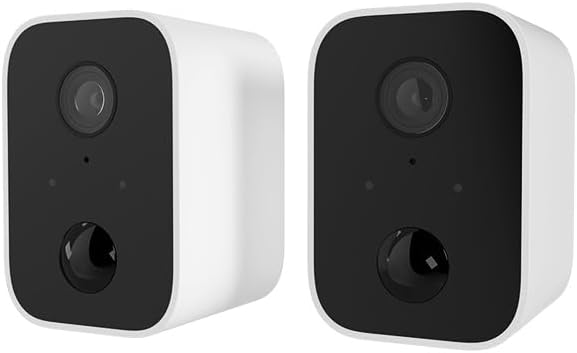
Image: Two Nexxt Wireless Security Cameras, showcasing their compact, white design with black camera faces.
Sifa Muhimu:
- 1080P HD Live Video: Crystal clear real-time video and playback.
- Betri Iliyojengewa Ndani: Wire-free design for flexible placement and continued operation during power outages.
- IP65 isiyo na hali ya hewa: Durable construction suitable for outdoor use in various weather conditions.
- Utambuzi wa Mwendo: Sends instant notifications to your smartphone upon detecting movement up to 26ft away.
- Sauti ya Njia Mbili: Communicate directly through the camera using the built-in speaker and microphone.
- Maono ya Usiku: Equipped with IR LEDs for clear vision in low-light or dark conditions.
- Hifadhi ya Ndani na Wingu: Supports micro-SD card (not included) for local storage and optional cloud storage (subscription required).
- Ujumuishaji wa Smart Home: Compatible with Amazon Alexa and Google Assistant for voice control.

Image: A single Nexxt security camera surrounded by icons representing its features: Full 1080P HD, Motion detection, Two-way communication, Night vision, Voice activated, IP65 weatherproof, Micro-microSD™ slot, Wall mount bracket included, and Cloud ready.
2. Yaliyomo kwenye Kifurushi
Tafadhali thibitisha kuwa bidhaa zote zipo na ziko katika hali nzuri unapofungua kifurushi. Ikiwa bidhaa yoyote haipo au kuharibiwa, tafadhali wasiliana na usaidizi kwa wateja.
- 2 x Nexxt Wireless Security Cameras
- 2 x Mabano ya Kuweka
- 2 x Kebo za Kuchaji za USB
- 1 x Mwongozo wa Kuanza Haraka
- Screw za Kuweka na Nanga za Ukutani

Image: The retail packaging for the Nexxt Smart Wi-Fi battery camera 2-pack, showing the cameras and key features on the box.
3. Mwongozo wa Kuweka
3.1 Kuchaji Kamera
Before initial use, fully charge both cameras. Connect the provided USB charging cable to the camera's charging port and a standard USB power adapter (not included). The charging indicator light will show the charging status.
3.2 Downloading the Nexxt App
Tafuta "Nexxt Home" in the Apple App Store or Google Play Store and download the application. Create an account or log in if you already have one.
3.3 Kuoanisha Kamera
- Open the Nexxt Home app and tap the "+" icon to add a new device.
- Select "Security Camera" from the device list.
- Follow the on-screen instructions to put the camera into pairing mode (usually involves pressing a reset button until an indicator light flashes).
- Unganisha simu yako mahiri kwenye mtandao wa Wi-Fi wa GHz 2.4. Note: 5GHz networks are not supported.
- The app will display a QR code. Hold your camera approximately 6-8 inches (15-20 cm) in front of your phone's screen until you hear a prompt from the camera.
- Once paired, the camera will connect to your Wi-Fi network, and you can name your device within the app.
3.4 Kuweka Kamera
The Nexxt Wireless Security Camera can be easily mounted indoors or outdoors. Choose a location that provides the desired viewing angle and is within range of your Wi-Fi network.

Image: A Nexxt security camera mounted on an exterior wall, demonstrating its weatherproof design and easy installation.
- Tambua sehemu inayofaa ya kupachika.
- Tumia mabano ya kupachika yaliyotolewa kama kiolezo cha kuashiria mashimo ya kuchimba visima.
- Drill pilot holes and insert wall anchors if mounting into drywall or masonry.
- Salama mabano ya kupachika kwenye uso kwa kutumia skrubu zilizotolewa.
- Ambatisha kamera kwenye mabano ya kupachika na urekebishe pembe inavyohitajika.

Image: A Nexxt security camera detached from its mounting bracket, showing the connection point for easy installation and removal.
4. Uendeshaji
4.1 Ishi View
Open the Nexxt Home app and select your camera from the device list to access the live video feed. You can view muda halisi footage kutoka mahali popote na muunganisho wa intaneti.
4.2 Ugunduzi wa Mwendo
The camera's motion sensors detect movement up to 26 feet away. When motion is detected, the camera will record a short clip and send a notification to your smartphone. You can adjust motion sensitivity and set detection zones within the app settings.

Image: A dog and a child playing in a yard, with a 'Motion detection' icon overlay, illustrating the camera's ability to detect activity.
4.3 Sauti ya Njia Mbili
To use two-way audio, tap the microphone icon in the live view interface of the app. You can then speak through your phone, and your voice will be projected through the camera's speaker. Release the icon to listen.
4.4 Maono ya Usiku
The camera automatically switches to night vision mode in low-light conditions, providing clear black-and-white video footage. This feature ensures continuous surveillance 24/7.
4.5 Chaguzi za Hifadhi
- Micro-SD Card: Insert a micro-SD card (up to 128GB, not included) into the camera's slot for local storage of recordings.
- Hifadhi ya Wingu: Nexxt offers optional cloud storage plans for secure, off-site storage of your video recordings. Refer to the Nexxt Home app for subscription details.
4.6 Udhibiti wa Sauti
Integrate your Nexxt camera with Amazon Alexa or Google Assistant for convenient voice control. Follow the instructions in the Nexxt Home app to link your account with your preferred smart home platform. You can then use voice commands to view mipasho ya moja kwa moja kwenye skrini mahiri zinazooana.
5. Matengenezo
5.1 Usimamizi wa Betri
To maximize battery life, ensure the camera is fully charged before deployment. The Nexxt Home app will notify you when the battery level is low. Regular charging is recommended, especially for cameras in high-traffic areas with frequent motion detection.
5.2 Kusafisha Kamera
Periodically clean the camera lens and housing with a soft, dry cloth to ensure clear image quality. Avoid using harsh chemicals or abrasive materials that could damage the camera.
5.3 Sasisho za Firmware
Nexxt Solutions may release firmware updates to improve performance, add new features, or address security vulnerabilities. The Nexxt Home app will notify you of available updates. It is recommended to keep your camera's firmware up to date for optimal performance and security.
6. Utatuzi wa shida
| Tatizo | Sababu inayowezekana | Suluhisho |
|---|---|---|
| Kamera haitawashwa | Betri ya chini; Kitufe cha nguvu hakijabonyezwa kwa usahihi | Charge the camera fully; Press and hold the power button for a few seconds. |
| Haiwezi kuunganisha kwenye Wi-Fi | Incorrect Wi-Fi password; Camera too far from router; Only 2.4GHz supported | Verify password; Move camera closer to router; Ensure you are connecting to a 2.4GHz network. |
| Utambuzi wa mwendo haufanyi kazi | Sensitivity too low; Detection zone not set; App notifications disabled | Adjust sensitivity in app; Configure detection zones; Enable notifications for Nexxt Home app. |
| Two-way audio not clear | Poor network connection; Obstruction near microphone/speaker | Check Wi-Fi signal strength; Ensure no obstructions; Reduce background noise. |
| Night vision is blurry | Dirty lens; IR LEDs obstructed | Clean the camera lens; Ensure nothing is blocking the IR LEDs. |
7. Maelezo ya kiufundi
| Kipengele | Vipimo |
|---|---|
| Jina la Mfano | Battery (Built-in Battery 2PK) |
| Azimio la Kukamata Video | 1080p HD |
| Matumizi ya Ndani/Nje | Nje, Ndani |
| Chanzo cha Nguvu | Inaendeshwa na Betri |
| Itifaki ya Muunganisho | Wi-Fi (GHz 2.4 pekee) |
| Aina ya Kidhibiti | Amazon Alexa, Msaidizi wa Google |
| Aina ya Kuweka | Mlima wa Ukuta |
| Ukadiriaji wa Ulinzi wa Kimataifa | IP65 Weatherproof |
| Aina ya Tahadhari | Sauti na Mwendo |
| Uzito wa Kipengee | 1.52 pounds (for the pair) |
| Vipimo vya Kifurushi | Inchi 11.69 x 6.5 x 2.56 |
| UPC | 798302057661 |
8. Udhamini na Msaada
8.1 Taarifa ya Udhamini
Nexxt Solutions products typically come with a 2-year warranty from the date of purchase, covering defects in materials and workmanship. Please retain your proof of purchase for warranty claims. The warranty does not cover damage caused by misuse, accidents, unauthorized modifications, or natural disasters.
8.2 Usaidizi kwa Wateja
For technical assistance, troubleshooting, or warranty inquiries, please visit the official Nexxt Solutions website or contact their customer support team. You can often find FAQs, video tutorials, and contact information on their support pages.
Msaada mkondoni: www.nexxtsolutions.com/support
Please have your product model number (Built-in Battery 2PK) and purchase date ready when contacting support.


