1. Utangulizi
Thank you for choosing the revolt Powerbank ZX8312-944. This portable power bank is designed to provide reliable and fast charging for your mobile devices, including smartphones, tablets, and compatible laptops. With its 20000mAh capacity, USB-C Power Delivery, and Quick Charge 3.0 technology, it ensures your devices stay powered on the go. Please read this manual carefully before use to ensure proper operation and to maximize the lifespan of your device.
2. Maagizo ya Usalama
- Usiweke benki ya umeme kwenye joto kali (zaidi ya 45°C au chini ya 0°C), jua moja kwa moja, au unyevu mwingi.
- Avoid dropping, disassembling, or attempting to repair the device yourself. This will void the warranty and may cause damage or injury.
- Weka benki ya nguvu mbali na maji na vimiminiko vingine.
- Tumia tu nyaya na adapta za kuchaji zilizoidhinishwa.
- Weka mbali na watoto.
- Tupa benki ya nguvu kwa kuwajibika kulingana na kanuni za ndani. Usitupe na taka za nyumbani.
3. Yaliyomo kwenye Kifurushi
- revolt Powerbank ZX8312-944
- Kebo ya Kuchaji ya USB
- Mwongozo wa Mtumiaji
4. Bidhaa za Bidhaa
- Uwezo wa Juu: Integrated 20000 mAh LiPo battery.
- USB-C Power Delivery (PD 2.0): Output up to 20W (5V/3A, 9V/2.22A, 12V/1.67A) for fast charging compatible devices like MacBook Pro, Samsung Galaxy S8, Huawei P20/P30, and iPhones 12 and later.
- Dual USB Type-A Quick Charge 3.0 Outputs: Each port delivers up to 18W (5V/3A, 9V/2A, 12V/1.5A) for devices compatible with Quick Charge technology. Backward compatible with Quick Charge 2.0.
- Kuchaji kwa Wakati Mmoja: Charge up to three devices concurrently with a total output of up to 15W (5V/3A) when using all ports.
- Onyesho la Dijitali la LED: Shows the battery capacity percentage for precise monitoring.
- Ubunifu Imara: Chuma cha kudumu casing kwa ajili ya ulinzi ulioimarishwa.
- Kitendo cha Kusubiri Kiotomatiki: The power bank enters standby mode when not in use to conserve power.
- Flexible Charging Input: Recharge the power bank via Micro USB or USB-C port.
5. Kuweka
5.1 Utozaji wa Awali wa Benki ya Nishati
Before first use, fully charge the power bank. This ensures optimal battery performance.
- Connect the provided USB charging cable to either the Micro USB input port or the USB-C input/output port on the power bank.
- Unganisha ncha nyingine ya kebo kwenye adapta ya umeme ya USB inayofaa (haijajumuishwa) au mlango wa USB wa kompyuta.
- The LED display will show the charging progress in percentage. When the display shows '100%', the power bank is fully charged.

Picha: Mwenye pembe view of the revolt Powerbank ZX8312-944 showing the LED display and ports. This image displays an angled shot of the power bank, highlighting its sleek design, the digital LED display showing '100%', and the various charging ports on one end.

Picha: Juu chini view of the revolt Powerbank ZX8312-944 with the LED display showing '100%'. This image provides a direct overhead view of the power bank, clearly showing the 'revolt' branding and the illuminated LED display indicating a full charge.
6. Maagizo ya Uendeshaji
6.1 Kuchaji Vifaa vya Nje
The power bank can charge up to three devices simultaneously.
- Unganisha kebo ya kuchaji ya kifaa chako kwenye mojawapo ya njia za kutoa umeme za benki ya nishati (USB-A au USB-C).
- Unganisha ncha nyingine ya kebo kwenye kifaa chako.
- Benki ya umeme itaanza kuchaji kifaa chako kiotomatiki. Onyesho la LED litaonyesha asilimia iliyobaki ya betritage ya benki ya nguvu.
- Ili kuacha kuchaji, tenga tu kebo kutoka kwa kifaa chako au benki ya umeme.
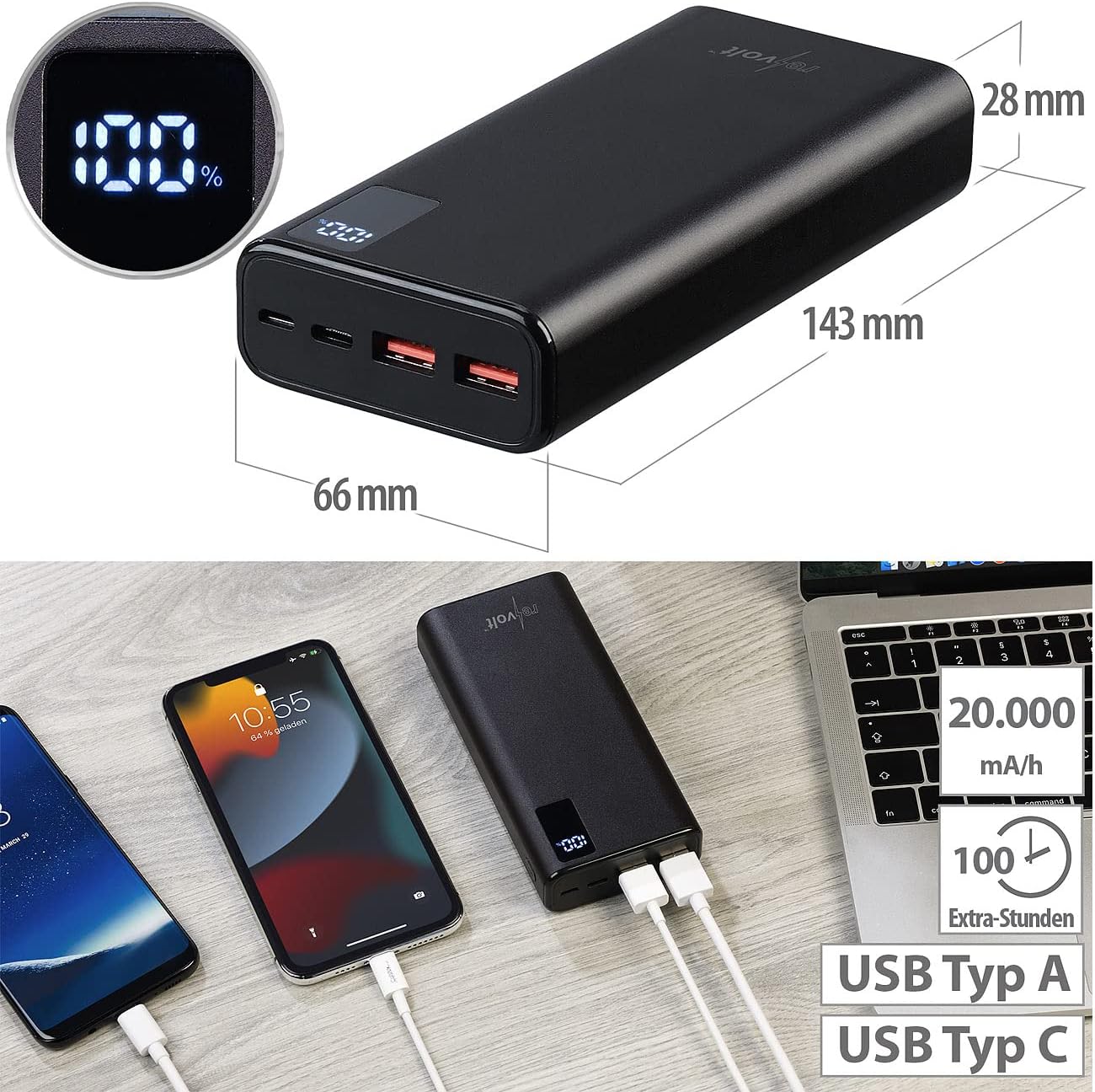
Picha: revolt Powerbank ZX8312-944 with dimensions and multiple devices connected for charging. This image illustrates the physical dimensions of the revolt Powerbank (143mm length, 66mm width, 28mm height) and demonstrates its capability to charge multiple devices simultaneously via its USB-A and USB-C ports. The LED display shows '100%', indicating a full charge.

Picha: revolt Powerbank ZX8312-944 charging a smartphone on a desk. The power bank is shown connected to a smartphone via a USB cable, actively charging the device. A computer monitor and a plant are visible in the background, suggesting a typical desk environment.
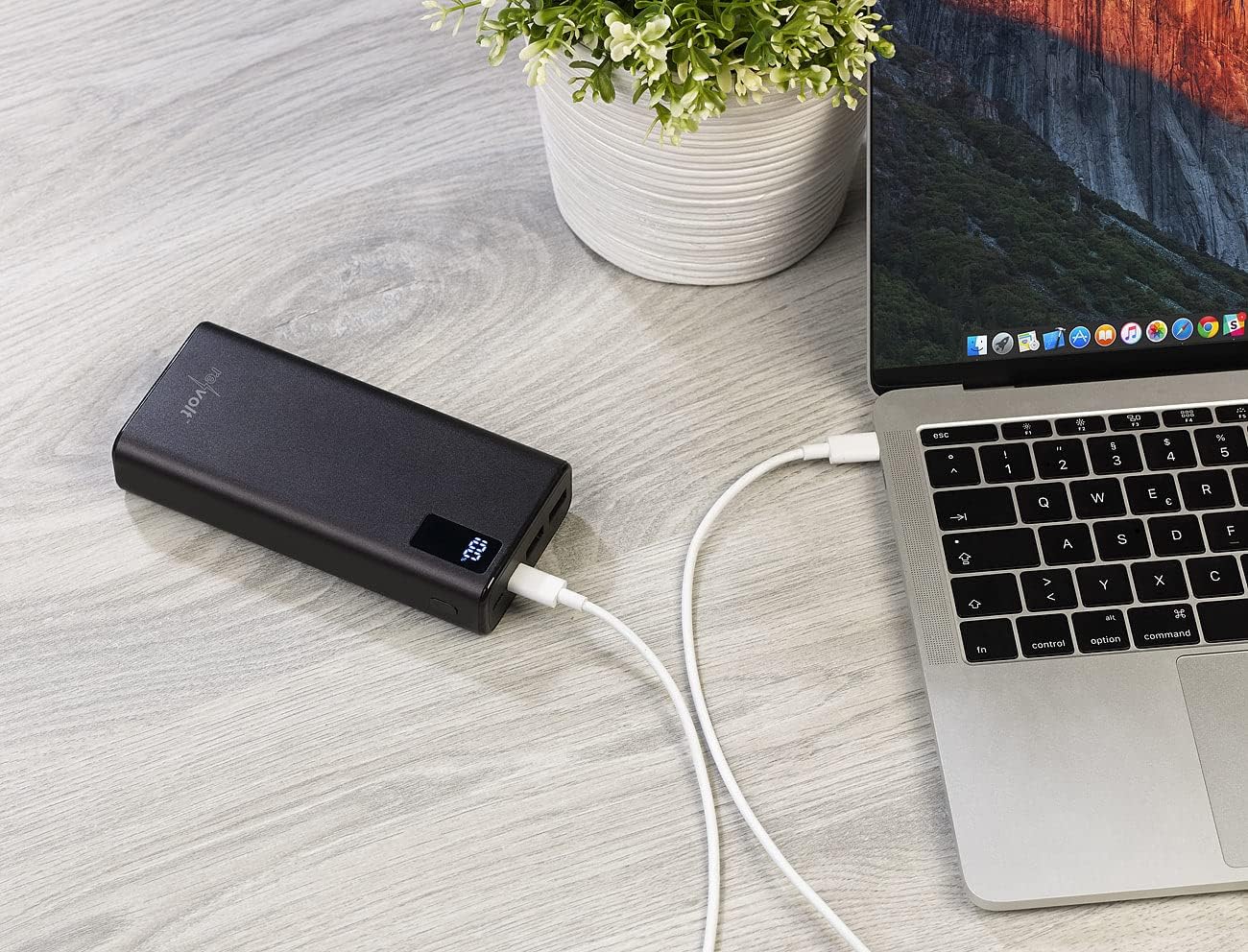
Picha: revolt Powerbank ZX8312-944 charging a laptop on a wooden surface. This image displays the power bank connected to a laptop via a USB-C cable, providing power to the laptop. The power bank's LED display is visible, showing the current charge level.
6.2 Kuangalia Kiwango cha Betri
The digital LED display on the power bank shows the remaining battery capacity in percentage. This display activates automatically when a device is connected for charging or when the power bank itself is being charged.

Picha: Karibu-up view of the revolt Powerbank ZX8312-944 ports. A detailed view of the power bank's input and output ports. From left to right, a USB-C port, a Micro USB port, and two USB-A ports are visible. The USB-A ports have orange inserts, indicating Quick Charge capability.
7. Matengenezo
- Kusafisha: Use a soft, dry cloth to clean the power bank. Do not use abrasive cleaners or solvents.
- Hifadhi: Store the power bank in a cool, dry place away from direct sunlight and extreme temperatures. For long-term storage, it is recommended to charge the power bank to about 50-70% every three months to maintain battery health.
- Epuka Uharibifu wa Kimwili: Protect the power bank from drops and impacts, as these can damage internal components.
8. Utatuzi wa shida
| Tatizo | Sababu inayowezekana | Suluhisho |
|---|---|---|
| Power bank haichaji | Charging cable is faulty or not properly connected. Power adapter is not working or insufficient. | Ensure the charging cable is securely connected. Try a different USB cable and/or power adapter. |
| Kifaa hakichaji kutoka kwa benki ya umeme | Device charging cable is faulty or not properly connected. Power bank battery is depleted. Device is incompatible. | Ensure the cable is securely connected to both the power bank and your device. Recharge the power bank. Verify device compatibility with the power bank's output specifications. |
| Inachaji polepole | Cable used does not support fast charging. Device does not support fast charging. Multiple devices are charging simultaneously. | Use a high-quality cable that supports Quick Charge or Power Delivery. Ensure your device supports fast charging. Disconnect other devices to allow maximum power to a single device. |
| Onyesho la LED halifanyi kazi | Power bank is completely discharged. Device malfunction. | Charge the power bank. If the issue persists, contact customer support. |
9. Vipimo
| Kipengele | Vipimo |
|---|---|
| Nambari ya Mfano | ZX8312-944 |
| Uwezo wa Betri | 20000 mAh (Lithium-ion Polymer) |
| USB-C Input/Output (PD 2.0) | 5V/3A (15W), 9V/2.22A (20W), 12V/1.67A (20W) |
| USB Type-A Output 1 (QC 3.0) | 5V/3A (15W), 9V/2A (18W), 12V/1.5A (18W) |
| USB Type-A Output 2 (QC 3.0) | 5V/3A (15W), 9V/2A (18W), 12V/1.5A (18W) |
| Ingizo ndogo la USB | 5V/2A (10W) |
| Nguvu ya Jumla ya Pato | Up to 20W (single port), Up to 15W (multiple ports) |
| Vipimo | 143 x 66 x 28 mm |
| Uzito | 470 g |
| Onyesho | LED Digital Percentage Kiashiria |
| Casing Nyenzo | Chuma |
10. Udhamini na Msaada
This product comes with a standard manufacturer's warranty. For detailed warranty information, please refer to the documentation provided at the time of purchase or contact your retailer. For technical support or inquiries, please contact revolt customer service through their official webtovuti au taarifa ya mawasiliano iliyotolewa na bidhaa yako.


