Utangulizi
Welcome to the user manual for your CANYON Sandy KW-44 Smartwatch. This guide provides essential information on setting up, operating, maintaining, and troubleshooting your device. Please read this manual carefully to ensure optimal performance and longevity of your smartwatch.
Sanidi
1. Yaliyomo kwenye Kifurushi
Kabla ya kuanza, hakikisha kuwa vitu vyote vipo kwenye kifurushi:
- CANYON Sandy KW-44 Smartwatch
- Kebo ya Kuchaji
- Mwongozo wa Mtumiaji (hati hii)

Figure 1: Product packaging showing the smartwatch and brand details.
2. Kuchaji Smartwatch
Kabla ya matumizi ya kwanza, chaji saa yako mahiri kikamilifu.
- Connect the charging cable to the charging port on the smartwatch.
- Unganisha ncha nyingine ya kebo kwenye adapta ya umeme ya USB (haijajumuishwa) au mlango wa USB wa kompyuta.
- Kiashiria cha malipo kwenye skrini kitaonyesha hali ya malipo.
- Chaji kamili huchukua takriban saa 2.
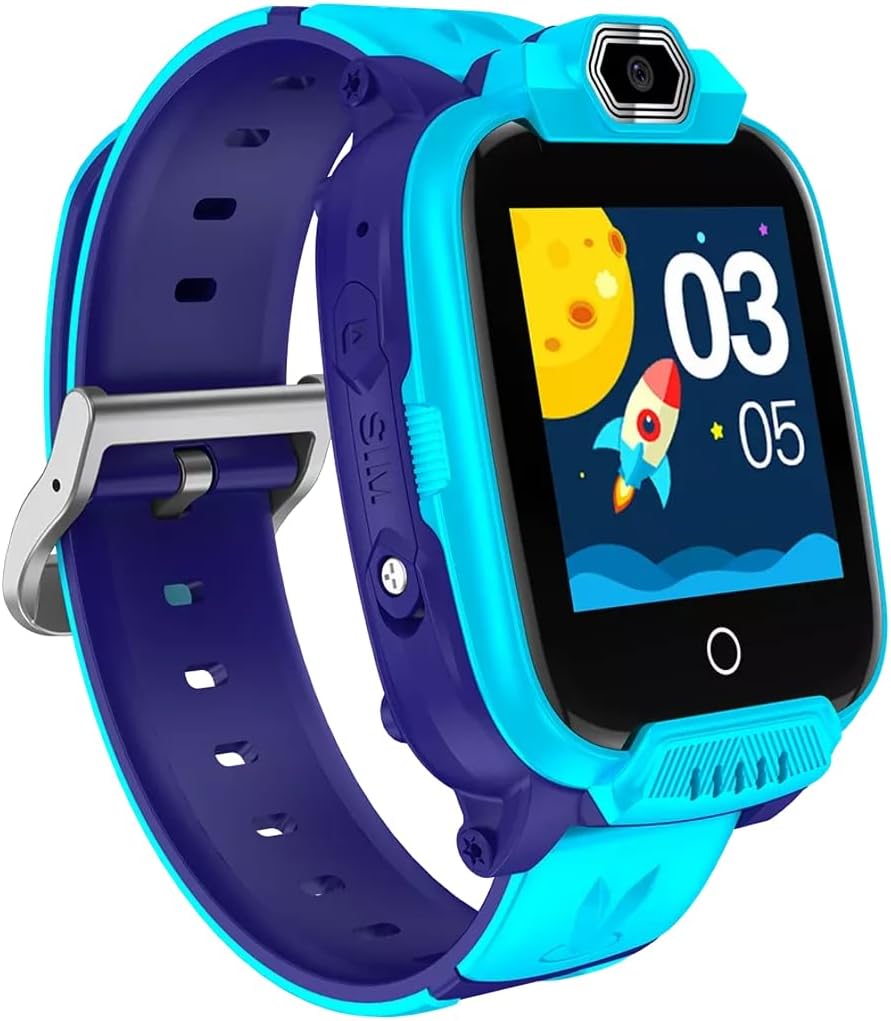
Kielelezo 2: Pembe view of the CANYON Sandy KW-44 Smartwatch, showing the side buttons and SIM card slot area.
3. Usakinishaji wa SIM Kadi (Si lazima)
The smartwatch supports a SIM card for call functions.
- Zima saa mahiri.
- Tafuta sehemu ya SIM kadi kwenye kando ya kifaa (rejelea Mchoro 2).
- Carefully insert a nano-SIM card into the slot with the gold contacts facing up, ensuring it clicks into place.
- Funga kifuniko cha nafasi ya SIM kadi kwa usalama.
- Power on the smartwatch.
4. Ufungaji na Kuoanisha Programu
To unlock full features and manage your smartwatch, download the companion app on your smartphone.
- Tafuta the "CANYON Life" app (or similar, check product documentation for exact app name) in your smartphone's app store (Google Play Store or Apple App Store).
- Pakua na usakinishe programu.
- Fungua programu na ufuate maagizo kwenye skrini ili kuunda akaunti au kuingia.
- Washa Bluetooth kwenye smartphone yako.
- In the app, select "Add Device" and choose your CANYON Sandy KW-44 from the list of available devices.
- Thibitisha ombi la kuoanisha kwenye simu yako mahiri na saa mahiri.
Maagizo ya Uendeshaji
1. Urambazaji wa Msingi

Kielelezo 3: Mbele view of the CANYON Sandy KW-44 Smartwatch, showing the main display with time and a rocket graphic.
- Washa/Zima: Press and hold the power button (usually on the side) to turn the device on or off.
- Skrini ya Kugusa: Swipe left/right or up/down to navigate through menus and features. Tap to select an option.
- Kitufe cha Nyuma: A dedicated button or a swipe gesture may be used to go back to the previous screen.
2. Kupiga na Kupokea Simu
With a properly installed and activated SIM card, you can make and receive calls directly from your smartwatch.
- Kupiga simu: Access the "Dialer" or "Contacts" app on the smartwatch, select a contact or dial a number, and tap the call icon.
- Kupokea Simu: When a call comes in, the smartwatch will ring and display the caller ID. Tap the green answer icon to accept or the red icon to decline.
3. Kutumia Kamera
The smartwatch is equipped with a built-in camera.
- Navigate to the "Camera" application on your smartwatch.
- Weka picha yako kwa kutumia skrini kama a viewmpataji.
- Tap the capture button on the screen to take a photo.
- Photos are saved to the smartwatch's internal memory.

Kielelezo 4: Pembe view of the CANYON Sandy KW-44 Smartwatch, highlighting the camera lens above the display.
4. Sifa Nyingine
Explore other functionalities available on your smartwatch, which may include:
- Onyesho la Wakati: Nyuso za saa zinazoweza kubinafsishwa.
- Arifa: Pokea arifa za simu, ujumbe, na arifa za programu kutoka kwa simu yako mahiri iliyooanishwa.
- Ufuatiliaji wa Shughuli: Monitor steps, distance, and calories (if supported by the model).
- Kicheza Muziki: Play music stored on the device or control music on your paired phone.
Matengenezo
1. Kusafisha
- Wipe the smartwatch and strap with a soft, damp kitambaa.
- Usitumie kemikali kali au kusafisha abrasive.
- Hakikisha kifaa ni kikavu kabla ya kuchaji.
2. Utunzaji wa Betri
- Epuka halijoto kali, ambayo inaweza kuathiri muda wa matumizi ya betri.
- Usiache betri ikiwa imezimwa kikamilifu kwa muda mrefu.
- Tumia kebo iliyotolewa tu ya kuchaji.
3. Ustahimilivu wa Maji (IP67)
The CANYON Sandy KW-44 Smartwatch is rated IP67, meaning it is protected from dust and can withstand immersion in water up to 1 meter for 30 minutes.
- Do not use the smartwatch for swimming or diving.
- Epuka kukabiliwa na maji ya moto, mvuke, au milipuko ya maji yenye shinikizo kubwa.
- Ensure all ports and covers are securely closed to maintain water resistance.
Kutatua matatizo
| Tatizo | Suluhisho linalowezekana |
|---|---|
| Smartwatch haiwashi. | Hakikisha betri imechajiwa. Unganisha kwenye chaja kwa angalau dakika 30. |
| Haiwezi kuoanishwa na simu mahiri. |
|
| SIM kadi haijatambuliwa. |
|
| Skrini haifanyi kazi. | Restart the smartwatch by pressing and holding the power button. If unresponsive, allow the battery to drain completely and then recharge. |
Vipimo
| Kipengele | Maelezo |
|---|---|
| Chapa | CANYON |
| Jina la Mfano | Mchanga KW-44 |
| Nambari ya Mfano | CNE-KW44BL |
| Ukubwa wa skrini | Inchi 1.44 |
| Teknolojia ya Uunganisho | Bluetooth |
| Kiwango cha Mawasiliano isiyo na waya | Bluetooth |
| Uwezo wa Kuhifadhi Kumbukumbu | 512 MB |
| Aina ya Betri | 1 Lithium-polymer (Rechargeable) |
| Vipengee vilivyojumuishwa | Kebo ya Kuchaji |
| Upana wa kamba | Milimita 20 |
| Ukadiriaji wa Upinzani wa Maji | IP67 (Imehifadhiwa na vumbi, imezama kwa hadi mita 1 kwa dakika 30) |
Udhamini na Msaada
For warranty information and technical support, please refer to the official CANYON website or contact their customer service. Details are typically provided on the product packaging or the manufacturer's official support page.
Mtengenezaji: CANYON


